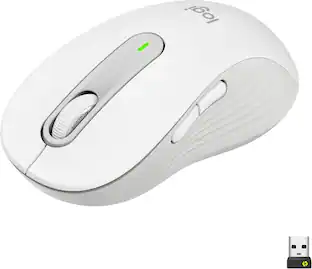
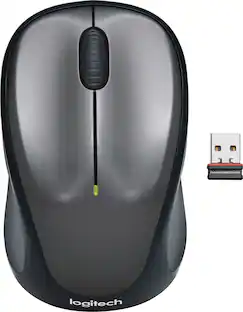
Logitech - M330 SILENT Wireless Optical Mouse with Quiet Clicks - Wireless - Gray
Customers are saying
Customers are impressed with the mouse's quiet clicking mechanism, ease of use, and overall performance. Users frequently highlight the device's perfect size, long battery life, and ergonomic design as key benefits. While the vast majority of feedback is positive, a very small number of users noted occasional issues with the scroll wheel or connectivity lag.
Color
GrayFeatures
Quieter click
Logitech’s SilentTouch Technology reduces over 90% of clicking sounds while ensuring top performance, meaning you can feel every single click but hear virtually nothing.¹
Computer mouse crafted for comfort
Design with naturally shaped contoured grips, the M330 SILENT wireless mouse is built for long-lasting comfort and functionality for right-handed users.
Long battery life
M330 SILENT has a 18-month battery life and power saving auto-sleep mode; it allows you to focus on your work without the hassle of changing batteries (1 x AA included).²
Advanced optical tracking
With a wireless range of up to 33 ft, this quiet computer mouse provides high-performance precision and smart cursor control on most surfaces.³
Plug and Play wireless mouse
M330 SILENT comes with a USB-A receiver that’s compatible with most operating systems including Windows, macOS, ChromeOS, and Linux.
More sustainable
Plastic parts in M330 SILENT PLUS include certified post-consumer recycled plastic (Black: 76%, Grey: 58%)*.⁴
Product carbon footprint
The carbon footprint of this product is 3.97 kg CO2e.
Specifications
- Lighting TypeNoneMaximum Sensitivity1000 dots per inchNumber of Buttons (Total)3Connection TypeWireless
Reviews
Rating 4.8 out of 5 stars with 1264 reviews
- Quiet Clicks (233)
- Ease of use (193)
- Overall Performance (146)
- Size (75)
- Battery Life (73)
- Scroll Wheel (10)
- Lag (9)
Customer Images
The vast majority of our reviews come from verified purchases. Reviews from customers may include My Best Buy members, employees, and Tech Insider Network members (as tagged). Select reviewers may receive discounted products, promotional considerations or entries into drawings for honest, helpful reviews.

- SteelSeries - Rival 3 Gen 2 Wireless Optical Gaming Mouse with Ultra-fast clicks - Wireless - Black$44.99The price was $59.99




Compare similar products

Enjoy the sound of silence with Logitech M330 SILENT wireless mouse. Enjoy the same click feel with over 90% noise reduction on the click sound. Made from high-performance material and a rubber wheel, M330 ensures quiet gliding and scrolling. The comfortable design features contoured grips crafted for your right hand. The cordless, battery-powered computer mouse is simple, reliable and strong with a long-lasting 18 months battery life. Featuring a plug-and-forget nano USB receiver and Logitech Advanced Optical Tracking. Begin using right away as no software or driver installation is required.

Put your style on display with the M340 wireless mouse collection, offering a choice of colorful statement designs made with recycled plastic. M340’s minimalist round shape and compact mouse design make it super portable. Enjoy silent clicks with Silent Touch Technology to work, browse, and chat in peace, and experience a strong wireless connection with the included USB receiver.
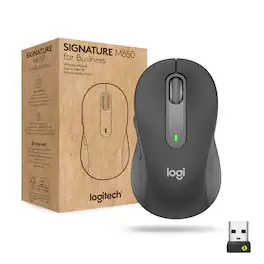
The easy-to-deploy (and manage) Signature M650 for Business Wireless Mouse improves employee productivity by 50% vs laptop touchpads. And it provides Secure Connections Only Mode—Bluetooth Low Energy Security Mode 1, Level 4 protection when paired with a Logi Bolt USB receiver. Or connect via Bluetooth Low Energy when cross-platform flexibility matters. Get line-by-line precision for documents – and super fast scrolling for long web pages by switching modes with a flick of the SmartWheel. It’s also 90% less “clicky” thanks to SilentTouch technology. In two sizes for small or large hands, and a contoured shape and soft thumb area for comfort.

Upgrade to smarter scrolling and more productivity with a mouse comfort-fit for your hand size and preference. You’ll work faster than ever before thanks to SmartWheel scrolling, silent clicks, and a contoured comfort design. Smartwheel Scrolling provides line-by-line precision for documents – and super fast scrolling for long web pages. Choose the right design for you – whether you have smaller or larger hands – and work long hours in comfort thanks to the computer and laptop mouse's contoured shape and soft-to-the-touch thumb area. Connect instantly via Bluetooth or Logi Bolt USB receiver. Work in peace and quiet thanks to 90% less click noise and Logitech SilentTouch technology. Plus, work for up to 2 years on the included AA battery so you never have to worry about recharging your mouse.
| Pros for Logitech - M330 SILENT Wireless Optical Mouse with Quiet Clicks - Wireless - Gray | |||
|---|---|---|---|
| Ease of use, Overall Performance, Size, Quiet Clicks, Battery Life | Ease of use, Overall Performance, Size, Noise Level, Design | There were no pros for this product— | Overall Performance, Ease of use, Size, Noise Level, Ergonomics |
| Cons for Logitech - M330 SILENT Wireless Optical Mouse with Quiet Clicks - Wireless - Gray | |||
| Scroll Wheel, Lag | There were no cons for this product— | There were no cons for this product— | There were no cons for this product— |
Specs
Customers often buy these together
Computer Keyboards
![Esc F1 F2 F3 F4 F5 F6 F7 F8 F9 F10 F11 F12 Print Screen Scroll Lock Pause Break 1 2 3 4 5 6 7 8 9 0 - + = Backspace Insert Home H Page Up A Num Look 1 I Tab Q W E R T Y U I o P { [ } ] I I Delete End IN Page Down 7 Home 8 9 Pg Up Caps A Lock A S D F G H J K L ; : DE g Enter 4 5 6 Shift Z X C V N M < > ? I Shift 1 End 2 3 Pp Dn Enter Ctrl Alt Alt Ctrl 0 Ins Del](https://pisces.bbystatic.com/image2/BestBuy_US/images/products/a588d446-5678-40ae-86b8-1f15e0026e66.jpg;maxHeight=232;maxWidth=233?format=webp)

![The text on the image reads:
888 DD DI DD 4 DSC i F2 F3 4 FS T6 ET 1. 1N IN F.. 11 1.. 114 1n F1 F12 118 in9 - a ee 1 8F 2 3 $ 4 % 5 A 6 & 7 . 8 I 9 I 0 ee I + = delete fn home page up clear - / + tab Q W E R T Y U I 0 P { [ ] ] | I delete end page down 7 8 9 ee caps lock A S D F G H J K L : I - return 4 5 6 + shift Z X C V N M < F > ? / shift a 1 2 3 control option 2 command 3 command option control Y - 0 enter
After grouping and correcting the text, it reads:
888 DD DI DD 4 DSC i F2 F3 4 FS T6 ET 1. 1N IN F.. 11 1.. 114 1n F1 F12 118 in9 - a ee 1 8F 2 3 $ 4 % 5 A 6 & 7 . 8 I 9 I 0 ee I + = delete fn home page up clear - / + tab Q W E R T Y U I 0 P { [ ] ] | I delete end page down 7 8 9 ee caps lock A S D F G H J K L : I - return 4 5 6 + shift Z X C V N M < F > ? / shift a 1 2 3 control option 2 command 3 command option control Y - 0 enter](https://pisces.bbystatic.com/image2/BestBuy_US/images/products/f4059d3a-0c2a-46ef-bcfd-4e11b9b26d5d.jpg;maxHeight=232;maxWidth=233?format=webp)
![esc ! - 1 tab caps lock shift ctrl F2 F3 # 2 3 Q W E R T Y U I O P A S D F G H J K L Z X C V B N M start opt alt cmd logi 44 HI . F10 F8 F7 F6 * ( ) - - & 0 8 9 7 O P U I Y K L H J > < N M B F + = { [ : I : ? I alt cmd 2 30 3 1 FQ page insert home up backspace page 1 delete end down ) ] / I I & shift ctrl fn opt 6 / + / clear 8 9 + 7 & P9 up home 5 6 4 a 4 2 3 enter 1 dn pg end = 0 del ins](https://pisces.bbystatic.com/image2/BestBuy_US/images/products/6539/6539508_sd.jpg;maxHeight=232;maxWidth=233?format=webp)
![The text on the image is a list of keys on a keyboard. Here is the grouped and corrected text:
1. Function keys: F1, F2, F3, F4, F5, F6, F7, F8, F9, F10, F11, F12
2. Numeric keys: 1, 2, 3, 4, 5, 6, 7, 8, 9, 0, -, =, +, (, )
3. Modifier keys: shift, control, option, command, caps lock, and return
4. Navigation keys: arrow keys (up, down, left, and right), and home and end keys
5. Punctuation keys: [, ], |, /, and ;
6. Numeric keypad keys: 7, 8, 9, *, -, and =
7. Other keys: tab, Q, W, E, R, T, Y, U, I, O, P, J, K, L, and Z
This list includes all the keys on a standard keyboard, grouped by their functions and types.](https://pisces.bbystatic.com/image2/BestBuy_US/images/products/eba31cb9-2606-42ab-9643-ed4280533545.jpg;maxHeight=232;maxWidth=233?format=webp)




Mouse Pads

Insignia™ - Mouse Pad - Black
Our 365-day lowest price$3.99The price was $7.99




Customers ultimately bought
 $24.99The price was $29.99



Explore tech essentials Sponsored





Discover related products
 $17.95The price was $21.45
 Techtober Deal$10.99The price was $13.99










Keep exploring
 $149.95The price was $215.95
 $79.95The price was $109.95