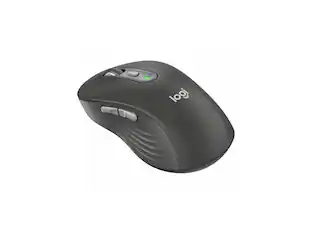
Logitech - MX MASTER 3S Bluetooth Edition for Business Performance Wireless Mouse - Wireless - Graphite
About this product
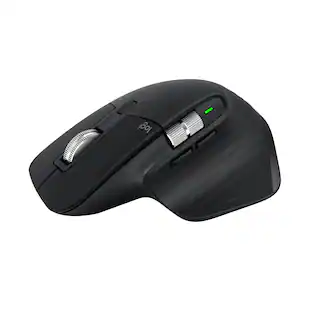
The MX Master 3S for Business is our iconic mouse, now even better. For ITDMs it offers more security with Logi Bolt and the ability to mass deploy and monitor via Logi Sync. 8000 DPI “Darkfield” tracking makes work on high-resolution monitors faster and more accurate—even on glass. MagSpeed Scrolling can zip down 1000 lines of code in a second. The ergonomic design’s shape cradles the hand, reducing forearm muscle fatigue. It’s also quiet with Quiet Click technology reducing click noise by 90% for better focus.
Features
Ideal For
IT departments that need secure wireless connections and easy deployment. Also analysts, creators and coders and others with specialized workflow needs.
Enterprise Secure
Logi Bolt is designed to meet enterprise security concerns with fully encrypted, Secured Connections Only mode.
Timesaving shortcuts
Personalize buttons with shortcuts such as activating Copilot in Windows (in preview) with Logi Options+ app. ¹ ²
Works On Any Surface
Hit the right pixel every time with the Darkfield 8000 DPI laser sensor. This mouse tracks with incredible precision—even on glass.
MagSpeed Scrolling
MX Master 3S zips down 1000 lines of code or spreadsheet cells in just a second and gets line-by-line pixel-by-pixel precision.
Comfort Design
Work better, faster, and with less forearm fatigue with a hand-sculpted cordless mouse that cradles the hand for all-day comfort.
90% Quieter
Quiet Click technology makes this quiet mouse ideal for open-plan work areas, reducing click noise by 90% for less distraction and better focus.
Built For Scale
Certified in more than 100 countries, support to IT pros & business users, remote mass deploy & monitor with Logitech Sync. ³
Specifications
- Lighting TypeNoneMaximum Sensitivity200 dots per inchNumber of Buttons (Total)7Connection TypeWireless
Reviews
Rating 5 out of 5 stars with 1 review
The vast majority of our reviews come from verified purchases. Reviews from customers may include My Best Buy members, employees, and Tech Insider Network members (as tagged). Select reviewers may receive discounted products, promotional considerations or entries into drawings for honest, helpful reviews.





Compare similar products

The MX Master 3S for Business is our iconic mouse, now even better. For ITDMs it offers more security with Logi Bolt and the ability to mass deploy and monitor via Logi Sync. 8000 DPI “Darkfield” tracking makes work on high-resolution monitors faster and more accurate—even on glass. MagSpeed Scrolling can zip down 1000 lines of code in a second. The ergonomic design’s shape cradles the hand, reducing forearm muscle fatigue. It’s also quiet with Quiet Click technology reducing click noise by 90% for better focus.

Logitech MX Master 3S Bluetooth Edition – productivity and precision mouse. With Quiet Clicks and 8K DPI any-surface tracking for more feel and performance.

The Logitech MX Master 4 brings immersive control and precision you can feel with haptic feedback. Experience haptic feedback on specific actions, shortcuts, notifications like switching desktops, slider adjustments and more. Customize vibration intensity in Logi Options+. With Actions Ring shortcuts and MX Master 4, save up to 33% of your time by accessing tools and filters at your cursor, reducing repetitive movements by up to 63%. Experience uninterrupted performance with 2X more powerful connectivity, powered by an advanced radio chip, optimized antenna placement, and a new USB-C dongle.
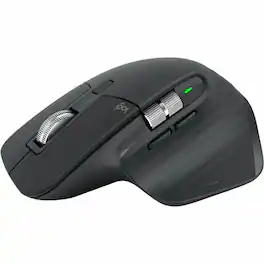
Logitech MX MASTER 3S Performance Wireless Mouse - Darkfield - Wireless - 32.81 ft - Bluetooth/Radio Frequency - 2.40 GHz - Rechargeable - Graphite - USB Type A - 8000 dpi - Scroll Wheel, Thumbwheel - 7 Button(s)
| Pros for Logitech - MX MASTER 3S Bluetooth Edition for Business Performance Wireless Mouse - Wireless - Graphite | |||
|---|---|---|---|
| There were no pros for this product— | Ergonomics, Overall Performance, Button Functionality, Battery Life, Connectivity | Ergonomics, Overall Performance, Button Functionality, Battery Life, Haptic Feedback | There were no pros for this product— |
| Cons for Logitech - MX MASTER 3S Bluetooth Edition for Business Performance Wireless Mouse - Wireless - Graphite | |||
| There were no cons for this product— | There were no cons for this product— | Weight, Size | There were no cons for this product— |
Specs
Customers often buy these together
Computer Keyboards
![esc ~ ! 1 tab caps lock shift ctrl F2 Fl # 2 3 Q W A S Z start opt L F3 $ 4 E D X alt cmd3 ) FS F4 A % 5 6 R T F G V C logi 44 HI & F9 FID FB F7 F6 * ) - - & 0 8 9 7 O P U I Y K L H J > < N M 1 B PM + = { [ : I ; ? I alt cmd D 2 4 300 3 1 F12 . * page I insert home up clear backspace 8 9 + 7 page A pg up end down home } I delete ] / 6 4 5 4 enter 2 3 enter 1 dn Pg end shift = 0 del ins etrl fn opt](https://pisces.bbystatic.com/image2/BestBuy_US/images/products/6539/6539505_sd.jpg;maxHeight=232;maxWidth=233?format=webp)
Logitech - MX Keys S Universal Full-size Wireless Scissor Keyboard for PC and Mac with Backlit keys - Black
Top Deal$119.99The price was $129.99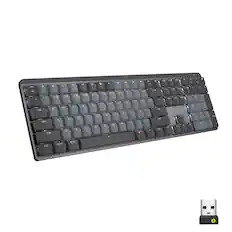
Logitech - MX Mechanical Full size Wireless Mechanical Tactile Switch Keyboard for Windows/macOS with Backlit Keys - Graphite
Top Deal$149.99The price was $179.99
Logitech - ERGO K860 Ergonomic Full-size Wireless Scissor Keyboard for Windows and Mac with Palm Rest - Black
Top Deal$119.99The price was $149.99
![Sure, here is the corrected and grouped text from the image:
**Top Row:**
- ESC
- F1
- F2
- F3
- F4
- F5
- F6
- F7
- F8
- F9
- F10
- F11
- F12
- PRTSC
- DEL
**Number Row:**
- 1
- 2
- 3
- 4
- 5
- 6
- 7
- 8
- 9
- 0
- -
- =
- \
**Letter Row:**
- TAB
- Q
- W
- E
- R
- T
- Y
- U
- I
- O
- P
- [
- ]
- \
**Letter Row:**
- CAPS
- A
- S
- D
- F
- G
- H
- J
- K
- L
- ;
- '
**Letter Row:**
- SHIFT
- Z
- X
- C
- V
- B
- N
- M
- ,
- .
- /
**Function Row:**
-](https://pisces.bbystatic.com/image2/BestBuy_US/images/products/9be10b95-8e90-4a5d-b85f-cbc6a7d8e8df.png;maxHeight=232;maxWidth=233?format=webp)
![logi esc 1 F1 2 F2 3 F3 F4 F5 F6 F7 F8 x F9 NI F10 x F11 F12 ins del ~ ! 1 2 # 3 $ 4 % 5 ^ 6 & 7 8 ( 9 ) 0 e - + = backspace tab Q W E R T Y U I O P { [ } ] I / caps lock A S D F G H J - K L : ; " enter shift Z X C V B N M < > ? / shift ctrl fn L start opt H alt cmd alt cmd ctrl opt](https://pisces.bbystatic.com/image2/BestBuy_US/images/products/6478/6478163_sd.jpg;maxHeight=232;maxWidth=233?format=webp)
![g) FS F4 F3 esc F2 F1 A $ % # 6 ! 4 5 ~ 3 1 2 R T W E Q tab F G S D lock A caps V C X Z shift H command option control F6 & 7 Y H B logi 44 F9 FB F7 * ( ) 9 0 8 I O U K L J < N M 1.0% r FI3 FQ2 Fl F10 fn + delete - = - 3 I { / P [ ] A return : I ; shift ? > I control option command 2 10 300 3 F PS F1 page clear home up page 7 end down Q P F F8 = I 8 9 4 5 1 2 0 F9 * 1 + 6 3 enter](https://pisces.bbystatic.com/image2/BestBuy_US/images/products/6578/6578481_sd.jpg;maxHeight=232;maxWidth=233?format=webp)
![MX Keys Mini for Business
The Master Series by Logitech
logi
esc 1 2 3 4 5 6 7 8 9 0 - = del
tab Q W E R T Y U I O P [ ] \
caps lock A S D F G H J K L ; '
shift Z X C V B N M , . /
ctrl fn opt cmd alt](https://pisces.bbystatic.com/image2/BestBuy_US/images/products/7883cf7b-946c-4233-8131-0c359f840adc.jpg;maxHeight=232;maxWidth=233?format=webp)
Mouse Pads
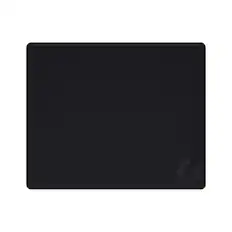
Logitech - G440 Cloth Gaming Mouse Pad with Rubber Base - Black
$15.99The price was $19.99





Customers ultimately bought
 Top Deal$79.99The price was $99.99
 Top Deal$69.99The price was $79.99
 Top Deal$99.99The price was $119.99
 $35.99The price was $39.99
 Top Deal$33.99The price was $39.99
 $69.99The price was $89.99



Explore tech essentials Sponsored
 Top Deal$69.99The price was $89.99
Discover related products
 $12.99The price was $13.99
 $247.00The price was $275.00











Keep exploring
 $79.95The price was $119.95
Logitech - B100 Corded Mouse – Wired USB Mouse for Computers and laptops, for Right or Left Hand Use
$13.29The price was $20.06 $16.99The price was $25.99
 $139.95The price was $187.95
 $29.46The price was $55.07