Deals Worth GiftingShop now

Main Content

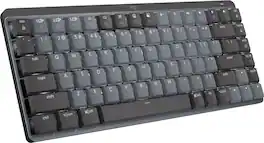
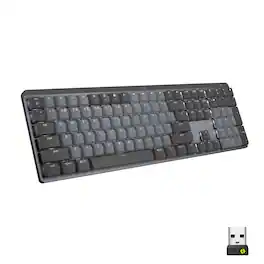
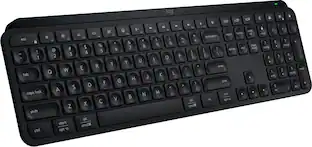
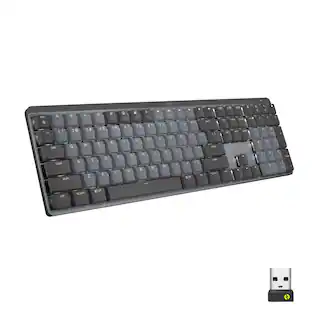
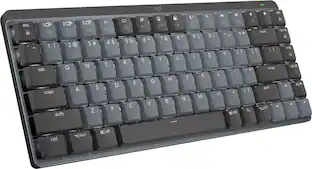
Logitech - MX Mechanical Mini Compact Wireless Mechanical Tactile Switch Keyboard for Windows/macOS with Backlit Keys - Graphite

Model: 920-010550
SKU: 6502583
$135.99
Save $24
Comp. Value: $159.99
or
Finance OptionsView your offers
Get it for lessWays to save on this item
Accidental Geek Squad Protection
Availability
Fulfillment Options
Pickup at
Act fast - Only 1 left at your store!
Sold by Best Buy

More Buying Options

Specifications
  • Lighting Type
    Single color
    Form Factor
    Compact (60%)
    Keyboard Technology
    Mechanical
    Key Switch Behavior
    Tactile
    Connection Type
    Wireless
  • Key Specs
    • Lighting Type: Single color
    • Form Factor: Compact (60%) (The size, arrangement, and physical configuration of the product.)
    • Keyboard Technology: Mechanical (Type of technology that detects a key press.)
    • Key Switch Behavior: Tactile (Refers to the mechanisms under the keycaps on a keyboard that enable you to type faster and more precisely. Linear switches move straight up and down without any sound or bump. Tactile switches provide a noticeable bump in the key press, and no sound. Clicky switches provide a bump in the key press and "clicky" sound.)
    • Connection Type: Wireless
  • General
    • Brand: Logitech
    • Model Number: 920-010550
    • Product Name: MX Mechanical Mini Compact Wireless Mechanical Tactile Switch Keyboard for Windows/macOS with Backlit Keys
    • Color: Graphite
  • Features
    • Lighting Type: Single color
    • Customizable Lighting: false
    • Numeric Keypad: false
    • Touchpad: false
    • Palm Rest: false
    • Spill Resistant: false (Designed to resist some degree of accidental liquid spill. The level of spill-resistance is indicated by the product manufacturer, but the degree of protection may not be guaranteed after normal wear of the product.)
    • Foldable: false
    • Keycap Material: ABS
  • Functions
    • Form Factor: Compact (60%) (The size, arrangement, and physical configuration of the product.)
    • Keyboard Technology: Mechanical (Type of technology that detects a key press.)
    • Dedicated Macro Keys: false (Perform shortcuts of key sequences to carry out commands with a single key. Key sequences may include key strokes, mouse actions, and/or menu actions.)
    • Adjustable Tilt Function: false
    • Key Switch Behavior: Tactile (Refers to the mechanisms under the keycaps on a keyboard that enable you to type faster and more precisely. Linear switches move straight up and down without any sound or bump. Tactile switches provide a noticeable bump in the key press, and no sound. Clicky switches provide a bump in the key press and "clicky" sound.)
    • Multimedia Keys: true
    • Number Of Programmable Keys: 0
  • Connectivity
    • Connection Type: Wireless
    • Wireless Connectivity: Radio Frequency (RF), Bluetooth (The manner in which a device sends data to another device over a short distance without the use of wires or cables.)
    • Maximum Wireless Range: 33 feet
    • Number Of USB Port(s): 1 (The total number of USB ports including all generations and versions.)
    • Number of Devices Connectable Simultaneously: 3
  • Compatibility
    • Operating System Compatibility: Universal, Mac, Chrome, Linux, Apple iPadOS, Apple iOS, Android
    • Plug and Play Operation: true
    • System Requirements: Bluetooth Low Energy technology enabled device: Windows 10, 11, or later, macOS 10.15 or later, iOS 14 or later, iPadOS 14 or later, Linux, ChromeOS, Android 8.0 or later. Available USB-A port required to connect via receiver. (The software that a product must have for it to be able to integrate with another product.)
  • Power
    • Rechargeable Battery: true
    • Battery Chemistry: Lithium
    • On/Off Switch: true
  • Dimensions
    • Product Height: 1.02 inches (The out of box height of the item. Height is measured as the vertical distance from the bottom of the item to the top as it would be primarily used or placed.)
    • Product Width: 12.3 inches (The out of box width of the item. Width is measured as the horizontal distance from one side of the item to the other as it would be primarily used or placed.)
    • Product Depth: 5.17 inches (The out of box depth of the item. Depth is measured as the distance from the front of the item to the back as it would be primarily used or placed.)
    • Product Weight: 21.58 ounces (The out of box weight of the item.)
  • Mouse
    • Mouse Included: false
  • Warranty
    • Warranty - Parts: 1 year
    • Warranty - Labor: None
  • Other
    • UPC: 097855174680

Introducing MX Mechanical Mini- a minimalist keyboard with extraordinary feel, precision, and performance. Low-profile mechanical typing delivers satisfying feedback in your choice of key switches – Tactile Quiet, Clicky, or Linear. MX Mechanical Mini is crafted for ergonomic comfort, with smart illumination and Easy-Switch – allowing you to connect up to 3 devices and stay in your flow for hours.

  • Fluid and quiet mechanical typing: MX Mechanical Mini keyboard features Tactile Quiet switches that deliver next-level feel and flow with less noise - Clicky and Linear switches are also available.
  • Low-profile keys, ergonomic comfort: A keyboard layout designed for effortless precision, with a small, compact form factor and low-profile mechanical switches for better ergonomics.
  • Smart illumination: Backlit keys light up the moment your hands approach the cordless keyboard and automatically adjust to suit changing lighting conditions.
  • Faster workflow, more customization: Customize Fn keys, assign backlighting effects, enable Flow cross-computer, multi-device control, and more in the improved Logi Options+ .¹
  • Multi-device, multi-OS wireless keyboard: Pair MX Mechanical Mini Bluetooth wireless keyboard with up to 3 devices on nearly any operating system via Bluetooth Low Energy or included Logi Bolt receiver.²
  • USB-C quick charging: MX Mechanical Mini keyboard stays powered up to 15 days on a full charge or up to 10 months with the backlighting turned off.³
  • Sustainable design: Plastic parts in MX Mechanical Mini (Graphite) include 47% certified post-consumer recycled plastic (excludes plastic in printed wiring assembly (PWA), cables, and packaging.).
  • 1-month of Adobe Creative Cloud on us (a value of $59.99)*: Pair two of the world’s top creative tools. Buy one MX Mechanical Mini Wireless Keyboard and claim your free 1-month Adobe Creative Cloud membership. *Value calculated based on Adobe Creative Cloud All Apps monthly value of $59.99 valid on Adobe.com on Sept 12, 2024. Terms & Conditions apply.¹ ² ³
  • Fluid and quiet mechanical typing: MX Mechanical Mini keyboard features Tactile Quiet switches that deliver next-level feel and flow with less noise - Clicky and Linear switches are also available.
  • Low-profile keys, ergonomic comfort: A keyboard layout designed for effortless precision, with a small, compact form factor and low-profile mechanical switches for better ergonomics.
  • Smart illumination: Backlit keys light up the moment your hands approach the cordless keyboard and automatically adjust to suit changing lighting conditions.
  • Faster workflow, more customization: Customize Fn keys, assign backlighting effects, enable Flow cross-computer, multi-device control, and more in the improved Logi Options+ .¹
  • Multi-device, multi-OS wireless keyboard: Pair MX Mechanical Mini Bluetooth wireless keyboard with up to 3 devices on nearly any operating system via Bluetooth Low Energy or included Logi Bolt receiver.²
  • USB-C quick charging: MX Mechanical Mini keyboard stays powered up to 15 days on a full charge or up to 10 months with the backlighting turned off.³
  • Sustainable design: Plastic parts in MX Mechanical Mini (Graphite) include 47% certified post-consumer recycled plastic (excludes plastic in printed wiring assembly (PWA), cables, and packaging.).
  • 1-month of Adobe Creative Cloud on us (a value of $59.99)*: Pair two of the world’s top creative tools. Buy one MX Mechanical Mini Wireless Keyboard and claim your free 1-month Adobe Creative Cloud membership. *Value calculated based on Adobe Creative Cloud All Apps monthly value of $59.99 valid on Adobe.com on Sept 12, 2024. Terms & Conditions apply.¹ ² ³
Whats Included
  • MX Mechanical Mini Keyboard
  • Logi Bolt receiver
  • USB-C charging cable (USB-A to USB-C)
  • User documentation
  • MX Mechanical Mini Keyboard
  • Logi Bolt receiver
  • USB-C charging cable (USB-A to USB-C)
  • User documentation

Q: How long does the battery last on this keyboard?

A: On a full charge, the MX Mechanical Mini can last up to 15 days with typical use, or up to 10 months with the backlighting turned off.

Q: Does the keyboard have backlighting?

A: Yes, the MX Mechanical Mini has backlit keys that illuminate as your hands approach and adjust to the ambient lighting conditions.

Q: Does this keyboard have a number pad?

A: No, the MX Mechanical Mini is a compact keyboard without a number pad. However, a full-size version with a number pad is available.

Q: Is this keyboard compatible with both Windows and macOS?

A: Yes, the MX Mechanical Mini is compatible with a wide range of operating systems, including Windows, macOS, iOS, iPadOS, Linux, ChromeOS, and Android.

Q: How many devices can I connect this keyboard to?

A: You can pair the MX Mechanical Mini with up to 3 devices simultaneously using Bluetooth Low Energy or the included Logi Bolt receiver.

Q: What type of switches does the MX Mechanical Mini keyboard use?

A: This keyboard features Tactile Quiet switches for a balance of feel and reduced noise. However, Clicky and Linear switches are also available.

Sponsored

Compare similar products

Logitech - MX Mechanical Mini Compact Wireless Mechanical Tactile Switch Keyboard for Windows/macOS with Backlit Keys - Graphite

Introducing MX Mechanical Mini- a minimalist keyboard with extraordinary feel, precision, and performance. Low-profile mechanical typing delivers satisfying feedback in your choice of key switches – Tactile Quiet, Clicky, or Linear. MX Mechanical Mini is crafted for ergonomic comfort, with smart illumination and Easy-Switch – allowing you to connect up to 3 devices and stay in your flow for hours.

Logitech - MX Mechanical Full size Wireless Mechanical Tactile Switch Keyboard for Windows/macOS with Backlit Keys - Graphite

Introducing MX Mechanical - a full-size keyboard with extraordinary feel, precision, and performance. Low-profile mechanical typing delivers satisfying feedback in your choice of key switches – Tactile Quiet, Clicky, or Linear. MX Mechanical is crafted for ergonomic comfort, with smart illumination and easy-switch – allowing you to connect up to 3 devices and stay in your flow for hours.

Keychron - V1 Max 75% Custom Wireless RGB Mechanical Keyboard with Programmable QMK/VIA Hot-Swappable Red Switch - Black
4.9(40)

The V1 Max is a compact 75% Layout QMK/VIA wireless mechanical keyboard upgraded with a 2.4 GHz wireless connection, featuring a 1000 Hz polling rate. Its gasket mount design, sound absorbing foam, double-shot PBT keycaps, and more take your typing experience to a new level, delivering heightened levels of comfort and productivity.

Logitech - MX Keys Mini TKL Wireless Bluetooth Scissor Keyboard with Backlit Keys - Black

Introducing MX Keys Mini, a smaller, smarter, and mightier minimalist wireless keyboard made for creators. The minimalist form factor provides improved ergonomics by aligning your shoulders and allowing you to place your mouse closer to your keyboard for less arm reaching, more comfort, and better body posture. Perfect Stroke keys are shaped for your fingertips with optimal key stability and tactile responsiveness to keep you oriented and in your flow. The backlit keys light up the moment your hands approach, and automatically adjust to suit changing lighting conditions. Smart Dictation, Mic Mute/Unmute and Emoji keys streamline your workflow even further.

Pros for Logitech - MX Mechanical Mini Compact Wireless Mechanical Tactile Switch Keyboard for Windows/macOS with Backlit Keys - Graphite
Keyboard Quality, Battery Life, Key Feel, Size, ConnectivityKeyboard Quality, Battery Life, Key Feel, Connectivity, Ease of useConnectivity, Battery Life, Build Quality, Typing Experience, Noise LevelKeyboard Quality, Ease of use, Battery Life, Size, Key Feel
Cons for Logitech - MX Mechanical Mini Compact Wireless Mechanical Tactile Switch Keyboard for Windows/macOS with Backlit Keys - Graphite
Price, Number Pad, WeightPrice, Noise Level, Software, Space BarThere were no cons for this productPrice, Number Pad, Noise Level, Compatibility

Specs

Reviews

Customers are saying

Customers are pleased with the MX Mechanical Mini keyboard's premium quality, long battery life, and satisfying key feel. Its compact size and reliable connectivity are also appreciated. Some find the price a bit high, and the design lacks a number pad, but the weight is acceptable.

This summary was generated by AI based on customer reviews.

Customer Images

The vast majority of our reviews come from verified purchases. Reviews from customers may include My Best Buy members, employees, and Tech Insider Network members (as tagged). Select reviewers may receive discounted products, promotional considerations or entries into drawings for honest, helpful reviews.

  • Rated 5 out of 5 stars

    A Great Upgrade Over The Magic Keyboard

    I've been using the Apple Magic Keyboard for about 3 years so I want to focus my review on how the MX Mechanical Mini compares to it. Overall, I prefer the MX Mechanical Mini as it's a better experience but there are a few things that I miss from the Apple Magic Keyboard. ***LAYOUT*** It took a couple of days to get used to the layout so don't feel discouraged at first. I was concerned it might affect my productivity but eventually, I got more comfortable with it and now it's a non-issue. If you look at my screenshot, you can see the differences between the two keyboards. Most notably, the keys on the Logitech are slightly narrower and the keys in the bottom right arranged differently. There were a few instances where I was hitting the wrong keys while typing but again, my mind got used to the layout after a few days. Some of the exclusive keys on the Logitech have been useful (screenshot, mic mute, home/end/pg up/pg dn) although the emoji key has been useless to me (I've remapped it to Mission Control). I do miss the forward/rewind and the brightness keys on the Magic Mouse but it's not a dealbreaker for me. Logitech's keyboard is backlit while Apple doesn't have one. I normally work in a well lit environment so this isn't a significant improvement for me but it could be very useful for your needs. I've also never been a big fan of the way the arrow keys are placed on the Apple Keyboard so the Logitech gets the win here. ***SIZE*** The Apple Magic Keyboard is not only a bit smaller but weighs less as well so it wins out here. I don't think it's that big of an issue unless you travel with your mouse/keyboard and your laptop bag is already filled to capacity. ***CONNECTIVITY*** MX Mechanical Mini easily wins here. I have a work laptop and a personal laptop so switching back and forth between the two with just the press of a button is so much better than having to turn constantly disconnect/reconnect the Apple Keyboard. ***TYPING EXPERIENCE*** Mechanical keyboards are generally superior for typing and the MX Mechanical Mini is no exception. I can't believe what I've been missing all these years! The MX Mechanical Mini has a pair of tilt legs (unlike Apple's) which puts it at a higher angle and feels better ergonomically. The feel of pressing the keys with the combination of the sound it makes also gives it a more premium feel and experience. Have I noticed an improvement in my typing speed? Not really but the better experience is noticeable though. The only thing that I prefer the Apple Magic Keyboard here is how it's quieter. Despite the MX Mechanical Mini being "Tactile Quiet", it still makes a bit of noise. This isn't a problem for me about 90% of the time but there are instances where I need to be more gentle with my typing in order to reduce the amount of noise it makes. ***PRICE*** MX Mechanical Mini is $50 more than the Apple Magic Keyboard and more expensive than other Mechanical Keyboards so this isn't an easy decision for most. I would say the MX Mechanical Mini is worth it if you: - Use multiple devices and want to switch easier - You spend hours doing heavy typing and a comfortable experience is a priority - Can take advantage of the extra key shortcuts and don't mind the lack of certain Mac specific keys like brightness and Mission Control.

    Posted by Steve

  • Rated 5 out of 5 stars

    Great keyboard for the office

    Such a good keyboard. I actually found some low profile keycaps and replaced them from the normal gray scale caps and it brings a new life to it (see bottom most keyboard in the picture). I felt the regular caps were just dull and dark which could be your vibe. Other than that the software works with their options software which works nicely with my Mx master mouse so it just works. I also like how it’s not rgb so it’s not a distraction as I use it for work and sometimes take it in to the office. I got the brown switches which work for me. Price is a little on the pricy side I will say and there may be better options out there but I have no regrets with this purchase.

    Posted by EricR

  • Rated 5 out of 5 stars

    Excellent decision

    I've been thoroughly impressed with my Logitech Pro X 60 mini so far. Initially, I was concerned about the price and the reports of loose sound keys from YouTube reviewers. To be honest, I shared those concerns. I was worried about the cost, wondering if it was worth the investment considering my budget constraints. As a video editor, I couldn't afford a Davinci Resolve controller or even a dedicated editing keyboard. I decided to opt for a gaming keyboard, hoping to find a good balance between customization and value. Since I wanted the flexibility to work anywhere, I prioritized wireless connectivity for its portability and versatility. Most importantly, I wanted to customize my keyboard with macros and hotkeys to streamline my editing and research workflow, ultimately saving me time. I appreciate the flexibility to create a profile for any app I want. Once set up, the Pro X 60 Mini seamlessly switches to the corresponding profile based on the open application. I really like this feature, as I also use color-coding to organize my profiles. To fully utilize the Pro X 60, you need to stay connected to Ghub, but it does offer three customizable profile slots stored directly on the keyboard, which can be accessed even when you're not connected to Ghub. I really like GHUB. ICUE is good too. Alongside the GHUB, I also value the G-Button's versatility. It enables me to tailor my setup with micros, actions, hotkeys, or any other desired feature, without sacrificing my function key shortcuts. I can reconfigure the entire layer as needed, without encountering any problems. Although I cannot create an entire layer of additional micros using the G-Button, I can assign any key to it. Moreover, I can create custom profiles for any application on my computer, and the Pro X 60 will automatically recognize and apply the relevant profile when an app is in focus. The typing experience is more about the tactile sensation than the noise level. It's not overwhelmingly loud, but it's not silent either. I enjoy the sensation of pressing the keys and the subtle give of the keys as I type, which is a pleasant surprise. The slight looseness of the keys doesn't hinder my typing at all. I'm thoroughly impressed with this device's design and construction. The volume control on the left side of the base is a thoughtful touch. What really stands out is how effortlessly it switches between my MacBook Pro and iPad - it's incredibly efficient. I've connected it to my iPad via Bluetooth and my MacBook Pro M1 via USB-C, and the process has been seamless. The connections and switching process are smooth and hassle-free. Before buying from Best Buy, I had the opportunity to test the Corsair 65 Plus Wireless, which boosted my confidence in making the right decision. I also tried out the Logitech G515 TKL wireless, the Logitech Mx Mechanical Mini Wireless, the Corsair K65 Pro mini Wired, and the Logitech Pro X TKL Wireless. Among them, my top choice is the K65 Pro mini Wired, which shares the same design as the Pro x 60. Since I couldn't find a wireless version of the K65 Pro mini, I decided to spend a bit more money, going against some YouTube reviewers' advice. Now, I'm a satisfied customer. I'm currently considering the Corsair K70 Core TKL Wireless, but I'm having trouble parting with my Pro X 60. Here is the rewritten text in first person: I must say, I'm thoroughly impressed with my Logitech Pro X 60 mini wireless gaming keyboard, despite initial reservations about the price and reports of loose sounding keys. As a video editor, I was seeking a balance between customization and value, and prioritized wireless connectivity for its portability and versatility. I appreciate the keyboard's ability to create profiles for any app, which seamlessly switches to the corresponding profile based on the open application. I also value the G-Button's versatility, which allows me to tailor my setup with macros, actions, hotkeys, or other features without sacrificing function key shortcuts. The typing experience is pleasant, with a tactile sensation and subtle give of the keys. I'm impressed with the device's design and construction, including the volume control on the left side of the base. I've connected the keyboard to both my MacBook Pro and iPad without issue, and I'm satisfied with my purchase. I had previously tested other keyboards, including the Corsair 65 Plus Wireless, Logitech G515 TKL wireless, Logitech Mx Mechanical Mini Wireless, the Corsair K65 Pro mini Wired, and the Logitech Pro X TKL Wireless, but ultimately chose the Pro X 60 mini.

    Posted by 5sMedia

No content
Sponsored

Similar products from outside of Best Buy

sponsored

Finance Options

My Best Buy® Credit Card
10% back in rewardson your first day of purchases when approved for the My Best Buy® Credit Card.
Buy Now, Pay Later
4 payments starting at $34.00

Get it for less

Save $6 with Plus or Total