Thanksgiving 24-Hour Flash SaleOne day. Online only. Ends today.Shop now

Skip to contentGo to Product Search
Main Content

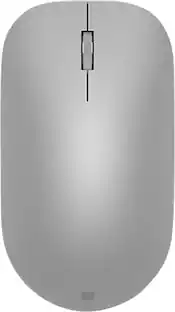
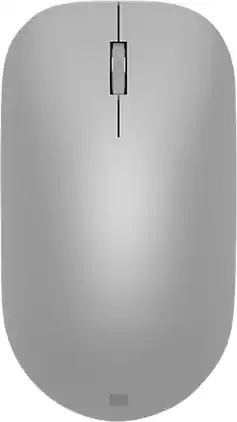
Microsoft - Surface Mouse - Bluetooth Ambidextrous Mouse with BlueTrack and Haptics - Wireless - Platinum

Model: EP2-79493
SKU: 6693144
Sold byBest Buy

About this product

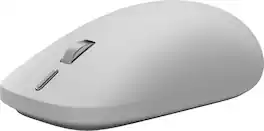
Meet the mouse designed to unlock the best of Surface. With precision feedback, seamless device switching, and a customizable action button, Surface Mouse helps you work smarter and stay focused from task to task [1, 3]. Feel greater control with every click, drag, and scroll thanks to advanced haptics designed to make interactions more natural and responsive [1].
Features

  • Your perfect companion

    Designed for modern work, Surface Mouse gives you precise control, instant access to your favorite tools, and the freedom to move seamlessly across devices [1, 3].

  • Made for Surface

    Designed to complement Surface with premium materials and thoughtful craftsmanship. Available in Platinum and Black to match your Surface setup.

  • Precision you can feel

    Advanced haptics add tactile feedback with every click, drag, and scroll, giving you greater confidence and control while navigating documents, apps, and creative work.

  • A magic button to do more

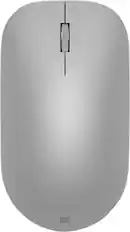
    Launch Copilot and your favorite tools with a customizable action button [4].

  • Designed to move with you

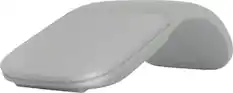
    Connect and switch between up to three devices to keep work moving across your setup [3].

  • Ready when you need it

    Stay productive longer with up to six months of battery life on included AAA batteries [2]

  • Track with confidence anywhere

    Microsoft BlueTrack Technology delivers reliable tracking across a variety of surfaces [1].

Specifications

  • Number of Buttons (Total)
    2
    Connection Type
    Wireless
Sponsored

Reviews

Rating 4.4 out of 5 stars with 10 reviews

90% would recommend to a friend

Customer Images

The vast majority of our reviews come from verified purchases. Reviews from customers may include My Best Buy members, employees, and Tech Insider Network members (as tagged). Select reviewers may receive discounted products, promotional considerations or entries into drawings for honest, helpful reviews.

  • Rated 5 out of 5 stars

    Sleek ambidextrous mouse with haptic feedback !

    The Microsoft Surface Mouse combines a clean, compact design with features that make it practical for everyday work. Its ambidextrous shape works for either hand, it is fully programmable and tunable and works correctly on every surface I have tried it on including wood, glass, a highly reflective table, Airline tray and I even moved it around on carpet for a bit of fun. Standout features: The haptic feedback, it adds tactile responses to supported Windows features and apps and it just feels "tuned". It's just powerful enough to provide feedback without being overly jarring. It's difficult to describe but I would phrase it as: "If you did not know it was haptic, you might not consciously notice it at all - it's just there and does what it is supposed to do." Some devices that use haptic feedback I have used in the past do it in a way that It also has a customizable action button for a shortcut or app you use often. I opted to assign the action button to drive taking a screenshot while using it with my work PC - for me this is a lifesaver as no other mouse I have used was as simple to set this up this way on and I did not have to give up an existing button assignment to create this feature. I will actually be buying another of these to use exclusively with my work PC for this reason. THREE DEVICE SUPPORT BUILT IN - There are very few mice on the market that support storing profiles to switch instantly between multiple paired devices. Not everyone needs this however it is handy for those of us that like to pair a single device to more than one PC. I paired position 1 to my personal machine. Position 2 to my work PC and Position 3 to my android tablet. Switching between any of those is a simple button press on the bottom of the mouse. This saves having to unpair-repair the device occasionally to use my favorite mouse across all of my devices used daily. Overall: A good fit if you want a polished wireless mouse with left- and right-hand use, broad surface tracking, and extra haptic controls. Room for improvement: - I would love to see predicted battery life measured categorically - i.e. Average use / Heavy use. - Full Linux support ( It's presently supported and works as a regular mouse )

    This review is from Microsoft - Surface Mouse - Bluetooth Ambidextrous Mouse with BlueTrack and Haptics - Wireless - Black

    Posted by James K

  • Rated 5 out of 5 stars

    Precision, Efficiency, and Location Freedom

    The Surface mouse looks simple and unassuming, yet it is obvious when using it that serious though went into its design. It is lightweight, smooth to the touch, and ergonomic yet provides precision, accuracy, and works on unlimited surfaces. Additionally, it is right and left hand compatible so all members of the household can use the same mouse. *Haptics* The haptic feedback vibration is customizable in strength and valuable when working with precision. The vibrations add the benefit of informing you when a certain action will take place, allowing adjustments to be made before committing to the action. The right, left, scroll, and action button are mechanical and thus not reliant on haptics. *Quick Action Button* The customizable action button can be configured three ways: press, double press, and long press. Each option allowing a quick access to a shortcut. It easily increases time efficiency and productivity when customized to functions that are regularly used. *BlueTrack Technology* Microsoft’s tracking technology works phenomenally. Since I mainly use this mouse with my laptop, I don’t always have consistent surfaces to put my mouse on, but with this mouse that is not an issue. I have used it on tables, books, paper stacks, my thigh, the couch, tile floor, carpet, and bed’s comforter without a loss in tracking responsiveness. Of course, soft surfaces do make clicking take more conscious effort and pilled carpets can physically impede and disrupt the mouse’s trajectory. The precision that the advanced tracking laser provides is palpable. It makes focusing in and stabilizing the micromovements of the cursor possible, providing control while cutting down frustration when it comes to working with creative projects that require intense focus and exact movements. *Bluetooth* Bluetooth connects quickly and can be simultaneously configured with up to three devices. The Surface laptop immediately detects the mouse and gives the option to connect it. Switching between devices is done with the Bluetooth button underneath. I have it connected to a laptop and my desktop, and it switches between them seamlessly by toggling the Bluetooth button. *App* Surface devices work hand-in-hand with this mouse. The Surface app allows quick customization of mouse settings plus a shortcut to advanced settings. *Battery Type* This mouse is powered with two AAA batteries, which come included. The battery compartment can be accessed by removing the bottom cover. It is magnetic and is super simple to pop off considering it stays on securely. I have moved it around my home and carried it around in a bag, the cover has slid off thus far. *Conclusion* All things considered, this is an outstanding mouse. The accuracy and precision combined with its portability due to the Bluetrack technology makes this an indispensable option. It is versatile among devices and provides a shortcut button that improves efficiency. Plus, this Surface mouse is not limited by available surfaces.

    This review is from Microsoft - Surface Mouse - Bluetooth Ambidextrous Mouse with BlueTrack and Haptics - Wireless - Black

    Posted by Akire

  • Rated 4 out of 5 stars

    Good for most people. Not the best though.

    This is a good overall mouse for most people. It works well and reliably, is comfortable and has a few neat tricks up its sleeve. There are also a few drawbacks such as a generic design and lack of buttons, but some people may prefer that. Build quality: The mouse feels great in hand. It has a silky/velvet texture to the surface which feels premium, but I wonder if it will absorb fingerprint oils over time. The buttons and wheel have a great click to it which is audible. I thought a nice touch was the battery compartment which is only held on with magnets and comes off easily when pressed in the right spot and feels secure when on. I was a bit disappointed that it takes AA batteries and is not rechargeable though. Features: The mouse is relatively basic in that it only has your normal left/right buttons, a scroll wheel and a middle button. The middle button can be configured to do multiple functions. I set my middle button to do “back” action with 1x press, screenshot with 2x press and start menu with long press. There are many options you can configure it to though which is nice. I still would have preferred a dedicated forward/back button though. The other special feature is haptic support in 26H1 and some builds of 26H1. It doesn’t really do much at present but could be neat in the future as support rolls out. Currently, I only noticed vibrations when resizing windows and snapping to parts of the screen. I can see neat possibilities here with creative apps one day like Lightroom or even CAD software. Updating functionality of the buttons and haptics starts in the Surface app if you have a surface, or in mouse settings on other PCs. Usage: The mouse works well. I had to decrease sensitivity out of the box as it was too fast. Otherwise it takes some getting used to (especially if you come from Logitech) as I found it to be a little more mechanical in feel.

    This review is from Microsoft - Surface Mouse - Bluetooth Ambidextrous Mouse with BlueTrack and Haptics - Wireless - Black

    Posted by psyclopps

  • Rated 5 out of 5 stars

    Sleek Design, Ergonomic, and Reliable Performance

    I have never owned or used a Microsoft-made mouse before, and this Bluetooth wireless Surface Mouse, powered by AAA batteries, absolutely had me hooked from the moment I started using it. Setup took barely a minute. I took the mouse out of the box, removed the plastic seal strip, and the batteries powered it up immediately. Almost instantly, my Surface Laptop Ultra popped up a connection prompt card. I clicked Connect, and boom! It was up and running to use. To take this mouse to the next level, the Microsoft Surface app is a useful tool for customizing the mouse and assigning preferred functions. The action button can be configured to perform specific actions, including shortcuts for quick access to Copilot, the Snipping Tool, and other productivity features. The Microsoft Surface Mouse has a sleek design that combines minimalism with comfort and functionality. Its black finish gives it a premium look, and it feels very comfortable in hand. Bluetooth connectivity is reliable, with a strong and stable connection. I have never experienced any lag or delays while using it. Haptic feedback is another great feature here, providing tactile feedback when interacting with compatible functions, such as snapping and resizing windows and dragging and dropping items. Its compact design also makes it easy to stash it and carry around. Overall, the Microsoft Surface Mouse is a sophisticated, comfortable, and well-designed accessory that complements the unmatched experience of my new Surface Laptop Ultra. Its minimalist design, reliable Bluetooth connectivity, and seamless integration with Microsoft's ecosystem make it a no-brainer choice. It is an excellent combination of sleek design, functionality, and convenience. However, one thing I wish this mouse would have is a built-in rechargeable battery instead of using replaceable AAA batteries just for convenience.

    This review is from Microsoft - Surface Mouse - Bluetooth Ambidextrous Mouse with BlueTrack and Haptics - Wireless - Black

    Posted by Zaid

  • Rated 5 out of 5 stars

    Sleek, Comfortable... Windows 11 Haptics? Cool

    I picked this up to pair with my Windows 11 laptop, and it’s a great everyday travel mouse. Pairing over Bluetooth took less than a minute, and the soft-touch silicone shell has a smooth velvety grip that feels great in the hand while easily slipping into a laptop sleeve. The subtle haptic vibrations when snapping windows or lining things up in PowerPoint are a surprisingly useful touch, and being able to program the extra action button below the scroll wheel for single tap, double tap and hold shortcuts via the Surface app makes jumping into Copilot or grabbing screenshots pretty easy. It also tracks smoothly on pretty much any surface without a mousepad, and switching between up to three Bluetooth devices is completely seamless. A few things to keep in mind are that the haptics and button customization are strictly Windows 11 features, and it runs on two included AAA batteries rather than USB-C charging. Its low-profile, ambidextrous shape is ideal for portability, though if you have larger hands and prefer a taller mouse to rest your palm on for all-day desktop use, it might feel a bit flat. If you’re used to a lightweight gaming mouse, this mouse will feel hefty as well, so it’s definitely not your gaming mouse. Overall, if you’re on a Windows 11 laptop and want a clean, lightweight mouse with smart shortcut controls, I would recommend this mouse.

    This review is from Microsoft - Surface Mouse - Bluetooth Ambidextrous Mouse with BlueTrack and Haptics - Wireless - Black

    Posted by softwareEngineer

Compare similar products

Microsoft - Surface Mouse - Bluetooth Ambidextrous Mouse with BlueTrack and Haptics - Wireless - Platinum
4.4(10)

Meet the mouse designed to unlock the best of Surface. With precision feedback, seamless device switching, and a customizable action button, Surface Mouse helps you work smarter and stay focused from task to task [1, 3]. Feel greater control with every click, drag, and scroll thanks to advanced haptics designed to make interactions more natural and responsive [1].

Microsoft - Surface Bluetooth Mouse - Optical Ambidextrous Mouse - Wireless - Silver

Maintain steady control over your internet browsing and other computing tasks with this Microsoft Surface mouse. It's ergonomically sculpted for comfort, and it has a metal scroll wheel for accurate navigation. This Microsoft Surface mouse is suitable for both left-handed and right-handed users, and Bluetooth connectivity lets you connect wirelessly to your computer.

Microsoft - Surface Arc Mouse - Bluetooth BlueTrack Ambidextrous Mouse - Wireless - Black

The Surface Arc mouse is designed to conform comfortably to your hand - and snaps flat to fit easily in your bag. The next generation of the Arc Touch mouse, the Surface Arc mouse features numerous refinements, including the ability to scroll both vertically and horizontally. Connects via Bluetooth. Now available in a choice of rich colors to complement your style.

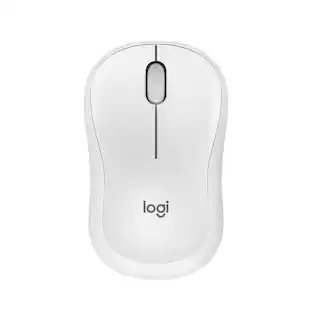
Logitech - M240 Silent Bluetooth Wireless Optical Ambidextrous Mouse - Wireless - Off-White
4.6(22)

Meet the reliable Logitech M240 Silent Bluetooth Mouse that frees up your workspace. Pair and play with a fast, easy Bluetooth wireless connection; just seconds and you’re connected—no dongle or port required. Ultra quiet-mouse with 90% reduced click sound and same click feel eliminates noise and distractions for you and others around you. 18-month battery life with auto sleep, so you go longer between battery changes. Comfortable, travel-friendly slim mouse is small enough to toss in a bag; the ambidextrous design guides either your right or left hand into a natural position.

Pros for Microsoft - Surface Mouse - Bluetooth Ambidextrous Mouse with BlueTrack and Haptics - Wireless - Platinum
There were no pros for this product—Ease of use, Design, Battery Life, Bluetooth, CompatibilityDesign, Overall Performance, Battery Life, Portability, ComfortOverall Performance, Ease of use, Connectivity, Noise Level, Size
Cons for Microsoft - Surface Mouse - Bluetooth Ambidextrous Mouse with BlueTrack and Haptics - Wireless - Platinum
There were no cons for this product—Connection, Scroll WheelScrolling, Price, Right ClickUSB Port

Specs

No content

Customers often buy these together
Sponsored