Minisforum - DEG1 eGPU Dock, OCuLink 4i PCIe 4.0x4, ATX/SFX PSU, PCIe x16 GPU, Signal Amplifier, Follow Startup - Black
About this product
Powered by the MINISFORUM DEG1 External GPU Dock, a compact OCuLink 4i graphics docking station for mini PCs and laptops with OCuLink output. 1× OCuLink 4i upstream (PCIe 4.0×4) delivers native PCIe bandwidth without Thunderbolt protocol overhead. 1× PCIe ×16 slot (PCIe 4.0×4) accepts a standard desktop graphics card. ATX / SFX PSU compatible with ATX 24-pin connector onboard. Built-in signal amplifier chip for stable high-speed PCIe signal integrity. Follow the Startup feature synchronizes GPU power on / off with the host PC. Compact 270.2×174.4×40.7mm horizontal metal chassis. GPU and PSU sold separately.
OCuLink 4i Native PCIe Bandwidth
External GPU enclosure for OCuLink-equipped mini PCs and laptops. 1× OCuLink 4i upstream (PCIe 4.0×4) provides native PCIe bandwidth without Thunderbolt protocol overhead. The preferred choice for low-latency gaming and creative workloads over Thunderbolt. No Thunderbolt support.
PCIe ×16 GPU + ATX / SFX PSU Support
1× PCIe ×16 slot (PCIe 4.0×4) accepts a standard desktop graphics card. ATX / SFX power supply compatible with ATX 24-pin power connector onboard. GPU and PSU sold separately. Supports most standard desktop GPUs for gaming, AI inference, and content creation acceleration.
Signal Amplifier + Follow the Startup
Built-in signal amplifier chip for stable high-speed PCIe signal integrity across the OCuLink cable. Follow the Startup feature synchronizes dock and GPU power on / off with the host PC — no extra power-button press needed for routine wake and shutdown.
Minimalist Industrial Design + Force Power On
Minimalist industrial metal chassis (270.2×174.4×40.7mm horizontal layout). Front panel: 1× Force Power On button with LED indicator for emergency GPU power-on without the host PC — handy for diagnostics and bench testing.
GPU & PSU Sold Separately — Windows / Linux
GPU and ATX / SFX power supply sold separately. OS support depends on the host system: Windows 10 / 11, Linux. macOS not supported via OCuLink. Driver support varies by GPU and host OS combination.
- Maximum Number of Displays Supported1Number of DisplayPort Outputs (Total)1Number of Thunderbolt Ports (Total)0
Reviews
Compare similar products
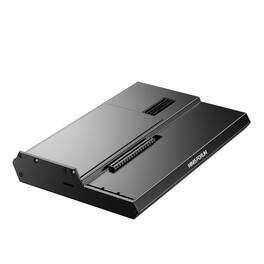
Powered by the MINISFORUM DEG1 External GPU Dock, a compact OCuLink 4i graphics docking station for mini PCs and laptops with OCuLink output. 1× OCuLink 4i upstream (PCIe 4.0×4) delivers native PCIe bandwidth without Thunderbolt protocol overhead. 1× PCIe ×16 slot (PCIe 4.0×4) accepts a standard desktop graphics card. ATX / SFX PSU compatible with ATX 24-pin connector onboard. Built-in signal amplifier chip for stable high-speed PCIe signal integrity. Follow the Startup feature synchronizes GPU power on / off with the host PC. Compact 270.2×174.4×40.7mm horizontal metal chassis. GPU and PSU sold separately.
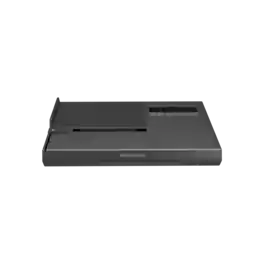
Powered by the Intel JHL9480 TBT5 controller, the MINISFORUM DEG2 External GPU Dock delivers dual-mode primary connection for mini PCs and laptops with OCuLink or TBT5 output. 1× OCuLink (PCIe 4.0×4) for native PCIe GPU bandwidth OR 1× TBT5 upstream (140W PD to host) — user-selectable via the OCuLink / TB5 front-panel switch. 1× TBT5 downstream (30W PD) supports daisy-chaining additional devices. 1× PCIe ×16 slot accepts a standard desktop graphics card. ATX 24-pin + 8-pin power connectors onboard. 1× M.2 2280 slot for SSD expansion, 1× 2.5 GbE LAN, 2× USB-A. Compact 258.9×174.17×42.75mm horizontal chassis. GPU, PSU, and SSD sold separately.
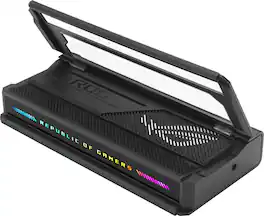
The ROG Bulwark Dock DG300 is a compact, sleek, 7-in-1 docking station that offers 4K at 144Hz and 8K at 30Hz output via HDMI 2.1, 1 x USB-C and 3 x USB-A for superfast up to 10 Gbps file transfers, gigabit Ethernet, audio jack and up to 100 watt USB Power Delivery to laptops and mobile devices.
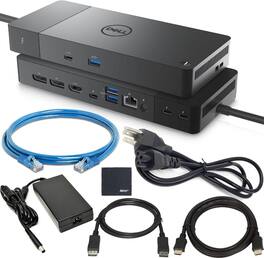
Dell Pro Thunderbolt 4 Smart Dock SD25TB4 offers a complete docking solution with Thunderbolt 4 connectivity, up to 130W power delivery, and support for up to four 4K 60Hz displays. Includes Zoomspeed DisplayPort and HDMI cables, Ethernet cable, and cleaning cloth for easy setup. Ideal for multi-monitor workstations, the compact design provides high-speed data transfer, reliable performance, and universal compatibility with most USB-C laptops running Windows.
| Pros for Minisforum - DEG1 eGPU Dock, OCuLink 4i PCIe 4.0x4, ATX/SFX PSU, PCIe x16 GPU, Signal Amplifier, Follow Startup - Black | |||
|---|---|---|---|
| There were no pros for this product— | There were no pros for this product— | Overall Performance, Connectivity, Portability, Charging Speed, Lighting | There were no pros for this product— |
| Cons for Minisforum - DEG1 eGPU Dock, OCuLink 4i PCIe 4.0x4, ATX/SFX PSU, PCIe x16 GPU, Signal Amplifier, Follow Startup - Black | |||
| There were no cons for this product— | There were no cons for this product— | Included Accessories, Port Quantity | There were no cons for this product— |
Specs
Customers often buy these together
 $429.99The price was $455.99
 $89.99The price was $109.99
 $107.99The price was $159.00
 $134.99The price was $199.99
 $159.99The price was $204.11
 Clearance$115.99The price was $144.99
 $89.99The price was $114.99

More to consider
 $109.99The price was $159.99
 $117.99The price was $139.99
Explore tech essentials Sponsored
 $2,399.00The price was $2,999.00

Keep exploring

Acer - 5 in 1 USB C Hub with 4K HDMI, 100W Power Delivery, 3 USB A Data Ports, USB C to HDMI Adapter
$15.99The price was $16.99 $17.99The price was $21.99