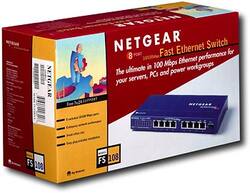
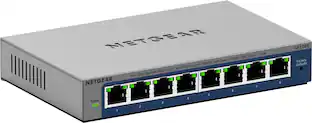
NETGEAR - 8-Port 10/100 Mbps Fast Ethernet Unmanaged Switch - Blue
- Key Specs
- Switch Management Type: Unmanaged (Unmanaged switches don't require user configuration and are typically used for basic connectivity. Managed switches have more features and can be configured by the user for custom network use.)
- Number of LAN Ports: 8 (Number of devices able to be connected to the Local Area Network (LAN). LAN ports allow wired connections to other networking devices (wireless access points, range extenders, etc.) in order to share the internet connection received through a WAN port.)
- General
- Brand: NETGEAR
- Model Number: FS108
- Product Name: 8-Port 10/100 Mbps Fast Ethernet Unmanaged Switch
- Color: Blue
- Features
- Auto Detecting: true
- Auto Speed Sensing: true
- Dimensions
- Product Height: 1.1 inches (The out of box height of the item. Height is measured as the vertical distance from the bottom of the item to the top as it would be primarily used or placed.)
- Product Length: 4.1 inches (The out of box length of the item. Length is measured as the longest dimension of the item.)
- Product Width: 9.3 inches (The out of box width of the item. Width is measured as the horizontal distance from one side of the item to the other as it would be primarily used or placed.)
- Product Weight: 1.7 pounds (The out of box weight of the item.)
- Warranty
- Warranty - Parts: Lifetime
- Warranty - Labor: Lifetime
- Other
- UPC: 606449003208
NETGEAR's popular FS100 series desktop switches, known for their reliability and performance, provide your LAN with high-speed, 10/100Mbps auto-sensing connectivity for as many as 8 users. Just plug in your Ethernet cables, connect a power cord, and you're ready to go-there's no software to configure. They negotiate to the fastest possible connection and with Auto Uplink technology, these switches automatically figure out if the link needs a straight-through or cross-over connection, and makes the right choice. Existing 10BASE-T devices are easily integrated within higher bandwidth environments, with full wire speeds on all ports of either 10Mbps or 100Mbps. Engineered without the need for internal fans, they operate silently. And each of these very compact switches is housed in a sturdy metal case for years of dependable use. Eight ports provide LAN access for many users. Every port supports up to 200Mbps in dedicated bandwidth and traffic is forwarded flawlessly with automatic flow control. Solidly built in small sizes that are easy to position when space is at a premium. Ideal for conference rooms, class rooms, study groups or small offices. Place it on any flat surface or use the included wall mount kit to tuck it out of the way. Once you connect the hardware, your switch is operating! Auto negotiation takes care of the speed and duplex, while Auto Uplink takes care of the MDI/MDI-X connection. Eliminate the need for toggle switches or special crossover cables. No fan means no noise, which helps maintain a peaceful atmosphere in your busy office.
- FAST ETHERNET: 8 auto-sensing 10/100 Mbps Fast Ethernet ports with non-blocking switching architecture for maximum throughput at wire speed.
- Plug-and-Play: Simple set up with no software or configuration needed. Rack and wall-mountable (kit included).
- Internet Splitter: Connectivity to your router or modem for additional wired connections (laptop, gaming console, printer, etc).
- Cost Effective: Most affordable connectivity to your network.
- Easy-monitoring: Per port LEDs for port activity and speed.
- Sleek and Stylish: Blends seamlessly into any environment with its distinctive reflective surface.
Whats Included
- 10/100 Desktop Switch (FS108)
- AC adapter
- Quick Installation Guide
- Wall-mount kit
- Warranty/support information card
A: If you have an Ethernet port you are connected to your router. You can get a cheap switch that will turn that one port into 4 or 8.i
Q: Does this have PoE? I need it to work with a Polycom phone.
A: undefined
A: This in an unmanaged device. Setup is simple, you plug in one active Ethernet line and you can plug in up to seven Ethernet devices. They will show up on your network as soon as you plug them into the switch.
People also viewed


Today's top picks
 $449.99The price was $829.99
 $2,449.99The price was $3,199.99
 $999.98The price was $1,639.98
 $199.99The price was $249.99
 $1,099.99The price was $1,499.99
 $549.99The price was $749.99








