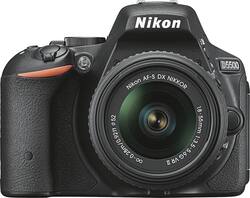
Nikon - D5500 DSLR Camera with AF-S DX NIKKOR 18-55mm f/3.5-5.6G VR II Lens - Black
- General
- Brand: Nikon
- Model Number: 1546
- Product Name: D5500 DSLR Camera with AF-S DX NIKKOR 18-55mm f/3.5-5.6G VR II Lens
- Color: Black
- Digital Camera Type: DSLR Camera with Lens
- Imaging
- Image Sensor Type: CMOS (CCD and CMOS are the two main technologies used in image sensors. CCD, the older of the two types, turns analog light signals into digital pixels. This conversion happens without distortion, resulting in high-quality images. Newer CMOS sensors use transistors at each pixel to move electrical charges. CMOS sensors are typically less expensive, but also require more light to create distortion-free images.)
- Image Resolution (Display): 6000 x 4000 (Refers to the number of pixels, both horizontally and vertically, used to either capture an image or display it. The higher the resolution the finer the image details.)
- Zoom Capability: true (This function allows for magnification of the subject.)
- Low Light/High Sensitivity: true (High sensitivity digital imaging devices are designed to work in low light conditions to produce a high dynamic range image.)
- Image File Format(s): RAW, JPEG (Standardized software format(s) of storing digital images. The type of format chosen for capturing and compressing the image can determine quality, level of detail, and storage space required.)
- Focus
- Autofocus: true (Allows the camera to automatically focus through the lens, rather than by adjusting the lens manually.)
- Exposure Control
- Shutter Speeds: 1/4000 - 30 sec. (The length of time the shutter remains open when the shutter release is activated, expressed in fractions of seconds. The longer the shutter is open, the more light that is able to be captured by the camera sensor.)
- Minimum Aperture: 36 (The smallest opening of a lens, typically expressed in f-numbers. The larger the number, the smaller the aperture and the less light that can enter the lens. A smaller aperture creates a larger depth of field, which keeps both foreground and background in focus.)
- Maximum Aperture: 3.5 (The limit to how wide a lens can be open, typically expressed in f-numbers. The smaller the number, the larger the aperture and the more light that can enter the lens. A larger aperture creates a shallower depth of field, helpful for keeping subjects in focus and blurring background details.)
- Minimum ISO: 100 (ISO is the measurement of a camera image sensor's light sensitivity. When there is plenty of light, using the lowest ISO setting available will typically result in a higher quality image.)
- Maximum ISO: 25600 (ISO is the measurement of a camera image sensor's light sensitivity. In low-light environments, using a higher ISO setting helps to capture a sharp, bright image.)
- Maximum Expandable ISO: 25600 (ISO is the measurement of a camera image sensor's light sensitivity. Expandable ISO settings use software to simulate brighter images than the device's native ISO range is capable of capturing.)
- Brightness Control: true (Allows the camera to adjust the brightness of a captured image for optimal exposure.)
- Burst Mode: true (Also referred to as continuous shooting. This feature captures multiple shots in rapid succession.)
- Self Timer: true
- Shooting Modes: P, S, A, M, auto, auto (no flash), scene, effects, movie (Exposure modes employed by the photographer to control the optimal aperture, shutter speed, ISO, and other settings for capturing specific subjects/scenes. Examples include Aperture-Priority, Macro, and Manual modes.)
- Panorama Mode: false
- Scene Modes: Autumn colors, beach/snow, blossom and more (Exposure modes with predetermined optimal settings for capturing specific scenes. Examples include Landcape, Portrait, and Sports modes.)
- White Balance Modes: Auto, incandescent, fluorescent (7 types), direct sunlight, flash, cloudy, shade, preset manual (Settings that calibrates how the color white is rendered in an image/video, reducing the appearance of unnatural contrasts caused by various light sources.)
- Lens
- Lens Mount Compatibility: Other
- Minimum Focal Length: 18 millimeters (The minimum distance between the lens and the image sensor that allows the subject to be in focus. The shorter the focal length, the greater the area of scene captured.)
- Maximum Focal Length: 55 millimeters (The maximum distance between the lens and the image sensor that allows the subject to be in focus. The greater the focal length, the smaller the area of scene captured.)
- In-Lens Image Stabilization: true (This feature helps reduce image blurring from camera motion. Lens stabilization means an element within the lens moves automatically to counteract detected motion.)
- Flash
- Flash Modes: Automatic, Red-eye reduction, Slow sync, Fill-in, Off (The flash feature emits light to increase the brightness of a subject in dimly lit environments. Common modes include Auto and Red-Eye Reduction.)
- Integrated Flash: true
- External Flash Mount: Hot Shoe (A cold shoe is a mounting point on top of a camera to securely attach a flash unit or other compatible accessories. A hot shoe is a cold shoe with an electrical connection that insures communication and synchronization between camera and accessory.)
- Display
- Display Type: LCD
- Screen Size: 3.2 inches (Size of the screen, measured diagonally from corner to corner.)
- Screen Resolution: 1,037,000 dots (Screens come in a range of resolutions (measured in pixels, horizontal x vertical). The higher the resolution, the greater the picture quality.)
- Viewfinder Type: Optical (A viewfinder is the part of a camera (or attachment) that allows you to see and focus a scene in frame. Optical viewfinders let you view the scene directly through the lens. Electronic viewfinders display the image on a screen in its approximate final form.)
- Viewfinder Magnification: 0.82 times (The measurement of the apparent size of the image in the viewfinder compared to how it would be seen with the naked eye.)
- Touch Screen: true (Touch-screen devices make navigating more intuitive. Using a touch-screen display, you can do things such as tap to select, hold and drag to move items, swipe to scroll, and pinch to zoom.)
- Varying Angle Screen: true (The camera's screen can be flipped out and adjusted to rotate, tilt, and/or swivel.)
- Storage
- Number of Memory Card Slots: 1
- Compatibility
- Tripod/Monopod Mountable: false (A support function that allows the device to be mounted to monopods and tripods for leveling and stability.)
- Socket Size: 1/4 in.
- Memory Card Compatibility: Secure Digital, Secure Digital High Capacity (SDHC), Secure Digital Extended Capacity (SDXC) (The type of memory card(s) recommended for use with the product.)
- Remote Compatible: true
- Features
- Face Detection: true (A function that automatically detects human faces and then sets focus and appropriate exposure to capture them.)
- Smile Mode: false (When enabled, this mode works in conjunction with face detection to automatically take a photo when a smile is detected.)
- Integrated GPS: No
- Records Audio: true
- Connectivity
- Output(s): HDMI, USB
- PictBridge Enabled: true (PictBridge allows digital cameras, camcorders and other image capture devices to connect and print directly to photo printers and other output devices without using a computer.)
- Power
- AC Adapter Compatible: true (The device is able to be charged using an external power adapter which meets input and output voltages specified by the manufacturer.)
- Number of Batteries Required: 1
- Number of Images Per Charge: 820
- Included
- Batteries Included: true (Indicates whether the product comes with the required batteries for its operation.)
- AC Adapter Included: false (An external power adapter is included for operation.)
- Memory Card Included: false (Indicates whether a memory card is included.)
- Dimensions
- Product Height: 2.76 inches (The out of box height of the item. Height is measured as the vertical distance from the bottom of the item to the top as it would be primarily used or placed.)
- Product Width: 3.82 inches (The out of box width of the item. Width is measured as the horizontal distance from one side of the item to the other as it would be primarily used or placed.)
- Product Depth: 4.88 inches (The out of box depth of the item. Depth is measured as the distance from the front of the item to the back as it would be primarily used or placed.)
- Product Weight: 0.9 pounds (The out of box weight of the item.)
- Filter Diameter: 52 millimeters
- Other
- UPC: 018208015467
Head out on your next shooting session with this Nikon D5500 DX-format DSLR camera, which features a high-resolution 24.2MP CMOS sensor and includes an AF-S DX NIKKOR 18-55mm f/3.5-5.6G zoom lens for an efficient, versatile setup.
Memory card sold separately.
- 24.2MP, 23.5mm x 15.6mm DX-format CMOS sensor: Captures high-resolution images up to 6000 x 4000 pixels.
- AF-S DX NIKKOR 18-55mm f/3.5-5.6G VR II lens included: For intricate picture detail. In-lens optical image stabilization helps ensure visual crispness. Nikon F mount accommodates additional interchangeable lenses (not included).
- 3.2" high-resolution Vari-angle touch-screen LCD: Provides a clear view of useful information.
- Full 1080p video at 60p: Makes it easy to capture special moments as they unfold.
- Up to 5 fps burst shooting: Lets you shoot fast-action sequence photos.
- ISO 100-25,600: Provides effective low-light performance, allowing you to get the shot you want, wherever you are.
- 39-point autofocus: Helps keep your subject crisp and clear. Full manual control, plus 16 scene modes and 7 special effects modes, offers customization.
- Optical viewfinder: With 0.82x magnification helps you frame your scene.
- Integrated flash: Provides multiple settings for efficient illumination. Additional hot shoe lets you attach an optional external flash (not included).
- Built-in Wi-Fi connectivity: Compatible with Android and Apple® iOS devices to simplify operation.
- Multicard slot: Supports SD, SDHC and SDXC formats.
- Store more photos!: Find compatible memory cards in our Memory Card Finder.
Whats Included
- D5500 DSLR Camera with AF-S DX NIKKOR 18-55mm Lens
- Rechargeable lithium-ion battery (EN-EL14a)
- Quick charger (MH-24)
- USB cable (UC-E23), A/V cable (EG-CP16)
- Camera strap (AN-DC3), body cap (BF-1B), CD-ROM
- Front lens cap (LC-52), rear lens cap (LF-4)
- Owner's manual
A: The D5500 has a larger LCD that has higher resolution. Larger and higher resolution flip out LCD is great for recording the FULL HD movie files you can record with the D5500. The D5500 has much better native ISO range of up to 25,600. This will gain you better pictures in lower light situations without the use of the flash. The D5500 has built-in WiFi, the D5200 requires the addition WU-1a accessory. The D5500 can take up 300 more shots on a single charge of the battery than the D5200. As you can see, the D5500 is a worthy upgrade from the D5200.
A: You can get between 400 to 22,000 images on a 32GB memory card, depending on the size and type of the image files you place on it. A 64GB memory card can hold between 800 to 45,000 images, again depending on size and type of file being saved. However, it is always recommended you upload your images to a safe place as soon as you are finished taking them to ward off possible accidental loss and to make room for more memories to be recorded. Approved card brands for the Nikon D5500 camera are SanDisk, Toshiba, Panasonic, and Lexar Media. Compatible memory card types are SD, SDHC and SDXC and range in size from 2GB to 256GB.
Q: Is it worth buying a 1, 2, or 3 year warranty through Best Buy?
A: I did not purchase an extra warranty. You can have your camera cleaned and serviced by a professional for less than $180. You should read up on how to keep the camera clean and how to prevent accidents. I would think if there was a manufacturing defect you would know it within the first year.
A: How important is a touch screen? I am buying a used Nikon D5300 that's only been used twice.. one lens the 18-55VRII 3.5-5.6G buying this as my first camera for $250 Worth it?
A: I had the same dilemma when purchasing my D5500. Everyone's usage varies, but below are the things that sold me on the D5500 compared to the D3300. Low light situations are better. Battery life is better. Built in WiFi. (I don't remember 100%, but I think there are external wifi adapters sold, but it was one extra thing to keep up with for me so the built in was KEY) Touchsreen display. (This did take some getting use to, but now that I have it, I don't know what I would do if I didn't.) Increased focus points (My last camera only had 8 or 9 and this one has 39. Huge improvement. D3300 only has 11)
Q: Is this a good camera for photographing wildlife?
A: I do not have any personal experience with Wildlife Photography, but interested in getting into it. Technically, the camera is not what would make a photo good or bad. It would be the lens you use with it. Even thou the included lens in the kit is good for all round photography, you will want to get a bigger lens with a longer zoom range and a bigger aperture to take good wildlife pictures. You can do a search in google or yahoo for "best lenses for wildlife photography" and you'll fine a lot of useful information and recommendations. I have a Nikon Nikkor AF-S 55-300mm f/4.5-5.6G ED VR DX Zoom Lens, which works great, but personally, I may invest in a Nikon 70-200mm f/2.8G VR II, the zoom is a bit less than the previous one, but the aperture is bigger, which means that I can use a faster shutter without sacrificing light. Lenses are going to be your biggest investment with the camera, and will determine the quality of your pictures.
A: I recently purchased the Nikon D5500 and I'm very pleased with the image quality. I used the camera extensively this Fall to take Autumn foliage photos and many where Landscape photos. I used the NIkon DX - AF-S NIkkor 18-55mm 3.5/5.6 lens that was part of the "kit" with the camera body I purchased. I would recommend this camera and lens for Landscape photos.
A: The Nikon D5500 DSLR camera has built-in WiFi that can transfer images to a compatible smart device running the Wireless Mobile Utility (WMU) application. Once the WMU app is downloaded on a compatible smart device and opened, the camera can easily transfer images as they are taken either remotely with the smart device or with the camera itself. To learn more about the WMU application and wireless camera options please contact Nikon Support.
Today's top picks
 $199.99The price was $249.99
 $2,449.99The price was $3,199.99
 $449.99The price was $829.99
 $999.98The price was $1,639.98
 $789.99The price was $1,049.99









