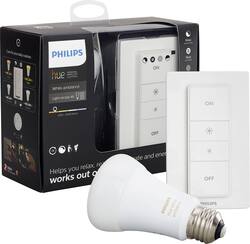
Philips - Hue White Ambiance A19 LED Recipe Kit - Adjustable White
- Key Specs
- Brightness: 800 lumens (A measure of the total light output.)
- Wattage Equivalent: 60 watts
- Bulb Shape Code: A19
- Bulb Base Code: E26
- Works With: Amazon Alexa, Apple HomeKit, Cortana, Google Assistant, Nest, SmartThings, Wink (Compatible with or able to be connected to other smart devices or applications.)
- Indoor or Outdoor Use: Indoor
- General
- Brand: Philips
- Model Number: 466706
- Product Name: Hue White Ambiance A19 LED Recipe Kit
- Color: Adjustable White
- Lighting
- Bulb Type: LED
- Brightness: 800 lumens (A measure of the total light output.)
- Light Color: Adjustable white
- Bulb Shape: Standard
- Bulb Finish: Frosted
- Number of Bulbs Included: 1
- Wattage Equivalent: 60 watts
- Beam Spread: 180 degrees
- Bulb Base Type: Screw-in
- Compatibility
- Bulb Shape Code: A19
- Bulb Base Code: E26
- Works With: Amazon Alexa, Apple HomeKit, Cortana, Google Assistant, Nest, SmartThings, Wink (Compatible with or able to be connected to other smart devices or applications.)
- App Compatible: true (The product can be connected to a program or software application on a mobile device, which then receives collected data from the product.)
- Features
- Dimmable: Yes - via app
- Instant On: true
- Performance
- Maximum Life Hours: 25000 hours
- Indoor or Outdoor Use: Indoor
- Power
- Bulb Wattage: 10 watts
- Voltage: 120 volts (Amount of power needed to support an electrical current.)
- Certifications Listings & Approvals
- ENERGY STAR Certified: false (Devices carrying the ENERGY STAR service mark, such as computer products and peripherals, kitchen appliances, and other products, generally use 20% to 30% less energy than required by federal standards.)
- Certification Type: None
- Dimensions
- Bulb Diameter: 2.8 inches
- Product Length: 0.6 inches (The out of box length of the item. Length is measured as the longest dimension of the item.)
- Product Height: 4.5 inches (The out of box height of the item. Height is measured as the vertical distance from the bottom of the item to the top as it would be primarily used or placed.)
- Product Weight: 0.2 pounds (The out of box weight of the item.)
- Warranty
- Warranty - Parts: 2 years
- Warranty - Labor: 2 years
- Other
- UPC: 046677466701
Set the tone for any occasion with this Philips hue light recipe kit, which handles up to 10 Philips hue lights for remote controlled operation. This versatile kit is easy to set up, and the dimmer can be mounted with either screws or adhesive tape. Use this Philips hue light recipe kit to create warm and inviting settings for any activity.
- Hue is your personal, customizable wireless lighting system: Start your Philips Hue experience with the included White Ambiance A19 LED Smart Bulb and choose the perfect light setting for any mood or activity.
- Warm white to cool bright daylight: Set the right ambience for any moment with a range of beautiful, natural white light.
- Use like a normal LED, or have full control with the Hue App: Quickly dim or brighten up to 10 lights in your room for games, parties, and movies from the comfort of your couch or bed.
- LED light bulb: Designed to provide longer, more energy-efficient illumination.
- Add Hue products to unlock enhanced lighting experiences: Easily expand your lighting system with up to 12 accessories per system (sold separately), such as a Hue Tap or Hue Motion Sensor.
- Quick, easy installation: Mount the Hue Dimmer Switch anywhere you want with the included screws or adhesive tape and control using the remote or the Philips Hue App with the Hue Bridge.
Whats Included
- Owner's manual
- Philips Hue White Ambiance A19 LED Recipe Kit
A: Yes. You just need to leave the light switch in the on position and control the Hue light, or lights, through the Hue Dimmer Switch. You can use Hub bulbs with your new dimmer switch even if you don't have a Hue Hub. But if you do use a Hue Hub, I'd recommend adding your dimmer switch in the Hue app before pairing lights to the the dimmer switch. If you have lights that are already connected to your Hub and you pair them to your dimmer switch, before adding the switch to the hub, the bulbs will become unreachable by Hue app.
Q: Can you purchase this in place of the starter kit, or do you need that first?
A: Hi, You can use the Philips Hue Dimmer Kit and control up to 10 white lights without the bridge but you won't be able to control the lights using Siri (HomeKit) or Alexa. It's a good way to test out the lights before committing to all the other Philips Hue products you'll want to try. Check out the user manual from Philips Hue website for more info, http://www2.meethue.com/media/2999135/Hue-Dimming-kit-NAM.pdf.
Q: Can this work with lifx bulbs?
A: No. However if you have other hue bulbs you can set your LIFX bulb to turn on and off when the hue bulb does in HomeKit if you’re an iOS user. Not sure about Android.
Q: Does this dimmer work on A19 color bulbs with bridge and 3rd generation
A: Yes, it sure does.
People also viewed


Today's top picks
 $199.99The price was $249.99
 $479.99The price was $729.99
 $799.99The price was $1,199.99
 $789.99The price was $1,049.99