Plugable - USB C to DisplayPort Adapter, Universal Video Graphics Adapter for USB 3.0 and USB-C Macs and Windows - Black
Related Item

About This Item
- Key Specs
- Connector Type (End 1): USB-C
- Gender (End 1): Male
- Connector Type (End 2): DisplayPort
- Gender (End 2): Female
- General
- Brand: Plugable
- Model Number: UGA-DP-S
- Product Name: USB C to DisplayPort Adapter, Universal Video Graphics Adapter for USB 3.0 and USB-C Macs and Windows
- Color: Black
- Quantity: 1
- Compatibility: Windows 7 and Above|macOS 10.14 (Mojave) or later|All versions of ChromeOS
- Connectivity
- Cable Type: Monitor
- Product Type: Adapter
- Connector Type (End 1): USB-C
- Gender (End 1): Male
- Connector Type (End 2): DisplayPort
- Gender (End 2): Female
- Environmental
- Indoor Or Outdoor Use: Indoor (Indicates the appropriate environment product was designed to be used in.)
- Warranty
- Warranty - Parts: 2 year limited
- Warranty - Labor: 2 year limited
- Other
- UPC: 819927012658
Extend Your Display - The Fast and Simple Way. "There’s no shortage of options when it comes to adding screens to your laptop, and that’s where things can get complicated (and expensive). The Plugable USB 3.0 and USB C to DisplayPort monitor adapter (UGA-DP-S) keeps things simple. A one plug solution that adds one DisplayPort port to your computer, the UGA-DP-S leaves your other ports open for peripherals. And because this USB A to DisplayPort adapter has a single function, it’s a lot more affordable than a docking station. Extend or Mirror 4 Screens. With the UGA-DP-S adding an extra display is just the start. Combining multiple USB to DisplayPort Adapters makes it possible to add up to 8 monitors on Windows computers and up to 4 monitors on macOS computers. Quad HD. Add a 2560x1440p @ 60hz Quad HD monitor through a USB 3.0 port, USB-C, or even a Thunderbolt port. This USB-C to DisplayPort adapter supports seamless connectivity for crystal-clear visuals and reliable performance. Connection Simplicity. A hybrid 2-in-1 cable means you don’t have to choose between a USB Type A and USB Type C to DisplayPort adapter picking an adapter that matches your computer. The UGA-HDMI-S works with the ports you have now, and the ports you’ll have on your next computer—USB 3.0, USB-C, USB4, even Thunderbolt. Its compact design makes this USB C to DisplayPort adapter as portable as your laptop. This USB A to DisplayPort adapter ensures you always have the right connection for your devices. For Best Compatibility. "Silicon Motion is a versatile software that enables you to be more productive by adding additional displays through USB 3.0, USB-C, or Thunderbolt ports on your computer. SMI drivers on Windows will automatically install through Windows Updates. SMI macOS InstantView driver download and installation is required for MAC. This USB to DisplayPort converter is the perfect solution for extending your display setup with ease and affordability.
- USB 3.0 to DisplayPort Adapter for Mac: Extend or mirror multiple monitors with resolutions up to 2560x1440 @ 60Hz even on M1, M2 or M3 Mac systems that would otherwise be limited to a single external display.
- USB 3.0 Type C to DisplayPort: Featuring a hybrid 2-in-1 cable, easily connect to a USB 3.0 or Type-C port, including USB4, Thunderbolt 5, Thunderbolt 4, or Thunderbolt 3 interfaces on laptops, desktops, or docking stations. It works even if your Type-C port lacks USB-C Alt Mode support, making it an ideal solution for connecting your DisplayPort monitor to virtually any Type-C enabled device. You'll never need an extra Display Port Adapter again.
- Expand Your Workspace with Multiple Monitors: This Display Port to USB Adapter not only allows one additional display, but also offers Windows and ChromeOS users to use this adapter with an existing docking station to support up to eight 2560x1440 (HD) displays using multiple adapters. Customize your setup further with the options for an additional dual display by combining it with a single USB-C dock. (one 1440p display per adapter, up to 4 on macOS)
- Compatibility: This USB to DisplayPort Adapter is compatible with Windows 10 and Windows 11, macOS 10.14 or later, and ChromeOS 100.x or later. SMI driver installation is required. Not compatible with DisplayLink drivers.
- Enhance Your Productivity: This USB to DP Adapter enables the use of multiple monitors, making it ideal for tasks such as online meetings, presentations, spreadsheets, web browsing, and more. Please note, it does not support playback of HDCP-protected content like Netflix or Hulu.
Whats Included
- Quick Start Guide
Reviews
This product doesn't have any reviews yet.
Compare similar products
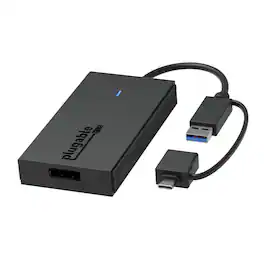
Extend Your Display - The Fast and Simple Way. "There’s no shortage of options when it comes to adding screens to your laptop, and that’s where things can get complicated (and expensive). The Plugable USB 3.0 and USB C to DisplayPort monitor adapter (UGA-DP-S) keeps things simple. A one plug solution that adds one DisplayPort port to your computer, the UGA-DP-S leaves your other ports open for peripherals. And because this USB A to DisplayPort adapter has a single function, it’s a lot more affordable than a docking station. Extend or Mirror 4 Screens. With the UGA-DP-S adding an extra display is just the start. Combining multiple USB to DisplayPort Adapters makes it possible to add up to 8 monitors on Windows computers and up to 4 monitors on macOS computers. Quad HD. Add a 2560x1440p @ 60hz Quad HD monitor through a USB 3.0 port, USB-C, or even a Thunderbolt port. This USB-C to DisplayPort adapter supports seamless connectivity for crystal-clear visuals and reliable performance. Connection Simplicity. A hybrid 2-in-1 cable means you don’t have to choose between a USB Type A and USB Type C to DisplayPort adapter picking an adapter that matches your computer. The UGA-HDMI-S works with the ports you have now, and the ports you’ll have on your next computer—USB 3.0, USB-C, USB4, even Thunderbolt. Its compact design makes this USB C to DisplayPort adapter as portable as your laptop. This USB A to DisplayPort adapter ensures you always have the right connection for your devices. For Best Compatibility. "Silicon Motion is a versatile software that enables you to be more productive by adding additional displays through USB 3.0, USB-C, or Thunderbolt ports on your computer. SMI drivers on Windows will automatically install through Windows Updates. SMI macOS InstantView driver download and installation is required for MAC. This USB to DisplayPort converter is the perfect solution for extending your display setup with ease and affordability.
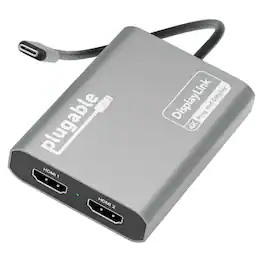
Add two 4K 60Hz HDMI displays to your MacBook M1 through M5, Windows laptop, or ChromeOS device from a single USB-C port. The Plugable USBC-6950M uses DisplayLink technology to extend your workspace beyond native display limits, making it a practical solution for multitasking, hybrid work, creative projects, and productivity-focused desk setups. Powered by the proven DL-6950 DisplayLink chip, this MacBook dual monitor adapter compresses and transmits video over USB-C to support dual external HDMI displays. On Macs, DisplayLink helps bypass Apple’s native single external display limitation on many base-model M-series systems, enabling expanded screen real estate for more flexible workflows. Setup is simple. On Mac, download DisplayLink Manager, connect the adapter, approve the required macOS display-access permission, and your displays will appear. Windows 10 and newer and ChromeOS 100+ systems are plug-and-play with no driver installation needed. The USBC-6950M is compatible with macOS 11 and newer, Windows 10 and newer, and ChromeOS 100 and newer systems with Thunderbolt, USB4, or USB-C. For best results on MacBook Air and MacBook Pro systems with M1 through M5 base chips, connect directly to the MacBook’s USB-C port rather than through a hub or dock. Please note that DisplayLink based adapters are not designed for HDCP-protected streaming apps such as Netflix, Disney+, Hulu, or Prime Video. These services may show a black screen on connected displays. For entertainment or gaming use, a standard display adapter is recommended instead. During extended use, the adapter may run warm. This is normal for DisplayLink technology. Use with clear airflow on all sides or elevate the adapter for long sessions. The aluminum body helps dissipate heat during operation. Backed by Plugable lifetime North American support and a 2-year limited warranty, the USBC-6950M is designed for dependable everyday productivity, with real help from real humans for as long as you own it
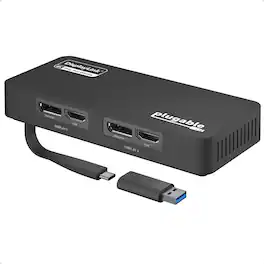
The Plugable USB 3.0 and USB-C Dual 4K Display Adapter (USBC-6950U) allows you to connect up to two additional displays that support resolutions up to 3840x2160 at 60Hz each. Designed for productivity and business use, this adapter is ideal for extending your desktop workspace with HDMI 2.0 or DisplayPort 1.2 connections. It is powered by the DisplayLink DL-6950 chipset and supports popular resolutions such as 1440p, 1080p, and lower, all at 60Hz refresh rates. To achieve 4K at 60Hz, connected monitors must support HDMI 2.0 and/or DisplayPort 1.2, and be used with appropriate cables. The adapter is compatible with most modern Windows systems, including Windows 11, 10, 8.1, and 7, as well as ChromeOS 100.x or later. It connects via USB 3.0 or USB-C and includes a USB-C to USB-A adapter for flexibility. Drivers install automatically through Windows Update on supported systems. The USBC-6950U is also TAA compliant. This adapter is not compatible with Linux/Unix, ARM-based Windows systems, or environments using non-DisplayLink USB graphics adapters or drivers such as MCT, j5, or SMSC. It does not support Dual-Link DVI conversions or HDCP-protected content, and it is not recommended for gaming or applications requiring high-frame-rate video. Each package includes the Plugable USB 3.0 and USB-C Dual 4K Display Adapter (USBC-6950U), a USB-C to USB-A adapter, and a Quick Start Guide.
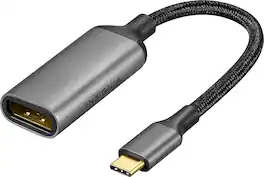
Improve your workstation by connecting your laptop to an external monitor with this Insignia 8K USB-C to DisplayPort Adapter. The adapter supports 8K Ultra HD to prevent loss in quality when transferring between screens. It features a sleek braided cable jacket that flexes and bends to easily connect, and the plug-and-play design makes setup a breeze.
| Pros for Plugable - USB C to DisplayPort Adapter, Universal Video Graphics Adapter for USB 3.0 and USB-C Macs and Windows - Black | |||
|---|---|---|---|
| There were no pros for this product— | There were no pros for this product— | There were no pros for this product— | Overall Performance |
Specs
Explore tech essentials Sponsored

Plugable - USB 3.0 and USB-C Universal Laptop Docking Station for Windows, Mac, ChromeOS | Dual HDMI
$112.95The price was $135.35 $169.99The price was $269.99