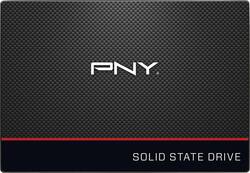
PNY - CS1311 240 GB Internal SATA III Solid State Drive
- Key Specs
- Storage Capacity: 240 gigabytes (Measured in megabytes (MB), gigabytes (GB) and terabytes (TB), this is the amount available for storing files, music, movies, photos and more. The total includes the capacity of the hard disk drive and solid state drive if both are included on the computer.)
- Storage Drive Type: SSD (Traditional, mechanical hard disk drives are the most common type of storage because they're relatively inexpensive and offer huge capacities. However, they also generate both noise and heat. Solid state drives, also known as SSDs, are many times faster than hard disk drives and have no moving parts to wear out, but typically offer less capacity for the same price.)
- Maximum Read Speed: 550 megabytes per second (The greatest speed at which the device can read information; for example, opening files.)
- Maximum Write Speed: 520 megabytes per second (The greatest speed at which the device can write information; for example, saving files.)
- Form Factor: 2.5 in.
- Interface(s): SATA (Refers to the types of connections that devices use to interact and communicate with each other.)
- General
- Brand: PNY
- Model Number: SSD7CS1311-240-RB
- Product Name: CS1311 240 GB Internal SATA III Solid State Drive
- Capacity
- Storage Capacity: 240 gigabytes (Measured in megabytes (MB), gigabytes (GB) and terabytes (TB), this is the amount available for storing files, music, movies, photos and more. The total includes the capacity of the hard disk drive and solid state drive if both are included on the computer.)
- Performance
- Storage Drive Type: SSD (Traditional, mechanical hard disk drives are the most common type of storage because they're relatively inexpensive and offer huge capacities. However, they also generate both noise and heat. Solid state drives, also known as SSDs, are many times faster than hard disk drives and have no moving parts to wear out, but typically offer less capacity for the same price.)
- Maximum Read Speed: 550 megabytes per second (The greatest speed at which the device can read information; for example, opening files.)
- Maximum Write Speed: 520 megabytes per second (The greatest speed at which the device can write information; for example, saving files.)
- Compatibility
- Internal Or External: Internal
- Product Compatibility: Desktop computers, Laptop computers
- Form Factor: 2.5 in.
- Interface(s): SATA (Refers to the types of connections that devices use to interact and communicate with each other.)
- Bare Drive: 240GB CS1311 (Drive is sold without any pre-installed software.)
- Minimum System Requirements: Windows 10, Windows 8, Windows 7, Windows Vista™, Windows XP™, Linux, Mac OS X
- Features
- Security Features: None
- Data Encryption: false
- Encryption Algorithm: false (The algorithm standard used to encrypt data on a device.)
- Usage: Everyday computing
- Memory
- Cache Buffer Size: 520 megabytes (The data capacity of the cache buffer (or disk buffer) that acts as temporary memory for the drive. The cache holds the most recently and frequently used data to save the drive the extra step of pulling it from permanent storage every time it's needed, which helps increase the drive's overall speed.)
- NAND Flash Memory Type: TLC (Single Level Cell (SLC) stores 1 bit of data per memory cell; Multi Level Cell (MLC) stores 2 bits per cell, Triple Level Cell (TLC) 3 bits, and Quad Level Cell (QLC) 4 bits. Vertical NAND (V-NAND) or 3D NAND stores more data by layering cells vertically. Similarly, there are 3D MLC, 3D TLC and 3D QLC stacked cells.)
- Dimensions
- Product Height: 3.9 inches (The out of box height of the item. Height is measured as the vertical distance from the bottom of the item to the top as it would be primarily used or placed.)
- Product Width: 2.75 inches (The out of box width of the item. Width is measured as the horizontal distance from one side of the item to the other as it would be primarily used or placed.)
- Product Weight: 1.6 ounces (The out of box weight of the item.)
- Included
- Included Software: Acronis Data Migration Software
- Warranty
- Warranty - Parts: 3 years
- Warranty - Labor: 3 years
- Other
- UPC: 751492590882
Experience speeds up to 24 times faster than an HDD with this PNY 240BG SSD. It also operates at a lower temperature than a standard hard drive, providing even more performance improvements. Enjoy the drive's quiet operation, and save money on utility bills with this energy-efficient SSD. The PNY 240GB SSD is covered by a three-year warranty.
- Trusted Performance: Upgrade to a PNY SSD to experience PC performance that's up to 24x faster than a traditional HDD.
- Quality Assurance: All PNY SSDs undergo extensive component and sub-system testing. We utilize high-quality NAND from the industry’s top vendors to ensure a solid SSD.
- Proven Reliability: Each SSD is guaranteed to meet the requirements of even the most demanding applications.
- Cool and Quiet Operation: Our SSDs reduce operating temperature and potential damage from overheating.
- Energy Efficient: If you’re aiming to build a silent, green PC, PNY SSDs are a must have on item your checklist.
- Shock Proof: The non-volatile NAND in the system enables the SSD to retain its memory if your computer ever falls or is dropped.
- Built by Experts: With a world class SSD engineering team based in Silicon Valley, we are well positioned to take advantage of emerging technologies.
- Creating Jobs in the USA: With our headquarters and state-of-the-art manufacturing facility in NJ, more than 80% of our global workforce is in the USA.
Whats Included
- CS1311 240GB Internal SATA III Solid State Drive
- Spacer
- Acronis data migration software
Q: Is it compatible with Desktop computers?
A: Compatible yes, as long as the computer you're installing it into has a SATA controller. If you are installing it into a desktop PC that is designed for 3.5" drives you will need a mounting bracket because all SSD drives are made with a 2.5" form factor which is typical of laptops. It will work fine as long as you have a bracket to mount it, or if the desktop already has a 2.5" bay. Unfortunately, Best Buy does not sell the 2.5" to 3.5" brackets at this time (big oversite on someone's part). Check online and you can find them for around $5 - $6.
Q: macbook pro got slower when I installed it? is there anything I should do?
A: Macs only enable TRIM on Apple provided solid-state drives. If you upgrade your Mac with an aftermarket SSD, your Mac won’t use TRIM with it. This reduces the drive’s performance. Thanks to Mac OS X 10.10.4 it is now possible to enable TRIM on any SSD in your Mac with a simple command. You no longer have to disable OS X security features and modify your system to do this. To run trimforce, open a Terminal window (press Command + Space, type Terminal, and press Enter to launch a terminal via Spotlight). Type the following command into the terminal window and press Enter: sudo trimforce enable Enter your user account’s password at the prompt. After you do, you’ll need to read a scary-sounding warning and agree by typing a (y). Your Mac will immediately reboot after you agree to the second question with a (y). After it reboots, TRIM will be enabled for all SSDs connected to your Mac. If you want to disable trimforce and only use TRIM for Apple’s OEM solid-state drives, open a Terminal window again and run the following command: sudo trimforce disable This should work properly with most SSD's as long as it's not one that's on the blacklist, which the PNY CS1311 is not on the list, so you should be fine. To see what SSD's are on the blacklist so far check the link (https://github.com/torvalds/linux/blob/e64f638483a21105c7ce330d543fa1f1c35b5bc7/drivers/ata/libata-core.c#L4227)
Q: Is this compatible with a Macbook pro 13.3 inc 2012 version non retina?
A: yes, your MBP boots from your password page to El Cap in 52sec with the factory HHD and boots in 13sec with this SSD. Everything improves that concerns hard drive processing even my youtube watching because of the writing speeds.
Q: will it work with windows 10
A: Did not work in Windows10 environment with the Acronis software(download is the 2015 version). Cloned a 1TB HDD to this 250GB SSD as follows: Downloaded the free “MiniTool Partion Wizard 10”. Resized/extended the partitions on the HDD such that the content of the partitions will fit on the SSD after the partitions are proportionally resized by the cloning software(ratio of HDD partition to SDD partition 4 to 1). Cloning was done using the free download “Ease US todo Backup free 10.0”. Worked flawlessly!
A: This is most likely caused by programs and processes running in the background reading/writing to the drive at the same time you are transferring. I would recommend disabling start up items in msconfig and anything else running before testing. If that doesn't work I would back up your files and do a clean Windows install or restore. Possible the OS is corrupt /degraded or could have a virus. A clean install should have no problems transferring files. If it does still have problems, maybe the drive is going bad and could be replaced within the manufacturer one year warranty. Good luck!
Q: does the pony 240gb ssd have a 22 pin conection
A: undefined
Q: Is this compatible with acre aspire?
A: undefined
People also viewed
 $349.99The price was $700.99
Today's top picks
 $199.99The price was $249.99
 $789.99The price was $1,049.99
 $799.99The price was $1,199.99