PRIMEPLUS - Wireless Keyboard and Mouse Combo, 2.4G Full Size Wave Keys Ergonomic Keyboard with Wrist Rest - Black
Reviews coming soon
About this product
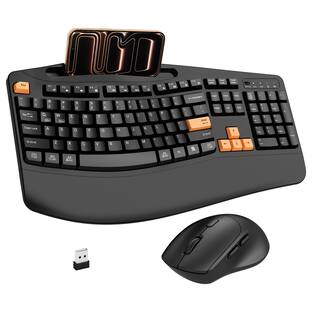
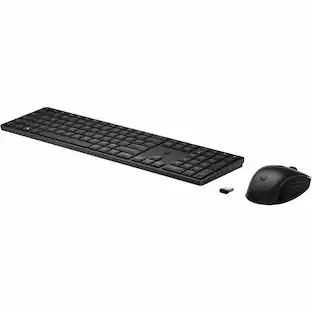
Work comfortably all day with this 2‑in‑1 wireless keyboard and mouse set. The wave‑shaped keyboard features a wide wrist rest and a 12° foldable stand – reducing wrist fatigue even during long typing sessions. The ergonomic mouse fits your hand naturally and offers three adjustable DPI levels (800/1200/1600) for precise control. Both devices share a single 2.4G USB receiver – just plug it in and start typing right away, with a stable connection up to 33 feet away. Smart power saving puts the keyboard to sleep after 15 minutes and the mouse after 30 seconds, so one AA battery in each lasts much longer. Click any key or button to wake instantly. Perfect for home offices or daily computing.
Color
BlackErgonomic Wave Keyboard + Wide Wrist Rest
The wavy key layout follows your natural finger movement. A padded wrist rest and 12° foldable stand keep your wrists straight and comfortable – less fatigue, more productivity. Say goodbye to sore hands after long workdays.
Ergonomic Wireless Mouse with 3 DPI Levels
Sculpted to fit your right hand, this mouse reduces strain during extended use. Adjust sensitivity on the fly: 800, 1200, or 1600 DPI. Perfect for everyday browsing, design work, or gaming.
2.4G Plug‑and‑Play – One Receiver for Both
No Bluetooth pairing, no software. Just plug the tiny USB receiver into your computer, and both keyboard and mouse work instantly. Reliable wireless range up to 33 feet, with no lag or dropouts.
Smart Auto‑Sleep + Long Battery Life
Keyboard sleeps after 15 minutes of inactivity, mouse sleeps after 30 seconds. Wake instantly by pressing any key or button. One AA battery per device (not included) lasts months. No more frequent battery changes.
- Form FactorErgonomicConnection TypeWireless
Reviews
This product doesn't have any reviews yet.





Compare similar products
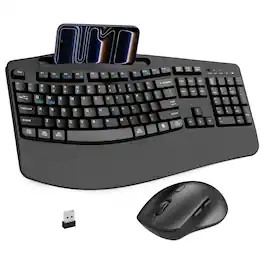
Work comfortably all day with this 2‑in‑1 wireless keyboard and mouse set. The wave‑shaped keyboard features a wide wrist rest and a 12° foldable stand – reducing wrist fatigue even during long typing sessions. The ergonomic mouse fits your hand naturally and offers three adjustable DPI levels (800/1200/1600) for precise control. Both devices share a single 2.4G USB receiver – just plug it in and start typing right away, with a stable connection up to 33 feet away. Smart power saving puts the keyboard to sleep after 15 minutes and the mouse after 30 seconds, so one AA battery in each lasts much longer. Click any key or button to wake instantly. Perfect for home offices or daily computing.
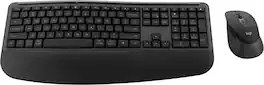
Feel the comfort all day with the Signature Comfort Plus MK880 bundle. Enjoy a keyboard with adjustable tilt legs and a curved palmrest and dual-foam support, keeping your hands relaxed even on busy days. The right-handed mouse is shaped for comfort, featuring a palm cushion and cozy side grips, plus quiet clicks and SmartWheel scrolling. Switch between up to three devices in a tap with Easy-Switch and Bluetooth—no dongle needed. Customizable shortcuts with Logi Options+ and dedicated AI launch key and video meeting keys make every workflow smarter. With long battery life and universal compatibility, MK880 fits every workspace and workday.
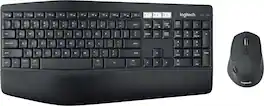
Experience next-level comfort and productivity with the MK850 Performance. Hyper-fast scrolling and a full-size keyboard help you get more done at your desk – and a cushioned palm rest, curved keyframe and contoured mouse let you power through in comfort. Type and switch seamlessly between your computer, tablet, and phone. And pair your mouse with up to 3 devices. The combo has been optimized for use with all your operating systems – including Windows, Mac, and Chrome OS.
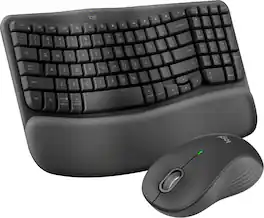
Experience day-long comfort and productivity with this wireless ergonomic keyboard and mouse combo. Typing feels instantly familiar on Wave Keys’ wavy keyframe design. The cushioned keyboard palm rest lifts pressure and improves wrist support. The Signature M550 L Wireless Mouse features a contoured shape and rubber side grip to keep medium- to large-sized hands comfortable throughout the day.
| Pros for PRIMEPLUS - Wireless Keyboard and Mouse Combo, 2.4G Full Size Wave Keys Ergonomic Keyboard with Wrist Rest - Black | |||
|---|---|---|---|
| There were no pros for this product— | Ergonomics, Overall Performance | Ease of use, Connectivity, Keyboard Quality, Battery Life | Ergonomics, Ease of use, Overall Performance, Connectivity, Palm Rest |
| Cons for PRIMEPLUS - Wireless Keyboard and Mouse Combo, 2.4G Full Size Wave Keys Ergonomic Keyboard with Wrist Rest - Black | |||
| There were no cons for this product— | There were no cons for this product— | Lag, Price | Keyboard Size, Key Spacing |
Specs
Be the first to ask a question.
We’ll try to get your question answered within 24 hours by a Best Buy customer or brand representative.
Customers often buy these together





![Sure, here is the corrected and grouped text from the image:
**Top Row:**
- ESC
- F1
- F2
- F3
- F4
- F5
- F6
- F7
- F8
- F9
- F10
- F11
- F12
- PRTSC
- DEL
**Number Row:**
- 1
- 2
- 3
- 4
- 5
- 6
- 7
- 8
- 9
- 0
- -
- =
- \
**Letter Row:**
- TAB
- Q
- W
- E
- R
- T
- Y
- U
- I
- O
- P
- [
- ]
- \
**Letter Row:**
- CAPS
- A
- S
- D
- F
- G
- H
- J
- K
- L
- ;
- '
**Letter Row:**
- SHIFT
- Z
- X
- C
- V
- B
- N
- M
- ,
- .
- /
**Function Row:**
-](https://pisces.bbystatic.com/image2/BestBuy_US/images/products/9be10b95-8e90-4a5d-b85f-cbc6a7d8e8df.png;maxHeight=232;maxWidth=233?format=webp)



![esc ~ ! 1 tab caps lock shift ctrl F2 Fl # 2 3 Q W A S Z start opt L F3 $ 4 E D X alt cmd3 ) FS F4 A % 5 6 R T F G V C logi 44 HI & F9 FID FB F7 F6 * ) - - & 0 8 9 7 O P U I Y K L H J > < N M 1 B PM + = { [ : I ; ? I alt cmd D 2 4 300 3 1 F12 . * page I insert home up clear backspace 8 9 + 7 page A pg up end down home } I delete ] / 6 4 5 4 enter 2 3 enter 1 dn Pg end shift = 0 del ins etrl fn opt](https://pisces.bbystatic.com/image2/BestBuy_US/images/products/6539/6539505_sd.jpg;maxHeight=232;maxWidth=233?format=webp)
![Sure, here is the corrected and grouped text:
```
ESC F1 F2 F3 F4 F5 F6 F7 F8 F9 F10 F11 F12 1 2 3 logitech - - 1 2 # $ 4 % 5 6 & 7 8 9 0 - - back insert home page up num lock clear / . tab Q W E R T Y U I O P { [ } ] / delete end page down 7 home 8 A 9 P9 up + caps lock A S D F G H J K L : ; a enter 4 5 6 shift Z X C V B N M < > ? shift 1 end 2 3 pg dn enter ctrl fn start alt opt alt crnd x alt cmd x fn ctrl alt opt 0 ins del 1 logitech
```](https://pisces.bbystatic.com/image2/BestBuy_US/images/products/5761/5761911_sd.jpg;maxHeight=232;maxWidth=233?format=webp)

![Esc F1 F2 F3 F4 F5 F6 F7 F8 F9 F10 F11 F12 Print Screen Scroll Lock Pause Break 1 2 3 4 5 6 7 8 9 0 - + = Backspace Insert Home H Page Up A Num Look 1 I Tab Q W E R T Y U I o P { [ } ] I I Delete End IN Page Down 7 Home 8 9 Pg Up Caps A Lock A S D F G H J K L ; : DE g Enter 4 5 6 Shift Z X C V N M < > ? I Shift 1 End 2 3 Pp Dn Enter Ctrl Alt Alt Ctrl 0 Ins Del](https://pisces.bbystatic.com/image2/BestBuy_US/images/products/a588d446-5678-40ae-86b8-1f15e0026e66.jpg;maxHeight=232;maxWidth=233?format=webp)
![Sure, here is the corrected and grouped text from the image:
---
**Top Row:**
- Esc
- F1 F2 F3 F4 F5 F6 F7 F8 F9 F10 F11 F12
**Second Row:**
- 1 ! 2 @ 3 # 4 $ 5 % 6 ^ 7 & 8 * 9 ( 0 ) - _ + =
**Third Row:**
- Tab Q W E R T Y U I O P [ { ] } \
**Fourth Row:**
- Caps Lock A S D F G H J K L ; ' Enter
**Fifth Row:**
- Shift Z X C V B N M , . / Shift
**Function Keys:**
- F1 F2 F3 F4 F5 F6 F7 F8 F9 F10 F11 F12
**Right Side:**
- Insert Home Page Up Delete End Page Down
**Bottom Row:**
- Ctrl Alt Spacebar Alt Ctrl
**Additional Keys:**
- Logi
- Scroll Lock
- Pause Break
---
This should match the layout of the keyboard in the image.](https://pisces.bbystatic.com/image2/BestBuy_US/images/products/0ce0f170-380c-41e4-8d6a-fa0aadbd534c.jpg;maxHeight=232;maxWidth=233?format=webp)

Customers ultimately bought
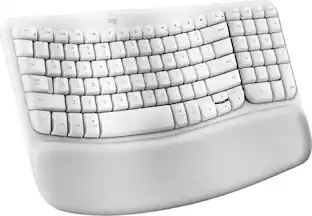 $69.99The price was $79.13
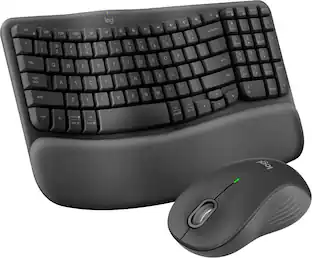

Explore tech essentials Sponsored
 $149.99The price was $229.99




Keep exploring
 $69.99The price was $99.99