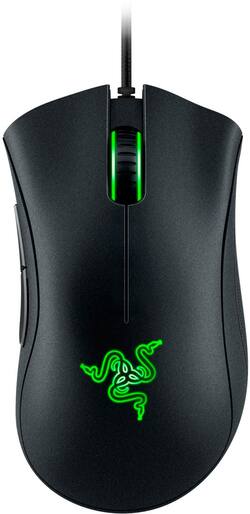
Razer - DeathAdder Essential Wired Optical Gaming Mouse - Black
- Key Specs
- Lighting Type: Single color
- Maximum Sensitivity: 6400 dots per inch (Mouse sensitivity is measured in dots per inch (DPI). The higher the DPI, the more sensitive the mouse is and may be more useful for high-density pixel screens. Lower DPI typically means more precision and accuracy in mouse movement.)
- Number of Buttons (Total): 5
- General
- Brand: Razer
- Model Number: RZ01-02540100-R3U1
- Product Name: DeathAdder Essential Wired Optical Gaming Mouse
- Color: Black
- System Requirements: Microsoft Windows 7 (64 bit) or later (The software that a product must have for it to be able to integrate with another product.)
- Features
- Mouse Type: Gaming
- Lighting Type: Single color
- Performance
- Mouse Operation: Scroll wheel, Button(s)
- Mouse Grip Style: Palm grip, Claw grip, Fingertip grip, Ergonomic (In comparison to many palm and claw grips, ergonomic grip mice are designed for a specific handedness and put the hand and wrist in a position to promote comfort. Customizable grips feature buttons/keys that can be configured to perform specific actions and may also have customizable calibration and sensitivity settings.)
- Handedness: Right-handed
- Tracking Method: Optical (There are several types of computer mice, optical and laser being among the most common. Optical mice detect less detail and provide more precise and accurate movement. Laser mice detect more detail and can be used on a wider variety of surfaces, but are more sensitive to small movements.)
- Maximum Sensitivity: 6400 dots per inch (Mouse sensitivity is measured in dots per inch (DPI). The higher the DPI, the more sensitive the mouse is and may be more useful for high-density pixel screens. Lower DPI typically means more precision and accuracy in mouse movement.)
- Number of Buttons (Total): 5
- Designed for Game Genre: MMO, MOBA, RPG, RTS, FPS
- Connectivity
- Wired Connectivity: USB Type A
- Operating System Compatibility: Windows, Mac, Linux
- Plug and Play Operation: true
- Power
- Mouse Power Source: Wired
- Dimensions
- Product Height: 1.7 inches (The out of box height of the item. Height is measured as the vertical distance from the bottom of the item to the top as it would be primarily used or placed.)
- Product Width: 2.9 inches (The out of box width of the item. Width is measured as the horizontal distance from one side of the item to the other as it would be primarily used or placed.)
- Product Weight: 96.1 grams (The out of box weight of the item.)
- Other
- UPC: 814855028825
Compete at a new level with the Razer DeathAdder Essential gaming mouse. Its 6400 dpi optical sensor ensures fast and accurate tracking, and it has five buttons that can be programmed for instant access to commonly used functions. The Razer DeathAdder Essential gaming mouse's ergonomic form provides comfort for use during long campaigns without impacting performance.
- Ergonomic form: Sleek and distinct body of the Razer DeathAdder Essential is designed for comfort, allowing you to maintain high levels of performance throughout long gaming marathons, so you'll never falter in the heat of battle.
- Up to 10 million clicks: The multi-award winning Razer™ Mechanical Switches last up to 10 million clicks for longer lifespan and extreme reliability.
- 6,400 DPI optical sensor: Allows fast and precise mouse swipes that offer greater control for the most essential gaming needs.
- Gaming-grade tactile scroll wheel: Designed to deliver distinct and precise gaming experience.
- Compatible with most versions of Windows: Works with most PCs.
Whats Included
- DeathAdder Essential Wired Optical Gaming Mouse
- Owner's Manual
Product Manuals
Q: Does the mouse work good with Linux?
A: The in-game mouse configurator and other Synapse 3 settings are compatible with Windows 10 or Windows 8 or Windows 7 only.
Q: Does this work with razer synapse?
A: Yes it does
A: Cann't answer the question as this item was a Christmas gift to our grandson but so far there have been no complaints and he is an avid player.
Q: I have this mouse, and the USB chip broke off is there any way I can replace the USB part?
A: Please reach out to our support so we can help you with some options.
Q: Is the mouse compatible with Xbox one?
A: yes it compatible with xbox one just plug the usb cord on the deathadder essintal and or razer keyboard. i own the razer deathadder essintal and the cynosa chroma rgb keyboard they are both wired and work perfectly. so it should work perfectly fine
A: you will have to have a windows 10 compatible pc to install the RAZER SYNAPSE V3 app but yes you do have to have a app installed on your windows 10 compatible device or if you have the DeathAdder v2 you can use the buttons on that to change the rgb but you can't on the DeathAdder essential mouse
Q: Is this mouse good for Drag clicking?
A: It does not work for drag clicking that good. I have one and I can't get a good drag click because of the sensors in the mouse for left and right click. If you are trying to drag click good, get a mouse with a pressure based click receiver instead of an optical one.
Q: is this mouse the 2020 version where the wire has a USB a the end of it? pls someone tell me
A: Well it has a usb at the end so probally!
People also viewed
 $87.99The price was $119.99
 $44.99The price was $69.99
 $126.99The price was $149.99
 $109.99The price was $159.99
Today's top picks
 $199.99The price was $249.99
 $149.99The price was $239.99
 $789.99The price was $1,049.99











