Skip to contentGo to Product Search
Main Content

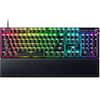
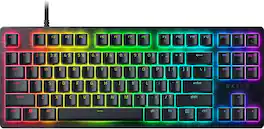
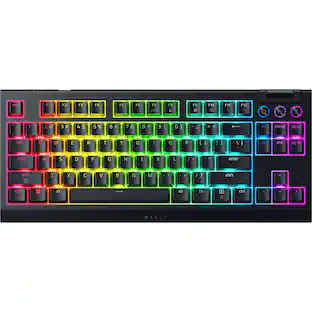
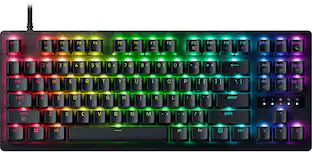
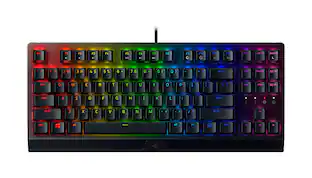
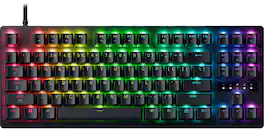
Razer - Huntsman V3 8KHz TKL Wired Hall Effect Magnetic Linear Switch Gaming Keyboard with Rapid Trigger - Black

Model: RZ03-05920200-R3U1
SKU: 6677747
Sold byBest Buy

Customers are saying

Customers consistently note that the product excels in build quality, responsive performance, and a satisfying key feel. Users also appreciate the quiet operation and effective backlighting, though some find the lack of dedicated media controls and wireless connectivity to be notable drawbacks. Additionally, a few customers mentioned that the limited incline adjustment options could be improved for better ergonomics.

Generated by AI based on customer reviews.
Features
  • Precision for Competitive Gaming

    Dominate FPS games and esports tournaments with Razer Hall Effect Magnetic Switches featuring Rapid Trigger and adjustable 0.1-4.0 mm actuation for faster reactions, cleaner movement inputs, and personalized control.

  • Ultra-Fast 8000Hz Performance

    Gain a split-second advantage with true 8000Hz HyperPolling, an advanced gaming keyboard technology that delivers near-zero latency response for competitive gaming, ranked matches, and esports play.

  • Faster Movement in FPS Titles

    Razer Snap Tap prioritizes the latest directional input between two selected keys, enabling quicker counter-strafes, cleaner directional changes, and more responsive movement for shooter games.

  • Advanced Magnetic Keystroke Customization

    Trigger up to four actions on a single key with Dynamic Keystroke and use Razer Snap Flex key-release activation for enhanced control in competitive games and complex keybind setups.

  • Tenkeyless Tournament-Ready Layout

    Enjoy more space for low-sensitivity mouse movement with a streamlined TKL gaming keyboard design that retains essential keys for esports, FPS gaming, LAN events, and competitive setups.

  • Durable PBT Keycaps for Daily Play

    Textured doubleshot PBT keycaps resist shine, fading, and heavy wear from long gaming sessions, delivering lasting comfort and reliability for competitive gamers.

  • Premium Wired Gaming Keyboard Design

    Built with a durable 5052 aluminum alloy top case, detachable USB-C cable, hybrid onboard storage for up to 6 profiles, anti-ghosting, and customizable Razer Chroma RGB lighting.

  • Designed for Competitive FPS Gaming

    Hall Effect Magnetic Switches with Rapid Trigger, Snap Tap, and 8000Hz HyperPolling deliver the speed and precision serious players need for Valorant, Counter-Strike 2, Apex Legends, Fortnite, and esports tournaments.

Specifications
  • Lighting Type
    RGB
    Form Factor
    Tenkeyless (TKL)
    Key Switch Behavior
    Linear
    Connection Type
    Wired
Sponsored

Reviews

Rating 4.8 out of 5 stars with 34 reviews

5 star rating. 27 reviews4 star rating. 7 reviews
100% would recommend to a friend
Customers are sayingCustomers consistently note that the product excels in build quality, responsive performance, and a satisfying key feel. Users also appreciate the quiet operation and effective backlighting, though some find the lack of dedicated media controls and wireless connectivity to be notable drawbacks. Additionally, a few customers mentioned that the limited incline adjustment options could be improved for better ergonomics.
This summary was generated by AI based on customer reviews.
  • Build Quality (23)
  • Performance (9)
  • Key Feel (8)
  • Noise Level (8)
  • Customization (3)
  • Control Layout (6)
  • Connectivity (4)
  • Ergonomics (3)

Customer Images

The vast majority of our reviews come from verified purchases. Reviews from customers may include My Best Buy members, employees, and Tech Insider Network members (as tagged). Select reviewers may receive discounted products, promotional considerations or entries into drawings for honest, helpful reviews.

  • Rated 4 out of 5 stars

    Loud and heavy keystrokes but a worthy TKL

    I tested a few Razer keyboards in the past (Huntsman V1 and Joro Portable) and for various reasons I just wasn't that impressed with either of them especially the Joro for many reasons but when I saw Razer has a TKL HE keyboard, I wanted to see how it stacks up against my SteelSeries Apex the current king. Razer definitely has their signature "look" down to a science in their product packaging and the Huntsman V3 TKL HE is no exception. I've said it before and I'll say it again, I like their unified look and unboxing experience. Inside, you will get your keyboard, USB C to USB A cable and a few other goodies. I love that Razer, like many others, have standardized on a USB-C port on their keyboards making interchanging keyboards easy and effortless. First impressions are good fit and finish and actually not too heavy. Like most Razer products, they look and feel premium. The lack of a numeric pad really shortens up the width of the keyboard to such an extent it could also work as a portable keyboard with your system while giving you that full gaming keyboard experience. I do miss media controls though and a few times when doing other tasks besides gaming I found myself reaching for the numeric pad. I realize I use it more than I realize. It does pair well with my Razer DeathAdder V3 Pro (current favorite gaming mouse) and matches my Razer speaker setup quite nicely. Razer definitely knows how to aesthetically align all their devices properly. There is no wrist guard and this may be because the keyboard itself tapers down at a finer edge and angle than many other keyboards I've owned. Still, I ended up using my SteelSeries wrist guard for some elevation. There are two levels of rear feet elevation legs which I'll call "small" and "medium." I do wish I could get a tad bit more elevation in the rear of the keyboard even using it without the wrist guard. It feels ever so slightly low when typing. Kudos to Razer for abandoning the classic "rainbow puke" pattern many devices default to when in use. Instead you get a full keyboard slow transition to different, solid colors. Something I can easily live with if I don't want Synapse on my system for whatever reasons. Speaking of, to gain full functionality and fine tuning you will need to have Razer Synapse installed and running. As someone who has used Razer products off and on over the decades, I will be the first to admit Synapse has gotten less "bloaty" and much more functional. I like that Razer externalizes most firmware updates outside of the software itself and only uses Synapse to inform you an update is available and usually needed. Razer keyboards have a "feel" to them and while this Huntsman is HE enabled and V3, the keys feel heavy, flat and loud. This isn't a knock but a reality about their approach to mechanical keyboards and they're not alone. But if a somewhat quiet typing/gaming experience is what you seek, you will have to seek it elsewhere. Compared to the Apex, the keys are painfully loud when typing and playing. Not as loud as some I've tried (I'm looking at you EVGA), but they're up there. I found a bit of finger fatigue the first few days getting used to the slightly heavier keypress than my Apex. Once adapted, I was good to go. As for gaming? Excellent. I used the Huntsman as my daily driver all week and had no problems using it. Response was super crisp and many sessions of World of Warcraft and Fallout 76 were used to see how it stacked up. In raids (wow) and Infestations and ORBS (Fallout 76) I readily noted the smooth feel and feedback of the Huntsman. I am a basic gamer so I do not use too many macros or key commands on my keyboard but I do like a few on my mouse. I let my daughter play Harry Potter using the Huntsman as a checksum and her impression was the keys required too much push for her liking and she scurried back to her Asus keyboard. Overall, I like it and it helps redeem the bad taste left in my mouth with their previous keyboards I've tried. I like the classic look and feel. I love the build quality and tactile feedback. I especially love the price which is very solid and well placed for a Razer keyboard. My only complaints would be the loud, slightly heavier keystrokes when using and gaming. I would also like a bit more rear elevation built in too. It will not be replacing my Apex, but in my EverQuest for the perfect desktop and travel keyboards, it has earned its place as my travel keyboard with my laptop and/or SFF as it hits all the right notes and is scaled down in size just enough to fit in my travel bag.

    Posted by Electrosoft

  • Rated 4 out of 5 stars

    Mechanical Keyboard, nearly perfect!

    The Razer Huntsman V3 HE Magnetic Tenkeyless 8KHz is an excellent mechanical-style keyboard that can replace most non-10-key keyboards. Smooth key strokes, LED backlighting, and precision inputs make this a great replacement choice for gamers or keyboard warriors alike. Rather than spending your day punching at flat, low profile/high error keys, the Razer Huntsman brings solid keys, excellent key stroke length, and fatigue-resistance to your computing needs. The keyboard size will fit well on most desktop spaces, near-zero latency, Razer Analog optical switch Gen-2 is perfect for those needing instant response gaming. Aluminum frame makes this a solid keyboard compared to the plastic gaming keyboards trying to compete. I found this keyboard to be a great addition to my computing needs with a few minor misses... 1. it is NOT wireless or Bluetooth capable. To me, this is a basic must for any high-end keyboard today. 2. It is missing the 10-key area. While this version is not designed for this, it is a feature I need for work as and a must to be my everyday replacement for a standard keyboard. The app makes this keyboard highly customizable for tweaking and peaking for your unique needs. PROS - Razer brand, quality, and innovation - Smaller footprint than most gaming keyboards - Feature rich, solid aluminum design - USB-C connectivity for fast, responsive inputs - Razer GEN-2 switches CONS - Not wireless or Bluetooth capable

    Posted by IronHorseGPS

  • Rated 5 out of 5 stars

    Great Keyboard with Near-Infinite Customization

    I don’t know if I can adequately describe everything this keyboard can do, but it’s a lot. The hall effect switches allow for multiple scenarios within the same keypress and individual keys can be configured to do anything from activating a macro to mimicking a gamepad or joystick input. The possibilities really do feel limitless and I appreciate the amount of customization that is possible both inside and outside of software (though the software is surely the easiest). On top of that it’s a very good keyboard that feels great to type on and pretty solidly built. The box includes the keyboard, a 6ft USB-C to USB-A cable, and some documentation that covers the various functions that are available. The cable has a braided jacket and the trademark green Razer coloring on the connectors and feels of pretty quality. The keyboard is a mostly plastic build, but it does have an aluminum top plate that looks nice and is cool to the touch. The keys have a subtle textured feel to them. It feels good to type on and the keys have a nice soft sound to them. This is a tenkeyless keyboard with no additional buttons or controls. It would have been nice to see a volume wheel, but I guess that’s what the Pro model is for. The main software is the Razer Synapse app. I’ve used the Synapse app before and I think it’s pretty good, but it feels like it’s better suited for managing many Razer products and it feels just a bit busy controlling the single one. The amount of customization available is quite daunting, but the app does a good job of containing everything in an intuitive way. The default profile does not allow any customization, so step 1 is creating one or going to one of the predefined profiles. Individual keys can be customized on both the standard keypress and when the key is pressed with the Fn key, or Hypershift as Razer refers to it. Within these keypresses you can add secondary functions at different points of the keypress. A scenario I’d imagine would be something like the W key being pressed lightly for walking and then doing a Shift+W on the deeper press for running. One issue that I did run into with the Synapse software was with the gamepad emulation, which creates a virtual Xbox 360 controller device that ended up interfering with my actual gamepad. I’m sure there is a more elegant way to solve this issue, but I ended up just disabling the virtual controller in Device Manager. Many of this keyboard’s functions can also be customized and set on the keyboard itself, so Synapse is not strictly required, though there are a lot of functions that do require Synapse to run. Gaming on this keyboard is a great experience. I haven’t experienced any drops or issues running it in its default 8kHz polling rate. It’s incredibly responsive. I don’t have any specific tuning on my keys at this point with a 1.2mm actuation point across the board, but that seems to be serving me well. The Fn key also provides access to some basic media controls and lighting adjustments. There is per key lighting here, though the lighting controls in Synapse appear to be limited to some basic effects. I tend to just stick with a static white color anyway, but the Razer Chroma RGB app does allow further customization and lets the keyboard sync the lighting with compatible games. Overall I’m pretty stoked on the Huntsman V3 HE, though in the week I’ve been using it I feel I’ve just barely scratched the surface of what it’s capable of.

    Posted by SamG

  • Rated 5 out of 5 stars

    A Pure Gaming Keyboard That Knows Its Lane, mostly

    If you are looking for a high-performance gaming keyboard, this is an easy recommendation. Razer clearly built the Huntsman V3 HE TKL with competitive gaming in mind, and it shows in everything from responsiveness to build quality. It is wired, which is worth calling out upfront, but that is intentional. this keyboard is all about speed, consistency, and zero compromises.And, it's Razer for crying out loud. It's gonna be about gaming. The magnetic switches are the reason to look at this, and they deliver a very smooth, linear keypress that feels similar to a Cherry MX Red. Keystrokes are quiet on landing, making this usable in shared or quiet environments. This is about as far from a clicky “blue switch” experience as you can get. If you prefer tactile or clicky feedback, this may not be your board. For gaming, though, it is great. The responsiveness is excellent, and the 8KHz polling contributes to that ultra-fast, precise input feel (although it's wasted on me because I suck). Everything about it is tuned for performance, and if that is your primary use case, there is very little to complain about. Where things get more nuanced is outside of gaming. For general typing and productivity, it is still very capable, but it comes down to preference. I average around 90 WPM and was able to get close to that here, but I personally prefer a bit more tactile feedback, like a brown switch. If you are used to linear switches, you will likely feel right at home. Design-wise, I am not a big fan of the open switch deck. This is subjective, but I tend to prefer keyboards with more of a protective top plate around the switches. The exposed design looks modern, but it isn't my personal preference, especially coming from more enclosed or “chiclet-style” layouts. There are also a few practical quirks. You need Razer’s software Synapse to take full advantage of the keyboard. Without it, you are essentially stuck with default RGB behavior, including constant rainbow cycling, which may just tick you off. Hey, it ticks me off. What's wrong with just a steady green from the steady green Razer company?. Speaking of lighting, this keyboard gets very bright. If it wakes from sleep at full brightness, it can be jarring in a dark room. On top of that, the secondary (FN) key functions are not backlit, which makes them difficult to see in low-light conditions. Overall, this is a focused, high-performance gaming keyboard. It is fast, smooth, and quiet, with excellent gaming responsiveness. Just be aware of the trade-offs: it leans heavily toward gaming over productivity, requires software to unlock its full potential, and includes a few design choices that may come down to personal preference. If your priority is gaming performance, this is an easy buy. RECOMMENDED!

    Posted by wizozzie

  • Rated 5 out of 5 stars

    HE keys with lots of Options

    Choosing the best keyboard for your gaming experience can be difficult due to the many choices in key switches and configurations. The Hall Effect switches used in this keyboard give you very fast response times with almost the feel of mechanical switches. Personally, I think it is the best compromise between the high speed optical switches and tactile feel of mechanical switches. Razer gives you the ability to customize your keyboard beyond the typical profiles and macros. Whether using this keyboard with it’s HE switches where you can adjust the actuation distance will improve your reaction time is hard to prove but one thing for certain Razer gives you complete control to gain every advantage. Pros: - Hall Effect Magnetic switches - Adjustable actuation via the Synapse software - Keys and keystroke feel refined - Total customization in the Synapse app including RGB lighting Cons: - Lots of composite / plastic used in the build - Synapse can be overwhelming in options but there is a tutorial - Lacks a rotary control for volume, medial control, etc. Overall: The keyboard feels solid and the keycaps have a slight roughness that enhances the fingertip feel. The key stroke sound is slightly less than that of Razer’s optical switches and much quieter than the typical mechanical keyboard. The keyboard lacks a rotary control for media but that function is assigned to Function keys. It uses the RGB lighting to validate a function selection versus having a dedicated set of LEDs on the keyboard. When you select a profile the top row of the function keys change color to let you know what has been selected. Razer includes two separate documents with the keyboard to highlight the possible key combinations used to access additional functions which is important if you don’t want to use the Synapse software or want to change profiles mid game. Synapse software: I am very familiar with the Synapse app because I use it with my Basilisk mouse, BlackShark headset, Freyja HD chair pad and other Razer keyboards. The Synapse software gives you total control over configuring the profiles, macros, RGB lighting and key stroke sensitivity. There are five preconfigured On-Board profiles; Factory Default, Analog WASD, Racing, FPS Rapid Trigger and High Sensitivity plus you can create your own profiles. The Rapid Trigger is great for FPS games and the High Sensitivity is good for fighting games and any game that needs quick reactions.

    Posted by explore42

Compare similar products

Razer - Huntsman V3 8KHz TKL Wired Hall Effect Magnetic Linear Switch Gaming Keyboard with Rapid Trigger - Black
4.8(34)

Experience the speed, precision, and control of the Razer Huntsman V3 HE Magnetic Tenkeyless 8KHz, an esports keyboard built for cleaner, faster execution in a streamlined tournament-ready layout. Powered by Razer™ Hall Effect Magnetic Switches, it delivers incredible precision with Rapid Trigger for lightning-fast repeated inputs, adjustable actuation from 0.1–4.0 mm, and a 100-million keystroke lifespan for lasting competitive performance. Execute every input with greater confidence through advanced controls made for competitive play. Razer™ Snap Flex lets you trigger precise actions on key release for tighter control and faster response, while Razer™ Snap Tap prioritizes the latest input between two selected keys for near-instant directional changes. With Dynamic Keystroke, assign up to 4 actions to a single keystroke and cancel instantly to adapt on the fly. Stay ahead of every play with true 8000 Hz HyperPolling, delivering a polling rate 8 times faster than the industry standard for near-zero latency response. Its tenkeyless form factor frees up mouse space while retaining the keys needed for competitive play, making it easy to position for home setups, LANs, and tournaments. Finished with textured doubleshot PBT keycaps, a durable 5052 aluminum alloy top case, and hybrid onboard storage for up to 6 profiles, this keyboard is built to perform wherever competition takes you.
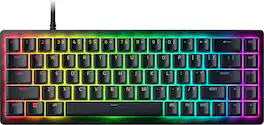
Razer - Huntsman V3 TKL 8KHz Wired Analog Optical Linear Switch Gaming Keyboard with Snap Tap for PC - Black
5.0(6)

Designed with and trusted by professional players, the Razer Huntsman V3 Tenkeyless 8KHz is an analog optical esports keyboard built for elite speed, precision, and control. Gen‑2 Razer Analog Optical Switches with Rapid Trigger enable ultra-fast repeated inputs, while a 0.1–4.0 mm adjustable actuation range and a 100‑million keystroke lifespan deliver long‑term competitive reliability. Razer Snap Tap prioritizes your intended input when two assigned keys are pressed simultaneously, enabling cleaner movement and faster directional changes during high‑pressure moments. A true 8000 Hz HyperPolling rate delivers near-zero latency, sending input data up to eight times faster than standard gaming keyboards for instantaneous response. Players can make on‑the‑fly adjustments to actuation height and Rapid Trigger sensitivity using the keyboard's number row as a visual guide and save up to six profiles to onboard memory with no software required. Individually lubricated switches and dense foam dampening provide a smooth, muted keystroke feel, while doubleshot PBT keycaps and a warp‑resistant aluminum top plate ensure durability for intense competitive use, and the tenkeyless form factor frees up desk space for greater mouse control.

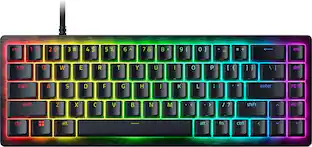
Razer - Huntsman V3 8KHz Mini 65% Wired Hall Effect Magnetic Linear Switch Gaming Keyboard with Rapid Trigger - Black
4.8(35)

Experience the speed, precision, and control of the Razer Huntsman V3 HE Magnetic Mini 65% 8KHz, a compact esports keyboard built for cleaner, faster execution. Powered by Razer™ Hall Effect Magnetic Switches, it delivers incredible precision with Rapid Trigger for lightning-fast repeated inputs, adjustable actuation from 0.1–4.0 mm, and a 100-million keystroke lifespan for lasting competitive performance. Execute every input with greater confidence through advanced controls made for competitive play. Razer™ Snap Flex lets you trigger precise actions on key release for tighter control and faster response, while Razer™ Snap Tap prioritizes the latest input between two selected keys for near-instant directional changes. With Dynamic Keystroke, assign up to 4 actions to a single keystroke and cancel instantly to adapt on the fly. Stay ahead of every play with true 8000 Hz HyperPolling, delivering a polling rate 8 times faster than the industry standard for near-zero latency response. Its compact 65% form factor gives you more room to maneuver your mouse while remaining easy to position and tournament-ready. Finished with textured doubleshot PBT keycaps, a durable 5052 aluminum alloy top case, and hybrid onboard storage for up to 6 profiles, this keyboard is built to perform wherever competition takes you.
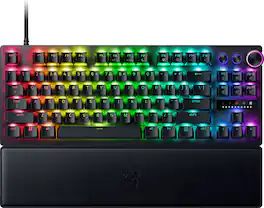
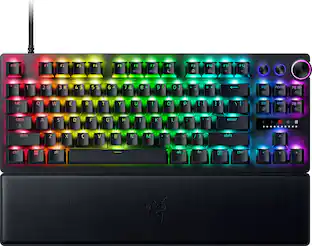
Razer - Huntsman V3 Pro Mini 60% Wired Analog Optical Linear Switch Gaming Keyboard with Snap Tap - Black

Experience response without rival on a scale you’ve never known with the Razer Huntsman V3 Pro Mini—a 60% keyboard featuring our latest analog optical switches. Supercharged by Razer Snap Tap and Rapid Trigger Mode, execute more responsive inputs at unfair speeds. Customize further with adjustable actuation to optimize your competitive advantage.
Pros for Razer - Huntsman V3 8KHz TKL Wired Hall Effect Magnetic Linear Switch Gaming Keyboard with Rapid Trigger - Black
Build Quality, Performance, Noise Level, Key Feel, CustomizationThere were no pros for this productBuild Quality, Performance, RGB Lighting, Noise Level, Polling RateRGB Lighting, Keyboard Quality, Size, Rapid Trigger, Feel
Cons for Razer - Huntsman V3 8KHz TKL Wired Hall Effect Magnetic Linear Switch Gaming Keyboard with Rapid Trigger - Black
Control Layout, Connectivity, ErgonomicsThere were no cons for this productThere were no cons for this productSnap Tap

Specs

Be the first to ask a question.

We’ll try to get your question answered within 24 hours by a Best Buy customer or brand representative.

No content

Customers often buy these together

Sponsored

Finance Options

My Best Buy® Credit Card
Buy Now, Pay Later

Special Offers

Top Offers
Included with Purchase