Skip to contentGo to Product Search
Main Content

Razer - USB 4 Dock Station with 14 Ports for Windows 10 or later (PC with USB‑C); macOS 10.13 or later (Mac) - Black

Model: RC21-02280100-R3U1
SKU: 13019722
Sold & shipped by

Customers are saying

Customers are delighted by the product's robust build quality and its versatile connectivity options, which include dual monitor support and efficient power delivery. Users appreciate the compact design that saves desk space while providing reliable charging capabilities for multiple devices. Although some individuals noted minor concerns regarding heat and the inability to reach specific high refresh rates, the overall feedback highlights a highly functional and well-constructed accessory.

Generated by AI based on customer reviews.

Features

  • Ultra-Fast USB 4 Connectivity

    Discover the new USB standard for data transfer rates, display output support and device charging that is backwards compatible with all your USB 2.0 & 3.0 devices.

  • 14-Port Design

    From external HDDs and displays, to speakers and peripherals, free up your PC ports and minimize cable clutter by running all your devices through a single USB C connection.

  • Dual-Monitor Support

    Create a display setup that offers the best of both worlds. Experience stunning visuals on your primary 4K 120 Hz display and still have the space you need to multitask on a secondary monitor.

  • Dedicated Laptop Charging & Power Delivery

    With the included 180 W adapter enjoy 100 W of laptop charging, while simultaneously powering all other connected devices, be ready to go at any time.

  • Durable & Lightweight All-Metal Casing

    On top of its compact footprint and portable design, the Razer USB 4 Dock is resistant to everyday wear and tear and ensures minimal heat buildup, making it ideal for extended use.

  • Windows & Mac Compatible

    With tons of port connectivity for almost any device, the Razer USB 4 Dock is the perfect complement to both desktop setups and mobile workstations.

Specifications

  • Maximum Number of Displays Supported
    2
    Maximum Supported Resolution
    4K (2160p), 8K (4320p)
    Number of DisplayPort Outputs (Total)
    1
    Number of Thunderbolt Ports (Total)
    0
    Passthrough Power
    Yes
Sponsored

Reviews

Rating 4.7 out of 5 stars with 86 reviews

94% would recommend to a friend
Customers are sayingCustomers are delighted by the product's robust build quality and its versatile connectivity options, which include dual monitor support and efficient power delivery. Users appreciate the compact design that saves desk space while providing reliable charging capabilities for multiple devices. Although some individuals noted minor concerns regarding heat and the inability to reach specific high refresh rates, the overall feedback highlights a highly functional and well-constructed accessory.
This summary was generated by AI based on customer reviews.
  • Ports (24)
  • Build Quality (17)
  • Power Delivery (16)
  • Connectivity (12)
  • HDMI (11)
  • Display Compatibility (4)
  • Refresh Rate (4)
  • Heat (3)

Customer Images

The vast majority of our reviews come from verified purchases. Reviews from customers may include My Best Buy members, employees, and Tech Insider Network members (as tagged). Select reviewers may receive discounted products, promotional considerations or entries into drawings for honest, helpful reviews.

  • Rated 5 out of 5 stars

    Full-Featured Dock That Is Great For Gaming

    The Razer USB 4 docking station is a compact, but quite full featured docking station. In a compact aluminum alloy casing measuring about 3” deep by 7.5” wide by 1” tall, you get 14 ports (including power input) in total. On the back you get a power input for the 180W adapter (which has a separate power brick), alongside the upstream USB 4 port which supports 40 Gb/s data transfer speeds and also features 100W of device charging to your laptop. Then you get your HDMI 2.1 and DisplayPort 1.4 for dual display support, a 1GB ethernet port, 2 USB-A 3.2 Gen 1 ports, and one USB-A 2.0 port. On the side you get another USB-A 2.0 port specifically for 2.4 Ghz dongles like a wireless mouse. On the front is a UHS-II port for both MircoSD & SD cards, a 3.5mm microphone/headphone combo port (which as a wired headphone purist I love), two USB-C 3.2 ports which support 20W device charging, and a USB-A 3.2 Gen 2 port. For my laptops, these are plenty of ports, although I do wish there was maybe 1 less USB-A port and 1 more USB-C port, but that is a matter of preference. Many peripherals are still USB-A sourced, so I can understand wanting more USB-A ports, and you can always use adapters if needed. Since you are passing data over USB 4, you do want to make sure you are using the right peripherals for the right ports to ensure you are maximizing your bandwidth potential, saving high bandwidth devices for the faster ports. I use a 3440x1440 175 hz monitor as my primary monitor and gaming display, and I had no issues getting my laptop up and running at full resolution and refresh rate. My primary driver is an Asus ROG Zephyrus G16 laptop, and is notoriously finicky with docks, specifically when it comes to charging since the G16 is quite power hungry. Normally I get power warnings when trying to charge the laptop and transfer video with a dock, but this is the first dock that seems to have taken to working great right out of the box, with the 100W charging being enough for the laptop. I played a few games from the laptop on my ultrawide with all of the peripherals connected, and didn’t run into any issues with the connectivity or display. I did have to update some drivers on the laptop when first set-up, but after that and a reboot it was smooth sailing, using the dedicated GPU with HDR. I also swapped to my work PC for a while to do general multitasking, and again ran into no issues. After a few hours of usage, the dock also stayed fairly cool and quiet. I haven’t stressed it for a long day of use yet, but I don’t anticipate any issues with the build and design, given it feels quite premium. No complaints on my end all around.

    This review is from Razer - USB 4 Dock Station with 14 Ports for Windows 10 or later (PC with USB‑C); macOS 10.13 or later (Mac) - Black

    Posted by Jacbo14

  • Rated 5 out of 5 stars

    The Ultimate Docking Solution

    If you’re looking to streamline your workspace while boosting productivity and enhancing your gaming experience, the Razer USB 4 Dock is a game-changer. I recently got my hands on this powerful docking station, and here’s why it’s become a crucial part of my setup. The standout feature for me has been the USB 4 connectivity. It offers a blazing-fast transfer rate of up to 40 Gbps, which has been a game-changer for my data-intensive tasks. Plus, it's backward compatible with USB 2.0 and 3.0 devices, so I didn’t have to worry about compatibility issues with older peripherals. The 14 ports available on this dock is like having a swiss army knife. I can now connect everything—external HDDs, displays, speakers, and more—through a single USB-C connection. No more struggling to find open ports or dealing with cable clutter. The ports are all clearly laid out, including HDMI 2.1, DisplayPort 1.4, multiple USB-A and USB-C ports, and even a dedicated port for 2.4 GHz dongles (great for wireless peripherals). If your someone like me who loves multitasking, the dual-monitor support is perfect. The Razer USB 4 Dock allows for 4K 120 Hz output on my primary display while providing a smooth secondary display setup. Whether I’m gaming or working on several projects at once, the dock keeps everything flowing seamlessly. The included 180W adapter is a huge plus. I can charge my laptop with up to 100W while still powering other connected devices. It’s incredibly convenient when I need to be on the go and don’t want to worry about finding multiple chargers or outlets. No need to worry about compatibility here—whether you’re using a Windows PC, MacBook, iPad, or Chromebook, this dock works seamlessly with pretty much any device you throw at it. I’ve been using the Razer USB 4 Dock for a few weeks now, and it’s been a major upgrade to my workspace. Whether I’m working, gaming, or both, it handles everything I throw at it without breaking a sweat. The ultra-fast data transfer, multi-display support, and convenient power delivery make it well worth the investment. Plus, the 2-year warranty and reliable tech support from Razer ensure peace of mind. If you’re serious about upgrading your workspace for both productivity and gaming, the Razer USB 4 Dock is a solid choice that you won’t regret.

    This review is from Razer - USB 4 Dock Station with 14 Ports for Windows 10 or later (PC with USB‑C); macOS 10.13 or later (Mac) - Black

    Posted by Ohanaman

  • Rated 5 out of 5 stars

    Great dock!! You won’t need any other!

    Great dock!! You won’t need any other! If you really want to make your laptop into a desktop replacement, this dock will let you do that easily! You will be able to have multiple displays thru a single connection to your laptop, including charging your laptop thru this dock. I have a standalone computer monitor via DisplayPort cable and a 65” 4K OLED via HDMI cable, and the laptop display itself, all running at once with no problems at all. If you have multiple USB devices and run out of ports on your laptop, this is great. I have a USB keyboard, USB wireless mouse, USB wireless game controller, 2 USB hard drives. I can now have it all plugged in at once. The drives all seem to run at the max speed. What is great about this setup is that if I take my laptop with me away from the desk, when I can return home, not only is it just one plugin away from the whole setup being ready to go at my desktop with all my peripherals, but it just keeps everything neat and tidy on my desktop. It will also charge my laptop at up to 100 watts with this dock's included charger, but I can also charge my phone as well, not needing the laptop to do this. I also get full ethernet speed out of the dock to my laptop. I have an ethernet line wired directly to my desktop, and just like that I can max out my bandwidth. You also get an SD card reader, which works out great for me, as I don’t have one built in to my laptop. You can also use this with a Steam Deck and ROG Ally X, and it works just as well for both situations too, and because this comes with a 100 watt charger, you won’t need your other charger for those handheld devices. This dock also frees up my ports directly on the laptop in case I did ever need to plug anything else in. While this isn’t the most inexpensive dock, it does present a really great value, considering other docks are at least this much money, and most do not have this many ports! Highly recommended for those needing extra ports when at home.

    This review is from Razer - USB 4 Dock Station with 14 Ports for Windows 10 or later (PC with USB‑C); macOS 10.13 or later (Mac) - Black

    Posted by blah

  • Rated 5 out of 5 stars

    4K 120Hz with 10-bit HDR, wish it was 240Hz though

    TL:DR - I am happy with it! It can do 4K 120 without any issues, it can also display 4K 240, but it doesn’t work well, it keeps flickering for me so it is not really usable, so I guess it can’t do 4K 240 lol, but thought I’d mention it. I was able to get 4K 120 with 10-Bit HDR and good performance there. I had my USB speakers attached, keyboard and mouse, headset dongle, and game controller’s wireless dongle attached. It doesn’t provide enough power for my particular laptop, but it will ‘trickle’ charge it in a worse case scenario. Long story short, it’s much better than the docking station I was coming from. — I love my 4K QD OLED monitor, way more so than the 300 Nit IPS display my laptop comes with. My laptop’s screen is not the best, but it’s what was available in 2023. My 4080 laptop comes with a 330 watt charger and this docking station didn’t have enough power to supply it, but it was able to trickle charge it. Specifically saying, if I had my laptop off it’d charge fine. I turned on Advanced Optimus and ran off the integrated graphics, and it was able to supply enough charge to actually charge it while doing daily tasks. Like writing this review. However as soon as I launched a game the graphic performance tanked and it wasn’t enough. But not a big deal since I just plug in two things rather than a bunch. Prior to this, I would have to plug my monitor in, power, USB dongle for headset, docking station, and wireless controller. My previous docking station which only did 4K 60 despite it saying it could do 4K 120 didn’t work when I turned on HDR. So the Razer already offered a huge perk over what I had. Setting it up was super easy, plug and play really. No instructions needed. I’m really happy with this since I can game in the living room, but whenever I need to do something more ‘enhanced’, I just run to my game room, plug in my PC to the dock and game away. My wife even uses it with her MacBook from time to time. At the end of the day, it’s a nice looking, and super beneficial addition to my set up. Very happy with it!

    This review is from Razer - USB 4 Dock Station with 14 Ports for Windows 10 or later (PC with USB‑C); macOS 10.13 or later (Mac) - Black

    Posted by GamingBusinessGuy

  • Rated 5 out of 5 stars

    Great Dock - Only One Monitor @ 120Hz, 2nd @ 60Hz

    I work from home and my desk setup includes: -Two 32” 4K 165Hz monitors -Dell work laptop -Macbook Air M3 15” -Galaxy S10 Plus Tab -iPhone 15 Pro Max -Z-Fold 6 -Old iPhone 6S Plus (used as an always-on media player -Plus several other items that I charge from time-to-time I’ve had a few docks that met most of my needs from HP and Dell but none met all my needs, and this dock is the one that has come closest. The Razer dock will take care of all the devices mentioned above, and then some. This dock has 14 ports! I have the ethernet port connected plus an HDMI for one monitor. The USB A ports contain my video camera and a charging cable for the iPhone 6S Plus. The front USB C ports have charging cables for whenever I need to charge another device. I am only using one video signal from the dock because only one runs faster than 60Hz if I use two monitors. With one HDMI cable I can get 4K @ 165Hz. When I use the DisplayPort it drops one from 165Hz to 120Hz and the second monitor only runs at 4K @ 60Hz. I contacted Razer and they confirmed - only one display will be at a higher refresh rate than 60Hz if you have two monitors connected to the dock. This is an unfortunate limitation for a “gaming” dock - or at least a dock from a gaming company. The Razer still does have a leg up on my other docks though as they are limited to 60Hz regardless of the monitors connected. If you have one ultrawide monitor - this dock is great. If you use more than one monitor and need/want the higher refresh rate you will need to connect the additional monitors separately. Other than the refresh rate issue I really like the dock. I haven’t had any issues. It runs warm but not hot so far. I got the silver or “Mercury Edition” which looks really nice. It's very sleek and modern. The Razer dock has simplified and cleaned up my workspace a bit too. I was able to get rid of a few charging blocks and clean up my desk. Overall I am very happy with the dock. This is an excellent solution for anyone with multiple monitors where 60Hz refresh rate is acceptable - most people looking at this for work will be fine. If you are considering the Razer USB 4 Dock because you are a gamer and recognize Razer as a gaming company, just know the refresh rate on a second monitor plugged into this dock will only run at 60Hz.

    This review is from Razer - USB 4 Dock Station with 14 Ports for Windows 10 or later (PC with USB‑C); macOS 10.13 or later (Mac) - Black

    Posted by RunJK

Compare similar products

Razer - USB 4 Dock Station with 14 Ports for Windows 10 or later (PC with USB‑C); macOS 10.13 or later (Mac) - Black
4.7(86)

Transform your workspace into the ultimate place for gaming and productivity with the Razer USB 4 Dock. Powered by ultra-fast USB 4 connectivity, unify your desktop or mobile setup with a 14-port design featuring dual display output, continuous power delivery, and ultra-low latency for all your devices.
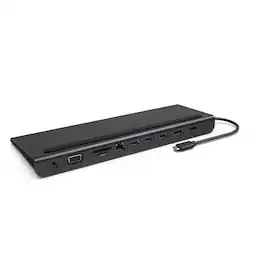
Belkin - 11-in-1 USB C Hub with 4K HDMI, DP, VGA, 100W PD Docking Station for MacBook Pro, Air, and more - Dark Gray

The Belkin Connect Universal USB-C 11-in-1 Pro Dock adds power and productivity to your setup with Silicon Motion technology, Mac, Windows, and Chromebook compatibility, and expansion up to 3 monitors. Get more done with 10Gbps transfer speeds and up to 100W of PD. Sustainably made, this Belkin USB-C hub's housing is made with a minimum of 72% post-consumer recycled content, while a 2-year limited warranty ensures your dock and other devices are safe and protected.
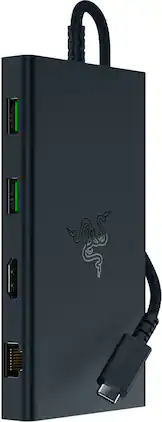
Razer - USB C Dock Station with 11 Ports for Windows 10 or later (PC with USB‑C); macOS 10.13 or later (Mac) - Black
4.1(7)

From Windows and Mac setups to desktops and mobile workstations, maximize your connectivity with the Razer USB C Dock—an 11-port design packed into one lightweight, durable package.
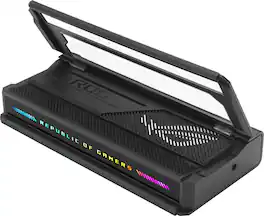
ASUS - ROG Bulwark 7-in-1 Charging Dock for ROG Xbox Ally (HDMI 2.1, USB-A 3.2, USB-C 3.2) - Black

The ROG Bulwark Dock DG300 is a compact, sleek, 7-in-1 docking station that offers 4K at 144Hz and 8K at 30Hz output via HDMI 2.1, 1 x USB-C and 3 x USB-A for superfast up to 10 Gbps file transfers, gigabit Ethernet, audio jack and up to 100 watt USB Power Delivery to laptops and mobile devices.

Pros for Razer - USB 4 Dock Station with 14 Ports for Windows 10 or later (PC with USB‑C); macOS 10.13 or later (Mac) - Black
Ports, Connectivity, HDMI, Build Quality, Power DeliveryHDMI, Overall Performance, Ports, Connectivity, Ease of usePerformanceOverall Performance, Connectivity, Portability, Charging Speed, Lighting
Cons for Razer - USB 4 Dock Station with 14 Ports for Windows 10 or later (PC with USB‑C); macOS 10.13 or later (Mac) - Black
Display Compatibility, Refresh Rate, HeatCable Length, Power Supply, PriceThere were no cons for this product—Included Accessories, Port Quantity

Specs

Questions & Answers

  • Is this dock compatible with both Windows and Mac?

    Yes, the dock is compatible with both Windows 10 or later with USB-C and Mac systems with macOS 10.13 or later.

    This question and answer was generated by AI based on customer and product data.
  • Does the dock have a headphone jack?

    Yes, the dock includes a headphone jack.

    This question and answer was generated by AI based on customer and product data.
  • What type of connectivity does this dock use?

    The Razer dock uses ultra-fast USB 4 connectivity.

    This question and answer was generated by AI based on customer and product data.
  • How many ports does this dock have?

    This dock has 14 ports in total.

    This question and answer was generated by AI based on customer and product data.
  • Does the dock come with a power supply?

    Yes, the dock includes a 180W power adapter.

    This question and answer was generated by AI based on customer and product data.
Ask a question
No content
Sponsored