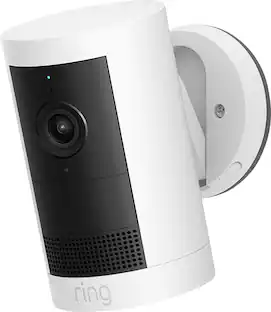
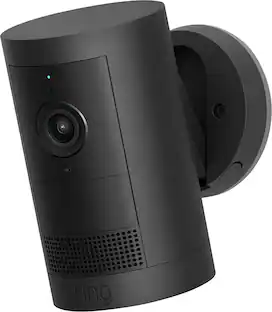
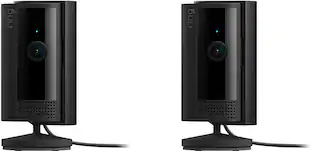
Ring - Indoor Cam Plus, Plug-In, Retinal 2K for enhanced video quality, 4x Zoom, Low-Light Sight for color in near dark - Black

Key Accessories:
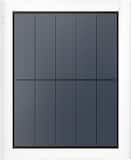
- 4W Solar Panel for Select Ring Security Cameras - White$47.99The price was $59.99

More Buying Options from Best Buy and Marketplace sellers
Related Item

Highlights
- Key Specs
- Video Camera Resolution: 2K (1440p) (Refers to the number of pixels, both horizontally and vertically, used to capture video/images. The higher the resolution the finer the detail that can be seen.)
- Night Vision: true
- Number Of Cameras Included: 1
- Camera Power Source: Cable with AC Adapter/Plug-in
- Works With: Amazon Alexa, Ring (Compatible with or able to be connected to other smart devices or applications.)
- Maximum Operating Temperature: 113 degrees fahrenheit (The highest recommended ambient (surrounding) temperature in which the product can ideally operate stated by the manufacturer. Generally long-term exposure of the product to temperatures more than the maximum can result in ineffective operation.)
- Storage Type: Cloud
- Indoor Or Outdoor Use: Outdoor (Indicates the appropriate environment product was designed to be used in.)
- Minimum Operating Temperature: -4.0 degrees fahrenheit (The lowest recommended ambient (surrounding) temperature in which the product can ideally operate stated by the manufacturer. Generally long-term exposure of the product to temperatures less than the minimum can result in ineffective operation.)
- Audio Communication: 2-way (1-way communication devices allow a user to hear detected audio, while 2-way communication adds the ability for a user to talk back through the device.)
- General
- Brand: Ring
- Model Number: B0DXMSSDHX
- Product Name: Ring Indoor Cam Plus, Plug-In, Retinal 2K for enhanced video quality, 4x Zoom, Low-Light Sight for color in near dark
- Color: Black
- Camera
- Video Camera Resolution: 2K (1440p) (Refers to the number of pixels, both horizontally and vertically, used to capture video/images. The higher the resolution the finer the detail that can be seen.)
- Camera Resolution: 2560 x 1440 (Refers to the number of pixels, both horizontally and vertically, used to capture video/images. The higher the resolution the finer the detail that can be seen.)
- Night Vision: true
- Night Vision Distance: 20 feet
- Number Of Cameras Included: 1
- Power
- Camera Power Source: Cable with AC Adapter/Plug-in
- Compatibility
- App Compatible: true (The product can be connected to a program or software application on a mobile device, which then receives collected data from the product.)
- App Features: Ring
- Compatibility: iOS 14 and above; Android 9 and above
- Works With: Amazon Alexa, Ring (Compatible with or able to be connected to other smart devices or applications.)
- Connectivity
- Camera Connectivity: Wired, Wired (Security system cameras can be set up in several ways. Wired cameras require cables for power and footage transmission, while wire-free cameras don't need cables for either. Wireless cameras still require cables for receiving power but are able to transmit footage via a wireless network.)
- Recording & Playback
- Video Recording Capability: true
- Subscription: Optional but not included
- Video Recording Prompt: Motion detection, Doorbell
- Performance
- Maximum Operating Temperature: 113 degrees fahrenheit (The highest recommended ambient (surrounding) temperature in which the product can ideally operate stated by the manufacturer. Generally long-term exposure of the product to temperatures more than the maximum can result in ineffective operation.)
- Indoor Or Outdoor Use: Outdoor (Indicates the appropriate environment product was designed to be used in.)
- Minimum Operating Temperature: -4.0 degrees fahrenheit (The lowest recommended ambient (surrounding) temperature in which the product can ideally operate stated by the manufacturer. Generally long-term exposure of the product to temperatures less than the minimum can result in ineffective operation.)
- Storage
- Storage Type: Cloud
- Features
- Audio Communication: 2-way (1-way communication devices allow a user to hear detected audio, while 2-way communication adds the ability for a user to talk back through the device.)
- Mount Type: Freestanding, Ceiling mount, Wall mount
- Dimensions
- Product Height: 1.96 inches (The out of box height of the item. Height is measured as the vertical distance from the bottom of the item to the top as it would be primarily used or placed.)
- Product Width: 1.96 inches (The out of box width of the item. Width is measured as the horizontal distance from one side of the item to the other as it would be primarily used or placed.)
- Product Depth: 3.78 inches (The out of box depth of the item. Depth is measured as the distance from the front of the item to the back as it would be primarily used or placed.)
- Product Weight: 0.18 pounds (The out of box weight of the item.)
- Sensor
- Sensors: Motion sensor (Detects stimuli such as heat, light, sound, motion, or pressure and responds accordingly by operating a control or initiating a function of the device.)
- Display
- Color Display: true
- Warranty
- Warranty - Parts: 1yr Limited
- Warranty - Labor: 1yr Limited
- Other
- UPC: 840414658196
Monitor your home with confidence. Indoor Cam Plus delivers 2K clarity and color around the clock, in any room you need. Check in when you want to, and use the removable lens cover when you don't.
- Capture it all with Retinal 2K video: See every detail of your home or business in full view — powered by Retinal 2K. (Video quality may vary based on internet bandwidth and device
- Zoom in 4x: Catch details at a distance with up to 4x Enhanced Zoom.
- Low-Light Sight: Get a full-color view in the near-dark. Minimal room lighting is all you need.
- 3D Motion Detection: Receive real-time alerts on your phone with Motion Detection.
- Live View & Two-Way Talk: See and respond to activity in real time.
- Removable Lens Cover: Take control of your privacy with an easy-to-slide lens cover. Note: Microphone stays on when covered, and can be disabled in the Ring app.
- See More. Know More. Protect More.: Scroll back in time to rewatch what you missed, get AI-powered alerts that tell you what’s happening, and so much more, with a compatible Ring Protect subscription (sold separately).
- Additional Ring Devices: Link with select Ring devices, allowing them to activate when this camera detects movement for additional security, recording angles, and more. Subscription required, sold separately.
Whats Included
- Indoor Cam Plus
- Installation Tools and Screws
- User Manual
- Safety Sticker
Disclaimers
- 1Video quality may vary based on internet bandwidth and device temperature.
Q: What is the maximum operating temperature for this camera?
A: The maximum operating temperature for this camera is 113 degrees fahrenheit.
Q: Does this camera have night vision?
A: Yes, this camera has night vision.
Q: What kind of video recording prompt does this camera have?
A: This camera has motion detection video recording prompt.
Q: What does the woman say at timestamp 00:00:27.694?
A: At timestamp 00:00:27.694, the woman says, 'Honey, I see you.'
Q: Can this camera detect motion?
A: Yes, this camera can detect motion.
Q: Does this camera require a subscription?
A: A subscription for this camera is optional but not included.
Q: Can I talk through this camera?
A: Yes, you can communicate through the camera with its two-way audio communication feature.
A: To join the Ring community, you have two main options depending on what you’re looking for: • Ring Neighbors App: This is the local community part where you share safety alerts and videos with people in your immediate area. It is a standalone app, but it's also integrated directly into the Ring mobile app under the "Neighbors" tab. • Ring Updates & Forums: If you mean the official product discussion boards, you can find those at community.ring.com via a web browser. It is not managed through the Best Buy website or app; you'll need the specific Ring tools to get started!
Compare similar products

Monitor your home with confidence. Indoor Cam Plus delivers 2K clarity and color around the clock, in any room you need. Check in when you want to, and use the removable lens cover when you don't.
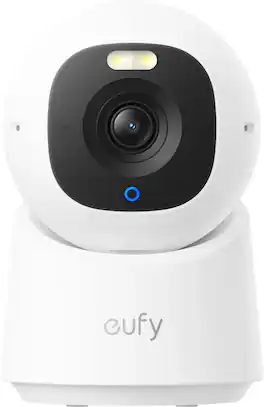
Upgrade to next-gen smart home security with eufy Indoor Cam E30. Ensuring peace of mind, day and night. Featuring the latest innovation in AI technology and stunning 4K UHD clarity, it ensures every image detail is captured with precision for 24/7 ultra-clear recording. AI-powered detection and auto-tracking precisely differentiates between humans, pets, audio, and crying noises then track movements to provide you with detailed monitoring of their whereabouts. The 360° panoramic view allows you to easily navigate the camera around your home’s interior using new eufy app features like Quick Focus Tap and Panoramic View for instant switching of the camera’s focus by simply tapping the desired area on your phone screen. An integrated spotlight ensures crystal-clear nighttime surveillance and can seamlessly switch between color night vision and infrared night vision based on your needs. Stay connected with your family at home through built-in two-way audio for real-time communication. Indoor Cam E30 seamlessly syncs with HomeKit, Alexa, and Google Assistant for enhanced home automation. You can store your footage locally with an SD card (not included) and enjoy all functions without any monthly cloud subscription fees.

Monitor your home with confidence. Indoor Cam Plus delivers 2K clarity and color around the clock, in any room you need. Check in when you want to, and use the removable lens cover when you don't.
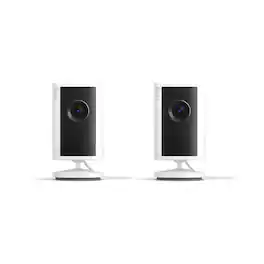
Monitor your home with confidence. Indoor Cam Plus delivers 2K clarity and color around the clock, in any room you need. Check in when you want to, and use the removable lens cover when you don't.
| Pros for Ring - Indoor Cam Plus, Plug-In, Retinal 2K for enhanced video quality, 4x Zoom, Low-Light Sight for color in near dark - Black | |||
|---|---|---|---|
| Video Quality, Setup Ease, Motion Detection, Privacy Feature, Field of View | Motion Detection, Setup Ease, Image Quality, Tracking | Video Quality, Setup Ease, Motion Detection, Privacy Feature, Field of View | There were no pros for this product— |
| Cons for Ring - Indoor Cam Plus, Plug-In, Retinal 2K for enhanced video quality, 4x Zoom, Low-Light Sight for color in near dark - Black | |||
| There were no cons for this product— | App Performance | There were no cons for this product— | There were no cons for this product— |
Specs
Reviews
Top Mentions
- Video Quality (42)
- Setup Ease (16)
- Motion Detection (7)
Customer Images
The vast majority of our reviews come from verified purchases. Reviews from customers may include My Best Buy members, employees, and Tech Insider Network members (as tagged). Select reviewers may receive discounted products, promotional considerations or entries into drawings for honest, helpful reviews.
- Rated 4 out of 5 stars
Solid 2K Camera for the Apartment
The 4x zoom and Retinal 2K resolution provide a very clear picture. I specifically like the Low-Light Sight feature for maintaining color in the dark. Great for keeping an eye on the apartment.
Dbear Posted
- Rated 5 out of 5 stars
Ring camera
Great camera motion works great definitely a great buy
This review is from Ring - Indoor Cam Plus, Plug-In, Retinal 2K for enhanced video quality, 4x Zoom, Low-Light Sight for color in near dark - White
Izzy Posted
- Rated 4 out of 5 stars
Great indoor camera solution with 2K resolution!
Adding new Ring cameras to an existing Ring ecosystem is always nice and simple, Ring has the process down! This is the new Ring Indoor Cam Plus, it's a plug in camera designed to be used, as you guessed it, indoors. I have this one set up in our living room and is replacing a competitors camera that we've used for about 10 years. What drew me to this is the increased 2K resolution of the camera for better image capturing, better video quality and overall piece of mind. Coupled with this are real time notifications* and low-light sight as well. *the real time notifications were a little slow upon set up, but they did get better the more the camera was used and worked better when I was actually away from home, bizarrely enough! As mentioned, set up was easy, you can scan the QR code on the back from the Ring app, and if you have a Ring Chime (which we do - but you do not need to have in order to use this camera), it connected to that right away. Voice prompts along the way from both the Ring Camera and the Ring Chime made it really straight forward out of the box. Now as soon as it's all set up and connected, there will be a software update to install. This takes another minute or two, not intolerable. From there, you can go into the app and use live view to help position your camera. There are mounting instructions within the app to aid with installation, if you are not placing it on a ledge, shelf or furniture. I have this one set up on the fireplace for now, as the power cord was not long enough for me to reach the ideal location that I want it in relation to a power source, so I will need to order a longer power cable. Live view initially had some lag in it, I wasn't that far away from my router in all honesty, but a couple of times, the lag was 8-10 seconds when timed. This got better and better the more I used it, but I hadn't experienced that lag with the other Ring cameras I have in my ecosystem. The image quality is really nice, being able to zoom in further (4x zoom) and maintaining a nice crisp image is great. And the low light visibility is good as well, especially when you may have just some accent lights on in your house, making visibility for other cameras challenging. This camera performed well in lower light for me. The visuals are color, and not the 'ghost grey' looking color of older models. Motion detection works very well indeed, and notifications were prompt when it happened. You can adjust the motion detection areas within the app, so if you have a high traffic area, you can map that out of the view to lower you notification frequency, if desired. Live view is always great, it's nice to check in remotely, if you are away or just out for the evening, you can check in on pets, family members, or just the house in general, to check if you left lights on etc. Two way talk has been a feature of Ring cameras and I feel like it's gotten better with each generation. I know my Ring doorbell camera which is about 10 years old, sometimes it's hard to understand what someone is saying, but with this new Ring Indoor Cam Plus, the voices are a lot clearer through the small speaker. And for those times that you don't want to have the camera running, there is a shutter that slides over the front of the camera to block its sight and maintain your privacy, very handy indeed, however, it doesn't have a smooth action and came off in my hand when I first slid it across. I have since finessed my approach to closing it over. If you subscribe to the Ring subscription (we do) you can have additional storage and ability to save and share your video history. This is convenient for capturing moment that are longer than one week out from happening. That subscription also allows you to have more cameras in your ecosystem as well, so it's definitely worth it. Overall, the Ring Indoor Cam Plus is a great addition to a Ring camera set up or a wonderful first step into the Ring camera world! With stunning 2K resolution, color images in near-dark conditions and a really easy to use set up and interface, it makes it a no brainer to check out!
This review is from Ring - Indoor Cam Plus, Plug-In, Retinal 2K for enhanced video quality, 4x Zoom, Low-Light Sight for color in near dark - White
Cupra Posted