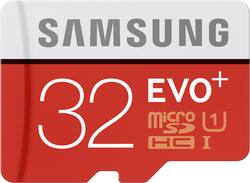
Samsung - EVO+ 32GB microSDXC UHS-I Memory Card
- Key Specs
- Storage Capacity: 32 gigabytes (Measured in megabytes (MB), gigabytes (GB) and terabytes (TB), this is the amount available for storing files, music, movies, photos and more. The total includes the capacity of the hard disk drive and solid state drive if both are included on the computer.)
- Maximum Read Speed: 80 megabytes per second (The greatest speed at which the device can read information; for example, opening files.)
- Maximum Write Speed: 20 megabytes per second (The greatest speed at which the device can write information; for example, saving files.)
- Memory Card Format: microSDXC
- General
- Brand: Samsung
- Model Number: MB-MC32DA/AM
- Product Name: EVO+ 32GB microSDXC UHS-I Memory Card
- Color: Red/White
- Capacity
- Storage Capacity: 32 gigabytes (Measured in megabytes (MB), gigabytes (GB) and terabytes (TB), this is the amount available for storing files, music, movies, photos and more. The total includes the capacity of the hard disk drive and solid state drive if both are included on the computer.)
- Speed
- Maximum Read Speed: 80 megabytes per second (The greatest speed at which the device can read information; for example, opening files.)
- Maximum Write Speed: 20 megabytes per second (The greatest speed at which the device can write information; for example, saving files.)
- SD Bus Mode: UHS-I
- SD Speed Class: Class 10
- UHS Speed Class: U1
- Storage
- Integrated Write-Protect Switch: false
- Compatibility
- Adapter Included: true
- Dimensions
- Product Height: 0.04 inches (The out of box height of the item. Height is measured as the vertical distance from the bottom of the item to the top as it would be primarily used or placed.)
- Product Width: 0.59 inches (The out of box width of the item. Width is measured as the horizontal distance from one side of the item to the other as it would be primarily used or placed.)
- Product Depth: 0.43 inches (The out of box depth of the item. Depth is measured as the distance from the front of the item to the back as it would be primarily used or placed.)
- Product Weight: 0.02 ounces (The out of box weight of the item.)
- Warranty
- Warranty - Parts: 10 Years (1 Year for SD adapter)
- Warranty - Labor: 10 Years (1 Year for SD adapter)
- Other
- UPC: 887276080611
Designed for use with a variety of mobile devices, including action cameras, smartphones and tablets, this 32GB Samsung EVO+ MB-MC32DA/AM microSDXC memory card offers ample room for pictures, videos and music.
- Compatible with a wide range of devices for both SD and microSD card slots: For use with your existing device. Ideal for Full HD video recording.
- 32GB storage capacity: Provides plenty of space for your photos, videos, documents and more.
- Four types of protection in one card: Backed by four-proof protection, the EVO+ can withstand up to 72 hours in seawater, extreme temperatures, airport X-ray machines and magnetic fields equivalent to an MRI scanner.*
- Fast data transfer: Features up to 80MB/sec. sequential read speed and 20MB/sec. sequential write speed.
Whats Included
- SD adapter
- Samsung EVO+ 32GB microSDXC UHS-I Memory Card
A: Hey, so here's the deal... Micro SD cards is usually any card 2GB or less, Micro SDHC - HC means High Capacity and is any card thats 4GB - 32GB Micro SCXC - XC means Extended Capactiy and is any card greater that 64GB. Soo....the suffix after Micro SD just is dependant on the size card you are buying and doesn't denote quality or speed writing speeds. If your buying a 32gb card its going to be a SDHC card. the biggest thing you should look for is class, which will be on the front of the card or packaging and will be a number inside a circle, (either 2,4,6,8,10). The higher the number, the faster the card can store and retrieve information to the card. for a tablet or cellphone i would buy a 8, or 10. Hope this helps. The Samsung - EVO+ 32GB microSDHC Class 10 UHS-1 Memory Card would work great for your tablet.
Q: will this work with the amazon fire?
A: I bought this for the fire tablet that I got for $35 on black Friday. It works great.
A: Yes, this card will work with that device. You can use it to transfer files.
Q: can this be used in a nintendo 3DS XL?
A: Yes it can. The memory card must be formatted as FAT32 before the 3DS can recognize it.
A: I use it on Moto G3; so I think it should work. Most probably you would need to reformat it using the phone's operating system and then it will work. If not, I suggest you try one from SanDisk but be sure to get one which is class 10 UHS 1 (otherwise you won't be able to use it as internal memory).
Q: Will this work for a Polaroid Cube live action camera?
A: I do not have one of these cameras but I went online and looked it up, it says it can take this type of memory card. micro sdhc
Q: how to remove data from memory card ?
A: You can either use the file manager in your tablet or phone (you can download one from the Play Store), or you can use the adapter to use the SD card reader on your laptop or computer. On your tablet or phone, you generally long press the file name and then select delete from the menu. On your computer, you just use Windows Explorer.
Q: Will this work in Samsung core prime phone
A: as per there website yes it will work http://www.gsmarena.com/samsung_galaxy_core_prime-6716.php
People also viewed
 Clearance$239.99The price was $299.99
Today's top picks
 $479.99The price was $729.99
 $69.99The price was $129.99
 $199.99The price was $249.99
 $49.99The price was $62.99