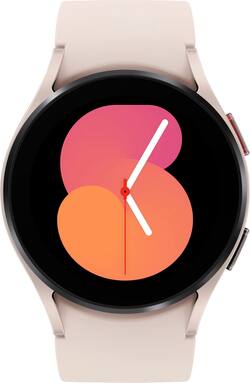
To preface this review, this is the first smartwatch I've purchased. I specifically bought it to help me manage productivity and health goals, which weren't as easy when relying purely on my Galaxy-based phone.
I wanted a device with Google Assistant integration since I have had a mixed experience with Samsungs Bixby assistant. I became aware of Google's new WearOs-based smartwatches. I wanted a device that could hopefully provide me with a decent amount of integration between my watch and phone, regarding setting and viewing calendar events, viewing notifications, marking doses of medications through the notification bar, etc. This smartwatch does cover a lot of those bells and whistles. It's beneficial as a secondary Google clock app alarm due to its ability to vibrate and play alarm tones in synchronization with a paired device.
A great aspect of this smartwatch is that notifications from my phone are readily available to read or access but the drawback is that Google Wear Os is still limited in what applications are integrated to directly use on the watch itself. For example, Microsoft Outlook is available on both current Android and Wear Os gen devices, but the same can't be said for Gmail or other popular productivity apps at this time. Very often, you'll have to open apps on your phone to view the nonfiction in full, instead of having more readily available cross-compatible WearOs based apps that work with their Smartphone Android Os counterpart versions. I'm hoping with time, more developers will be focused on integrating light versions of their Android apps towards wearos-based devices and users.
The setup process was relatively simple, even though I had a few issues where the Galaxy wearable app was unable to connect my Google account/Samsung account with the device on the first pairing attempt. In addition, sometimes Wifi on secure networks wasn't recognized on the first try as well when entering the correct password. Once I was able to get past some of those initial bugs, the experience was smooth sailing for the most part. The GPS version pairs via Bluetooth, and you'll likely be utilizing Bluetooth for the majority of the connectivity between the devices to receive notifications, so be aware of needing the have the devices near each other to have the best functionality.
You can still set alarms and perform some other task through the watch if it's unpaired/not connected to Bluetooth or Wifi, but the core usage is as an extension of your smartphone.
Another quick thing to note toward the end of this review is the battery life, which is a bit disappointing in the non-pro model of the Galaxy Watch 5. The battery last roughly 8-10 hours for me, if GPS is enabled. In addition, using Google Assitant on the Watch, Wifi, Always On Display, or GPS individually or in combination, drains the battery much faster. If you keep Bluetooth on, and keep GPS and always on Display off, you'll likely be able to have the battery last throughout your day with light to moderate use. The watch comes with a USB-c cable/mini wireless charger pad which will require you to have an adapter to plug said USB-c cable into to charge the watch. The charge time is about an hour and a half to two hours, depending on your adapter's wattage.
To conclude this review, I want to highlight some of where I think the watch does indeed shine. At the price range, it's a great investment for those trying to reduce their need to look at their smartphones during productivity sessions. The widgets and customizations to receive notifications, set alarms, check the weather forecasts hourly or weekly, check your heart rate/mark your vitals& nutrition, etc, are highly worthwhile features when considering getting a smartwatch that is supposed to be an extension of the capabilities of your smartphone. While I wish the device was a bit more expansive and well-optimized out of the box, I think it's a great additional tool for those willing to acknowledge some of the limitations it currently holds.
Again, I'm hoping some of the issues with app integration and battery life are resolved in upcoming/future firmware updates. I would recommend this smartwatch, but again encourage anyone considering purchasing it to look at their needs and see if this specific model works for them.