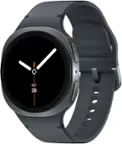
Samsung - Galaxy Watch6 Classic Stainless Steel Smartwatch 47mm LTE - Silver - (2023)
- Key Specs
- Screen Size: 47 millimeters (Size of the screen, measured diagonally from corner to corner.)
- Touch Screen: true (Touch-screen devices make navigating more intuitive. Using a touch-screen display, you can do things such as tap to select, hold and drag to move items, swipe to scroll, and pinch to zoom.)
- Operating System Compatibility: Wear OS
- Operating System: Wear OS (The operating system manages all software and hardware, including files, memory and connected devices. Most importantly, it lets you interact with your device and your programs in a visual way; otherwise, you'd be typing computer code to get anything done.)
- App Compatible: true (The product can be connected to a program or software application on a mobile device, which then receives collected data from the product.)
- Carrier: Unlocked
- Built-in Storage: 16 gigabytes
- Global Positioning: Galileo, GLONASS, GPS (A system of satellites which enables a mobile receiver to determine its precise location based on signals received from satellites such as the US Global Positioning System (GPS), the Russian Global Navigation Satellite System (GLONASS), the European Global Navigation Satellite System (Galileo), or the Japanese Quasi-Zenith Satellite System (QZSS).)
- Usage Time: 40 hours (All battery claims depend on network configuration and many other factors; actual results will vary. Battery has limited recharge cycles and may eventually need to be replaced. Battery life and charge cycles vary by use and settings.)
- Metrics Measured: Blood oxygen, Cadence, Calories burned, Distance traveled, Duration of exercise, Duration of sleep stages, Electrocardiography (ECG), Hours slept, Laps swam, Pace, Skin temperature, Stairs climbed
- Protective Qualities: Water resistant, Dust resistant, Shock resistant
- Maximum Depth of Water Resistance: 164 feet (Measurement of the maximum depth of water in which the product is able to resist some degree of water penetration.)
- Band Material: Other
- Series: Watch6 (Part of a group of the same product type with similar features.)
- General
- Brand: Samsung
- Model Number: SM-R965UZSAXAA
- Product Name: Galaxy Watch6 Classic Stainless Steel Smartwatch 47mm LTE
- Color: Silver
- Product Type: Smartwatch
- Form Factor: Wristwatch (The size, arrangement, and physical configuration of the product.)
- Model Family: Samsung Galaxy Watch6 Classic
- Series: Watch6 (Part of a group of the same product type with similar features.)
- Year of Release: 2023
- Design
- Case Size: 47mm (The diameter or longest measurement of the case.)
- Case Shape: Round
- Band Type: Hybrid Eco-Leather Band
- Band Color: Silver
- Clasp Type: Buckle
- Rotating Bezel: true (Rotating the bezel controls the various functions of the device.)
- Dimensions
- Case Thickness: 0.43 inches
- Band Width: 20 millimeters
- Product Height: 1.8 inches (The out of box height of the item. Height is measured as the vertical distance from the bottom of the item to the top as it would be primarily used or placed.)
- Product Width: 1.8 inches (The out of box width of the item. Width is measured as the horizontal distance from one side of the item to the other as it would be primarily used or placed.)
- Product Weight: 3.3 ounces (The out of box weight of the item.)
- Product Length: 0.4 inches (The out of box length of the item. Length is measured as the longest dimension of the item.)
- Minimum Wrist Size: 210.82 millimeters
- Maximum Wrist Size: 231.14 millimeters
- Size: Adjustable
- Band Size: Medium/Large
- Display
- Display Screen: true
- Screen Size: 47 millimeters (Size of the screen, measured diagonally from corner to corner.)
- Touch Screen: true (Touch-screen devices make navigating more intuitive. Using a touch-screen display, you can do things such as tap to select, hold and drag to move items, swipe to scroll, and pinch to zoom.)
- Screen Resolution: 480 x 480 (Screens come in a range of resolutions (measured in pixels, horizontal x vertical). The higher the resolution, the greater the picture quality.)
- Display Type: AMOLED
- Color Display: true
- Backlit Display: true (Integrated lights allow for visibility of the display in low-light conditions.)
- Adjustable Brightness: true
- Customizable Watch Faces: true
- Screen Material: Sapphire Crystal Glass
- Compatibility
- Operating System Compatibility: Wear OS
- Operating System: Wear OS (The operating system manages all software and hardware, including files, memory and connected devices. Most importantly, it lets you interact with your device and your programs in a visual way; otherwise, you'd be typing computer code to get anything done.)
- App Compatible: true (The product can be connected to a program or software application on a mobile device, which then receives collected data from the product.)
- Works With: SmartThings, Google Home (Compatible with or able to be connected to other smart devices or applications.)
- Voice Assistant Built-in: Bixby, Google Assistant (A digital assistant built into the device that uses voice commands to answer questions and control smart devices.)
- Connectivity
- Data Plan Required: false
- Carrier: Unlocked
- Bluetooth Version: 5.2 (The Bluetooth specification formalized by the Bluetooth Special Interest Group. All versions of the Bluetooth standard are backwards compatible with previous versions.)
- Wireless Connectivity: Bluetooth, Wi-Fi (The manner in which a device sends data to another device over a short distance without the use of wires or cables.)
- Wireless Standard: N (The wireless networking protocol used by the device. Each iteration of the protocol is based on the 802.11 standard developed by the Institute of Electrical and Electronics Engineers (IEEE) Standards Association. Denoted by letters following 802.11 (802.11a, 802.11ac, etc.), each version, published in alphabetical order, encompasses all previous versions.)
- Features
- Built-in Storage: 16 gigabytes
- GPS Enabled: true
- Global Positioning: Galileo, GLONASS, GPS (A system of satellites which enables a mobile receiver to determine its precise location based on signals received from satellites such as the US Global Positioning System (GPS), the Russian Global Navigation Satellite System (GLONASS), the European Global Navigation Satellite System (Galileo), or the Japanese Quasi-Zenith Satellite System (QZSS).)
- Usage Time: 40 hours (All battery claims depend on network configuration and many other factors; actual results will vary. Battery has limited recharge cycles and may eventually need to be replaced. Battery life and charge cycles vary by use and settings.)
- Mobile Notifications: true
- Alert Type: Audible, Vibration, Visual
- Mobile Payment Service Supported: Samsung Pay, Google Pay
- Music Player: true
- Silent Alarm: true
- Built-In Microphone: true
- Voice Activated: true (Able to interpret dictation and/or respond to simple voice commands.)
- Languages Supported: English, Spanish, American Sign Language, French, Chinese (traditional), German, Japanese, Korean, Russian
- Activity
- Metrics Measured: Blood oxygen, Cadence, Calories burned, Distance traveled, Duration of exercise, Duration of sleep stages, Electrocardiography (ECG), Hours slept, Laps swam, Pace, Skin temperature, Stairs climbed
- Multi-Sport Tracking: true
- Sensors: Accelerometer, Barometer, Compass, Gyro sensor, Proximity sensor, Temperature sensor (Detects stimuli such as heat, light, sound, motion, or pressure and responds accordingly by operating a control or initiating a function of the device.)
- Medical Incident Notification: 911/EMS, App alert, Contact call, Email (Receive notifications for detected medical incidents that enable you to contact emergency services if needed. In some cases, emergency services and/or preprogrammed emergency contacts may be notified automatically. May be reliant on whether wireless network coverage is available.)
- Performance
- Protective Qualities: Water resistant, Dust resistant, Shock resistant
- Maximum Depth of Water Resistance: 164 feet (Measurement of the maximum depth of water in which the product is able to resist some degree of water penetration.)
- Maximum Height of Shock Resistance: 3 feet (Maximum height from which the product can be dropped and resist some degree of damage from impact.)
- Ingress Protection (IP) Rating: IP68 (A 4 to 6 character code classifying a product's degree of protection against intrusion of solid particles and liquids as well as impact. Each number in the IP Code denotes a level of protection, determined through testing and published by the International Electrotechnical Commission (IEC). The first digit represents the degree of protection against solid foreign objects or particles and the second digit represents the degree of protection against water ingress.)
- Minimum Operating Temperature: 32 degrees fahrenheit (The lowest recommended ambient (surrounding) temperature in which the product can ideally operate stated by the manufacturer. Generally long-term exposure of the product to temperatures less than the minimum can result in ineffective operation.)
- Maximum Operating Temperature: 95 degrees fahrenheit (The highest recommended ambient (surrounding) temperature in which the product can ideally operate stated by the manufacturer. Generally long-term exposure of the product to temperatures more than the maximum can result in ineffective operation.)
- Processor
- Processor Speed: 1.4 gigahertz (Actual central processing unit (CPU) speed may vary by device configuration and design. Also referred to as clock speed, this is how quickly the central processing unit (CPU) can receive and interpret instructions. The higher the number, the more operations per second that can be completed. Working in combination with system memory, the power of the processor determines the complexity of software you can run.)
- Central Processing Unit: Exynos W930, Dual-core 1.4 GHz
- Graphics Processing Unit (GPU): Mali-G68 (Often referred to as a graphics card, a graphics processing unit (GPU) is the electronic circuitry responsible for manipulating and processing computer graphics/images and accelerating video decoding. Ultimately, a powerful GPU will provide a boost for anything involving visuals, including games, graphic design, and video editing.)
- Power
- Rechargeable: true
- Battery Strength Indicator: true
- Battery Capacity: 425 milliampere hours (The amount of energy stored in the battery.)
- Charging Time: 110 minutes
- Charging Interface(s): Wireless (The connection for transmitting power to charge the device.)
- Wireless Charging Standard: Qi
- Battery Chemistry: Lithium-ion
- Replaceable Battery: false
- Material
- Band Material: Other
- Case Material: Stainless steel
- Case Back Material: Stainless steel
- Camera
- Integrated Camera: No
- Warranty
- Warranty - Parts: 1 year
- Warranty - Labor: 1 year
- Other
- UPC: 887276760179
Meet the stylish smartwatch that’s packed with the latest innovation —Samsung Galaxy Watch6 Classic. With a sleek silhouette, a rotating bezel and our large display, it boasts the iconic look of a traditional watch. Take your style on the go and use Galaxy Watch6 Classic to call, text, pay and check notifications anytime, anywhere. Keep moving and motivated with wellness insights right on your wrist, and develop better sleep habits with Advanced Sleep Coaching. The style you want. The innovation you need. That’s Galaxy Watch6 Classic.
- Classic Design and Rotating Bezel: Galaxy Watch6 Classic features a timeless, iconic look and a bezel that just clicks with your style. It not only looks great, but it also rotates to give you easy access to all your apps.
- Fitness Tracking: Work out to your full potential with fitness tracking on Galaxy Watch6. Get useful performance insights on duration, distance, calories burned and more.
- Personalized HR Zones: Zone in on the results you want during your workouts with personalized heart rate zones. Galaxy Watch6 Classic scans your health data to provide HR zones tailored just for you.
- Advanced Sleep Coaching: Get the insights you need to develop better sleep habits and own your day with Advanced Sleep Coaching. Use Galaxy Watch6 Classic to plan your bedtime, detect snoring and understand and track your sleep stages (awake, light, deep, REM).
- Continuous iHRN: Get ahead of your heart health with always-on heart monitoring. Galaxy Watch6 Classic continually scans your heart rate to inform you when it’s detected an irregular rhythm that might be A-fib —
- BIA (Bioelectrical Impedance Analysis): Stay in the know about your body with the advanced BIA sensor. Use Galaxy Watch6 Classic to get readings on body fat, skeletal muscle, body water, Body Mass Index (BMI) and more —giving you helpful insights to track your progress to a healthier you.⁵
- Ecosystem —Multi-Device Experience: Open up a world of convenient possibilities right from your wrist. Galaxy Watch6 Classic syncs with your other Galaxy devices seamlessly so you can play your favorite music, control your smartphone camera, make calls, text and do more1from anywhere.⁶
- Bigger Screen: Style that lasts —that’s Galaxy Watch6 Classic. Plus, you’ll feel confident wearing it just about anywhere —durable crystal glass keeps your screen looking great while protecting it from bumps and scratches.⁷
- Personalization with One-Click Bands: Style your day and own your look. Match any mood or outfit with a wide variety of bands —now even easier to swap with one simple click. Then accent your look with an assortment of new and enhanced Watch faces.⁸
- Classic Design and Rotating Bezel: Galaxy Watch6 Classic features a timeless, iconic look and a bezel that just clicks with your style. It not only looks great, but it also rotates to give you easy access to all your apps.
- Fitness Tracking: Work out to your full potential with fitness tracking on Galaxy Watch6. Get useful performance insights on duration, distance, calories burned and more.
- Personalized HR Zones: Zone in on the results you want during your workouts with personalized heart rate zones. Galaxy Watch6 Classic scans your health data to provide HR zones tailored just for you.
- Advanced Sleep Coaching: Get the insights you need to develop better sleep habits and own your day with Advanced Sleep Coaching. Use Galaxy Watch6 Classic to plan your bedtime, detect snoring and understand and track your sleep stages (awake, light, deep, REM).
- Continuous iHRN: Get ahead of your heart health with always-on heart monitoring. Galaxy Watch6 Classic continually scans your heart rate to inform you when it’s detected an irregular rhythm that might be A-fib —
- BIA (Bioelectrical Impedance Analysis): Stay in the know about your body with the advanced BIA sensor. Use Galaxy Watch6 Classic to get readings on body fat, skeletal muscle, body water, Body Mass Index (BMI) and more —giving you helpful insights to track your progress to a healthier you.⁵
- Ecosystem —Multi-Device Experience: Open up a world of convenient possibilities right from your wrist. Galaxy Watch6 Classic syncs with your other Galaxy devices seamlessly so you can play your favorite music, control your smartphone camera, make calls, text and do more1from anywhere.⁶
- Bigger Screen: Style that lasts —that’s Galaxy Watch6 Classic. Plus, you’ll feel confident wearing it just about anywhere —durable crystal glass keeps your screen looking great while protecting it from bumps and scratches.⁷
- Personalization with One-Click Bands: Style your day and own your look. Match any mood or outfit with a wide variety of bands —now even easier to swap with one simple click. Then accent your look with an assortment of new and enhanced Watch faces.⁸
Whats Included
- Quick Start Guide
- Watch
- Band
- Charger
- Quick Start Guide
- Watch
- Band
- Charger
Disclaimers
- ¹Requires smartphone with Android 8.0 or later, 1.5GB or more RAM and Samsung Health app version 6.22 or later.
- ²Available only for running workouts. Requires initial set up of 10 minutes of outside running with GPS on; smartphone with Android 8.0 or later, 1.5GB or more RAM and Samsung Health app version 6.22 or later.
- ³Requires smartphone with Android 8.0 or later, 1.5GB or more RAM and Samsung Health app version 6.22 or later. Phone must be within 2 feet of user with snore detection enabled through Samsung Health app version 6.22 or later. Fabric band sold separately.
- ⁴The ECG Monitor App intended for adults 22 years and older analyzes pulse rate data to identify episodes of irregular heart rhythms suggestive of AFib and provides a notification suggesting the user record an ECG to analyze the heart rhythm.
- ⁵The IHRN feature is not intended to provide a notification on every episode of irregular rhythm suggestive of AFib and the absence of a notification is not intended to indicate no disease process is present;
- rather the feature is intended to opportunistically acquire pulse rate data when the user is still and analyze the data when determined sufficient toward surfacing a notification.
- The Samsung BIA is a body analyzer that uses bioelectrical impedance analysis (BIA) technology to track body composition based on weight, body fat, body mass index (BMI), skeletal muscle, body water, and basal metabolic rate (BMR) measurements.
- It is not intended to specifically diagnose or treat a medical condition.
- ⁶Compatibility for Galaxy wearable apps: Android 8.0 or later, 1.5GB of RAM.
- ⁷47mm Galaxy Watch6Classic model only.
- ⁸Select interchangeable watch bands sold separately
- ¹Requires smartphone with Android 8.0 or later, 1.5GB or more RAM and Samsung Health app version 6.22 or later.
- ²Available only for running workouts. Requires initial set up of 10 minutes of outside running with GPS on; smartphone with Android 8.0 or later, 1.5GB or more RAM and Samsung Health app version 6.22 or later.
- ³Requires smartphone with Android 8.0 or later, 1.5GB or more RAM and Samsung Health app version 6.22 or later. Phone must be within 2 feet of user with snore detection enabled through Samsung Health app version 6.22 or later. Fabric band sold separately.
- ⁴The ECG Monitor App intended for adults 22 years and older analyzes pulse rate data to identify episodes of irregular heart rhythms suggestive of AFib and provides a notification suggesting the user record an ECG to analyze the heart rhythm.
- ⁵The IHRN feature is not intended to provide a notification on every episode of irregular rhythm suggestive of AFib and the absence of a notification is not intended to indicate no disease process is present;
- rather the feature is intended to opportunistically acquire pulse rate data when the user is still and analyze the data when determined sufficient toward surfacing a notification.
- The Samsung BIA is a body analyzer that uses bioelectrical impedance analysis (BIA) technology to track body composition based on weight, body fat, body mass index (BMI), skeletal muscle, body water, and basal metabolic rate (BMR) measurements.
- It is not intended to specifically diagnose or treat a medical condition.
- ⁶Compatibility for Galaxy wearable apps: Android 8.0 or later, 1.5GB of RAM.
- ⁷47mm Galaxy Watch6Classic model only.
- ⁸Select interchangeable watch bands sold separately
Q: What is the difference between LTE and BT?
A: Hey Many! It's great to hear from you! We see that you reached out to inquire about the Galaxy Watch6 Classic. Samsung offers a range of smartwatches, including models that are compatible with both Bluetooth and LTE. The LTE models are particularly notable because they allow users to receive calls and messages without having to be connected to a smartphone. However, to use the LTE service, you will need to activate a plan with your mobile carrier, either AT&T, T-Mobile, or Verizon, that matches the plan you have for your phone. If you have any other questions, please be sure to reach out to us at Support. -Kelvin
A: 1. Yes. Watch is a bit large for that size. I probably should have gotten the slightly smaller size. I wear 7.5 gloves at work. Wrist slightly larger than average. 2. Band is a little uncomfortable; looking for new one. 3. I don't know answer to this.
Q: Does this come with a charger or must you purchase it separately?
A: Comes with a charger and cable but no 'brick'. USB C connector.
A: Greetings Dutchy, thank you for finding the time out of your day to ask us your question about the Samsung Galaxy Watch6 Classic. You'll first need to activate service for your watch through the same carrier as your mobile phone. You can activate the mobile network only when you use a phone running the Android operating system 5.0 or later and with 1.5GB of RAM or more. You must be connected to a Wi-Fi or mobile network. Plans and connection method may vary depending on the carrier. Take a look at, "Activate LTE service for your Samsung Galaxy Watch" for more information on setting up your Galaxy Watch6 Classic. Let us know if you have any questions afterwards by contacting Samsung Support. Thank you for being a dedicated Samsung customer. - Debra
Q: Can you use this watch with a Motorola phone? Need the cellular service too
A: Unfortunately the Galaxy Watches are a lot like the Apple Watches. A lot of their features won't work without your phone being from the same brand as the watch. The good news is, unlike Apple, Samsung has some cheap phones.
Q: Water proof? Buttons work underwater heat with stand drop pressure?
A: The watch works perfectly fine underwater, the only exception is the screen. Since it's a capacitive touch screen, water will interact with it like your fingers would, making the screen useless while completely submerged. The way around this is to turn water mode on, which turns off the screens touch ability. Then use the buttons, rotating bezel, and gestures to control the watch.
Q: Does this watch have the capability to detect afib or other heart arythmias?
A: I'm not 100% certain, but the watch will alert you if your heart rate exceeds normal range (you can set the min/max heart rates yourself). The watch will also track heart rate and heart rate variation while you sleep. Outside of that, I don't know.