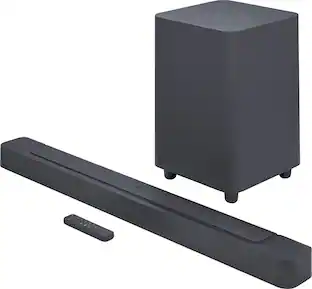
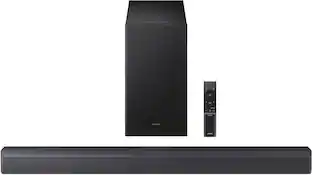
Samsung - HW-S60B 5.0ch All in One Soundbar with Wireless Dolby Atmos - Black
- Key Specs
- Wireless Connectivity: Bluetooth, Wi-Fi (The manner in which a device sends data to another device over a short distance without the use of wires or cables.)
- Wireless Subwoofer Connectivity: false
- App Compatible: true (The product can be connected to a program or software application on a mobile device, which then receives collected data from the product.)
- Wall Mountable: true (The product is able to be secured to a wall. Some products are designed ready to mount, while others may require additional hardware/accessories for installation.)
- Dialogue Enhancement: true (Improves clarity of dialogue in audio playback. This is typically achieved with dedicated speakers and/or technology that separates dialogue from the rest of the audio in order to make it clearer.)
- Works With: Amazon Alexa, SmartThings (Compatible with or able to be connected to other smart devices or applications.)
- Voice Assistant Built-in: Amazon Alexa (A digital assistant built into the device that uses voice commands to answer questions and control smart devices.)
- General
- Brand: Samsung
- Model Number: HW-S60B/ZA
- Product Name: HW-S60B 5.0ch All in One Soundbar with Wireless Dolby Atmos
- Color: Black
- Audio
- Number of Channels: 5.0 (The number of discrete channels of sound output. This can be a single number or multiple numbers separated by decimal(s). The first number is the primary, horizontally directed audio channels. The number after the first decimal, if applicable, is the number of subwoofer outputs or channels. The number after the second decimal, if applicable, is the number of height or atmospheric channels designed to immerse the listener by producing overhead sound effects.)
- Surround Sound Supported: Dolby Atmos, Dolby Digital Plus, DTS Virtual:X (Surround sound systems use multiple audio channels and speakers to create an immersive sound experience for the listener. There are also various proprietary technologies that imitate this kind of sound via a device's built-in speakers or soundbar.)
- High Resolution Audio: true (Hear music the way musicians and sound technicians intended it to be heard. Products that support hi-res audio deliver audio signals with a dynamic range and bandwidth far greater than that of a standard CD so you'll be able to enjoy pure music with outstanding sound quality. The device supports high-resolution audio signals, which more closely resemble the quality of music as it was originally recorded, with more texture and detail than can be heard via typical music streaming services or CDs.)
- RMS Power: 200 watts (The maximum amount of continuous power the device is able to handle.)
- Peak Power Handling: 200 watts (The maximum amount of power an electronic device, like a speaker, can handle without damage. This refers to short bursts of power, while root mean square (RMS) power handling indicates the amount of continuous power a device can sustain. Higher levels of distortion can also occur at peak power levels when the device is powered beyond its recommended usage.)
- Connectivity
- Wireless Connectivity: Bluetooth, Wi-Fi (The manner in which a device sends data to another device over a short distance without the use of wires or cables.)
- Wireless Multi-Room Audio: true (Technology that allows multiple speakers and/or soundbars to be connected wirelessly and play audio in separate rooms.)
- Wireless Multi-Room Technology: Apple AirPlay 2 (Proprietary technology that allows multiple speakers and/or soundbars to be connected wirelessly and play audio in separate rooms.)
- Wireless Subwoofer Connectivity: false
- Satellite Speakers: Optional (sold separately) (Using satellite speakers in conjunction with a soundbar allows for a surround sound experience; the soundbar can serve as a center channel speaker while satellites provide rear channel audio or additional front channel audio.)
- HDMI Audio Return Channel (ARC): ARC
- Audio Only Inputs: 1 x Optical digital audio
- Number of HDMI Inputs (Total): 0
- Audio/Video Outputs: 1 x HDMI 2.0 (The number and type of HDMI outputs the product has.)
- Number of USB Inputs: 1
- Number of Optical Audio Inputs: 1
- Number of HDMI Outputs (Total): 1
- Features
- App Compatible: true (The product can be connected to a program or software application on a mobile device, which then receives collected data from the product.)
- Wall Mountable: true (The product is able to be secured to a wall. Some products are designed ready to mount, while others may require additional hardware/accessories for installation.)
- Dialogue Enhancement: true (Improves clarity of dialogue in audio playback. This is typically achieved with dedicated speakers and/or technology that separates dialogue from the rest of the audio in order to make it clearer.)
- Speaker
- Subwoofer: Built-in
- Number of Tweeters: 3
- Number of Woofers: 4
- Dimensions
- Product Height: 2.4 inches (The out of box height of the item. Height is measured as the vertical distance from the bottom of the item to the top as it would be primarily used or placed.)
- Product Width: 26.4 inches (The out of box width of the item. Width is measured as the horizontal distance from one side of the item to the other as it would be primarily used or placed.)
- Product Depth: 4.1 inches (The out of box depth of the item. Depth is measured as the distance from the front of the item to the back as it would be primarily used or placed.)
- Product Weight: 6 pounds (The out of box weight of the item.)
- Included
- Remote Control Included: true
- Cable(s) Included: HDMI
- Mounting Hardware Included: true
- Certifications Listings & Approvals
- ENERGY STAR Certified: true (Devices carrying the ENERGY STAR service mark, such as computer products and peripherals, kitchen appliances, and other products, generally use 20% to 30% less energy than required by federal standards.)
- Warranty
- Warranty - Parts: 1 year
- Warranty - Labor: 1 year
- Compatibility
- Works With: Amazon Alexa, SmartThings (Compatible with or able to be connected to other smart devices or applications.)
- Voice Assistant Built-in: Amazon Alexa (A digital assistant built into the device that uses voice commands to answer questions and control smart devices.)
- Other
- UPC: 887276637525
Enjoy room filling sound in an all in one design. Hear Dolby Atmos sound from above and around without requiring HDMI cables. Perfectly synchronized TV and soundbar sound brings a new level of immersion. Don't miss a word, thanks to a built in center speaker. Plus, play your favorite songs with Alexa built in.
- All-in-one: Everything you need in a single soundbar. The 5.0ch system features 4 woofers and 3 tweeters built in, so you can enjoy powerful surround sound that fills the room.
- Wireless Dolby Atmos: Surround sound soars with Dolby Atmos and DTS Virtual:X. The built-in wireless Dolby Atmos connection from Samsung Smart TV-to- soundbar allows 3D sound reach new heights projecting audio overhead and all around the room.¹
- Samsung Audio Lab: Expert-tested. Scientifically tuned. Samsung’s perfectly balanced, room-filling sound is developed by top audio engineers at our California Audio Lab.
- Listen and Compare: Sound you can feel. Sound that moves you. Hear the difference a soundbar can make when paired with a Samsung TV.
- Q-Symphony: Perfectly synchronized audio from both Samsung TV speakers and soundbar speakers that tracks with each scene for the most harmonious, cinematic experience.²
- Built-In Center Speaker: Never miss a word with enhanced dialogue delivered by a dedicated center channel speaker to project voices clearly.
- Voice Assistant: With Alexa built-in, use all of Alexa's functionalities like playing music, delivery notifications, weather updates and more. Or simply pair to an iPhone or other iOS device to stream your favorite content using AirPlay.³
- Wireless TV Connection: Sync your Soundbar to your TV without any wires. Use your choice of Wi-Fi or Bluetooth® to connect in just a few steps, so you can make your TV time even more enjoyable with Soundbar's cinematic sound.⁴
- Adaptive sound: Revel in dynamically optimized sound with enhanced voice clarity for whatever content you are watching, including sports, games, movies and more.
- Music Mode: Take your music to the next level with crisp clarity that layers vocals and instrumentals so you can hear each note as the artists intended.
- Tap Sound: Mirror music from your phone to your soundbar for seamless connection and listening with just a tap.⁵
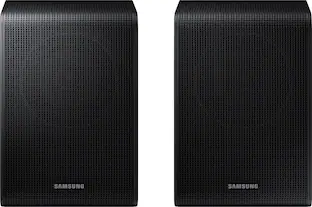
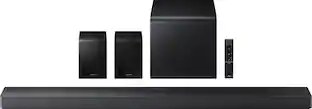
- Wireless Rear Speaker Connection: Upgrade to surround sound by adding SWA-9100S⁶ Wireless Rear Speaker Kit to your soundbar. Our wireless surround package delivers 360° audio without the need to route wires around your living room. More cinematic and fewer messy wires.
Whats Included
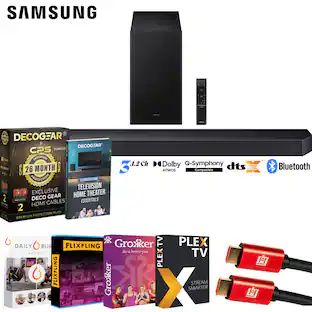
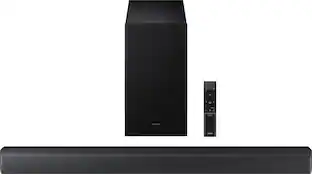
- Samsung HW-S60B/ZA 5.0ch All in One Soundbar
- Wall Mount Kit
- Remote Control
- HDMI Cable
- User Manual
Product Manuals
Q: Does Dolby Atmos work if the speaker is paired with a non-Samsung TV?
A: Hi Bob, Yes the HW-S60B Soundbar does not require a Samsung TV for Dolby Atmos to work. It will work as long as you are connected it with a HDMI cable to a TV that is Dolby Atmos compatible and playing Dolby Atmos content! ^Andrew
Q: What rear speakers are compatible with the hw-s60b?
A: Hi Jb, The HW-S60B Soundbar is compatible with either the SWA-9100S Wireless Rear Speaker Kit or the new SWA-9200S Wireless Rear Speaker Kit. ~Samsung Solutions
A: Download SmartThings app and add the Soundbar to the app. Easy to control the features such as turning on voice enhancement, tuning the bass, subwoofer, rear speakers (sold separately) 3 channels, voice feedback on/off also the language.
A: Hello EdgarB, For the HW-S60B Soundbar we do recommend using an HDMI cable as this will give you the best audio experience. ~Samsung Solutions
A: Make sure the TV External Device Manager selection is Anynet + (HDMI-CEC). This is a bullet under Troubleshooting under "The Soundbar does not output any sound" in the User Manual. That's what prevented easy plug and play.
A: I am using in a 250 sq ft room and it sounds great!
Q: Does this sound bar have an external light that stays on while watching TV?
A: No it does not
People also viewed
 $299.99The price was $399.99
 $179.99The price was $279.99
 $699.99The price was $999.99
 $169.99The price was $229.99
 $249.99The price was $399.99



Today's top picks
 $1,599.99The price was $1,999.99
- $249.99The price was $399.99
 $799.95The price was $1,199.99
 $799.99The price was $899.99
 $599.99The price was $999.99