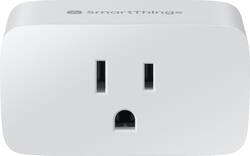
Samsung - SmartThings Wi-Fi Smart Plug - White
- Key Specs
- Works With: Amazon Alexa, SmartThings, Google Home (Compatible with or able to be connected to other smart devices or applications.)
- App Compatible: true (The product can be connected to a program or software application on a mobile device, which then receives collected data from the product.)
- General
- Brand: Samsung
- Model Number: GP-WOU019BBAWU
- Product Name: SmartThings Wi-Fi Smart Plug
- Color: White
- Power
- Amperage: 15 amperes (Strength of electrical current.)
- Voltage: 120 volts (Amount of power needed to support an electrical current.)
- Certifications Listings & Approvals
- Product Safety Certifications and Standard(s): UL Listed (Lists the applicable certifications and/or standards, as stated by the manufacturer, in which the product has met the requirements for the assurance of quality and safety.)
- Compatibility
- Works With: Amazon Alexa, SmartThings, Google Home (Compatible with or able to be connected to other smart devices or applications.)
- App Compatible: true (The product can be connected to a program or software application on a mobile device, which then receives collected data from the product.)
- Dimensions
- Product Height: 2.12 inches (The out of box height of the item. Height is measured as the vertical distance from the bottom of the item to the top as it would be primarily used or placed.)
- Product Width: 1.5 inches (The out of box width of the item. Width is measured as the horizontal distance from one side of the item to the other as it would be primarily used or placed.)
- Product Length: 2.68 inches (The out of box length of the item. Length is measured as the longest dimension of the item.)
- Product Weight: 0.16 pounds (The out of box weight of the item.)
- Warranty
- Warranty - Parts: 1 year
- Warranty - Labor: 1 year
- Other
- UPC: 887276337944
Control your small appliances from a smartphone by plugging it into this Samsung SmartThings Wi-Fi smart plug. Compatibility with Alexa and Google Assistant enables seamless voice control. This Samsung SmartThings Wi-Fi smart plug lets you trigger lights to automatically turn on and off, and it extends the range of your devices when plugged into a wall outlet.
- Compatible with Bixby, Google Assistant, and Amazon Alexa: Allows you to control small appliances or electronics without having to use your hands.
- Compact design: You can use just one socket or stack multiple smart plugs in a single outlet.
- Control power: Supports home appliances up to 1800W.
- Side button: If your Wi-Fi goes down, you can manually control the smart plug by pressing the button, which is located on its side.
- No hub or accessories required: Samsung works with Wi-Fi that you already have in your home.
- SmartThings app: Lets you turn on or off your appliances, monitor the energy use, and set the routines to power off certain plugs right from your phone, tablet, or TV.
Whats Included
- Samsung SmartThings Wi-Fi Smart Plug
Q: Can you use regular light bulbs if you have the plug? Or do you have to buy smart bulbs?
A: Regular is fine. You are just controlling the power. Lamp switch would stay on and you turn the power on and off.
A: I purchased one to try it out because not even the Samsung ambassador comprehends the difference between wi-fi and the internet. Here is what I found: 1. To set up the plug, the Samsung hub has to be connected to your router (by either ethernet or Wi-Fi) and your router has to be connected to the internet 2. To turn the plug on or off using the Samsung App the Samsung hub has to be connected to your router (by either ethernet or Wi-Fi) and your router has to be connected to the internet 3. To set up a smart app routine to turn the plug off and back on at set times the Samsung hub has to be connected to your router (by either ethernet or Wi-Fi) and your router has to be connected to the internet 4. HOWEVER, once it is set up, the Samsung hub WILL turn the plug on via a pre-set time in the smart app WITHOUT a connection to the INTERNET as long as the hub is connected to your router (by either ethernet or Wi-Fi). So I can use it to shut off my modem at a set time, cutting off my connection to the internet (but no the router), then turn the modem back on as long as I do it via set times via a smart app routine. I should get a free plug from Samsung for figuring this out for them. How does a person become a Samsung ambassador without knowing how Samsung products work?
A: You need the SmartThings app to set up
Q: is this plug 5G compatible?
A: That's a really good question, Richk! The SmartThings Wi-Fi Smart Plug requires a 2.4 GHz Wi-Fi network. Thank you! Samsung Brand Ambassador
Q: Can you set a timer for these to automatically turn things off or on like a light?
A: Yes you can! You can set a timer, or power on time and power off time.
Q: What is the Hub that is compatible to this Smart Plug?
A: Supposedly can be used with Smart Things hub. But I have it running on app and now hub won’t even recognize. Imwas hoping to get the hub to control devices, but no luck yet.
A: Hello! You can set up an automation within the SmartThings App to turn off the Smart Plug if the Water Leak Sensor detects moisture and have a notification sent to you. You can learn more about automations on our Support page here -- https://support.smartthings.com/hc/en-us/articles/115002056383-Custom-Automations-in-the-SmartThings-app. Please note that the SmartThings Water Leak Sensor does require the SmartThings Hub as well. Thank you! ~Samsung Brand Ambassador
Q: Does this smart plug report energy usage?
A: Yes, you can see that in the SmartThings App.