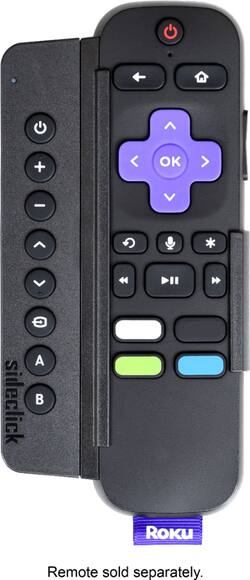
Sideclick - Universal Attachment for Roku® Streaming Player Remote - Black
- Key Specs
- Remote Control Type: Universal
- Remote Control Features: Auto code search, Multi-Function
- Number Of Devices Controlled: 8
- General
- Brand: Sideclick
- Model Number: SC2-RK17K
- Product Name: Universal Attachment for Roku® Streaming Player Remote
- Color: Black
- Features
- Remote Control Type: Universal
- Remote Control Features: Auto code search, Multi-Function
- Display Type: None
- Number of Buttons: 8
- Connectivity
- Number Of Devices Controlled: 8
- Wireless: true
- Connectivity Technology: Infrared (The manner in which a device sends data to another device over a short distance.)
- Connector Type: Proprietary
- Compatibility
- Brand Compatibility: Roku
- Model Compatibility: Roku Express, Express+; Roku Premiere, Premiere+; Roku Ultra; 2013 Roku - 2 (2720) and 3 (4200); 2014 Roku Stick (3500); 2015 Roku - 2 (4210), 3 (4320), 4 (4400R), SE, Streaming Stick(3500); 2016 Roku Streaming Stick (3600); Roku enabled TVs
- Compatible Product(s): Receiver, Television
- Power
- Rechargeable: false
- Battery Size: AAA (The battery size required for operation.)
- Number of Batteries Required: 2
- Number Of Batteries Included: 2
- Dimensions
- Product Weight: 6 ounces (The out of box weight of the item.)
- Warranty
- Warranty - Parts: 1 year
- Warranty - Labor: 1 year
- Other
- UPC: 859585006354
Bring management of your audiovisual devices together with this Sideclick universal Roku remote attachment. The eight-button add-on uses adapters to snap onto a variety of Roku remotes and provides control of Blu-ray players, soundbars, TV, and other devices. This Sideclick universal Roku remote attachment uses IR learning technology for easy programming.
- Compatiblity: Compatible with all Roku streaming player remotes and all Roku enabled smart TVs.
- Control all of your devices: You can control your streaming player and other multiple devices, such as a TV, soundbar, Blu-ray player, amplifier, DVD player and more, with this all-in-one universal remote control attachment.
- Programmable buttons: Using IR learning technology, this remote attachment lets you program eight buttons over multiple devices in under a minute. No need to keep remotes for your TV, soundbar, receiver, or Blu-ray player lying around.
- Don't lose your voice: Sideclick's clip-on design attaches in a snap and allows you to utilize your streaming remote's voice search feature, which is lost in other universal remote options.
- Ultimate accessory for cord cutters: Perfect solution for channel-changing with an HD antenna.
- Designed for everyday operation: Sideclick requires two AAA alkaline batteries (included).
Whats Included
- Sideclick Universal Attachment for Roku® Streaming Player Remote
- 5 Roku adapter clips
- 2 AAA batteries
- Owner's manual
Product Manuals
Q: Can I use this to replace my broken remote for the tv? Or would I need an extra piece as well?
A: Hi Tiffani, Sideclick can replace the functions of your TV remote however you need the remote in order to program Sideclick. Sideclick needs an IR remote to learn from and doesn't have the ability to use source codes. There is a potential work-around if you do not have your original remote. Option 1) Some smartphones have an IR transmitter. Peel Smart Remote is a free app that can be used to program Sideclick using your smartphone. Option 2) If your phone does not have an IR transmitter, what we recommend is getting a cheap universal remote under $5. Use this remote to program your TV using code search and then in-turn use that remote to program your Sideclick using its IR learning capability. I know it's not the simplest solution but that would get your Sideclick functioning as intended. Thank you your inquiry and let us know if you have any other questions. We can be reached at [email protected]
Q: Is this compatable with a Roku TV? Does this have a headphone plug?
A: We have a TCL tv (Roku operating system) and this works great with it. The side-click itself has no headphone plug, but comes with several different adapters for the different Roku remotes. If your Roku remote has a headphone jack you can move things around and still have access to it.
Q: Can I configure and of these buttons to "page" through the guide menu on say DirectTV now?
A: Yes the buttons are completely universal. The icons on there are just suggestive
A: The sidekick has 8 buttons that can be programmed individually. The buttons on the sideckick are power, volume +/-, arrow up/down, change input, A, B and you would traditionally program all these buttons to control 1 additional device to the roku. However, you could program these buttons to several different devices since it is a learning remote. IE - you could use power to turn on the tv, A to turn on the comcast box, B to turn on the receiver with the volume going to the receiver, the input change to the tv, and the arrows to the comcast box. You may not be able to get all of your devices in a way that makes sense, but you can program each button individually. As for the PS3/PS4, if you have an IR remote for the PS3/PS4 you can program the sidekick for it, but you would need that to do it.
Q: With this on the Roku remote, can the ear buds still be plugged in?
A: No, the Slickclick for Roku will cover the earbud jack although it's easy to pop the sideclick off and on when needed.
A: No, this attaches beside the Roku remote so you use one for tv power, volume, channel up and down, etc. while using your normal Roku remote for its normal functions.
A: Hello yes this remote works with ROKU 1-4 FOR QUESTIONS WITH COMPATIBILITY YOU CAN FIND THESE ANSWERS ON THE SIDEKICKS BOX JUST ENHANCE THE BOX :) I HOPE THIS HELPS YOU. HAVE A FANTASTIC DAY.. PAMMY
Q: will this work with Roku3, and can I prgram it to work with my SAT receiver SKY TV.
A: It comes with several adapters for, I assume, every Roku remote type. You program the remote using your other remote programming each button at a time so yeah it should work with any remote, also that method was a lot easier than I had imagined.
People also viewed
 $279.99The price was $380.00

Today's top picks
 $449.99The price was $829.99
 $2,449.99The price was $3,199.99
 $999.98The price was $1,639.98
 $199.99The price was $249.99
 $1,099.99The price was $1,499.99
 $549.99The price was $749.99








