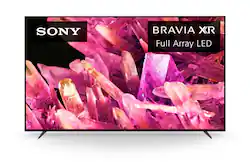
Sony - 85" Class BRAVIA XR X90K LED 4K UHD Smart Google TV
- Key Specs
- Display Type: LED
- Resolution: 4K (2160p) (Refers to the number of pixels, both horizontally and vertically, used to capture video/images. The higher the resolution the finer the detail that can be seen.)
- Screen Size Class: 85 inches (The group size measurement of a screen. This differs from a screen size measured diagonally from corner to corner.)
- High Dynamic Range (HDR): true (An HDR-compatible 4K TV or other HDR-compatible product displays HDR video content when it's available from sources like 4K Ultra HD Blu-ray Discs and 4K streaming services.)
- High Dynamic Range Format: HDR 10, Hybrid Log-Gamma (HLG), Dolby Vision (There are a few HDR formats that tell the TV or other HDR-compatible product how to best utilize its capabilities to display HDR content. HDR technology can support one or multiple formats, each with various benefits to picture quality.)
- LED Panel Type: Standard LED
- Backlight Type: Full Array Local Dimming (Edge-lit: lights are on the edges of the display with ~10 zones of vertical LEDs. Direct-lit: lights are on the edges and behind the screen for more light uniformity than Edge-lit. Full array: direct-lit with local dimming for greater contrast with up to 100 zones of LEDs.)
- Refresh Rate: 120Hz (The number of frames per second the device can produce natively without enhancement. Higher rates help produce smooth, seamless pictures.)
- Motion Enhancement Technology: X-Motion Clarity (Proprietary technologies produced in addition to the Refresh Rate that smooth out faster moving pictures to reduce blur and pixelation.)
- Smart Platform: Google TV (Just like a computer, a smart TV needs an operating system (also called a smart platform) in order to access the Internet, connect with entertainment apps, and play streaming content. Some common TV smart platforms are; Roku TV, Android TV, and Chromecast.)
- Featured Streaming Services: Netflix, Prime Video, Disney+, YouTube, Apple TV+, HBO Max, Peacock (Streaming services and other programs are available on this device. Keep in mind, there may be more services supported than just those shown here.)
- Number of HDMI Inputs (Total): 4
- Works With: Google Assistant, Amazon Alexa (Compatible with or able to be connected to other smart devices or applications.)
- Voice Assistant Built-in: Google Assistant, Amazon Alexa (A digital assistant built into the device that uses voice commands to answer questions and control smart devices.)
- General
- Brand: Sony
- Model Number: XR85X90K
- Product Name: 85" Class BRAVIA XR X90K LED 4K UHD Smart Google TV
- Color: Black
- Series: X90K Series (Part of a group of the same product type with similar features.)
- Model Year: 2022
- Dimensions
- Product Height With Stand: 44.37 inches
- Product Width: 74.87 inches (The out of box width of the item. Width is measured as the horizontal distance from one side of the item to the other as it would be primarily used or placed.)
- Product Depth With Stand: 18.5 inches
- Product Height Without Stand: 43 inches
- Product Depth Without Stand: 2.87 inches
- Product Weight With Stand: 104.7 pounds
- Product Weight Without Stand: 100.9 pounds
- Adjustable Stand Width: false (Whether the stand can adjust to have more than one measurement either between the legs or the base itself.)
- Display
- Display Type: LED
- Resolution: 4K (2160p) (Refers to the number of pixels, both horizontally and vertically, used to capture video/images. The higher the resolution the finer the detail that can be seen.)
- Screen Size: 84.6 inches (Size of the screen, measured diagonally from corner to corner.)
- Screen Size Class: 85 inches (The group size measurement of a screen. This differs from a screen size measured diagonally from corner to corner.)
- High Dynamic Range (HDR): true (An HDR-compatible 4K TV or other HDR-compatible product displays HDR video content when it's available from sources like 4K Ultra HD Blu-ray Discs and 4K streaming services.)
- High Dynamic Range Format: HDR 10, Hybrid Log-Gamma (HLG), Dolby Vision (There are a few HDR formats that tell the TV or other HDR-compatible product how to best utilize its capabilities to display HDR content. HDR technology can support one or multiple formats, each with various benefits to picture quality.)
- Picture Quality Enhancement Technology: Cognitive Processor XR
- LED Panel Type: Standard LED
- Backlight Type: Full Array Local Dimming (Edge-lit: lights are on the edges of the display with ~10 zones of vertical LEDs. Direct-lit: lights are on the edges and behind the screen for more light uniformity than Edge-lit. Full array: direct-lit with local dimming for greater contrast with up to 100 zones of LEDs.)
- Curved Screen: false
- Refresh Rate: 120Hz (The number of frames per second the device can produce natively without enhancement. Higher rates help produce smooth, seamless pictures.)
- Motion Enhancement Technology: X-Motion Clarity (Proprietary technologies produced in addition to the Refresh Rate that smooth out faster moving pictures to reduce blur and pixelation.)
- Closed Captioning: true (The text version of spoken audio displayed on the screen. Devices that can display closed captioning typically have the option to toggle the feature on or off.)
- Language(s) Displayed: English (The available language options for displayed text or captions.)
- Features
- Remote Control Type: Voice control
- Smart Capable: true (Smart, or smart-capable devices are able to connect directly to your home network in order to stream content from the Internet, run Internet-based apps, or connect to other smart devices.)
- Smart Platform: Google TV (Just like a computer, a smart TV needs an operating system (also called a smart platform) in order to access the Internet, connect with entertainment apps, and play streaming content. Some common TV smart platforms are; Roku TV, Android TV, and Chromecast.)
- Featured Streaming Services: Netflix, Prime Video, Disney+, YouTube, Apple TV+, HBO Max, Peacock (Streaming services and other programs are available on this device. Keep in mind, there may be more services supported than just those shown here.)
- Screen Mirroring: true (Casts the screen of one device onto another wirelessly, using a common protocol (typically Bluetooth).)
- Screen Mirroring Technology: Miracast, Apple AirPlay
- Indoor Or Outdoor Use: Indoor (Indicates the appropriate environment product was designed to be used in.)
- TV Tuner: Digital (The ATSC TV Tuner is a component built into conventional TV sets or other devices for receiving over-the-air broadcast TV without a cable/satellite box. Digital tuners may be purchased separately and connected to a device if it does not have one built in.)
- Connectivity
- Number of HDMI Inputs (Total): 4
- HDMI Audio Return Channel (ARC): true
- RF Antenna Input: true (This input is used to connect devices such as antennas or cable boxes to a TV via a coaxial cable.)
- Number Of USB Port(s) (Total): 2 (The total number of USB ports including all generations and versions.)
- Bluetooth Version: 4.2 (The Bluetooth specification formalized by the Bluetooth Special Interest Group. All versions of the Bluetooth standard are backwards compatible with previous versions.)
- Compatibility
- VESA Wall Mount Standard: 400mm x 400mm (VESA wall mount standards refer to the spacing of screw holes built into a TV in order to fit with standard TV wall mounts. These standards are implemented into most TVs and monitors.)
- Works With: Google Assistant, Amazon Alexa (Compatible with or able to be connected to other smart devices or applications.)
- Voice Assistant Built-in: Google Assistant, Amazon Alexa (A digital assistant built into the device that uses voice commands to answer questions and control smart devices.)
- Audio
- Built-In Speakers: true
- Built-in Speaker Type: Downward firing, Backward firing (Backward, downward, and front-firing speakers direct sound into the room from those respective directions. A soundbar is typically long and rectangular, and designed to act as an all-in-one speaker with greater sound production than that of a TV alone. An acoustic surface is the result of small sound actuators embedded directly behind the screen, turning the entire screen's surface into a speaker.)
- Surround Sound Supported: DTS Digital Surround (Surround sound systems use multiple audio channels and speakers to create an immersive sound experience for the listener. There are also various proprietary technologies that imitate this kind of sound via a device's built-in speakers or soundbar.)
- Power
- ENERGY STAR Certified: false (Devices carrying the ENERGY STAR service mark, such as computer products and peripherals, kitchen appliances, and other products, generally use 20% to 30% less energy than required by federal standards.)
- EPEAT Qualified: false (The Electronic Product Environmental Assessment Tool (EPEAT) was designed to provide an environmental assessment tool for purchasers. In order to qualify for EPEAT, a product must meet all 23 required criteria.)
- Estimated Annual Operating Cost: 43 United States dollars (Predicted cost of operating the product under average conditions for one year.)
- Estimated Annual Electricity Use: 356 kilowatt hours (Predicted amount of electricity needed to operate the product under average conditions for one year.)
- Rechargeable Battery (Remote Control): false
- Battery Size (Remote Control): AAA (The battery size required for operation.)
- Number Of Batteries Required (Remote Control): 2
- Number of Batteries Included (Remote Control): 2
- Included
- Wall Mount Included: false
- Stand Included: true
- Box Dimension
- Height: 48.5 inches
- Width: 80 inches
- Depth: 9.5 inches
- CubicDimension: 36860 inches
- Other
- UPC: 027242924741
Make movies and games come to life with the immersive detail and contrast of Full Array LED, powered by the intelligent Cognitive Processor XR. See billions of accurate colors, each reproduced with the subtle differences of the real world with XR Triluminos Pro. And XR Contrast Booster 10 further enhances the dynamic range of the picture bringing out the beauty in everything you watch.
- Cognitive Processor XR: Intelligent TV processing understands how humans see te real world to deliver intense contrast with deep blacks, high peak brightness and natural colors.
- Full Array LED Contrast: Precisely controlled backlighting delivers deep black, high peak brightness and is further enhanced by XR Contrast Booster 10 for real-life depth and detail.
- TRILUMINOS Pro: Rediscover everything you watch with billions of accurate colors and see impressive picture quality that is natural and beautiful.
- Google TV with Google Assistant: Organizes your favorite content all in one place. Stream from Netflix, Disney+, Apple TV, HBO Max, Peacock and many more. Also, stream from your Apple device with AirPlay support.
- Movies included with BRAVIA CORE: Bring the cinematic experience home. Enjoy streaming high-quality 4K UHD quality movies included with the BRAVIA CORE app, exclusively on select Sony TVs.
- Enhanced Entertainment with HDR and Dolby Vision: Experience immersive and engaging cinematic content as the creator intended with support for Dolby Vision, IMAX Enhanced, and Netflix Adaptive Calibrated Mode.
- Perfect for PlayStation 5: Take your gaming to the next level with input lag as low as 8.5ms and BRAVIA XR exclusive features for the PlayStation 5 to improve gaming picture quality.
- Features specified in HDMI 2.1: Get the advantage in high-performance gaming on BRAVIA XR TVs with HDMI 2.1 features such as 4K/120,10 VRR,11 and ALLM.
- Acoustic Multi-Audio: With Acoustic Multi-Audio and Dolby Atmos support, hear true immersive audio with two sound positioning tweeters in addition to traditionally placed TV speakers.
- XR Motion Clarity: See blur-free picture quality in fast-moving sports and action-packed movies.
- XR 4K Upscaling: Bring back lost texture and detail and see all your content upscaled to 4K resolution.
- 2-WAY MULTI-POSITION STAND: Beautifully designed to complement your unique viewing experience, offering two variations of flexibility – standard low-profile setting for immersive viewing or raised to accommodate a soundbar.
- Compatible with optional BRAVIA CAM: Video chat with friends and family, use gesture controls, and allow Ambient Optimization Pro to automatically adjust picture and sound according to your room environment.
Whats Included
- Television
- Remote Control
- Batteries
- AC Power Cord
- Operating Instructions
- Quick Setup Guide
- Warranty
- Table Top Stand
Documents
- Energy_Guide_PDF
A: Before purchasing my new 75 X90K, I was using an older 75 XBR 850D edge-lit model. (Think Full array local dimming vs. Edge-lit) I can honestly say that the older set's viewing angle is very slightly better when it comes to viewing off angle, but there is more of a color drop off at larger angles with the edge-lit set. The X90K is not bad at all, but you will notice a difference if you will be sitting at a large angle. It's very subtle, but there is a difference. If you watch a lot of TV in the dark at large angles, then you might want to consider an OLED. My set is in my living room and I routinely watch it from an angle in another room when working from home on my PC. No issue for me at all. Just remember, the more the angle, the worse it gets. Tip 1 - Go to BBuy and watch darker content at the larger angle to see if you can deal with it at home. Tip 2 - Get a tabletop TV stand from Fitueyes or Perlesmith that "swivels" and call it a day. That's what I did. LOL. Hope this helps. Peace!
A: Thank you for your question, Elduende911! Absolutely, yes. The XR-85X90K supports Dolby Atmos playback. With the BRAVIA XR X90K Full Array LED TV everything you watch becomes more detailed and immersive with true-to-life 4K picture, powered by the Cognitive Processor XR™. With immersive picture and sound, and sleek flush bezel design, be prepared to level up your favorite movies, TV shows, and games. I hope this helps you and thank you for considering Sony! - Romeo
Q: Will I have full internet access using google
A: Hi there, Thank you for your inquiry. If you are referring to internet services like streaming applications, absolutely, yes. The Google TV feature of the X90K brings together movies, shows, live TV, and more from across your apps and subscriptions and organizes them just for you. Discover new things to watch with recommendations based on your viewing history and subscriptions. Use Google Assistant to find movies and shows, answer questions, control smart home devices, and more. And with the Google TV app, you can watch it anywhere, anytime. However, if you are referring to the web browser app, unfortunately, the TV doesn't have it pre-installed. There's good news, however! You can download and install third-party apps that function as a web browser through the Google Play™ store. For more details on how to install apps to the TV, check out the following links: https://helpguide.sony.net/tv/jusltn1/v1/en-003/01-02_01.html?hl=app https://www.sony.com/electronics/support/televisions-projectors-lcd-tvs-android-/xr-85x90k/articles/00121075 With the BRAVIA XR X90K Full Array LED TV everything you watch becomes more detailed and immersive with true-to-life 4K picture, powered by the Cognitive Processor XR™. With immersive picture and sound, and sleek flush bezel design, be prepared to level up your favorite movies, TV shows, and games. Should you have any additional questions, please email us at [email protected] with the following details and we'll be more than happy to assist you. Name: BestBuy Username: Model Number: Issue: Telephone Number: Hope this helps, and thank you so much for considering Sony! Best regards, Romeo Sony Social Support
A: It puts off way less heat than a plasma. Almost non existent, although any electronic will generate some.
Q: can you get a remote that has buttons instead of voice control?
A: The remote has all the basic buttons: volume, channel, power, direction keys, enter, home, back. It also has a few app launch buttons for popular apps. It's nice and small, easy to use, and uses bluetooth to connect to tv which is really nice. Only downside is no backlight.
A: When looking at the set like you're watching it, the input connections are on the left and the power connection is on the left side.
Q: From the bottom of the TV, how many inches up are the bottom vesa mount holes? Thanks
A: Thank you so much for the question, Bryan! The distance from the bottom mounting hole to the bottom of the TV (without the supplied TV stand) is Approx. 5.50 inches (140.8 mm). Additional information: When wall mounting this TV, we always recommend using a Vesa compliant wall mount bracket with Vesa Hole pitch of 15.75 x 15.75 in (400 x 400 mm). The wall mount bracket should also be able to hold the TV weight (without stand - 100.9 lb (45.8 kg)) to avoid any issues. For safety reasons, product protection, and to make sure that the installation is performed correctly, Sony strongly recommends that the installation of our TV on a wall be performed by qualified professionals. You may visit your local retailer/dealer or contact Best Buy to find the best VESA-compliant wall mount bracket that meets the size of our TV, your wall or environmental requirements, and your stylistic preferences. I hope this helps, and thanks again for your inquiry! - Romeo
People also viewed
 $3,998.00The price was $4,499.99
 $1,199.99The price was $1,999.99
 $2,499.99The price was $2,799.99
 $2,497.99The price was $2,699.99
Today's top picks
 $199.99The price was $249.99
 $149.99The price was $239.99
 $789.99The price was $1,049.99











