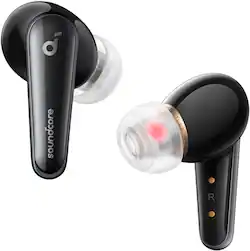
Soundcore - by Anker Liberty 4 True Wireless Earbud Headphones - Black
- Key Specs
- Connection Type: Wireless, Wireless
- Wireless Connectivity: Bluetooth, Bluetooth (The manner in which a device sends data to another device over a short distance without the use of wires or cables.)
- True Wireless: true (These headphones not only lack wires between the device and headphones, they also lack wires between the headphones themselves. (true wireless is really only possible with in-ear headphones))
- Headphone Fit: In-Ear
- General
- Brand: Soundcore
- Model Number: A3953Z11
- Product Name: by Anker Liberty 4 True Wireless Earbud Headphones
- Color: Black
- Audio
- Sound Isolating: true
- Connectivity
- Connection Type: Wireless, Wireless
- Wireless Connectivity: Bluetooth, Bluetooth (The manner in which a device sends data to another device over a short distance without the use of wires or cables.)
- True Wireless: true (These headphones not only lack wires between the device and headphones, they also lack wires between the headphones themselves. (true wireless is really only possible with in-ear headphones))
- Design
- Headphone Fit: In-Ear
- Dimensions
- Product Width: 2.2 inches (The out of box width of the item. Width is measured as the horizontal distance from one side of the item to the other as it would be primarily used or placed.)
- Product Weight: 0.1 pounds (The out of box weight of the item.)
- Other
- UPC: 194644105358
Soundcore by Anker Liberty 4, Noise Cancelling Earbuds, True Wireless Earbuds with ACAA 3.0, Dual Dynamic Drivers, Hi-Res Audio, Heart Rate Sensor, CloudComfort Eartips, Spatial Audio, 28H Playtime
- Premium Sound via ACAA 3.0: Enjoy sound with deep, punchy bass, accurate mids, and clear treble direct from our acoustic system's dual dynamic drivers. It's wide soundstage allows every part of the song to shine for detail-rich listening.
- Immersive Spatial Audio: As you listen to music and watch movies, the built-in gyroscope and spatial audio algorithm track your head movements to always keep you at the heart of the sound for a completely immersive experience.
- Heart Rate Tracking: The in-ear heart rate sensor tracks you heart rate as you listen throughout the day. Check your daily data, use while working out, and more via soundcore Wellness in the app.
- Personalized Sound: Soundcore's unique technology analyzes your ears and the way you hear sound to create a personalized sound profile that's unique to your ears.
- CloudComfort Ear Tips: The dual-layer structure adapts to the shape of your ear canal for a pressure-free fit for the full 9 hours of playtime. Includes 4 sizes of ear tips to ensure you find the right fit for you.
- Crisp, Clear Sound: With dual dynamic drivers, Liberty 4 delivers crisp and clear sound.
- Outstanding Performance: Two dynamic drivers aligned on the same axis produce high-res sound with 3x more clarity**Compared with Liberty 2 Pro True Wireless Earbuds
- Hear Every Detail: Hear every detail from the deepest, punchiest bass to the highest treble thanks to the wide soundstage.
- Hear the Unexpected: Premium sound quality allows you to rediscover old favorites and create new musical memories.
- 360° of Immersion: Put yourself at the heart of the music or movie as sound surrounds you from all directions.
- Music and Movie Modes: The built-in gyroscope and spatial audio algorithm tailor the sound to the content you're enjoying.
- Cloud-Like Comfort: The dual-layer structure relieves pressure on your ear canals for cloud-like comfort, all day long.
- In Tune with Your Heart: An in-ear heart rate sensor detects your heart rate, so you feel in tune with your heart.
- Sound That's Tuned to You: Create your own HearID signature sound and use the customizable EQ settings for personalized sound.
- Adjusts to Noise Levels: HearID ANC automatically adjusts the noise cancelling to different noise levels around you.
- A Soundtrack for Your Day: Recharge Liberty 4's case with a wireless charger or USB-C cable. The earbuds have a 9-hour playtime that's extended to 28 hours with the case and get 90 minutes of listening with a 10-min charge.
- Seamless Switching: Connect Liberty 4 to your phone and laptop at the same time to switch between music, videos, calls and more.
- Exceptional Call Clarity: 6 microphones and an AI-noise reduction algorithm filter out background noises and enhance your voice in real time so you can be heard clearly.
- Convenient Customization: Access Transparency mode, customize touch controls to suit your listening style, and enjoy calming white noise when you want to rest or concentrate on your tasks.
A: I'll answer my own question since I now have both to compare. In summary the only current downgrade I can find in the L4 from the Lp3 would be the transparency mode. But this can easily be fixed in a firmware update. Overall they are an upgrade for me.
Q: Can you provide the latency level for the Liberty 4 Ear Bud model. Thank you.
A: The latency level for the Liberty 4 Ear Buds is around 40ms. This means that there is a delay of 40 milliseconds between when the audio signal is sent from the device and when it is received by the earbuds. This is considered to be a low latency level, and is good for gaming and watching videos. The latency level can be affected by a number of factors, such as the Bluetooth codec that is being used, the distance between the earbuds and the device, and the quality of the Bluetooth connection. The Liberty 4 Ear Buds support the SBC, AAC, and LDAC Bluetooth codecs. LDAC is the highest quality codec, but it also has the highest latency. AAC is a good compromise between quality and latency.
Q: How do you answer incoming call
A: I usually just say hello. If I think it might be a spam call, I'll listen for a bit and hang up.
A: If you don’t use the heart rate sensor, you can buy XS tips on Amazon. Spin Fit makes some that look identical. I don’t use the heart rate sensor at all. I love mine too but I have problems with the software. It almost never shows up in my iOS battery widget. Plus the controls on the buds stop working or change on their own and I have to reset them using the app. I’m considering returning mine.
A: Thanks for your interest in our products. The main reason is Liberty 4 focuses on the sound quality, which relies on the LDAC. When the earbuds are using LDAC, the multi-point connection cannot be used. Please feel free to contact us via [email protected] if there is anything we can help you with.
A: Thanks for sharing your experience. I would like to present our deepest apologies for all the inconvenience. To fix the issue the issue you mentioned, we kindly ask you to try the following tips: 1. Reset the earbuds: Put the earphones into the charging box, keep the charging box cover open, and hold down the charging box button for 10 seconds: ① The breathing lamp blinks three times (500ms/ time), indicating that the reset is successful. ② The rear breathing lamp flashes for 1s, indicating a pairing request. ③ After connecting the device successfully, keep on for 1s and breathe for 2S 2. Check for firmware updates. 3. Clean the microphone: Dust or debris in the microphone could cause the popping sound. Use a soft, dry cloth to gently clean the microphone. Please feel free to contact us via [email protected] with your order information and problems. We will always be more than happy to help you.
A: Yes they can but I wouldn't recommend it personally
People also viewed
 $99.99The price was $129.99
 $129.99The price was $149.99
 $199.99The price was $249.99

Today's top picks
- $199.99The price was $249.99
 $399.99The price was $429.00
 $199.00The price was $359.00