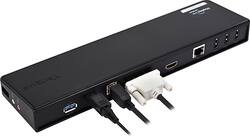
Targus - Dual-Video USB 3.0/2.0 Docking Station - Black
- Key Specs
- Maximum Number of Displays Supported: 1
- Number of DisplayPort Outputs (Total): 0
- General
- Brand: Targus
- Model Number: ACP70US
- Product Name: Dual-Video USB 3.0/2.0 Docking Station
- Color: Black
- Display
- Maximum Number of Displays Supported: 1
- Ports
- Display Connector(s): 1 x HDMI, 1 x DVI (The number and type of connectors used to connect to an external display.)
- Number of DisplayPort Outputs (Total): 0
- Number of HDMI Ports (Total): 0
- Number of VGA Ports: 0 (VGA (Video Graphics Adapter or Video Graphics Array) is a display standard that transmits via analog signals. This type of interface is typically used to connect a computer to a display device such as a monitor, projector, or TV.)
- Number of USB Ports (Total): 6
- USB Ports: 1 x USB-C 3.0, 4 x USB-A 2.0 (The number and type of USB ports the product has.)
- Power
- Powered: false
- Compatibility
- Brand Compatibility: Universal
- Model Compatibility: Universal
- Dimensions
- Product Height: 2 inches (The out of box height of the item. Height is measured as the vertical distance from the bottom of the item to the top as it would be primarily used or placed.)
- Product Length: 11.25 inches (The out of box length of the item. Length is measured as the longest dimension of the item.)
- Product Width: 5.75 inches (The out of box width of the item. Width is measured as the horizontal distance from one side of the item to the other as it would be primarily used or placed.)
- Product Weight: 2 ounces (The out of box weight of the item.)
- Warranty
- Warranty - Parts: 1 year
- Warranty - Labor: 1 year
- Other
- UPC: 092636271350
This Targus ACP70US dual-video docking station features 2 USB 3.0 and 4 USB 2.0 ports for connecting peripherals to your PC or netbook. The Gigabit Ethernet port offers a fast Web connection.
- 3' USB 3.0 cable: Lets you connect your computer to multiple peripherals with just 1 cable.
- 2 USB 3.0 ports and 4 USB 2.0 ports: Along with DVI-I and HDMI ports, Gigabit Ethernet connectivity and audio in/out ports allow flexible connectivity options.
- Security lock slot: Allows you to attach a lock (not included) to protect your docking station.
- 3' USB 3.0 cable: Lets you connect your computer to multiple peripherals with just 1 cable.
- 2 USB 3.0 ports and 4 USB 2.0 ports: Along with DVI-I and HDMI ports, Gigabit Ethernet connectivity and audio in/out ports allow flexible connectivity options.
- Security lock slot: Allows you to attach a lock (not included) to protect your docking station.
Whats Included
- Targus Dual-Video USB 3.0/2.0 Docking Station
- AC adapter, 3' USB cable, DVI-to-VGA adapter, HDMI-to-DVI adapter
- Owner's manual
- Targus Dual-Video USB 3.0/2.0 Docking Station
- AC adapter, 3' USB cable, DVI-to-VGA adapter, HDMI-to-DVI adapter
- Owner's manual
Q: What other laptops is it compatible with?
A: It plugs into my laptops USB...so I would think you could plug into any of them.
A: You control that through your laptop: - Go to the settings menu on your laptop and pick the "System." - Then choose "Power & sleep" and click on "Additional power settings" at the bottom. - From there, just click on "Choose what closing the lid does" and change the selection from "Sleep" to "Do nothing." As long as your laptop is on when you dock it, it will stay on after you close the lid.
A: Yes, I run two monitors at work no problem at all.
Q: Does this docking station connect with both Macs and Windows?
A: The Targus - Dual-Video USB 3.0/2.0 Docking Station is for PCs only, it's not compatable with the MacBook Pro.
Q: Will this device work with a iPad air?
A: undefined
A: undefined
Q: will this work with an HP laptop running Windows 10?
A: I use this with an HP laptop running Windows 10 and have not had any problems.