Targus - USB-C Universal Dual HD Docking Station with 80W PD Pass-Thru - for Keyboard, Mouse, Hard Drive, Monitor
About this product
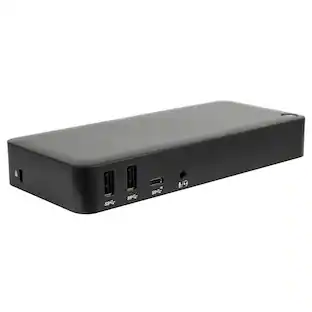
Streamline your on-the-go workspace with the Targus® USB-C® Universal Dual Monitor HD Docking Station with 80W PD Pass-Thru. Its stow-away host cable and compact, lightweight design makes it easy to slip into the pocket of your backpack or luggage, and ensures it doesn't take up valuable working real estate if you're working remotely. A rubber-padded bottom provides grip so the dock stays in one place. Equipped with DisplayLink® technology, this tiny dock offers compatibility with most laptop brands and supports single 2K 2560 x 1440 video or dual HD 2048 x 1152 video via HDMI. Additionally, it comes with a USB-A host adapter so you can use it with new or legacy laptops. This flexible and powerful dock offers multiple ports - an Ethernet port, 1 USB-C port (10 Gbps) and 2 USB-A ports (10 Gbps) - to accommodate your essential accessories like a mouse, keyboard, or hard drive. To top that off, the DOCK116GLZ is the smartest travel dock you'll need to stay connected, powered, and productive while on the road. With 80W power pass-thru**, you can keep your host and other devices charged while connecting your power supply to the dock. Or, simply plug your USB-C dual monitor docking station into the host for the computer to do all the charging - no AC adapter needed.
Features
Innovative Design
A compact, lightweight design makes this USB-C dual monitor docking station ideal for travel and easily fits into the pocket of your backpack. Its tethered stow-away cable management keeps messy wires at bay. For ultimate flexibility, it's host bus-powered or you can connect a USB-C® power adapter to the USB-C dual monitor dock (power adapter not included) to pass-thru and power the host. Perfect for those laptops with only a single
Truly Universal Compatibility
Unlike proprietary docking solutions that lock users into a specific platform, brand, or even model of laptop, this USB-C dual monitor docking station utilises DisplayLink® technology for maximum compatibility. That compatibility eliminates the need to replace it at every laptop refresh, which translates to lower cost of ownership for higher productivity over a longer time. The DOCK116GLZ is compatible with both Windows® and
Supports Dual HDMI Monitors
Create a picture-perfect dual display set-up on both PC and Mac with this USB-C dual monitor docking station. With two HDMI ports available, you can enjoy dual HD (2048 x 1152) displays via HDMI or opt for a single 2K (2560 x 1140) connection.
Connect Your Favourite Accessories
With 2 USB-A ports (10 Gbps) and 1 USB-C® port (10 Gbps), it's simple to add the latest keyboard, external drives, and other peripherals to customise your travel or home workspace experience. More from the Manufacturer
Specifications
- Maximum Number of Displays Supported2Number of DisplayPort Outputs (Total)2
Reviews
This product doesn't have any reviews yet.


Compare similar products

Streamline your on-the-go workspace with the Targus® USB-C® Universal Dual Monitor HD Docking Station with 80W PD Pass-Thru. Its stow-away host cable and compact, lightweight design makes it easy to slip into the pocket of your backpack or luggage, and ensures it doesn't take up valuable working real estate if you're working remotely. A rubber-padded bottom provides grip so the dock stays in one place. Equipped with DisplayLink® technology, this tiny dock offers compatibility with most laptop brands and supports single 2K 2560 x 1440 video or dual HD 2048 x 1152 video via HDMI. Additionally, it comes with a USB-A host adapter so you can use it with new or legacy laptops. This flexible and powerful dock offers multiple ports - an Ethernet port, 1 USB-C port (10 Gbps) and 2 USB-A ports (10 Gbps) - to accommodate your essential accessories like a mouse, keyboard, or hard drive. To top that off, the DOCK116GLZ is the smartest travel dock you'll need to stay connected, powered, and productive while on the road. With 80W power pass-thru**, you can keep your host and other devices charged while connecting your power supply to the dock. Or, simply plug your USB-C dual monitor docking station into the host for the computer to do all the charging - no AC adapter needed.

Streamline your on-the-go workspace with Targus USB-C Universal Dual HD Docking Station with 80W PD Pass-Thru. Its stow-away host cable, compact, lightweight design makes it easy to slip into the pocket of your backpack or luggage, and ensures it doesn’t take up valuable working real estate if you’re working remotely. A rubber-padded bottom provides grip so the dock stays in one place. Equipped with DisplayLink technology, this tiny dock offers compatibility with most laptop brands and supports single 2K 2560 x 1440 video or dual HD 2048 x 1152 video via HDMI. Additionally, it comes with a USB-A host adapter so you can use it with new or legacy laptops.
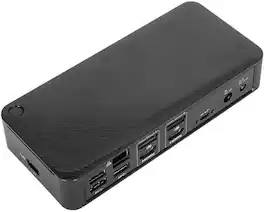
FEATURES Supports single and dual 4K UHD @ 60 Hz video via two DisplayPort 1.2a ports or HDMI 2.0 ports Power Delivery 3.0 up to 100W for USB-C hosts 1 USB 3.2 Gen 2 Type-C (10 Gbps) port 4 USB 3.2 Gen 1 Type-A ports (1 fast charging) 1 Gigabit Ethernet port 1 3.5mm combo Audio In/Out port Integrated lock slot accommodates standard security locks to safeguard equipment 1M USB-C detachable host cable (C/M to C/M) with (C/F to A/M) tethered adapter Compatible with Targus VESA Mounting Bracket (ACX003GLZ, sold separately) Weight: 12.16 oz Height: 7.06" Width : 3.25" Depth 1.25"
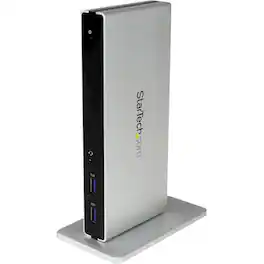
Connect two monitors to your laptop with this DVI dual-monitor docking station. It includes adapters to connect a DVI monitor to HDMI or VGA connections, and the front panel has two USB ports, so you can charge devices without a host connection. Use this DVI dual-monitor docking station horizontally or vertically to suit your setup.
| Pros for Targus - USB-C Universal Dual HD Docking Station with 80W PD Pass-Thru - for Keyboard, Mouse, Hard Drive, Monitor | |||
|---|---|---|---|
| There were no pros for this product— | Overall Performance, Connectivity, Portability, Port Quantity | There were no pros for this product— | There were no pros for this product— |
Specs
Be the first to ask a question.
We’ll try to get your question answered within 24 hours by a Best Buy customer or brand representative.
Find more like this


Customers ultimately bought
Targus USB-C Universal Dual HD Docking Station with 80W PD Pass-Thru
Clearance$34.99The price was $69.99Dell SD25TB4 Pro 13-in-1 Quad Display Thunderbolt 4 Smart Docking Station
$229.00The price was $333.99
Explore tech essentials Sponsored
Keep exploring
Dockztorm 11-in-1 Steam Deck Dock with 4K@120Hz HDMI, 140W PD Charging, Compatible with Steam Deck, ROG Ally, Legion Go, MSI Claw
Holiday Deal$49.99The price was $59.99Minisforum DEG1 eGPU Dock, OCuLink 4i PCIe 4.0x4, ATX/SFX PSU, PCIe x16 GPU, Signal Amplifier, Follow Startup
$119.00The price was $139.00Dell SD25TB4 Pro 13-in-1 Quad Display Thunderbolt 4 Smart Docking Station
$229.00The price was $333.99Dell D6000 Universal Laptop Dock – USB-C & USB-A, 65W Power Delivery, 3 Monitors
$219.89The price was $249.99Dockztorm 11-in-1 RGB Docking Station for ROG Xbox Ally, ROG Ally X, ROG Ally, Steam Deck (OLED), Legion Go, MSI Claw
Holiday Deal$49.99The price was $59.99