Everything for Back to School — and then someShop now

Skip to contentGo to Product Search
Main Content

Wacom - ExpressKey Remote - Black, Grey

Model: ACK411050
SKU: 12562406
Sold & shipped by

About this product

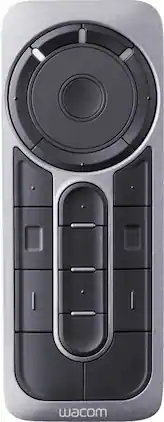
Access different pen display functions quickly with this Wacom ExpressKey remote. Its 17 customizable buttons let you assign multiple shortcuts for your most-used modes, settings, clicks, keystrokes and creative software application tools. Use this versatile Wacom ExpressKey remote with a compatible Cintiq Pro, MobileStudio Pro or Intuos Pro pen display.

Features
  • Compatible with select Wacom pen devices

    Including Wacom Cintiq Pro or Cintiq pen displays, Wacom Mobile Studio Pro or Cintiq Companion Pen computers, and Wacom Intuos Pro pen tablets.

  • 17 customizable buttons

    Along with a touch ring, allow instant one-touch access to time-saving shortcuts in all your favorite creative applications.

  • Optimize your workflow

    Connect up to five remotes at a time - one for each of your creative software applications.

  • Wireless connectivity

    Place remote anywhere it's convenient while drawing - on screen, in your hand or beside your keyboard.

See all features
Specifications
  • Remote Control Type
    Programmable
    Number Of Devices Controlled
    1
Sponsored

Reviews

Customer Images

The vast majority of our reviews come from verified purchases. Reviews from customers may include My Best Buy members, employees, and Tech Insider Network members (as tagged). Select reviewers may receive discounted products, promotional considerations or entries into drawings for honest, helpful reviews.

  • Rated 5 out of 5 stars

    Wacom wireless key remote

    I was a bit scared to buy this, since I was so used to using built in express-keys, and I was afraid of connectivity issues. But, after I got this in, I didn't run into much trouble, really; things didn't feel as different as I thought they would, and actually they felt much better. I used to only have 4 keys, but now I have a whole host of keybinds to work with - not to mention on-screen keybinds, as well. There is really only one issue with this - hence the four stars: the radial at the top. It isn't nearly as responsive as it could be; most of the time, it just won't even work for me. And on the occasion it does, it is a bit choppy - not nearly as smooth as it could be.

    This review is from Wacom - ExpressKey Remote - Black, Grey

    Posted by Wacom

  • Rated 2 out of 5 stars

    One Way to do it.

    A hotkey remote seems like a must have for a drawing tablet user. This one is pretty good but their are a few issues. The touch dial is way to fast for any use I can find; even set to the least sensitive available. It is set up for undo/redo in some software and you can watch your work disappear and reappear right before your very eyes! Moving one reasonable step forward or backwards whether it be undo/redo or assigned to zooming is futile and makes the dial useless until I find a function that requires lightspeed. A Wacom representative was aware of it's finicky attributes telling me directly that it would not be good for those functions; which it was obviously over-designed for. Another issue is that within the Wacom Tablet properties I get duplicate applications showing up randomly that can interfere; they can be duplicated and they can re-appear sometimes leaqving doubt as to which one is to be used to assign keys in. Also after assigning hotkeys, upon returning to the properties where there is a diagram depicting hot key assignments, the labels will often revert to default. They may continue to maintain their assigned functions but you must reassign them for the labels to accurately reflect the function chosen and description you made the effort to type in the first place. This can make it difficult when first learning your own assignment, lol; or when returning to assign new keys and make adjustments but the whole thing is a default facade. The express key feels easier to use when stuck to the tablet and is otherwise to tall to use without shuffling it around in your hand playing a game of hand twister to reach some of the buttons. Sadly the remote does not stick to the bottom bezel which can be the left side of the screen when physically rotating into a portrait position, a real shame. I ordered one of these not realizing it came with the CintiQ Pro24 and I will be returning the second one after following the reps suggestions to try a few things on it; a great open box buy that I would recommend! I was looking forward to keeping it but I can see that I would rather try to find something better. I am 100% confident I could have designed something better with a technical team to help flesh out my ambitions and certainly cannot excuse the horrible touch wheel. I can say right now that should have been mechanical doubling as a fourway and the middle button should have been a clickable smooth scrolling wheel with left and right switches.

    This review is from Wacom - ExpressKey Remote - Black, Grey

    Posted by BELIEVE

  • Rated 3 out of 5 stars

    Meh

    This thing is very temperamental when it doesn’t want to work. Have to keep it charging all the time jic if it doesn’t keep the charge even if it’s off If the remote isn’t close to the Bluetooth connector that it will shut off about 2-3 secs after you turned it on cause it won’t connect. And when I say that I mean 9-12 counts as too far. I had to get a usb extender so the thing would actually work.

    This review is from Wacom - ExpressKey Remote - Black, Grey

    Posted by Butters

  • Rated 5 out of 5 stars

    Allows for great control on tablets without touch

    Great for additional functionality from tablets that don't have touch controls. Great for use on Fresco. Mainly use it for the wheel function, but soon will start learning some of the other many button shortcuts. Back padding makes for good no-slip grip on tablet or tabletop surface. It is pricey, but a nice addition.

    This review is from Wacom - ExpressKey Remote - Black, Grey

    Posted by Rivithed

  • Rated 5 out of 5 stars

    Good remote companion to the cintiq

    Paired this remote with the Cintiq 22, and it's been a great way to quickly access short cut keys when I don't have access to my keyboard. It takes a little to get used to, especially the scroll wheel, but it's helped make my workflow more efficient when drawing.

    This review is from Wacom - ExpressKey Remote - Black, Grey

    Posted by Artsytech

Compare similar products

Wacom - ExpressKey Remote - Black, Grey
3.9(30)

Access different pen display functions quickly with this Wacom ExpressKey remote. Its 17 customizable buttons let you assign multiple shortcuts for your most-used modes, settings, clicks, keystrokes and creative software application tools. Use this versatile Wacom ExpressKey remote with a compatible Cintiq Pro, MobileStudio Pro or Intuos Pro pen display.

Canon - Wireless Remote - Black

Easily control your Canon digital SLR camera with this wireless remote that requires a CR2032 lithium battery (included) for long-lasting use.

BOOX - Tappy Wireless Page Turner

Experience a more immersive and comfortable reading journey with the BOOX Tappy. Designed to act as a natural extension of your hand, this wireless page turner allows you to flip through chapters, scroll through documents, or control multimedia without ever needing to touch your screen. Whether you're settled into a chair or have your device mounted on a stand, Tappy keeps you in your flow.

Westcott - FJ-X3 S Wireless Flash Trigger with Sony Camera Mount

2.4GHz wireless trigger for FJ wireless flash system. Compatible with many Sony cameras. Includes removable lithium-ion battery and user-friendly interface.

Specs

Questions & Answers
  • Does it work with a one

    Yes, it will work nicely with the Wacom One.

    Answered by Wacom
    Wacom response
  • What type of battery does the remote use?

    This remote uses a Lithium-ion battery.

    This question and answer was generated by AI based on customer and product data.
  • Is the battery in the Wacom ExpressKey Remote rechargeable?

    Yes, the Lithium-ion battery in this remote is rechargeable.

    This question and answer was generated by AI based on customer and product data.
  • Is the Wacom ExpressKey Remote wireless?

    Yes, it connects wirelessly, so you can place it wherever is most convenient.

    This question and answer was generated by AI based on customer and product data.
  • How many buttons does the Wacom ExpressKey Remote have?

    This remote has 17 customizable buttons and a touch ring.

    This question and answer was generated by AI based on customer and product data.
Ask a question
No content
Sponsored
Ask BlueAI

Finance Options

My Best Buy® Credit Card
Buy Now, Pay Later

Finance Options

My Best Buy® Credit Card
Buy Now, Pay Later