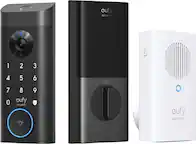
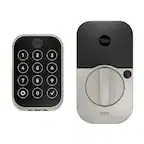
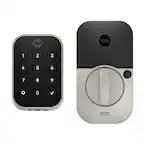
Yale - Smart Lock Conversion Kit – Works with Existing Deadbolt & Keys | Wi-Fi & Fingerprint Keypad Access - Black Suede
FREE shipping to
Related Item

Highlights
- Key Specs
- Color Finish: Black
- Lock/Unlock Mechanism: App, Keypad (There are several technologies used by smart locks to manage access, such as biometrics, Bluetooth, or NFC. Some locks allow codes to be entered via a keypad or touchscreen; digital keys can often be sent to multiple authorized devices or temporarily shared with guests.)
- Power Source: Battery-powered
- Installation Type: Retrofit
- Wireless Connectivity: Wi-Fi (The manner in which a device sends data to another device over a short distance without the use of wires or cables.)
- General
- Brand: Yale
- Model Number: B-YRR110-F-WF1-N-BSP
- Product Name: Smart Lock Conversion Kit – Works with Existing Deadbolt & Keys | Wi-Fi & Fingerprint Keypad Access
- Color: Black Suede
- Color Finish: Black
- Features
- Lock/Unlock Mechanism: App, Keypad (There are several technologies used by smart locks to manage access, such as biometrics, Bluetooth, or NFC. Some locks allow codes to be entered via a keypad or touchscreen; digital keys can often be sent to multiple authorized devices or temporarily shared with guests.)
- Auto Unlock: true (Locks with this feature automatically unlock when certain conditions are met, such as coming within range of a home wireless network or when activated via a mobile app.)
- Unlock Notifications: true
- Shareable Keys: true (This feature allows a single key to be shared with multiple users or authorized devices.)
- Power
- Power Source: Battery-powered
- Rechargeable Battery: true
- Battery Chemistry: Alkaline
- Compatibility
- Installation Type: Retrofit
- App Compatible: true (The product can be connected to a program or software application on a mobile device, which then receives collected data from the product.)
- Wireless Connectivity: Wi-Fi (The manner in which a device sends data to another device over a short distance without the use of wires or cables.)
- Operating System Compatibility: Apple iOS, Android
- Works With: Amazon Alexa, Hue (Compatible with or able to be connected to other smart devices or applications.)
- Warranty
- Warranty - Parts: 1 Year - Electronics
- Warranty - Labor: Unlimited
- Other
- UPC: 081023135689
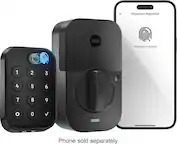
Let Yale welcome you home with it’s very first retrofit biometric smart lock: the Yale Approach Lock with Wi-Fi + Keypad. This discreet, interior-only lock installs over your existing deadbolt and lets you keep your keys, while the keypad can be placed anywhere within Bluetooth(R) range- so you're effortlessly enhancing your door without changing a thing about it. Thanks to the biometric keypad, enjoy an extra layer of convenience and security and enter your home with just a simple touch of your finger. With multiple ways to lock your door- including Auto-Lock with Doorsense and One-Touch Locking, and the ability to easily track who comes and goes using the Yale Access App, rest easy knowing your home is secure at all times.
- The Perfect Touch: Enhance your door without altering a single detail. Your lock installs on the inside of your door and comes with a biometric keypad that can be placed anywhere within Bluetooth(R) range of your lock.
- Unlock with your fingerprint: Your fingerprint is now the unique key you'll never lose. Simply use the fingerprint scanner to unlock the door in less than 0.5 seconds with 99% accuracy for ultimate convenience.
- Effortless install: The lock is compatible with most single-cylinder deadbolts and the keypad installs with the included adhesive pad or screw mounting options- no complicated wiring or power tools needed. Will not operate outside the US and Canada.
- Multiple ways to unlock: Enjoy secure access for guests and offer fingerprint touch, keypad codes, optional Auto-Unlock, a backup key, or share virtual keys on the Yale Access app.
- Lose your keys: Enjoy secure, keyless, and trackable access with friends, family, vacation rental guests, and more by creating customizable entry codes- so you never have to hide a key again.
- Stay in control: Keep 24/7 control over your door by tracking who comes and goes and remotely managing access to your door through the Yale Access app's Activity Feed.
- One less thing to worry about: Enjoy ultimate peace of mind thanks to Auto-Lock with DoorSense, and know that your door is always locked behind you.
- Hands-free access: For those moments when your hands are full, your lock Auto-Unlocks- so you can walk right into your home without touching your lock or phone.
- Lock with one touch: Lock your door in just a quick touch with convenient One-Touch Locking.
- Easy entry, no matter the hour: Backlit buttons can be read at all times, even in the dark, and you won’t have to worry about the numbers fading away.
- Secure access at your fingertips: Your fingerprint is the fastest, most secure key to your home that can never be lost or replicated.
Whats Included
- Yale Approach Lock
- Yale Connect Bridge
- Yale Keypad Touch (Fingerprint)
- Door Sense
- Batteries
- Screws
- Adaptors
- Quick Start Guide
Q: Do I have to have Wi-Fi to operate this lock?
A: Thank you for your question. You can use it as a standard Bluetooth connection with the App or the keypad alone also. If you have additional questions, please reach out to [email protected] or +1-855-213-584.
Q: Will this lock work with a M3-Medeco deadbolt?
A: Thank you for your question. Unfortunately, it's not compatible with MC-Medeco deadbolts. If you have additional questions please reach out to our support team at [email protected] or call 855.213.5841.
Q: Can the lock resist external damage? Like a hammer blow?
A: undefined
Q: When will you have SimpliSafe smart locks?
A: Thank you for your question. Unfortunately, it is unknown how soon we'll manufacture this. We appreciate your understanding.
Compare similar products

Let Yale welcome you home with it’s very first retrofit biometric smart lock: the Yale Approach Lock with Wi-Fi + Keypad. This discreet, interior-only lock installs over your existing deadbolt and lets you keep your keys, while the keypad can be placed anywhere within Bluetooth(R) range- so you're effortlessly enhancing your door without changing a thing about it. Thanks to the biometric keypad, enjoy an extra layer of convenience and security and enter your home with just a simple touch of your finger. With multiple ways to lock your door- including Auto-Lock with Doorsense and One-Touch Locking, and the ability to easily track who comes and goes using the Yale Access App, rest easy knowing your home is secure at all times.

Upgrade your home security with the TP-Link Smart Door Lock — the perfect blend of convenience, control, and peace of mind. Keypad entry or the Tapo app, and manage access from anywhere with remote locking and real-time alerts. With advanced encryption, tamper detection, and auto-lock features, you get enhanced security without sacrificing ease of use. Whether you're home or away, TP-Link puts smarter, safer access at your fingertips.

YALE ASSURE LOCK 2 TOUCH. A LOCK AS UNIQUE AS YOU. Make coming home more seamless than ever with the Yale Assure Lock 2 Touch. Thanks to the new biometric keypad, a simple touch of your finger is all it takes. Explore multiple ways to access your home including your fingerprint, entry code on the keypad, hands-free Auto-Unlock, or using the app on your phone (at the door only). For added peace of mind, never worry about locking the door behind you with advanced Auto-Lock and DoorSense. The Yale Assure Lock 2 Touch can be upgraded with a Wi-F Smart Module whenever you’re ready, so unlike other smart locks, you won’t have to buy a new one if your smart home needs change.

YALE ASSURE LOCK 2 TOUCH. A LOCK AS UNIQUE AS YOU. Make coming home more seamless than ever with the Yale Assure Lock 2 Touch. Thanks to the new biometric keypad, a simple touch of your finger is all it takes. Explore multiple ways to access your home including your fingerprint, entry code on the keypad, hands-free Auto-Unlock, or using the app on your phone (at the door only). For added peace of mind, never worry about locking the door behind you with advanced Auto-Lock and DoorSense. The Yale Assure Lock 2 Touch can be upgraded with a Wi-Fi Smart Module whenever you’re ready, so unlike other smart locks, you won’t have to buy a new one if your smart home needs change.
| Pros for Yale - Smart Lock Conversion Kit – Works with Existing Deadbolt & Keys | Wi-Fi & Fingerprint Keypad Access - Black Suede | |||
|---|---|---|---|
| Battery Life, Installation, Keypad, Ease of use, Auto Lock | Installation Ease, Battery Life, Overall Performance, Connectivity, Button Layout | There were no pros for this product— | Installation Ease, Fingerprint Reader, Build Quality, Door Detection, Appearance |
| Cons for Yale - Smart Lock Conversion Kit – Works with Existing Deadbolt & Keys | Wi-Fi & Fingerprint Keypad Access - Black Suede | |||
| Fingerprint Reader, App | There were no cons for this product— | There were no cons for this product— | Connectivity |
Specs
- SimpliSafe - 7pc Indoor Security System - White$129.99$229.99
- SimpliSafe - 8pc Outdoor Home Security System - White$249.99$349.99
- SimpliSafe - 9pc Outdoor Home Security System - White$299.99$449.99


Reviews
Customers are saying
Customers are pleased with the Approach Smart Lock's easy installation and reliable keypad, citing positive experiences with setup and functionality. However, some users found the fingerprint reader unreliable and the app somewhat challenging to navigate. The auto-lock feature and long battery life were also frequently praised. Concerns were raised about the app's occasional connectivity issues and the fingerprint reader's accuracy.
Customer Images
The vast majority of our reviews come from verified purchases. Reviews from customers may include My Best Buy members, employees, and Tech Insider Network members (as tagged). Select reviewers may receive discounted products, promotional considerations or entries into drawings for honest, helpful reviews.
- Rated 5 out of 5 stars
Best retrofit apartment smart lock!!
This is by far the best product I’ve purchased ever. I live in an apartment and it was the best option to convert to a smart lock that’s available. The product is retrofit so I didn’t have to change the key and maintenance can still come and go as needed. It was super easy to install. The directions were very clear. I purchased this lock because I have a teenager who can’t seem to keep up with his key, I love that you can unlock the door with the keypad or it will automatically lock when you get near it. Although I will say the automatic unlock function is not suitable because it only gives you an option to unlock the door when you’re about a mile away and the app doesn’t quite support the unlock feature and map tool. I love that I can set unlimited code to give to friends and family, and I can also disable those codes when I don’t want those people to have access to my house. It’s also very convenient that I can check when the door is locked or unlocked or if my kid forgot to close the door all the way which sometimes happens, there’s an automatic lock feature where you can set the door to lock a minute after it closes, which is super convenient. I love the option to have a fingerprint sensor, although it will only support one fingerprint instead of multiple fingerprints from different people, I am super happy I invested in this product. It was super easy to set up as a directions and instructions were very clear and straightforward not to mention that the app gives you step-by-step directions along with pictures and videos. I love the option of also using my Alexa to be able to lock and unlock the door when unlocking the door with Alexa it requires a pin code to unlock so the door just can’t be unlocked by anyone who has access to your Alexa.I highly recommend this product as it has been a game changer to my smart home.
Posted by Neeko
- Rated 5 out of 5 stars
The Best Lock for Renters
This is by far the best purchase I’ve made for my apartment. While the initial setup might require repeating a few steps to get everything configured correctly, once it’s done the lock works flawlessly. The standout feature for me is Auto Unlock—it’s incredibly convenient. As soon as I’m within Wi-Fi range, the lock automatically unlocks, saving me the hassle of fumbling with keys or pulling out my phone. It feels seamless and makes coming home much easier. If you’re a renter looking for a reliable and renter-friendly smart lock, I highly recommend this one. It combines ease of use with smart convenience that truly makes everyday life better.
This review is from Yale - Smart Lock Conversion Kit – Works with Existing Deadbolt & Keys | Wi-Fi & Fingerprint Keypad Access - Silver
Posted by Vineeth
- Rated 4 out of 5 stars
Best Fit For Guest Use
The Yale Approach Smart Lock Kit is an extremely high-tech way of securing your entryway! Inside the kit includes the deadbolt locking mechanism itself and a smart-hub that connects to the Number/Fingerprint Keypad for door access from the outside if you do not have access via the Yale Access App. All parts are battery powered as well, so there are no cables connected to any parts in this kit. All parts of the kit, including the matte black deadbolt, keypad and smart-hub, are also very high quality and well made! This is something that is easy to recommend for anyone looking to share access to their apartment/condo without having to provide keys! The deadbolt mechanism was super easy to retrofit onto my door with no prior knowledge of how to install a lock on a door. Pairing with the Yale Access app, an extremely useful must-have if you are the “admin” (aka owner) of the lock (and has many useful settings to explore, like auto-locking, entry notifications, location sensing unlock, etc.), you will be guided through an extremely easy setup process. There is also a small component that is optional to be mounted on the side of the door frame next to the deadbolt lock during the setup process to help the lock indicate if the door is open or not, which I found works pretty well as a peace-of-mind feature for when I’m away! I personally did not need to screw my component into the door frame; the adhesive has worked perfectly! The keypad is also extremely easy to set up, pair and mount outside your door. It works very seamlessly to register a fingerprint or new number combination for the keypad via the Yale Access app, but as a comment on the app, it isn’t the most intuitive app I’ve used for smart home-related devices. It was a bit confusing trying to find the proper place to reset the number code on the keypad, and might require a bit of digging through the app to find the right settings. The app informs me sometimes too that it has issues detecting if my door is actually locked or not, so now I unfortunately don’t have full trust in it being synced at any given time if I’m not near my home and were to trigger a lock/unlock via the app. This is usually caused when I manually lock or unlock the door, and the lock for some reason cannot detect its open or closed state. Overall though, the app is simple to use once everything is set up and the app works so long as the batteries in the deadbolt are on! With my experiences in mind, I personally don’t feel comfortable leaving the house without a physical key with this product, and maybe it’s out of an abundance of caution just to be sure that I won’t be locked out upon the batteries dying unexpectedly (which also ultimately defeats the purpose of the lock for myself), but still, if using in a guest-centric scenario with only the keypad, this kit is a great way for others to be able to securely enter when I’m not present, a purpose it serves best!
Posted by RAM2060