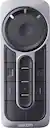
Wacom - ExpressKey Remote - Black, Grey
Related Item

About This Item
- Key Specs
- Remote Control Type: Programmable
- Number Of Devices Controlled: 1
- General
- Brand: Wacom
- Model Number: ACK411050
- Product Name: ExpressKey Remote
- Color: Black, Grey
- Features
- Remote Control Type: Programmable
- Number of Buttons: 17
- Connectivity
- Number Of Devices Controlled: 1
- Wireless: true
- Compatibility
- Brand Compatibility: Wacom
- Model Compatibility: Wacom Cintiq DTK2700, DTH2700, DTK2200, DTH2200, DTH1620, DTH1320, DTH1300, DTHA1300, DTHW1310; Cintiq Pro DTH1320, DTH1620; MobileStudio Pro DTHW1320, DTHW1620; Intuos Pro PTH660, PTH860, PTH451, PTH651, PTH851
- Power
- Rechargeable: true
- Battery Chemistry: Lithium-ion
- Dimensions
- Product Weight: 0.6 ounces (The out of box weight of the item.)
- Warranty
- Warranty - Parts: 1 year
- Warranty - Labor: 1 year
- Other
- UPC: 753218989765
Access different pen display functions quickly with this Wacom ExpressKey remote. Its 17 customizable buttons let you assign multiple shortcuts for your most-used modes, settings, clicks, keystrokes and creative software application tools. Use this versatile Wacom ExpressKey remote with a compatible Cintiq Pro, MobileStudio Pro or Intuos Pro pen display.
- Compatible with select Wacom pen devices: Including Wacom Cintiq Pro or Cintiq pen displays, Wacom Mobile Studio Pro or Cintiq Companion Pen computers, and Wacom Intuos Pro pen tablets.
- 17 customizable buttons: Along with a touch ring, allow instant one-touch access to time-saving shortcuts in all your favorite creative applications.
- Optimize your workflow: Connect up to five remotes at a time - one for each of your creative software applications.
- Wireless connectivity: Place remote anywhere it's convenient while drawing - on screen, in your hand or beside your keyboard.
- Compatible with select Wacom pen devices: Including Wacom Cintiq Pro or Cintiq pen displays, Wacom Mobile Studio Pro or Cintiq Companion Pen computers, and Wacom Intuos Pro pen tablets.
- 17 customizable buttons: Along with a touch ring, allow instant one-touch access to time-saving shortcuts in all your favorite creative applications.
- Optimize your workflow: Connect up to five remotes at a time - one for each of your creative software applications.
- Wireless connectivity: Place remote anywhere it's convenient while drawing - on screen, in your hand or beside your keyboard.
- Compatible with select Wacom pen devices: Including Wacom Cintiq Pro or Cintiq pen displays, Wacom Mobile Studio Pro or Cintiq Companion Pen computers, and Wacom Intuos Pro pen tablets.
- 17 customizable buttons: Along with a touch ring, allow instant one-touch access to time-saving shortcuts in all your favorite creative applications.
- Optimize your workflow: Connect up to five remotes at a time - one for each of your creative software applications.
- Wireless connectivity: Place remote anywhere it's convenient while drawing - on screen, in your hand or beside your keyboard.
Whats Included
- Wacom ExpressKey Remote
- Micro-USB cable
- Wireless receiver
- Owner's manual
- Wacom ExpressKey Remote
- Micro-USB cable
- Wireless receiver
- Owner's manual
- Wacom ExpressKey Remote
- Micro-USB cable
- Wireless receiver
- Owner's manual
Q: What type of battery does the remote use?
A: This remote uses a Lithium-ion battery.
Q: Is the battery in the Wacom ExpressKey Remote rechargeable?
A: Yes, the Lithium-ion battery in this remote is rechargeable.
Q: Is the Wacom ExpressKey Remote wireless?
A: Yes, it connects wirelessly, so you can place it wherever is most convenient.
Q: How many buttons does the Wacom ExpressKey Remote have?
A: This remote has 17 customizable buttons and a touch ring.
Q: What devices are compatible with this remote?
A: This remote is compatible with select Wacom pen devices, including Cintiq Pro or Cintiq pen displays, Mobile Studio Pro or Cintiq Companion Pen computers, and Intuos Pro pen tablets.
A: Yes, it will work nicely with the Wacom One.
Q: Will this combine use for a Sony smart tv and dvd player
A: undefined
Reviews
Customer Images
Compare similar products
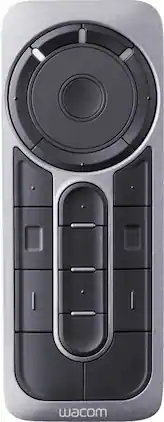
Access different pen display functions quickly with this Wacom ExpressKey remote. Its 17 customizable buttons let you assign multiple shortcuts for your most-used modes, settings, clicks, keystrokes and creative software application tools. Use this versatile Wacom ExpressKey remote with a compatible Cintiq Pro, MobileStudio Pro or Intuos Pro pen display.

Get creative with this Wacom Pen 4K stylus. It's highly pressure-sensitive for accurate drawing on a compatible Intuos pen tablet, and it has a programmable side switch for quick access to your favorite functions. This Wacom Pen 4K stylus is wireless and battery-free, so you can use it for hours without recharging.

With 4096 levels of pressure sensitivity and tilt recognition, this cordless, battery-free pen features Wacom’s EMR technology. Seize control and streamline your workflow with the pen buttons, effortlessly accessing your favorite keyboard shortcuts when writing, drawing, and bringing your visions to life. Tailor the pen to reflect your unique style by customizing the back with a range of color and clip options. The Wacom One Pen works with both the Wacom One 12 (DTC121W) and Wacom One 13 touch (DTH134W) as well as Wacom One tablet Small (CTC4110WL) and Wacom One tablet Medium (CTC6110WL).

Sketch with speed on Wacom Intuos Pro Paper Edition (PTH-660P, PTH-860P) or Wacom Intuos Pro (PTH-660, PTH-860) with the new Wacom Ballpoint Pen. With 8,192 pressure levels, the 1.0 mm nib and long-lasting black oil ink cartridge give you the freedom to work just as you would with a regular pen. When used with the Wacom Intuos Pro Paper Editon (Medium or Large) or Wacom Intuos Pro (Medium or Large) and Wacom Paper Clip, the tablet can capture every stroke digitally while you draw. Three refills come as standard. Wacom Ballpoint BP 1.0 refills" must be used to replace the gel ink cartridge. Compatible with: Wacom Intuos Pro PTH-660, PTH-860.