Samsung - Galaxy Tab A9+ 11" 256GB - Wi-Fi - Graphite
Total Storage Capacity
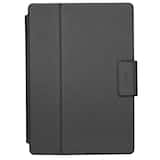
256GB- Targus - Safe Fit Universal 9-10.5” 360 Rotating Tablet Case (including Samsung A9+) - Black$44.99
More Buying Options

Highlights
- Key Specs
- Screen Size: 11 inches (Size of the screen, measured diagonally from corner to corner.)
- Screen Resolution: 1920 x 1200 (Screens come in a range of resolutions (measured in pixels, horizontal x vertical). The higher the resolution, the greater the picture quality.)
- Processor Model: Qualcomm Snapdragon 695 (SM6375) (Your computer's processor is like its brain. Working in combination with system memory, the power of the processor determines the complexity of software you can run, how many programs you can have open at the same time, and how fast those programs will run. Most computers feature an AMD, Intel or Snapdragon processor.)
- Total Storage Capacity: 256 gigabytes
- Operating System: Android 13 (The operating system manages all software and hardware, including files, memory and connected devices. Most importantly, it lets you interact with your device and your programs in a visual way; otherwise, you'd be typing computer code to get anything done.)
- Voice Assistant Built-in: No (A digital assistant built into the device that uses voice commands to answer questions and control smart devices.)
- Works With: Amazon Alexa, Google Home, Nest, Ring, SmartThings (Compatible with or able to be connected to other smart devices or applications.)
- Wireless Connectivity: Bluetooth, Wi-Fi (The manner in which a device sends data to another device over a short distance without the use of wires or cables.)
- Battery Chemistry: Lithium-ion
- 2-in-1 Design: false (A laptop and a tablet combined in one lightweight, portable device. Sometimes referred to as "convertible" or "hybrid" laptops, these devices deliver the processing power and keyboard of a laptop. When you're ready to play, either detach the screen or fold your 2-in-1 into tablet mode to comfortably watch movies, play games, read an e-book and more.)
- Security Features: Facial recognition
- General
- Brand: Samsung
- Model Number: SM-X210NZAIXAR
- Product Name: Galaxy Tab A9+ 11" 256GB - Wi-Fi
- Color: Graphite
- Model Family: Samsung Galaxy Tab A9+
- Year of Release: 2024
- Display
- Display Type: LCD
- Screen Size: 11 inches (Size of the screen, measured diagonally from corner to corner.)
- Screen Resolution: 1920 x 1200 (Screens come in a range of resolutions (measured in pixels, horizontal x vertical). The higher the resolution, the greater the picture quality.)
- High Dynamic Range (HDR): false (An HDR-compatible 4K TV or other HDR-compatible product displays HDR video content when it's available from sources like 4K Ultra HD Blu-ray Discs and 4K streaming services.)
- Processor
- Processor Brand: Snapdragon
- Processor Model: Qualcomm Snapdragon 695 (SM6375) (Your computer's processor is like its brain. Working in combination with system memory, the power of the processor determines the complexity of software you can run, how many programs you can have open at the same time, and how fast those programs will run. Most computers feature an AMD, Intel or Snapdragon processor.)
- Storage
- Total Storage Capacity: 256 gigabytes
- Memory
- System Memory (RAM): 8 gigabytes (Random-access memory (RAM) is a computing device's short-term data storage, which allows active information to be accessed quickly. The size and type of RAM determines how efficiently the device can handle large amounts of information at one time. For example, gaming or video editing requires more RAM for optimal performance.)
- Compatibility
- Operating System: Android 13 (The operating system manages all software and hardware, including files, memory and connected devices. Most importantly, it lets you interact with your device and your programs in a visual way; otherwise, you'd be typing computer code to get anything done.)
- Operating System Compatibility: Android
- Voice Assistant Built-in: No (A digital assistant built into the device that uses voice commands to answer questions and control smart devices.)
- Works With: Amazon Alexa, Google Home, Nest, Ring, SmartThings (Compatible with or able to be connected to other smart devices or applications.)
- Connectivity
- Display Connector(s): No external display connection (The number and type of connectors used to connect to an external display.)
- Wireless Connectivity: Bluetooth, Wi-Fi (The manner in which a device sends data to another device over a short distance without the use of wires or cables.)
- Network Connectivity: None (The manner in which a device sends data to another device over a long distance using a cellular network.)
- Headphone Jack: true (The device features an interface that allows for the connection of headphones.)
- Bluetooth Version: 5.1 (The Bluetooth specification formalized by the Bluetooth Special Interest Group. All versions of the Bluetooth standard are backwards compatible with previous versions.)
- Number of USB Ports (Total): 1
- Data Plan Required: false
- Power
- Power Supply Input: USB-C
- Charging Interface(s): USB-C (The connection for transmitting power to charge the device.)
- Battery Capacity: 7040 milliampere hours (The amount of energy stored in the battery.)
- Battery Chemistry: Lithium-ion
- Camera
- Front-Facing Camera: true
- Front Facing Camera Megapixels: 5 megapixels (The more megapixels, the more detail that the camera facing the user can capture.)
- Rear-Facing Camera: true
- Rear Facing Camera Megapixels: 8 megapixels (The more megapixels, the more detail that the camera facing away from the user can capture.)
- Features
- 2-in-1 Design: false (A laptop and a tablet combined in one lightweight, portable device. Sometimes referred to as "convertible" or "hybrid" laptops, these devices deliver the processing power and keyboard of a laptop. When you're ready to play, either detach the screen or fold your 2-in-1 into tablet mode to comfortably watch movies, play games, read an e-book and more.)
- Security Features: Facial recognition
- Dimensions
- Product Height: 10.12 inches (The out of box height of the item. Height is measured as the vertical distance from the bottom of the item to the top as it would be primarily used or placed.)
- Product Width: 6.64 inches (The out of box width of the item. Width is measured as the horizontal distance from one side of the item to the other as it would be primarily used or placed.)
- Product Depth: 0.27 inches (The out of box depth of the item. Depth is measured as the distance from the front of the item to the back as it would be primarily used or placed.)
- Product Weight: 16.96 ounces (The out of box weight of the item.)
- Included
- Stylus Included: false
- Warranty
- Warranty - Parts: 1 year
- Warranty - Labor: 1 year
- Other
- UPC: 887276894737
Meet your go to device for on the go family fun Galaxy Tab A9+. A bright, engaging 11" screen is perfect for every family member to do what they love. Whether they’re enjoying a show, unwinding with a game or catching up on schoolwork or day to day tasks, an upgraded chipset makes every experience feel smooth and easy. You can even open multiple apps at the same time and get all your everyday tasks done quickly. Use it for hours without worrying about power, and keep everything you love together with plenty of storage space. Plus, the preloaded Samsung Kids app provides a safe digital environment for your little ones to happily learn and play. Give your family a great all in one Tab that perfectly meets all their everyday needs without taking a bite out of your wallet Galaxy Tab A9+.
- Big screen. Family sized fun.: Bring fun home to everyone with a bright, engaging 11" screen.¹ A refresh rate of up to 90Hz makes every experience feel smooth it’s great for videos, games or fun time for the kids.
- Rich sound all around: Your music. Your shows. Your games. Hear them all loud and clear, thanks to quad speakers powered by Dolby Atmos. Galaxy Tab A9+ delivers a cinema like audio experience your ears will love.
- Power for all you do. Storage for all you love.: Galaxy Tab A9+ gives everyone in the family the performance they need for all the things they love to do. Knock out daily tasks and then unwind with a movie or game the upgraded chipset makes it easy to keep up with everyone’s favorite pastimes.
- See and use multiple apps at once: Open multiple apps⁴ at once with Galaxy Tab A9+ and accomplish more seamlessly. Bounce between the things you need to do like a multitasking pro browse on the internet, check your email and jot down your notes all on one screen .
- Loved by kids. Trusted by parents.: Give your kids a safe place to learn and play with the Samsung Kids app⁵. Kids will love a wide variety of playful, colorful content that keeps them entertained while stimulating their young minds.
- Slim. Light. Durable.: Carry your Tab easily with a slim, light design that’s also durable. Galaxy Tab A9+ is the perfect blend of performance and portability to help you bring the fun with you wherever you go.
- Send files in a flash: Sharing files with family members has never been easier with Quick Share. Select the file you want to share on your device from a video clip to a photo of your favorite cat. Then easily transfer the file to another device whether it’s Android or iOS.
- Take it to the big screen: With Smart View, you get to experience your favorite videos exactly how you want. Looking to see more detail on that sports clip or cooking video you’re watching on your Tab? Cast it to your Samsung TV and experience the thrills on your TV screen.
- Keep the conversation going: With Galaxy, it’s easy to stay connected to family and friends. Pick up a call or return a text from your Tab⁶, even if your phone is in the next room.
- The best tablet screen needs the best content.: Get 3 months of Peacock Premium at no extra cost on your new Galaxy device. Terms apply.*
Whats Included
- Galaxy Tab A9+ Tablet
- Data Cable
- Quick Start Guide
Disclaimers
- ¹Measured diagonally, the Galaxy Tab A9+ screen size is 11.0" in the full rectangle and 10.9" accounting for the rounded corners. Actual viewable area is less due to the rounded corners.
- ²Portion of storage / memory occupied by existing content.
- ³MicroSD card sold separately.
- ⁴Certain applications may not support Multi Active Windows use.
- ⁵Samsung Kids app comes preloaded on Galaxy Tab A9+.
- ⁶Requires devices to have One UI 2.5 or later. Devices must be logged in to the same Samsung account and be on the same Wi Fi network.
- *This Peacock promotional offer (the “Offer”) grants you access to Peacock’s ad-supported video on demand offering currently branded as Peacock Premium (“Peacock Premium”) subject to all applicable terms and conditions, for three months (your “Access Period”) at no charge (currently a $7.99/month retail value). Taxes may apply. This Offer is valid 12/4/24 – 6/4/25 and is subject to early termination (the “Redemption Period”). This Offer must be redeemed by the last date of the Redemption Period
- You can start your Access Period by downloading the Peacock app from the Samsung Galaxy Store, selecting this offer within the app and completing the redemption steps. You are only eligible to redeem this offer if you: (i) are 18 years of age or older; (ii) reside in the United States (including its territories, commonwealths and possessions); (iii) provide Peacock with a valid payment method;
- (iv) are a new Peacock subscriber; and (v) have purchased or purchase any Samsung mobile smartphone or tablet which use the Android operating system. Redemption of this offer and your use of Peacock Premium during and after your access period (if applicable) are subject to the Terms of Use, available at peacocktv.com/terms, and Privacy Policy, available at peacocktv.com/privacy, and the terms hereof. Programming and content subject to change
- Unless you cancel before the end of your access period, when your access period expires, you will be automatically charged for your Peacock Premium subscription at the then-current monthly fee (plus applicable taxes and fees), which will auto-renew on a monthly basis unless and until you cancel. Cancel anytime to avoid future charges. To cancel your subscription, see peacocktv.com/cancellation. In the event of cancellation no credits or refunds will be provided for subscription fees already paid
- While supplies last. Peacock reserves the right to modify or terminate this Offer at any time and for any reason. After such time, Peacock shall not be obligated to accept redemptions of this Offer. If lost or stolen, offer cannot be replaced. No cash value, except as required by law. Cannot be combined with any other offer, including any offer redeemed in the past 12 months. One-time use only; limit one offer per account.
Q: Does the Samsung Galaxy Tab A9+ have a headphone jack?
A: Yes, this tablet does have a headphone jack.
Q: What is the battery capacity of this Samsung tablet?
A: The battery capacity of the Galaxy Tab A9+ is 7040 milliampere hours.
Q: What operating system does the Galaxy Tab A9+ use?
A: The Samsung Galaxy Tab A9+ uses the Android 13 operating system.
Q: What is the screen size of this Samsung tablet?
A: The Samsung Galaxy Tab A9+ has an 11-inch screen.
Q: How much storage space does this tablet have?
A: This tablet comes with 256GB of storage.
Q: Can I use this tablet to share files with other devices?
A: Yes, you can share files with other Android and iOS devices using Quick Share.
Q: Does the 256gb version have an expandable slot for additional memory (microsd)?
A: Greetings James, thank you for finding the time out of your day to ask us your question about the Samsung Galaxy Tab A9+. Yes, the Tab A9+ offers expandable storage capabilities, up to 1TB, when you add a microSD card to this device. If you have additional questions for us, feel free to reach out to Samsung Support at your leisure. Thank you for being a dedicated Samsung customer. - Debra
Q: can i do email with this tablet
A: We appreciate you coming to us with your question, Coco. We noticed that you are interested in using the Tab A9+ for emails. To access apps, send emails, or use certain features - like syncing data - on your phone or tablet, you need to sign into an account. Or, if you want to download that brand-new app from the Play Store, you will need a Google account. Luckily, you can add these accounts and more to your Galaxy device. You can add an email account and receive your emails through the Samsung Email app. Navigate to and open Settings, and then swipe to and tap Accounts and Backup. Tap Manage accounts, and then tap Add account. Select your email provider and then enter your account credentials. Depending on your provider, there may be additional requirements to complete the setup on your device. If needed, sign into your account via the internet, and then enable access to allow the use of the app. If you have any further questions or concerns, please reach out to us at Support. -Kelvin
Compare similar products
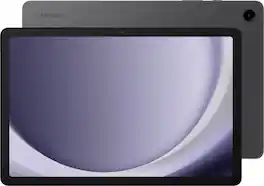
Meet your go to device for on the go family fun Galaxy Tab A9+. A bright, engaging 11" screen is perfect for every family member to do what they love. Whether they’re enjoying a show, unwinding with a game or catching up on schoolwork or day to day tasks, an upgraded chipset makes every experience feel smooth and easy. You can even open multiple apps at the same time and get all your everyday tasks done quickly. Use it for hours without worrying about power, and keep everything you love together with plenty of storage space. Plus, the preloaded Samsung Kids app provides a safe digital environment for your little ones to happily learn and play. Give your family a great all in one Tab that perfectly meets all their everyday needs without taking a bite out of your wallet Galaxy Tab A9+.

Make studying smoother and staying on track easier with the Lenovo Idea Tab, your AI-powered study buddy. The 11” 2.5K display with a 90Hz refresh rate and quad Dolby Atmos speakers deliver clear visuals and rich sound for focused learning, lectures and fun. Need help on the spot? Instantly search or translate information on your screen with Circle to Search with Google, all without switching apps, enhanced by the Lenovo Tab Pen with 40% improved latency for smoother, more natural writing. Open the Notepad app and use Lenovo AI Notes to keep writing when you’re stuck, rephrase messy notes, or quickly summarize long content. Powered by the MediaTek D6300 with up to 70% more power*, multitasking feels smooth and effortless. Add the Pogo-pin Folio Keyboard (sold seperately) for easy typing, and count on all-day battery life to keep up wherever your day takes you.

Meet your go to device for on-the-go family fun Galaxy Tab A9+. A bright, engaging 11" screen is perfect for every family member to do what they love. Whether they’re enjoying a show, unwinding with a game, or catching up on schoolwork or day to day tasks, an upgraded chipset makes every experience feel smooth and easy. You can even open multiple apps at the same time and get all your everyday tasks done quickly. Use it for hours without worrying about power and keep everything you love together with plenty of storage space. Plus, the preloaded Samsung Kids app provides a safe digital environment for your little ones to happily learn and play. Give your family a great all in one Tab that perfectly meets all their everyday needs without taking a bite out of your wallet Galaxy Tab A9+.

Meet your go to device for on-the-go family fun Galaxy Tab A9+. A bright, engaging 11" screen is perfect for every family member to do what they love. Whether they’re enjoying a show, unwinding with a game, or catching up on schoolwork or day to day tasks, an upgraded chipset makes every experience feel smooth and easy. You can even open multiple apps at the same time and get all your everyday tasks done quickly. Use it for hours without worrying about power and keep everything you love together with plenty of storage space. Plus, the preloaded Samsung Kids app provides a safe digital environment for your little ones to happily learn and play. Give your family a great all in one Tab that perfectly meets all their everyday needs without taking a bite out of your wallet Galaxy Tab A9+.
| Pros for Samsung - Galaxy Tab A9+ 11" 256GB - Wi-Fi - Graphite | |||
|---|---|---|---|
| Overall Performance, Screen Size, Ease of Use, Battery Life, Storage Capacity | There were no pros for this product— | Ease of Use | Overall Performance, Screen Size, Portability |
| Cons for Samsung - Galaxy Tab A9+ 11" 256GB - Wi-Fi - Graphite | |||
| Camera Quality, Touchscreen Responsiveness, Weight | There were no cons for this product— | There were no cons for this product— | There were no cons for this product— |
Specs
Reviews
Customers are saying
Customers highly value the Galaxy Tab A9+ 11" for its overall performance, convenient screen size, battery life, ease of use, ample storage capacity, and speed. However, some customers have noted concerns regarding charging. Additionally, a few customers mentioned the weight and camera quality as potential drawbacks.
Customer Images
The vast majority of our reviews come from verified purchases. Reviews from customers may include My Best Buy members, employees, and Tech Insider Network members (as tagged). Select reviewers may receive discounted products, promotional considerations or entries into drawings for honest, helpful reviews.
- Rated 5 out of 5 stars
Best Tablet in Its Class — Samsung Galaxy Tab A9+!
I recently picked up the Samsung Galaxy Tab A9+ 11″ 256GB Wi-Fi in Graphite and I’m genuinely impressed! The large 11-inch screen makes everything from streaming movies to browsing super enjoyable — bright, clear, and perfect for everyday use. The 256GB storage means I can keep all my apps, photos, games, and media without constantly deleting files. It’s fast, smooth, and handles multitasking without lag — definitely feels like a premium tablet without the premium price tag. Battery life is solid, easily lasting throughout a full day of use, and the overall performance is excellent for gaming, videos, apps, and light work. I love how dependable it is and how much value I got for the price. Whether you want entertainment, productivity, or a great family tablet, this one checks all the boxes! Highly recommend! #Samsung #GalaxyTabA9Plus #BestBuyFinds
LiaZ Posted
- Rated 5 out of 5 stars
Great tablet
Originally bought this to use for google maps for a trip. Now i take it everywhere. Well made, durable and screen/resolution is great. Battery usage isn't terrible. I live stream a few hours a day without issues. I actually bought a second one for my daughter. I would purchase a screen protector of your choice. Sound is clear
MikeM Posted
- Rated 5 out of 5 stars
Great Product!
My old Samsung Tablet (Galaxy Tab E, SMT560NU) was no longer compatible with some sports apps. It still works, so I gave it to my son. It was hard to find the microSD card to locate all my music files in the new tablet. Bought this mainly to use on the plane. I make 4-5 trips a year. Works perfect! Long battery life. Would recommend it.
ArubaOrBust Posted