Amazon - Fire TV Stick 4K Select (newest model) Streaming Device, streaming in 4K, AI-powered search, 8GB, free & live TV - Black
Series
4K Select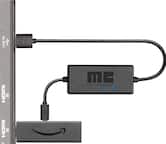 Amazon - USB Power Cable for Fire TV Stick (Eliminates the Need for AC Adapter) - Black$25.99
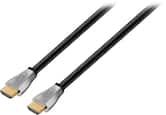

Related Item

Specifications
- Featured Streaming ServicesNetflix, Hulu, Disney+, Prime VideoMaximum Supported Resolution2160p (4K)High Dynamic Range (HDR)YesHeadphone/Headset ConnectivityBluetoothOperating System CompatibilityNoneRemote Control IncludedYes
- Key Specs
- Featured Streaming Services: Netflix, Hulu, Disney+, Prime Video (Streaming services and other programs are available on this device. Keep in mind, there may be more services supported than just those shown here.)
- Maximum Supported Resolution: 2160p (4K)
- High Dynamic Range (HDR): true (An HDR-compatible 4K TV or other HDR-compatible product displays HDR video content when it's available from sources like 4K Ultra HD Blu-ray Discs and 4K streaming services.)
- Headphone/Headset Connectivity: Bluetooth
- Operating System Compatibility: None
- Remote Control Included: true
- Storage Type: Internal
- Storage Capacity: 8 gigabytes (Measured in megabytes (MB), gigabytes (GB) and terabytes (TB), this is the amount available for storing files, music, movies, photos and more. The total includes the capacity of the hard disk drive and solid state drive if both are included on the computer.)
- Processor Model: MEDIATEK MT8698 (Your computer's processor is like its brain. Working in combination with system memory, the power of the processor determines the complexity of software you can run, how many programs you can have open at the same time, and how fast those programs will run. Most computers feature an AMD, Intel or Snapdragon processor.)
- Power Source: AC adapter
- Media Card Slot: false
- Works With: Amazon Alexa (Compatible with or able to be connected to other smart devices or applications.)
- Voice Assistant Built-in: Amazon Alexa (A digital assistant built into the device that uses voice commands to answer questions and control smart devices.)
- General
- Brand: Amazon
- Model Number: B0C6W3D4RM
- Product Name: Amazon Fire TV Stick 4K Select (newest model) Streaming Device, streaming in 4K, AI-powered search, 8GB, free & live TV
- Color: Black
- Series: 4K Select (Part of a group of the same product type with similar features.)
- Display
- High Dynamic Range Format: HDR 10, HDR 10+ (There are a few HDR formats that tell the TV or other HDR-compatible product how to best utilize its capabilities to display HDR content. HDR technology can support one or multiple formats, each with various benefits to picture quality.)
- Warranty
- Warranty - Parts: 90 day limited warranty
- Warranty - Labor: Not applicable
- Compatibility
- Works With: Amazon Alexa (Compatible with or able to be connected to other smart devices or applications.)
- Voice Assistant Built-in: Amazon Alexa (A digital assistant built into the device that uses voice commands to answer questions and control smart devices.)
- Other
- UPC: 840268958794
Essential 4K streaming - Get everything you need to start streaming in 4K.
- Essential 4K streaming: Get everything you need to stream in brilliant 4K Ultra HD with High Dynamic Range 10+ (HDR10+).
- Make your TV even smarter: Fire TV gives you instant access to a world of content, tailor-made recommendations, and Alexa, all backed by fast performance.
- All your favorites in one place: Experience endless entertainment with access to Prime Video, Netflix, YouTube, Disney+, Apple TV+, HBO Max, Hulu, Peacock, Paramount+, and thousands more. Easily discover what to watch from over 1.8 million movies and TV episodes (subscription fees may apply), including over 400,000 episodes of free ad-supported content.
- Getting set up is easy: Plug in and connect to Wi-Fi for smooth streaming.
- Alexa is at your fingertips: Press and ask Alexa to search and launch shows across your apps.
- Coming Soon: The new Alexa on Fire TV: Getting to what you love has never been easier. Talk naturally to find what to watch fast, manage your smart home, or dive into virtually any topic.
- Coming Soon: Play Xbox games, no console required: Stream Forza Motorsport, Starfield, Palworld, and discover hundreds of other high-quality games directly on your Fire TV Stick 4K Select with Xbox Game Pass Ultimate via cloud gaming. *Terms and exclusions apply.
- Control your compatible smart home: Alexa checks the weather, dims the lights, streams music, and more.
- *Xbox Cloud Gaming (Beta) requires Xbox Game Pass Ultimate subscription: Supported device (sold separately). Cloud playable games not included with Xbox Game Pass Ultimate are sold separately, and may be made available with Xbox Game Pass Ultimate in the future. Game catalog varies. Stream directly on Xbox consoles, or with the Xbox app or at xbox.com/play on supported devices.
- Select regions (xbox.com/regions) and devices (xbox.com/cloud-devices). See cloud gaming library (xbox.com/play).: **Requires Xbox Game Pass Ultimate (sold separately) and Xbox App, Xbox Cloud Gaming app and supported controller (sold separately) or Xbox.com/play access. Third party device shown. Game(s) shown coming soon, catalog varies by region and plan. See Xbox.com for details.
Whats Included
- Fire TV Stick 4K Select
- Alexa Voice Remote
- power cable and power adapter
- HDMI extender cable for Fire TV Stick 4K Select
- 2 AAA batteries
- Quick Start Guide
Q: Can this device allow 3rd party apps to be installed?
A: Hi Roy! The Fire TV Stick 4K Select features access to the Amazon App Store, which allows you to install third party apps like Netflix, Disney+, and YouTube quickly and easily! You'll even be prompted to select a few to download right as you set up the device. You'll also have access to tons of free channels as soon as you finish setup, and can see what's available via the Channel Guide! I hope that helps, have a great rest of your day!
Q: can the 4k fire stick be used without a cable box?
A: Yes, just plugs into a hdmi port
Q: Can this allow you to display or cast images from a phone, laptop?
A: Hello Ssiroc and thank you for your question! Yes, you can mirror to the Amazon FireTV Stick 4K. To mirror a device to a Fire TV Stick, connect both your device and Fire TV Stick to the same Wi-Fi network, then use the mirroring or casting option on your device to connect to the Fire TV Stick. For Android, this is often found in the Quick Settings menu as "Cast" or "Smart View," while for iPhones, you will need an app like "Fire Mirror" or "AirScreen" and may need to enable mirroring in the Fire TV's settings first. Hope this helps! Have a great day!
Q: Does Fire Stick have YouTube TV app on it?
A: Hi jman805! The Fire TV Stick 4K Select has YouTube TV available via the app store as a free download, along with tons of other popular streaming services. What's even better is that you can configure the Fire TV's channel guide to show you what's playing on channels from all of your Live TV apps at once, so you don't have to bounce around between apps looking at your options! I hope that helps, have a great rest of your day!
A: undefined
Q: Does this work with bluetooth headphones and speakers
A: Hello and thank you for asking this question. Fire Sticks can absolutely connect to Bluetooth speakers and headphones for wireless audio. An important thing to keep in mind is that there is an audio latency or delay when Bluetooth devices are used for TV audio. Fire Sticks are also compatible with Echo speakers and traditional soundbars and receivers which can provide a more premium audio experience. I hope this answers your question and that you have a great day.
Compare similar products
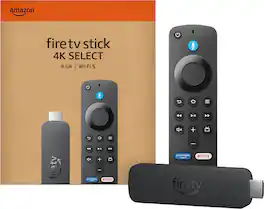
Essential 4K streaming - Get everything you need to start streaming in 4K.

Our most powerful streaming stick - Elevate your entertainment experience with a powerful processor for lightning-fast app starts and fluid navigation.
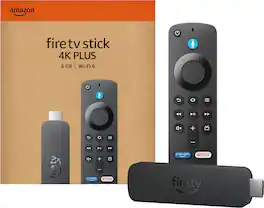

Cinematic experience - Watch in vibrant 4K Ultra HD with support for Dolby Vision, HDR10+, and immersive Dolby Atmos audio.
| Pros for Amazon - Fire TV Stick 4K Select (newest model) Streaming Device, streaming in 4K, AI-powered search, 8GB, free & live TV - Black | |||
|---|---|---|---|
| There were no pros for this product— | Overall Performance, Ease of use, Speed, Setup, Storage | Overall Performance, Ease of use, Speed, Setup, Price | Overall Performance, Ease of use, Speed, Setup, Price |
| Cons for Amazon - Fire TV Stick 4K Select (newest model) Streaming Device, streaming in 4K, AI-powered search, 8GB, free & live TV - Black | |||
| There were no cons for this product— | Lag, User Interface, Compatibility | Lag | Lag |
Specs
Reviews
The vast majority of our reviews come from verified purchases. Reviews from customers may include My Best Buy members, employees, and Tech Insider Network members (as tagged). Select reviewers may receive discounted products, promotional considerations or entries into drawings for honest, helpful reviews.
- Rated 5 out of 5 stars
easy to use
easy to use , you can get it setup really quickly and use it anywere
Posted by RogerG
- Rated 5 out of 5 stars
Great versatile and reliable device
Good, reliable, versatile device for streaming different services.? (YouTube, Prime, Netflix, YouTube tv, Roku TV, news, etc.) Remote also controls TV functions like power and volume. Also, no glitches like some of my older smart TVs sometimes have.
Posted by ScottM
- Rated 5 out of 5 stars
The stick with unlimited possibilities
I have never used the fire stick before, but I like this. The quality is awesome and the picture looks so real. The steak is very easy to use and I can sign on and off no problem. Watch TV shows and move. This is an awesome deal.
Posted by MsExtra







