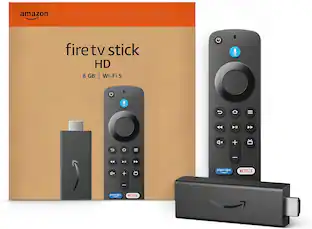
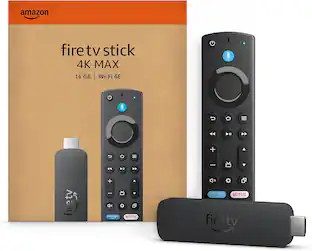
Amazon - Fire TV Stick 4K with Alexa Voice Remote, Dolby Vision, HD Streaming Media Player (includes TV controls) - Black
More Buying Options from Marketplace sellers
Related Item

Specifications
- Featured Streaming ServicesNetflix, Hulu, Disney+, HBO Max, Prime VideoMaximum Supported Resolution2160p (4K)High Dynamic Range (HDR)YesOperating System CompatibilityFire OSRemote Control IncludedYesStorage TypeInternal, Cloud
- Key Specs
- Featured Streaming Services: Netflix, Hulu, Disney+, HBO Max, Prime Video (Streaming services and other programs are available on this device. Keep in mind, there may be more services supported than just those shown here.)
- Maximum Supported Resolution: 2160p (4K)
- High Dynamic Range (HDR): true (An HDR-compatible 4K TV or other HDR-compatible product displays HDR video content when it's available from sources like 4K Ultra HD Blu-ray Discs and 4K streaming services.)
- Operating System Compatibility: Fire OS
- Remote Control Included: true
- Storage Type: Internal, Cloud
- Storage Capacity: 8 gigabytes (Measured in megabytes (MB), gigabytes (GB) and terabytes (TB), this is the amount available for storing files, music, movies, photos and more. The total includes the capacity of the hard disk drive and solid state drive if both are included on the computer.)
- Power Source: AC adapter, Battery-powered
- Works With: Amazon Alexa (Compatible with or able to be connected to other smart devices or applications.)
- Voice Assistant Built-in: Amazon Alexa (A digital assistant built into the device that uses voice commands to answer questions and control smart devices.)
- General
- Brand: Amazon
- Model Number: B08XVYZ1Y5
- Product Name: Fire TV Stick 4K with Alexa Voice Remote, Dolby Vision, HD Streaming Media Player (includes TV controls)
- Color: Black
- Features
- Remote Control Type: Voice control
- Connectivity
- Wireless Connectivity: Bluetooth (The manner in which a device sends data to another device over a short distance without the use of wires or cables.)
- Display
- High Dynamic Range Format: Dolby Vision, HDR 10, HDR 10+ (There are a few HDR formats that tell the TV or other HDR-compatible product how to best utilize its capabilities to display HDR content. HDR technology can support one or multiple formats, each with various benefits to picture quality.)
- Power
- Rechargeable Battery: false
- Battery Chemistry: Alkaline
- Battery Size: AAA (The battery size required for operation.)
- Number of Batteries Required: 2
- Number Of Batteries Included: 2
- Warranty
- Warranty - Parts: 1-year limited warranty and service
- Warranty - Labor: 1-year limited warranty and service
- Compatibility
- Works With: Amazon Alexa (Compatible with or able to be connected to other smart devices or applications.)
- Voice Assistant Built-in: Amazon Alexa (A digital assistant built into the device that uses voice commands to answer questions and control smart devices.)
- Other
- UPC: 840080588964
Vibrant 4K cinematic experience - Unlock a complete 4K Ultra HD experience with support for leading HDR formats, Dolby Vision, Dolby Atmos Audio, access to the latest 4K content, and a lightning-fast processor, Fire TV Stick 4K enables you to experience the beauty of 4K Ultra HD movies and shows on your TV. Includes the Alexa Voice Remote with dedicated power and volume buttons to control your compatible TV, soundbar and receiver. Plus, convenient preset app buttons make it easy to go directly to your favorite apps.
- Cinematic experience: Watch in vibrant 4K Ultra HD with support for Dolby Vision, HDR, and HDR10+.
- Home theater audio with Dolby Atmos: Feel scenes come to life with support for immersive Dolby Atmos audio on select titles with compatible home audio systems
- Endless entertainment: Stream more than 1 million movies and TV episodes from Netflix, Prime Video, Disney+, Peacock, and more, plus listen to millions of songs. Subscription fees may apply.
- Live and free TV: Watch live TV, news, and sport with subscriptions to SLING TV, YouTube TV, and others. Stream for free with Pluto TV, IMDb TV, YouTube and more.
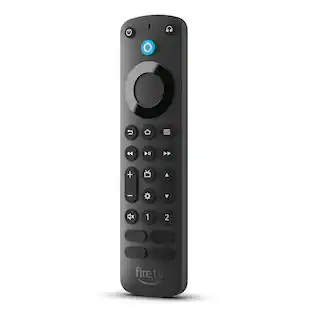
- Alexa Voice Remote: Search and launch content with your voice. Get to favorite apps quickly with preset buttons. Control power and volume with one remote.
- Control your smart home: Ask Alexa to check weather, dim the lights, view live camera feeds, stream music and more.
- Simple and intuitive: Quickly access your favorite apps, live TV, and things you use most, all from the main menu.
- Easy to set up, compact enough to stay hidden: Plug in behind your TV, turn on the TV, and connect to the internet to get set up
Whats Included
- Fire TV Stick 4K
- Alexa Voice Remote (3rd Gen)
- USB cable and power adapter
- HDMI extender cable for Fire TV Stick 4K
- 2 AAA batteries
- Quick Start Guide
Q: Can I transfer settings between an existing and new Firestick 4G?
A: Hello Flatch! You are able to restore your new Fire Stick with the settings and approved app content from your old Fire Stick during the setup process. It will recognize that you have another Fire Stick profile and will ask if you would like to restore the new Fire Stick with that content and settings. You may have to redownload some apps separately. I hope this helps and that you have a spectacular day!
Q: Do I need a cable box connected to the TV for the Firestick to work?
A: Hi Rusty33, You do not need a cable box connected to the TV to use your Fire TV Stick 4K with Alexa Voice Remote. By plugging in and setting up your Fire TV Stick 4K you will be able to stream your favorites from Netflix, Hulu, and more. To set up this device the following is required: 1. Plug your Fire TV Stick 4K directly into your HDTV, or use the included HDMI extender to plug it into one of your TV's HDMI ports. 2. Plug into wall outlet. 3. Connect to the internet with your Wifi password and credentials and enjoy. To watch live TV if you have a cable subscription, you can download your providers app onto your TV. For example, search for the Xfinity stream app or ask Alexa to find it and download it to enjoy your cable subscription services. Subscription rates may apply depending on your provider. Hope that helps!
Q: I am a novice with f ire stick. Is it hard to install.? Do the apps cost? What apps are free?
A: Hello, jellybeanrt! The Fire TV Stick 4K has a simple set up process that happens on your TV screen after you plug the device in. You will input the information it asks for, and then you can begin downloading apps. Some apps cost money, but there are many options for free streaming services. Apps like Netflix and Hulu would have their normal subscription costs. I hope that information helps. Have a great day!
Q: I have 4 tv's in my house. Do I have to get a Firestick for every tv?
A: Hi Ocalagal! The Firesticks are very travel friendly. So, you could potentially place it into whichever TV you are currently using and move it around with you. However, if you want to keep everything in its place, then yes, you will want to place one into each tv. There is not currently a wireless signal that can be emitted from one Firestick to multiple TVs. I hope I answered your question fully, have a great day!
Q: Can I control TV from this device ?
A: Hi! Your Fire TV Stick 4K is able to control most TVs, to set this up please follow these steps: 1. Press the home button. At the top of the screen scroll to the far right & select “settings” 2. Scroll to/select “equipment control” 3. Scroll to/select “manage equipment” 4. Select “TV” 5. Select “change tv” Follow on screen instructions. I hope this helps, have a great day!
Q: Does a 4K Fire Stick work with an older (non-4K) TV that happens to have an HDMI port?
A: Hi yes as long as your tv has an hdmi the fire stick works. Just the image won't be 4k but in all reality most tv shows or movies aren't 4k so you'll be good
Q: Does the Alexa Voice Remote Work Without having a Alexa? My mom is Anti Alexa.
A: Hi ChaoticTakinomUnderworlderFan! Yes, the remote can be used without using Alexa. The remote that comes with the Fire TV Stick 4K comes with buttons which allow you to navigate through all of your apps, and dedicated buttons for controlling your TV. There is a dedicated Alexa button near the top of the remote, but it is not necessary to use if you do not wish to do so. Thanks for your question, have a great day!
A: Hi Jimmybob! All current fire sticks have the new alexa voice remote with quick buttons for popular streaming services near the bottom. This model is the Fire TV Stick 4k ,not the Fire TV Stick 4k Max. Both models can stream in 4k, with support for dolby vision. The Fire TV Stick 4k Max gives you upgraded wifi capabilities with a faster processor and upgraded RAM. I hope this helps, enjoy your day!
Compare similar products
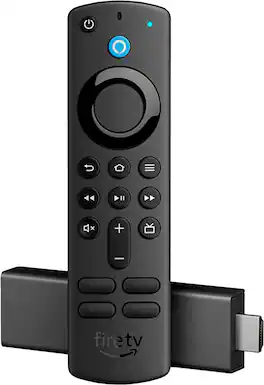
Vibrant 4K cinematic experience - Unlock a complete 4K Ultra HD experience with support for leading HDR formats, Dolby Vision, Dolby Atmos Audio, access to the latest 4K content, and a lightning-fast processor, Fire TV Stick 4K enables you to experience the beauty of 4K Ultra HD movies and shows on your TV. Includes the Alexa Voice Remote with dedicated power and volume buttons to control your compatible TV, soundbar and receiver. Plus, convenient preset app buttons make it easy to go directly to your favorite apps.

Our most powerful streaming stick - Elevate your entertainment experience with a powerful processor for lightning-fast app starts and fluid navigation.

Stream in Full HD - Enjoy fast, affordable streaming in Full HD, and control it all with the Alexa Voice Remote.

Cinematic experience - Watch in vibrant 4K Ultra HD with support for Dolby Vision, HDR10+, and immersive Dolby Atmos audio.
| Pros for Amazon - Fire TV Stick 4K with Alexa Voice Remote, Dolby Vision, HD Streaming Media Player (includes TV controls) - Black | |||
|---|---|---|---|
| There were no pros for this product— | Overall Performance, Ease of Use | Overall Performance | Overall Performance |
Specs
Reviews
Customer Images
The vast majority of our reviews come from verified purchases. Reviews from customers may include My Best Buy members, employees, and Tech Insider Network members (as tagged). Select reviewers may receive discounted products, promotional considerations or entries into drawings for honest, helpful reviews.
- Rated 5 out of 5 stars
Amazon fire stick
I recently upgraded to the Amazon Fire TV Stick 4K with Alexa Voice Remote, Dolby Vision, and HD Streaming Media Player, and I couldn't be happier with my purchase. First off, the setup was incredibly straightforward. Within minutes, I had the Fire TV Stick 4K plugged into my TV and connected to my Wi-Fi. The intuitive on-screen instructions made the process seamless, even for someone who's not particularly tech-savvy. The streaming quality is phenomenal. The 4K Ultra HD resolution combined with Dolby Vision delivers stunning picture quality with vibrant colors and sharp details. Whether I'm watching my favorite shows on Netflix or streaming the latest movies, the visual experience is always top-notch. The streaming is smooth, with no buffering issues, even when watching content in 4K. The Alexa Voice Remote is a game-changer. It's so convenient to simply speak into the remote to search for content, control playback, or even ask for weather updates. The voice recognition is impressively accurate, and it makes navigating through apps and menus a breeze. The addition of TV controls on the remote means I can adjust the volume and power on/off my TV without needing multiple remotes. One of the features I love the most is the vast selection of apps available on the Fire TV Stick 4K. From streaming services like Netflix, Hulu, and Disney+ to music apps like Spotify, everything I need is right at my fingertips. The user interface is clean and easy to navigate, making it simple to find and organize my favorite apps. The compact and discreet design of the Fire TV Stick 4K is another plus. It plugs directly into the HDMI port of my TV and stays out of sight, keeping my entertainment area tidy. Despite its small size, it packs a powerful punch in terms of performance and capabilities. Overall, the Amazon Fire TV Stick 4K has greatly enhanced my home entertainment experience. It's a fantastic device that offers incredible value for its price. If you're looking for a reliable and feature-packed streaming media player, I highly recommend the Fire TV Stick 4K. Five stars all the way
This review is from Amazon - Fire TV Stick 4K with Alexa Voice Remote, Dolby Vision, HD Streaming Media Player (includes TV controls) - Black
Mkenya Posted
- Rated 5 out of 5 stars
Best Firestick So FAR!
I've owned the previous 2 generation firesticks. This firestick is better! Love being able to just use 1 remote now to turn on my Tv and enjoy endless streaming! This firestick is better in my opinion than the actual Fire TV and ive owned the 1st and 2nd Generation. Definitely faster! Plays 4k content with ease! Beautiful picture and Sound!
This review is from Amazon - Fire TV Stick 4K with Alexa Voice Remote, Dolby Vision, HD Streaming Media Player (includes TV controls) - Black
RobJ Posted
- Rated 5 out of 5 stars
Great Non-Smart TV addition.
Bought the Fire TV Stick 4K for a small non-smart TV in the kitchen. Easy to use remote and has Alexa voice controls too. You can tell Alexa to change inputs, adjust volume, ask about the weather and probably a lot more that I haven't discovered yet as it's still new to me. Great picture. Since we can't get out very much due to the corona-virus, we now stream our church services from home. We've also been able to enjoy our son and his university choirs performances thru the YouTube app even though we are 3-plus hours away. While my wife is "Hallmark-ing" her shows on the big screen in the living room, I can sneak off to the kitchen and watch my fishing or other sports programs. I bought this on sale and had $10.00 worth of Rewards dollars so this purchase was a no-brainer. A lot cheaper than purchasing a new "Smart TV". I will probably get another for the bedroom.
This review is from Amazon - Fire TV Stick 4K with Alexa Voice Remote, Dolby Vision, HD Streaming Media Player (includes TV controls) - Black
BillFireStick Posted