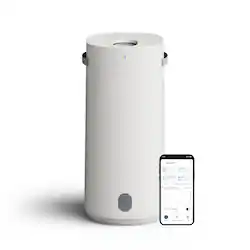
Blueair - 2-in-1 Purify + Humidify Air Purifier with HEPASilent and InvisibleMist Technology - White
- Key Specs
- Recommended Room Size: 360 square feet (The recommended area size in which the product is designed to operate and produce optimal results, such as the desired heating or cooling. Generally, running a unit too big or too small for the space will result in ineffective operation and wasted energy.)
- App Compatible: true (The product can be connected to a program or software application on a mobile device, which then receives collected data from the product.)
- Wireless Connectivity: Wi-Fi, Bluetooth (The manner in which a device sends data to another device over a short distance without the use of wires or cables.)
- Air Quality Indicator Light(s): true (Lights indicate when the air quality level reaches or deviates from the desired setting.)
- Filter Type: HEPA
- General
- Brand: Blueair
- Model Number: 111811
- Product Name: 2-in-1 Purify + Humidify Air Purifier with HEPASilent and InvisibleMist Technology
- Color: White
- Dimensions
- Recommended Room Size: 360 square feet (The recommended area size in which the product is designed to operate and produce optimal results, such as the desired heating or cooling. Generally, running a unit too big or too small for the space will result in ineffective operation and wasted energy.)
- Product Height: 26 inches (The out of box height of the item. Height is measured as the vertical distance from the bottom of the item to the top as it would be primarily used or placed.)
- Product Width: 13.4 inches (The out of box width of the item. Width is measured as the horizontal distance from one side of the item to the other as it would be primarily used or placed.)
- Product Depth: 12 inches (The out of box depth of the item. Depth is measured as the distance from the front of the item to the back as it would be primarily used or placed.)
- Product Weight: 20.1 pounds (The out of box weight of the item.)
- Compatibility
- App Compatible: true (The product can be connected to a program or software application on a mobile device, which then receives collected data from the product.)
- Wireless Connectivity: Wi-Fi, Bluetooth (The manner in which a device sends data to another device over a short distance without the use of wires or cables.)
- Features
- Air Quality Indicator Light(s): true (Lights indicate when the air quality level reaches or deviates from the desired setting.)
- Remote Control: false
- Filter Info
- Filter Type: HEPA
- Filter Included: true
- Filter Model Number: 112084
- Filter Indicator Light(s): true
- Certifications Listings & Approvals
- AHAM Certified: true (Products with the AHAM Verifide mark have been tested and rated by the Association of Home Appliance Manufacturers (AHAM) for their ability to reduce pollutants and allergens in the air.)
- Warranty
- Warranty - Parts: 3-Year Extended Limited Warranty
- Warranty - Labor: 3-Year Extended Limited Warranty
- Other
- UPC: 689122028439
Blueair's 2-in-1 Purify + Humidify is a powerful multi-functional air purifier + humidifier that provides both clean and humidified air all in one smart and beautiful device. Blueair's HEPASilent Technology purifies dirty air, while 360° InvisibleMist Technology humidifies dry air, delivering ultimate air care with clean, fresh air and balanced humidity— dual-action technology for ultimate air wellness. Independently evaluated for safety standards and third-party tested for performance as part of the AHAM Verifide Program for air cleaners, the fast purification takes only 12.5 minutes to clear the air, removing 99.97%** of all airborne pollutants down to 0.1 microns. Innovative refill through our premium LED display that doubles as a water refill without hassle, Auto Smart control with AutoHydrate feature; app connection, Night and Auto mode available, Designed to be easily cleaned and handled. **Tested on PM2.5 up to 90 minutes
- Dual Action For Ultimate Wellness: Blueair's hepasilent Technology purifies dirty air, while 360° invisiblemist Technology humidifies dry air, delivering ultimate air care with clean, fresh air and balanced humidity—all in one powerful solution.
- Premium Refill: Our truly innovative design features a premium LED display that doubles as a water refill point for quick top-offs without the hassle of disassembly, or bucket refill for large volumes.
- Powerful Pump: Features a water pump that recirculates water. Smart chip indicator in pump reacts in real time to alert the user when refills are needed.
- Easy Clean: Water tank cleaning made easy with a large opening and no hard-to-reach spots when a deeper clean is needed. Tank capacity of 3L.
- Prevent Musty Smells: The pump delivers fresh water to the 360° wick with coating that absorbs & distributes water evenly into the air; Smart auto drying mode then ventilates the wick ensuring your space stays fresh & must-free
- Dual Action For Ultimate Wellness: Blueair's hepasilent Technology purifies dirty air, while 360° invisiblemist Technology humidifies dry air, delivering ultimate air care with clean, fresh air and balanced humidity—all in one powerful solution.
- Premium Refill: Our truly innovative design features a premium LED display that doubles as a water refill point for quick top-offs without the hassle of disassembly, or bucket refill for large volumes.
- Powerful Pump: Features a water pump that recirculates water. Smart chip indicator in pump reacts in real time to alert the user when refills are needed.
- Easy Clean: Water tank cleaning made easy with a large opening and no hard-to-reach spots when a deeper clean is needed. Tank capacity of 3L.
- Prevent Musty Smells: The pump delivers fresh water to the 360° wick with coating that absorbs & distributes water evenly into the air; Smart auto drying mode then ventilates the wick ensuring your space stays fresh & must-free
Q: How long does it take to purify the air in a room?
A: It takes only 12.5 minutes to clear the air.
Q: Is the air purifier certified by any independent organizations?
A: This air purifier has been independently evaluated for safety standards and its performance has been third-party tested as part of the AHAM Verifide® Program for air cleaners.
Q: What is the maximum room size this air purifier can handle?
A: This air purifier has a recommended room size of 360 square feet.
Q: What type of filter does the air purifier use?
A: This air purifier uses a HEPA filter.
Q: Can the air purifier be connected to a mobile app?
A: This air purifier has an app you can connect to.
Q: wher can i buy replacement filters
A: Thank you for your interest in Blueair! You can purchase replacement filters on Blueair.com.