CORSAIR - Commander PRO Hardware Controller - Black
- General
- Brand: CORSAIR
- Model Number: CL-9011110-WW
- Product Name: Commander PRO Hardware Controller
- Color: Black
- Warranty
- Warranty - Parts: 2 years
- Warranty - Labor: 2 years
- Other
- Additional Accessories Included: 2 x RGB LED hub cables, 4 x thermal sensors, 4 x fan extension cables, 2 x mounting tape
- UPC: 843591094344
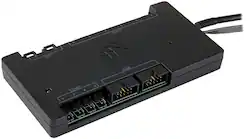
Mount this CORSAIR Commander PRO module on the outside of your case to closely monitor gaming hardware. It supports up to six fan connectors and four temperature inputs, so you can push your system to its limits and see how it responds. This CORSAIR Commander PRO module lets you manage fan speeds and temperature readings via CORSAIR LINK software.
- Absolute command of your system: Accurately monitor how your system reacts when you push it to its limits.
- CORSAIR LINK software support: Easily manage and control the devices connected to Commander PRO.
- Two USB 2.0 internal headers: Connect your CORSAIR LINK devices while only occupying one USB 2.0 header on your motherboard.
- Six four-pin fan ports with voltage and PWM control: Control three-pin and four-pin fans with ease from a complete stop to maximum speed.
- Four thermistor inputs: Monitor temperature in different locations throughout your system.
- Dual-channel lighting: Conduct a symphony of RGB lighting with individually addressable RGB LED strips (sold separately) and unleash the full RGB potential of the HD RGB and SP RGB fans (sold separately).
- Low-profile design: The controller's slim form factor allows installation nearly anywhere in your case.
- Absolute command of your system: Accurately monitor how your system reacts when you push it to its limits.
- CORSAIR LINK software support: Easily manage and control the devices connected to Commander PRO.
- Two USB 2.0 internal headers: Connect your CORSAIR LINK devices while only occupying one USB 2.0 header on your motherboard.
- Six four-pin fan ports with voltage and PWM control: Control three-pin and four-pin fans with ease from a complete stop to maximum speed.
- Four thermistor inputs: Monitor temperature in different locations throughout your system.
- Dual-channel lighting: Conduct a symphony of RGB lighting with individually addressable RGB LED strips (sold separately) and unleash the full RGB potential of the HD RGB and SP RGB fans (sold separately).
- Low-profile design: The controller's slim form factor allows installation nearly anywhere in your case.
Whats Included
- CORSAIR Commander PRO Hardware Controller
- 2 x RGB LED hub cables
- 4 x Thermal sensors
- 4 x Fan extension cables
- 2 x Mounting tape
- Installation guide
- CORSAIR Commander PRO Hardware Controller
- 2 x RGB LED hub cables
- 4 x Thermal sensors
- 4 x Fan extension cables
- 2 x Mounting tape
- Installation guide
Product Manuals
Q: Is the commander pro compatible with non-corsair fans as long as they stay within the power limits?
A: Yes, you can connect non-Corsair fans to the Commander Pro as it is a 6 fan, 4 pin PWM controller; however, RGB control is proprietary and you will not be able to control that.
A: As a fan controller, all of the fans (fan cable) are plugged into this. The led cables on your fans goes into the node core and then the node core gets plugged into one of the 2 led slots on this. You wouldn’t need the node pro because this actually does the same thing. Especially since you only have 5 fans. The cooler can be plugged into one of the USB ports on this as well.
A: If you are using the Lighting Node Pro (which I assume you are as the Lighting Node Core is for a different set of fans) then it will handle up to 12 fans (for RGB lighting purposes only). The preferred method would be to connect these two fans to the pump as it is a unit. The pump on this water cooler has connections for the two fans PWM connections and the RGB lighting connections. A USB connection is required for the pump and lighting control. If you don't have an available USB header on your motherboard then you will need to go to the Lighting node commander pro which will give you two USB ports as well and would replace your Lighting Node Pro. Using the Corsair iCue software will let you control all of the water cooler functions as a unit so that as the pump speed increase the fan speeds would be managed within those fan speed curves that are designed for that pump. Hope this helps
A: Hi HussAlQallaf, If the fans are PWM, you can control them using the Commander Pro. For assistance with your setup, please contact our support team: support.corsair.com -Brian
A: Hi dmx0987654321, This would connect via USB 2.0 internal header on your motherboard. If you have further questions, feel free to reach out to our support team: support.corsair.com -Brian
A: Yes. The Commander Pro requires 1x USB-2 Header from the computer's mainboard, and 1 SATA-style power connector from your power supply. In return, it supplies: 2x Lighting channels (just like the Lighting Node Pro that came with the case) 2x USB-2 Headers 6x 4-pin PWN Fan power connectors (works fine with 3-pin fans) 4x 10K 2-pin Temperature Probe ports for optional temp probes (comes with 4 probes) The iCue software will allow you to set custom fan curves on each fan (or group them as you like) based on the CPU core temp, the GPU core temp, temp readings from the mainboard itself, or from any of the 4 optional temp probes that can be directly attached to the Commander Pro itself. Your existing Lighting Node Pro can either be removed entirely (since the Commander Pro also has 2 lighting channels), or you can plug it into one of the USB-2 Headers on the Commander Pro to give yourself a total of 4 Corsair lighting channels. I personally use these in 3 of my 4 liquid-cooled rigs. Highly recommended, and unlike a lot of Corsair products, it works very well and for years on end.
A: You can plug the fans power cables directly into the commander pro for power.