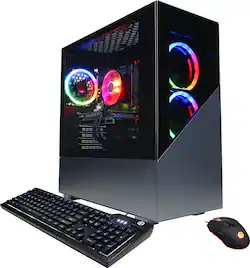
CyberPowerPC - Gamer Xtreme Gaming Desktop - Intel Core i5-9600KF - 8GB - NVIDIA GeForce GTX 1660 SUPER - 1TB HDD + 240GB SSD - Black
- Key Specs
- Processor Model: Intel 9th Generation Core i5 (Your computer's processor is like its brain. Working in combination with system memory, the power of the processor determines the complexity of software you can run, how many programs you can have open at the same time, and how fast those programs will run. Most computers feature an AMD, Intel or Snapdragon processor.)
- Storage Type: HDD, SSD
- Total Storage Capacity: 1240 gigabytes
- System Memory (RAM): 8 gigabytes (Random-access memory (RAM) is a computing device's short-term data storage, which allows active information to be accessed quickly. The size and type of RAM determines how efficiently the device can handle large amounts of information at one time. For example, gaming or video editing requires more RAM for optimal performance.)
- Graphics Type: Dedicated (Dedicated graphics uses a separate graphics card for processing video images. Because it does not use memory from the system's RAM, there is no extra burden on the CPU and graphics are processed more efficiently. Integrated graphics shares system RAM to process video images.)
- Graphics: NVIDIA GeForce GTX 1660 SUPER (Often referred to as a "graphics processing unit" (GPU), this device is responsible for displaying image content and decoding/encoding video content in programs and games.)
- General
- Product Name: Gamer Xtreme Gaming Desktop - Intel Core i5-9600KF - 8GB - NVIDIA GeForce GTX 1660 SUPER - 1TB HDD + 240GB SSD
- Brand: CyberPowerPC
- Model Number: GXI2800BST
- Processor
- Processor Brand: Intel
- Processor Model: Intel 9th Generation Core i5 (Your computer's processor is like its brain. Working in combination with system memory, the power of the processor determines the complexity of software you can run, how many programs you can have open at the same time, and how fast those programs will run. Most computers feature an AMD, Intel or Snapdragon processor.)
- Processor Model Number: i5-9600KF
- Storage
- Storage Type: HDD, SSD
- Total Storage Capacity: 1240 gigabytes
- Solid State Drive Capacity: 240 gigabytes (The amount of data that can be stored on the device's solid state drive (SSD). SSD is a flash-based storage with faster speeds than a hard disk drive (HDD).)
- Hard Drive Capacity: 1000 gigabytes (The amount of data that can be stored on the device's mechanical hard drive. Hard disk drives (HDDs) typically have larger capacities than solid state drives (SSDs) but may have slower speeds.)
- Solid State Drive Interface: SATA (Connects the solid state drive to the host system. PCI and SATA interfaces are the most common; PCI interfaces are typically faster, but SATA interfaces are compatible with a wider range of systems.)
- Hard Drive Interface: SATA (Connects the hard drive to the host system for transferring data between the hard disk cache and system memory. IDE and SATA interfaces are primarily used for personal computing, while larger servers and workstations typically use SAS or SCSI.)
- Hard Drive RPM: 7200 revolutions per minute (A hard drive's data is stored on disks, or platters, that spin while transferring information to the host system. The higher the RPM, the faster the hard drive's performance.)
- Memory
- System Memory (RAM): 8 gigabytes (Random-access memory (RAM) is a computing device's short-term data storage, which allows active information to be accessed quickly. The size and type of RAM determines how efficiently the device can handle large amounts of information at one time. For example, gaming or video editing requires more RAM for optimal performance.)
- Type of Memory (RAM): DDR4 SDRAM (Each type of RAM delivers a different level of speed, bandwidth, energy efficiency and performance.)
- System Memory RAM Speed: 3000 megahertz (How fast the information-storing hardware operates. The faster the RAM, the faster memory can be transferred to other system components. Ultimately, faster RAM improves operational efficiency.)
- Number Of Memory Slots: 4
- System Memory RAM Expandable To: 64 gigabytes (Adding more random-access memory (RAM) to a computer speeds up performance and improves efficiency. Upgrades to memory are limited by the number of expansion slots for additional RAM and existing RAM installed on the device.)
- Graphics
- Graphics Type: Dedicated (Dedicated graphics uses a separate graphics card for processing video images. Because it does not use memory from the system's RAM, there is no extra burden on the CPU and graphics are processed more efficiently. Integrated graphics shares system RAM to process video images.)
- GPU Brand: NVIDIA
- Graphics: NVIDIA GeForce GTX 1660 SUPER (Often referred to as a "graphics processing unit" (GPU), this device is responsible for displaying image content and decoding/encoding video content in programs and games.)
- Compatibility
- Operating System: Windows 10 (The operating system manages all software and hardware, including files, memory and connected devices. Most importantly, it lets you interact with your device and your programs in a visual way; otherwise, you'd be typing computer code to get anything done.)
- Operating System Architecture: 64-bit (An operating system (OS) manages computer hardware, software resources, and programs in conjunction with the system's processor. 64-bit operating systems can handle more data at once than 32-bit systems, resulting in faster speeds, more effiency, and overall improved performance.)
- Connectivity
- Number of HDMI Outputs (Total): 1
- Number of DisplayPort Outputs (Total): 1
- Number of USB Ports (Total): 8
- Ethernet Card: 10/100/1000 (Also known as an Ethernet adapter, this card plugs into a computer's motherboard and enables it to access an Ethernet network. Ethernet data transmission speeds are measured in Mbps (megabits per second) and Gbps (gigabits per second). For example, a 10/100 Ethernet port transmits 10 and 100 Mbps, while a 10/100/1000 Ethernet port transmits 10 and 100 Mbps and has a maximum speed of 1000 Mbps (1 Gbps).)
- Number Of Ethernet Ports: 1
- Expansion
- Number Of Internal 2.5" Bays: 2
- Number Of Internal 3.5" Bays: 2
- Features
- Customizable Case Lighting: true
- Audio Technology: 7.1-channel surround
- Dimensions
- Product Height: 18.5 inches (The out of box height of the item. Height is measured as the vertical distance from the bottom of the item to the top as it would be primarily used or placed.)
- Product Width: 8.5 inches (The out of box width of the item. Width is measured as the horizontal distance from one side of the item to the other as it would be primarily used or placed.)
- Product Depth: 18.5 inches (The out of box depth of the item. Depth is measured as the distance from the front of the item to the back as it would be primarily used or placed.)
- Product Weight: 32 pounds (The out of box weight of the item.)
- Certifications Listings & Approvals
- ENERGY STAR Certified: false (Devices carrying the ENERGY STAR service mark, such as computer products and peripherals, kitchen appliances, and other products, generally use 20% to 30% less energy than required by federal standards.)
- EPEAT Qualified: false (The Electronic Product Environmental Assessment Tool (EPEAT) was designed to provide an environmental assessment tool for purchasers. In order to qualify for EPEAT, a product must meet all 23 required criteria.)
- Included
- Optical Drive Type: None (An optical disk drive (ODD) uses a laser light to read data from or write data to an optical disc. These discs include CDs, DVDs, and Blu-ray Discs. This allows you to play music or watch movies using prerecorded discs.)
- Keyboard Included: true
- Mouse Included: true
- Other
- UPC: 811842066587
Expunge the opposition with this CyberPowerPC Gamer Xtreme desktop computer. The Intel Core i5 processor and 8GB of RAM run AAA titles smoothly for fast-paced gaming, while the 1TB HDD and a 240GB SSD offer vast media storage and rapid booting. This CyberPowerPC Gamer Xtreme desktop computer has an NVIDIA GeForce GTX 1660 SUPER graphics card for delivering ultra-realistic visuals.
- Windows 10 operating system: Brings back the Start menu from Windows 7 and introduces new features, such as the Edge web browser that lets you mark up web pages on your screen. Learn more ›
- 9th Gen Intel® Core™ i5-9600KF processor: Smart six-core, six-way processing performance. The Intel Turbo Boost technology delivers dynamic extra power when you need it, while increasing energy efficiency when you don't.
- 8GB system memory for advanced multitasking: Substantial high-bandwidth DDR4 RAM to smoothly run your games, photo- and video-editing applications, multiple programs and browser tabs at the same time.
- 1TB hard drive and 240GB solid-state drive (SSD) for blend of storage space and speed: The hard drive provides ample storage, while the SSD delivers faster start-up times and data access.
- NVIDIA GeForce GTX 1660 SUPER graphics: Driven by 6GB GDDR6 dedicated video memory to quickly render high-quality images for videos and games.
- Eight USB ports: Quick plug-and-play connectivity for your devices and accessories.
- Next-Gen wireless connectivity: Connects to your network or hotspots on all current Wi-Fi standards. Connect to a Wireless-AC router for speed nearly 3x faster than Wireless-N. The Gigabit LAN port also plugs into wired networks.
- Additional ports: HDMI output for high-definition monitor or HDTV, DisplayPort, auxiliary output, PS/2 port.
Whats Included
- CyberPowerPC Gamer Xtreme Gaming Desktop - Intel Core i5-9600KF - 8GB - NVIDIA GeForce GTX 1660 SUPER - 1TB HDD + 240GB SSD
- Power cord
- USB gaming keyboard
- USB gaming mouse
Q: If i were to upgrade the graphics card to a GeForce RTX 2060, would it be bottlenecked?
A: The short version: No, it would not be bottlenecked. In fact, if you are able to kick that up to a 2060 Super, I would say that's a great combo (the i5-9600KF + the 2060 Super). Just make sure that you get a 2 fan version instead of the 3X OC version just in case the case isn't big enough. If you do the measurements and you can stuff the 2060 super 3X OC version, then, by all means, go for it. You won't be sad about that upgrade. The long version: When upgrading, the main factor of bottlenecking is key to avoid, and you know that. So seeing as this PC has an Intel i5-9600KF, you are set for a while. Looking at other PCs around this price range (850-1.1K), I see clearly that CyberPowerPC has made the incredible decision to add this instead of a i5-9400F or a i7-9700F. In the case of the i5-9400F, looking at CPU UserBenchmark, the i5-9400F vs. the i5-9600KF; there is a clear winner here. The i5-9600KF beats out the i5-9400F outright in the single, dual, quad, and octacore NON-OVERCLOCKED tests by an average of 14-15% (that is an increase of 30-40 points in all categories). The "K" in i5-9600KF relates to that the CPU can overclock, so it makes sense that the overclocked test as well beat the i5-9400F by an average of 20-23% (that is an increase of about 50-60 points in all categories). The i5-9600KF, in fact, can still beat out the i7-9700F in all categories except for the octacore category. This is because the i5-9600KF is a hexacore and the i7-9700F is an octacore (you can probably see why I don't need to elaborate). At the end of the day you could probably slap a 2070 Super onto this PC and still not have any bottlenecking issues. MY RECOMMENDATION: This is only my opinion. You don't have to do this at all, I would just do this if it were me upgrading. If you have the money for it, get a 2060 Super and make sure that you have AT LEAST 16GB of RAM. These days, applications, gaming or not, are getting more resource-intensive, so having that extra leg room will do a lot. Hope this helps!
A: Thank you for reaching out to us. This system should include a 600 watt power supply and 3000mhz RAM. If you have any further questions or concerns then please do not hesitate to give our tech support agents a call for any assistance; we're always happy to help. Tech support: (855) 888-2039 -CyberpowerPC Support
Q: What software is loaded on this computer? Windows? What else?
A: Thank you for reaching out to us Joe. This system does not come with any preinstalled software other than Windows. If you have any further questions or concerns then please do not hesitate to give our tech support agents a call for any assistance; we're always happy to help. Tech support: (855) 888-2039 -CyberpowerPC Support
A: Thank you for reaching out to us Chris. The best way to purchase more RAM for the PC would be to look up the serial number on the side of the RAM online and purchase the exact same stick. It is always recommended that you have matching sticks of RAM inside your PC to avoid incompatibility issues. If you have any further questions or concerns then please do not hesitate to give our tech support agents a call for any assistance; we're always happy to help. Tech support: (855) 888-2039 -CyberpowerPC Support
Q: Will this work okay with the Oculas Rift S?
A: The PC is more than ready for VR. Here's a picture from SteamVR Perf Test that confirms that it is. Also, you should have enough USB ports, since i can plug in all my things and still have a few USB slots left. NOTE - I am using the computer this question is for.
A: Me too. Im waiting to be restock. I want buy it
A: Thank you for reaching out to us. This PC should be able to support VR as it does meet the minimum system requirements for some VR headsets. However, the amount of FPS you receive in-game will vary depending on the resolution and refresh rate of your display, in-game graphics settings, as well as your network connection. It is always recommended that you check the system requirements of the game you would like to play before making your purchase. If you have any further questions or concerns then please do not hesitate to give our tech support agents a call for any assistance; we're always happy to help. Tech support: (888)937-5582 -CyberpowerPC Support
Q: What motherboard comes in this Desktop
A: It's rebranding of B360M Pro4 made by ASrock




















