DJI - Osmo Mobile SE Smartphone 3-Axis Gimbal Stabilizer - Gray
More Buying Options
Related Item

About This Item
- Key Specs
- Maximum Weight Capacity: 0.64 pounds (The maximum load that can be supported by the product.)
- Compatible Devices: Smartphone
- Auto Tracking Features: Object recognition, Face
- General
- Brand: DJI
- Model Number: CP.OS.00000214.03
- Product Name: Osmo Mobile SE Smartphone 3-Axis Gimbal Stabilizer
- Color: Gray
- Dimensions
- Maximum Weight Capacity: 0.64 pounds (The maximum load that can be supported by the product.)
- Socket Size: 1/4 in.
- Product Weight: 0.78 pounds (The out of box weight of the item.)
- Compatibility
- Compatible Devices: Smartphone
- Stabilizer and Support Type: Gimbal
- Brand Compatibility: Universal
- Model Compatibility: Apple, HUAWEI, HONOR, Samsung, Xiaomi, OPPO, vivo, OnePlus, Google, Nothing
- Connectivity
- Auto Tracking Features: Object recognition, Face
- App Compatible: true (The product can be connected to a program or software application on a mobile device, which then receives collected data from the product.)
- Wireless Connectivity: Bluetooth (The manner in which a device sends data to another device over a short distance without the use of wires or cables.)
- Material
- Material: Metal, Plastic
- Features
- Base Type: Fixed grip, Tripod grip
- Number of Axis: 3-Axis (The number of ways or axes that the device can move along. The three axes are commonly known as yaw (pan) or left to right movement, pitch (tilt) or up and down movement, and roll or horizontal movement.)
- Foldable Design: true
- Shutter Release Button: TRUE
- Non-Slip Grip: TRUE
- Power
- Rechargeable Battery: true
- Battery Chemistry: Lithium-ion
- Charging Interface(s): USB-C (The connection for transmitting power to charge the device.)
- Battery Capacity: 2600 milliampere hours (The amount of energy stored in the battery.)
- Battery Life (up to): 8 hours (Battery life will vary depending on the product configuration, product model, applications loaded on the product, power management setting of the product and the product features used by the customer. As with all batteries, the maximum capacity of this battery will decrease with time and usage.)
- Battery Charge Time: 2.2 hours (Battery charge time will vary depending on the product configuration, product model, applications loaded on the product, power management setting of the product and the product features used by the customer. Charging time will likely decrease with time and usage of the battery.)
- Warranty
- Warranty - Parts: 1 year
- Warranty - Labor: 1 year
- Other
- UPC: 190021064256
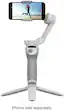
Unfold, snap-in, and start rolling. Osmo Mobile SE's lightweight foldable body and magnetic quick-release design make it easy to carry and capture at a moment's notice. With the newly added status panel, you can switch gimbal modes with the push of a button. An array of intelligent features helps to dynamically shoot and highlight moments, adding a creative flair to anything you want to capture.
- Take It With You: Osmo Mobile SE's foldable design is easy to store and carry. Throw it in your pocket so that when inspiration strikes, you're ready to shoot smooth footage on the spot.
- Film in a Snap: Just clamp in your smartphone, snap it onto the gimbal, and start shooting. The gimbal and magnetic phone clamp can be separated, which allows you to snap your smartphone in or out to call and share the exciting news.
- High-Precision Brushless Motor: Osmo Mobile SE is equipped with a small high-torque brushless motor that allows the gimbal to respond to slight shifts even when compensating for large or heavy smartphones.
- 3-Axis Stabilization: With a new generation of control algorithms, Osmo Mobile SE performs real-time compensation based on the gimbal's attitude, reducing camera shake for buttery smooth footage.
- ActiveTrack 6.0: The powerfully updated ActiveTrack 6.0 helps continually track subjects even when obstructed. Tracking is optimized even during fast movements and when using the front camera.
- Timelapse: Osmo Mobile SE supports Timelapse, Motionlapse, and Hyperlapse, with simple Motionlapse templates embedded to condense highlighted clips into stunning videos.
- Horizontal and Vertical: Quick Roll makes it easy to segue between horizontal filming for longer videos or vertical videos for shorter content. Whether you're moving around or staying still, portrait or landscape, you’ll have flexibility in how you shoot.
- Intuitive Mode Checking: With the new built-in status panel, you can conveniently check the battery level, system status indicator, and gimbal mode. With a press of the M button, you can easily switch between four gimbal modes, instantly elevating your footage.
- Take It With You: Osmo Mobile SE's foldable design is easy to store and carry. Throw it in your pocket so that when inspiration strikes, you're ready to shoot smooth footage on the spot.
- Film in a Snap: Just clamp in your smartphone, snap it onto the gimbal, and start shooting. The gimbal and magnetic phone clamp can be separated, which allows you to snap your smartphone in or out to call and share the exciting news.
- High-Precision Brushless Motor: Osmo Mobile SE is equipped with a small high-torque brushless motor that allows the gimbal to respond to slight shifts even when compensating for large or heavy smartphones.
- 3-Axis Stabilization: With a new generation of control algorithms, Osmo Mobile SE performs real-time compensation based on the gimbal's attitude, reducing camera shake for buttery smooth footage.
- ActiveTrack 6.0: The powerfully updated ActiveTrack 6.0 helps continually track subjects even when obstructed. Tracking is optimized even during fast movements and when using the front camera.
- Timelapse: Osmo Mobile SE supports Timelapse, Motionlapse, and Hyperlapse, with simple Motionlapse templates embedded to condense highlighted clips into stunning videos.
- Horizontal and Vertical: Quick Roll makes it easy to segue between horizontal filming for longer videos or vertical videos for shorter content. Whether you're moving around or staying still, portrait or landscape, you’ll have flexibility in how you shoot.
- Intuitive Mode Checking: With the new built-in status panel, you can conveniently check the battery level, system status indicator, and gimbal mode. With a press of the M button, you can easily switch between four gimbal modes, instantly elevating your footage.
Whats Included
- 1*Osmo Mobile SE
- 1*DJI OM Magnetic Phone Clamp 3
- 1*Grip Tripod
- 1*Power Cable
- 1*Storage Pouch
- 1*Osmo Mobile SE
- 1*DJI OM Magnetic Phone Clamp 3
- 1*Grip Tripod
- 1*Power Cable
- 1*Storage Pouch
Product Manuals
Q: Can I easily switch between horizontal and vertical filming with this gimbal?
A: Yes, the Quick Roll feature allows for easy switching between horizontal and vertical filming.
Q: How does the Osmo Mobile SE handle fast movements?
A: The ActiveTrack 6.0 feature is optimized to track subjects even during fast movements.
Q: What is the battery life of the Osmo Mobile SE?
A: This gimbal stabilizer has a battery life of up to 8 hours.
Q: Does the Osmo Mobile SE support timelapse photography?
A: Yes, the Osmo Mobile SE supports Timelapse, Motionlapse, and Hyperlapse.
Q: Is the Osmo Mobile SE compatible with smartphones other than iPhones?
A: Yes, the Osmo Mobile SE is compatible with a wide range of smartphone brands, including Apple, HUAWEI, HONOR, Samsung, Xiaomi, OPPO, vivo, OnePlus, Google, and Nothing.
Q: Does this work with the Samsung Galaxy S23 Ultra?
A: I just got mine today and it isn't working properly with my S23 Ultra. Your suppose to pull the trigger once and it will follow you with active track, that doesn't seem to work. Also the button that changes to the front camera doesn't work. But the record button on the handle works to start and stop video or take pictures. I also couldn't find where to download an app for the DJI Osmo Mobile SE. I found a compatibility list that shows the s22 ultra is compatible. But it doesn't show the S23 ultra on the list. The Gimbal works great with with the S23 Ultra. Very smooth videos and like that they are automatically level. I will probably trad up for the 360 instant flow. If anyone knows how to fix these problems let me know.
Q: Does this come with video editing software?
A: Dear Customer, Yes, you can use LightCut app with DJI osmo Mobile SE. You can download the LightCut app from major app stores, or from the Downloads page on the DJI official website: scroll to the bottom, go to Download Center > Top Downloads. Should you need any further assistance, please feel free to contact our DJI support at http://www.dji.com/support, we are always here to help. Best Regards, DJI Support
Q: Does the magnet ever fail or is very reliable?
A: Very Reliable.
Reviews
Customers are saying
Customers are positive about the Osmo Mobile SE's ease of use, video quality, and stabilization capabilities, with many praising its smooth operation and user-friendly design. They also appreciate the gimbal's performance and value for its price. However, some customers expressed concerns about the device's weight, particularly during extended use, and a few experienced compatibility issues with certain phone models. A small number also found the app integration and lack of physical instructions to be less than ideal.
Customer Images
The vast majority of our reviews come from verified purchases. Reviews from customers may include My Best Buy members, employees, and Tech Insider Network members (as tagged). Select reviewers may receive discounted products, promotional considerations or entries into drawings for honest, helpful reviews.
Compare similar products

Unfold, snap-in, and start rolling. Osmo Mobile SE's lightweight foldable body and magnetic quick-release design make it easy to carry and capture at a moment's notice. With the newly added status panel, you can switch gimbal modes with the push of a button. An array of intelligent features helps to dynamically shoot and highlight moments, adding a creative flair to anything you want to capture.

Capture every highlight effortlessly. Introducing Osmo Mobile 7 and Osmo Mobile 7P, designed to be lightweight, portable, and user-friendly. Featuring DJI's seventh-generation stabilization and ActiveTrack 7.0 technology, these smartphone gimbals take three-axis stabilization and intelligent tracking to new heights. With a range of intelligent features, capturing cinematic-quality footage has never been easier.
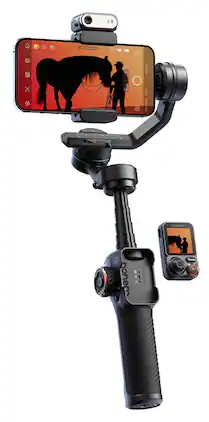
The iSteady M7 brings mobile filmmaking to new heights through innovations. Featuring an upgraded on-device AI tracker, it seamlessly tracks any subject, from person to object, with your phone's native camera. With an innovative detachable touchscreen remote, it enables real-time preview and tracking target selection from a distance, making solo filmmaking easier than ever!
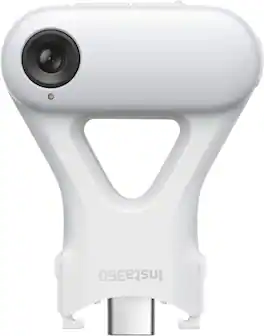
Say goodbye to model or app limitations, unlock AI tracking in more conditions than ever before.
| Pros for DJI - Osmo Mobile SE Smartphone 3-Axis Gimbal Stabilizer - Gray | |||
|---|---|---|---|
| Overall Performance, Ease of Use, Stabilization, Battery Life, Features | Overall Performance, Ease of Use, Stabilization, Features, Battery Life | Stabilization, Battery Life, Build Quality, AI Tracking, Remote Control | There were no pros for this product— |
| Cons for DJI - Osmo Mobile SE Smartphone 3-Axis Gimbal Stabilizer - Gray | |||
| Controls, Weight | Rotation Range | Learning Curve | There were no cons for this product— |