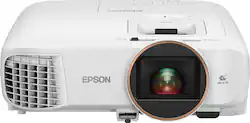
Epson - Home Cinema 2250 1080p 3LCD Projector with Android TV
- Key Specs
- Product Weight: 5.95 pounds (The out of box weight of the item.)
- Light Source: Lamp
- Resolution: Full HD (1080p) (Refers to the number of pixels, both horizontally and vertically, used to capture video/images. The higher the resolution the finer the detail that can be seen.)
- Contrast Ratio: 70000:1 (Measured difference between a displayed image's brightest whites and darkest blacks. The larger the first number, the more detail and color that can be displayed.)
- Projector Use: Home Theater
- General
- Product Name: Home Cinema 2250 1080p 3LCD Projector with Android TV
- Brand: Epson
- Model Number: EPSON HC2250 V11HA11020
- Dimensions
- Product Height: 3 inches (The out of box height of the item. Height is measured as the vertical distance from the bottom of the item to the top as it would be primarily used or placed.)
- Product Width: 11.9 inches (The out of box width of the item. Width is measured as the horizontal distance from one side of the item to the other as it would be primarily used or placed.)
- Product Depth: 9.2 inches (The out of box depth of the item. Depth is measured as the distance from the front of the item to the back as it would be primarily used or placed.)
- Product Weight: 5.95 pounds (The out of box weight of the item.)
- Display
- Light Source: Lamp
- Display Technology: 3LCD (Denotes the product’s visual process, sometimes manufacturer specific, used to display an image.)
- Resolution: Full HD (1080p) (Refers to the number of pixels, both horizontally and vertically, used to capture video/images. The higher the resolution the finer the detail that can be seen.)
- Resolution (Native): 1080p (Native resolution of a screen refers to its single, fixed resolution. Sometimes screens must scale an image up or down in order to fit the native resolution. This can cause a loss of resolution or detail.)
- 3-Chip Technology: true (Projectors with this technology are able to display images with optimal brightness, color, and detail. Because of their high-performance design, these projectors are primarily used in large venues and digital cinemas.)
- High Dynamic Range (HDR): false (An HDR-compatible 4K TV or other HDR-compatible product displays HDR video content when it's available from sources like 4K Ultra HD Blu-ray Discs and 4K streaming services.)
- Contrast Ratio: 70000:1 (Measured difference between a displayed image's brightest whites and darkest blacks. The larger the first number, the more detail and color that can be displayed.)
- Aspect Ratio: 16:9 (The measurement of the width of a screen compared to the height of a screen, expressed as a ratio.)
- Throw Ratio Range: 1.3 - 1.56:1 (This measurement indicates what size of projected image can be produced from a certain distance. The smaller the ratio, the closer the projector can be to the screen while still producing a large image.)
- Digital Keystone Correction: true ("Keystone effect" refers to the distortion of an image when it is projected on an angled surface or when the projector is positioned too high or too low from the center of the display. Projectors with a digital keystone correction feature are able to scale the image as needed before it is projected, resulting in the correct image orientation no matter where it is displayed.)
- 3D Technology: false
- Viewing
- Minimum Projector Distance: 3 feet (Minimum distance that the projector can be placed from the screen to produce a display with acceptable visual performance.)
- Maximum Projector Distance: 26.6 feet (Maximum distance that the projector can be placed from the screen to produce a display with acceptable visual performance.)
- Minimum Viewable Screen Size: 33.1 inches
- Maximum Viewable Screen Size: 320 inches
- Features
- Projector Use: Home Theater
- Remote Control Included: true
- Screen Mirroring: Mobile to screen (Casts the screen of one device onto another wirelessly, using a common protocol (typically Bluetooth).)
- Exposure Control
- Focus Adjustment: Manual (The method used to focus the device in order to view or display a sharper image.)
- Minimum Aperture: f/1.49 (The smallest opening of a lens, typically expressed in f-numbers. The larger the number, the smaller the aperture and the less light that can enter the lens. A smaller aperture creates a larger depth of field, which keeps both foreground and background in focus.)
- Maximum Aperture: f/1.72 (The limit to how wide a lens can be open, typically expressed in f-numbers. The smaller the number, the larger the aperture and the more light that can enter the lens. A larger aperture creates a shallower depth of field, helpful for keeping subjects in focus and blurring background details.)
- Optical Zoom: 1.1x (The optical zoom uses a combination of lenses that magnify the image prior to it being registered at high resolution by the imaging sensor.)
- Digital Zoom Capability: true (Projectors with this feature allow for digital adjustment to the projected image size without changing the location of the projector.)
- Connectivity
- Number of HDMI Inputs (Total): 1
- Audio
- Sound Mode: Mono
- Integrated Speaker(s): true
- Speaker(s) Included: true
- Compatibility
- Voice Assistant Built-in: Google Assistant (A digital assistant built into the device that uses voice commands to answer questions and control smart devices.)
- Warranty
- Manufacturer's Warranty - Parts: 2 years
- Manufacturer's Warranty - Labor: 2 years
- Other
- UPC: 010343958593
Android TV built-in projector for seamless access to content Powered by Google, watch all your favorite streaming channels including Netflix, Hulu, HBO NOW, YouTube and more. Sit back, relax and watch movies with this Epson video projector. It offers 2.700 lumens of color & white brightness to ensure vibrant, accurate colors, and its HD resolution delivers crisp image quality at 1080p. This Epson video projector lets you also connect a Blu-ray player or gaming console via an HDMI input for smooth streaming of your favorite media.
- Android TV: Android TV built-in for seamless access to content Powered by Google, watch all your favorite streaming channels including Netflix, Hulu, HBO NOW, YouTube and more. No need for external streaming media player
- ±30° keystone correction: For distortion-free images.
- 2700 lumens of color brightness and 2700 lumens of white brightness: Boost display visibility and produce clear, vibrant on-screen images.
- Dynamic contrast ratio: Up to 70,000:1 for rich detail in dark scenes.
- 1080p resolution: Smooth crisp image – with Image Enhancement and Frame Interpolation
- HDMI input: Makes it easy to connect to high-definition sources.
- 33.1" - 320" viewable screen size: Allows everyone in the room to enjoy a clear view.
- USB Plug 'n Play instant setup: Instantly projects audio and video from a PC or Mac via a USB connection.
- Manual zoom: Offers setting versatility.
- UHE 210W lamp: Delivers up to 10,000 hours of lamp life in ECO mode and up to 6,000 hours of lamp life in normal mode for extended use.
- 29-37dBA fan noise: Ensures quiet operation.
- Built-in speaker: Provides crisp sound.
- Included remote: Provides simple control from across the room.
Whats Included
- Epson Home Cinema 2250 1080p 3LCD Projector
- Power Cord
- Quick Setup Guide
- Remote Control with AA batteries
A: Somehow the "Android" volume gets turned way down. And this is a different volume setting from the primary "Epson" sound setting. I had the same problem. SOLUTION: Use "Google Assistant" on the remote, and say "Set Max Volume", this will turn the "Android" volume all the way up, then all you have to do is adjust the main (Epson) volume using the remote keys. Also make certain Google assistant is enabled by clicking "APPS" on the remote, and then clicking tools -> apps -> Google assistant, and click to enable. THIS IS A BEST IN CLASS PROJECTOR!!! BEAUTIFUL. ACCURATE, BRIGHT PICTURE, EVEN WITH THE LIGHTS ON!!! UNLIKE DLP PROJECTORS, THERE IS ABSOLUTELY NO RAINBOW EFFECT!!! ALSO: Replacement Bulbs for the Epson 2250 is around $60, DLP replacement bulbs can cost well over $200.
Q: Can speakers be hooked up to projector?
A: Hello Sandi, I have my Bose soundbar hooked up to it via Bluetooth.
A: I'm having pretty much the same issue. It will connect to a cheap pair of bluetooth earbuds and a small Ultimate Ears Megaboom 3, but none of my soundbars or my Sony SRS XP700. I'm really annoyed, because this thing has great picture quality but it is ridiculously limited in it's audio connectivity, and it is NOT easy to see if a speaker is compatible with this thing before you purchase and try it. Don't know why it has to be so hard. Almost every other bluetooth device I've ever owned just worked. This one is apparently limited on purpose. It needs a firmware update, big time.
A: You can actually remove the android dongle from back of the projector, and connect it directly to your AV Receiver and then connect the AV out from receiver to your projector.
A: Hi DMORT. No, the Epson Home Cinema 2250 projector does not support HDMI ARC. Regards, Bobby - The Epson Team.
A: Hello Lindsey. The Home Cinema 2250 supports connecting external speakers over the Audio Out port or via Bluetooth. For more information, please visit the official Epson Support page. Regards, Kevin - The Epson Team.
Q: Can I connect the 2250 via Bluetooth to my Sonos play bar or do I need to run an optic cable?
A: Hello. Yes, you can connect the Epson Home Cinema 2250 to external speakers using a Bluetooth connection. Just navigate to the settings menu, choose HDMI Link, and you should be able to choose your device there. For more information on setting up your audio connection, please visit the official Epson Support page. Regards, Kevin - The Epson Team.
A: Hi Nicky, Have you tried connecting the Home Cinema 2250 to your AV receiver using the 3.5 mm stereo out port? This disables the projector's onboard speaker and sends audio through the 3.5 mm port. Regards, Mark - The Epson Team.



















