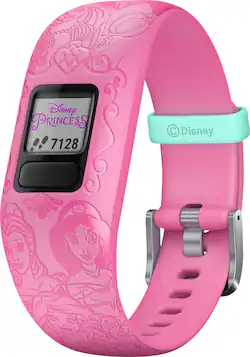
Garmin - vívofit jr. 2 Activity Tracker - Ariel, Rapunzel, Belle, Mulan & Jasmine
- Key Specs
- Screen Size: 16 millimeters (Size of the screen, measured diagonally from corner to corner.)
- Touch Screen: false (Touch-screen devices make navigating more intuitive. Using a touch-screen display, you can do things such as tap to select, hold and drag to move items, swipe to scroll, and pinch to zoom.)
- Operating System Compatibility: Android, Apple iOS
- Operating System: Garmin (The operating system manages all software and hardware, including files, memory and connected devices. Most importantly, it lets you interact with your device and your programs in a visual way; otherwise, you'd be typing computer code to get anything done.)
- App Compatible: true (The product can be connected to a program or software application on a mobile device, which then receives collected data from the product.)
- Metrics Measured: Activity vs. inactivity, Steps taken
- Protective Qualities: Water resistant
- Maximum Depth of Water Resistance: 130 feet (Measurement of the maximum depth of water in which the product is able to resist some degree of water penetration.)
- Band Material: Silicone
- General
- Product Name: vívofit jr. 2 Activity Tracker
- Brand: Garmin
- Product Type: Activity tracker
- Form Factor: Wristband (The size, arrangement, and physical configuration of the product.)
- Model Family: Garmin Vivofit Jr 2
- Model Number: 010-01909-33
- Year of Release: 2017
- Color: Ariel, Rapunzel, Belle, Mulan & Jasmine
- Design
- Band Type: Adjustable
- Band Color: Pink
- Clasp Type: Buckle
- Display
- Display Screen: true
- Screen Size: 16 millimeters (Size of the screen, measured diagonally from corner to corner.)
- Touch Screen: false (Touch-screen devices make navigating more intuitive. Using a touch-screen display, you can do things such as tap to select, hold and drag to move items, swipe to scroll, and pinch to zoom.)
- Display Type: Digital
- Color Display: false
- Clock Display: true
- Backlit Display: false (Integrated lights allow for visibility of the display in low-light conditions.)
- Adjustable Brightness: false
- Customizable Watch Faces: true
- Compatibility
- Operating System Compatibility: Android, Apple iOS
- Operating System: Garmin (The operating system manages all software and hardware, including files, memory and connected devices. Most importantly, it lets you interact with your device and your programs in a visual way; otherwise, you'd be typing computer code to get anything done.)
- App Compatible: true (The product can be connected to a program or software application on a mobile device, which then receives collected data from the product.)
- Connectivity
- Bluetooth Version: Other (The Bluetooth specification formalized by the Bluetooth Special Interest Group. All versions of the Bluetooth standard are backwards compatible with previous versions.)
- Wireless Connectivity: Bluetooth (The manner in which a device sends data to another device over a short distance without the use of wires or cables.)
- Features
- GPS Enabled: false
- Mobile Notifications: false
- Alert Type: Audible, Visual
- Music Player: false
- Silent Alarm: true
- Built-In Microphone: false
- Activity
- Metrics Measured: Activity vs. inactivity, Steps taken
- Multi-Sport Tracking: false
- Sensors: Accelerometer (Detects stimuli such as heat, light, sound, motion, or pressure and responds accordingly by operating a control or initiating a function of the device.)
- Performance
- Protective Qualities: Water resistant
- Maximum Depth of Water Resistance: 130 feet (Measurement of the maximum depth of water in which the product is able to resist some degree of water penetration.)
- Minimum Operating Temperature: 14 degrees fahrenheit (The lowest recommended ambient (surrounding) temperature in which the product can ideally operate stated by the manufacturer. Generally long-term exposure of the product to temperatures less than the minimum can result in ineffective operation.)
- Maximum Operating Temperature: 113 degrees fahrenheit (The highest recommended ambient (surrounding) temperature in which the product can ideally operate stated by the manufacturer. Generally long-term exposure of the product to temperatures more than the maximum can result in ineffective operation.)
- Dimensions
- Product Width: 0.89 inches (The out of box width of the item. Width is measured as the horizontal distance from one side of the item to the other as it would be primarily used or placed.)
- Product Length: 0.46 inches (The out of box length of the item. Length is measured as the longest dimension of the item.)
- Minimum Wrist Size: 130.05 millimeters
- Maximum Wrist Size: 175.01 millimeters
- Power
- Rechargeable: true
- Charging Interface(s): Other (The connection for transmitting power to charge the device.)
- Replaceable Battery: false
- Material
- Band Material: Silicone
- Camera
- Integrated Camera: No
- Other
- UPC: 753759211448
Equip your adventurous child with this swim-friendly Garmin vivofit jr. 2 activity tracker. Its parent-controlled companion app provides a fun way for kids to achieve daily activity goals and lets you set reminders for your child’s scheduled tasks. Hold a friendly competition with the family via the Toe-to-Toe step challenge feature of this Garmin vivofit jr. 2 activity tracker.
- Keep track of your child's daily activity: Estimates steps, sleep and 60 minutes of daily recommended activity.
- Sunlight-visible LCD display: Delivers clear visual readouts even under the sunlight.
- Reminder alerts and task timer: Keep kids on top of chores such as homework, practice time and brushing teeth.
- Waterproof design: Allows you to wear the tracker while swimming.
- Parent-controlled app: Parents can access chore management and reward tools. Available for select iOS and Android devices.
- No recharging needed: User-replaceable battery that lasts 1+ year.
Whats Included
- Garmin vívofit jr. 2 Activity Tracker
- Owner's manual
Q: Can this device be used for recording conversations?
A: No, the device does not have a microphone to record anything. Debbie with Garmin
Q: Can the parent track the kids while they are in school?
A: The vivofit jr. 2 will keep track of your child's activity throughout the day, but you cannot track their location. -Blake with Garmin
Q: Can the bluetooth be turned off? I realize this will not allow it to track steps or sleep.
A: Bluetooth cannot be turned off. You could pair the device to your phone to set it up and then unpair it. It would track steps and sleep but not upload to the app. You may want to go to support.garmin.com where you'll find many FAQ's and video's on the functions of the device. You may also reach out to a product support specialist from that page. Debbie with Garmin
Q: does this track you kids heartrate ?
A: It doesn’t track heart rate
Q: Can this be paired with an iPad, instead of a smartphone?
A: Yes. The Garmin App can is in the Apple App Store and can go on an iPad.
Q: Can this be swapped out for another band?
A: The band on the vivofit jr. 2 can be replaced. -Blake with Garmin
A: It will not pair with the vivofit jr. 2. There are a number of watches it will pair with. Please go to support.garmin.com where you'll find many helpful FAQ's and video's on the functions of the device(s). As well, if you still need assistance you can reach out directly to a product support specialist. Debbie with Garmin
Q: Does the child have to read to interact with this?
A: The watch will show feet and the interaction is on the app itself with the story. You may want to go to support.garmin.com where you'll find many helpful FAQ's and video's on the function of the device. As well, if you need further assistance you may reach out directly to a product support associate for assistance from that link. Debbie with Garmin