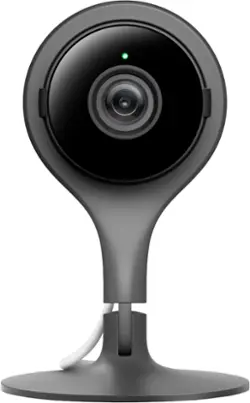
Google - Nest Cam Indoor Security Camera
- Key Specs
- Field Of View: 130 degrees (The area of a target, measured as an angle from the location of viewing, that can be observed.)
- Night Vision: true
- Number Of Cameras Included: 1
- Works With: Amazon Alexa, Google Assistant, Hue, Nest, Wink (Compatible with or able to be connected to other smart devices or applications.)
- Number Of Channels: 1
- Maximum Operating Temperature: 104 degrees fahrenheit (The highest recommended ambient (surrounding) temperature in which the product can ideally operate stated by the manufacturer. Generally long-term exposure of the product to temperatures more than the maximum can result in ineffective operation.)
- Storage Type: Cloud
- Indoor Or Outdoor Use: Indoor (Indicates the appropriate environment product was designed to be used in.)
- Minimum Operating Temperature: 32 degrees fahrenheit (The lowest recommended ambient (surrounding) temperature in which the product can ideally operate stated by the manufacturer. Generally long-term exposure of the product to temperatures less than the minimum can result in ineffective operation.)
- Audio Communication: 2-way (1-way communication devices allow a user to hear detected audio, while 2-way communication adds the ability for a user to talk back through the device.)
- General
- Product Name: Nest Cam Indoor Security Camera
- Brand: Google
- Model Number: NC1102ES
- Camera
- Camera Resolution: 1920 x 1080 (Refers to the number of pixels, both horizontally and vertically, used to capture video/images. The higher the resolution the finer the detail that can be seen.)
- Field Of View: 130 degrees (The area of a target, measured as an angle from the location of viewing, that can be observed.)
- Night Vision: true
- Night Vision Distance: 20 feet
- Number Of Cameras Included: 1
- Frame Rate: 30 frames per second (The frequency at which consecutive images can be captured. The higher the frame rate, the more detail that can be captured.)
- Day/Night Mode: true (Captures images/video with optimal clarity by automatically adjusting settings to various light levels.)
- IP Camera: true (An Internet Protocol (IP) camera is able to record and display image/video data via the internet, without need for a local recording device.)
- Number of IR LEDs: 8 (Quantity of infrared (IR) LED lights for emitting IR light and allowing the camera to detect objects in low light.)
- Camera Iris: Fixed (The iris is the opening on a camera that controls how much light reaches its image sensor, which in turn affects image/video clarity. Fixed and manual irises are generally suited for locations with consistent levels of light. Automatic and "P" (precise) irises automatically adjust in response to changing levels of light and are suited for a wider variety of environments. "P" irises feature additional capabilities for improving footage clarity.)
- Image Sensor Type: CMOS (CCD and CMOS are the two main technologies used in image sensors. CCD, the older of the two types, turns analog light signals into digital pixels. This conversion happens without distortion, resulting in high-quality images. Newer CMOS sensors use transistors at each pixel to move electrical charges. CMOS sensors are typically less expensive, but also require more light to create distortion-free images.)
- Infrared Cut Off Filter: true (Often referred to as an IR or heat-absorbing filter, this camera feature is designed to block infrared light during the day to produce optimally lit images, while still allowing for night vision capabilities in low light.)
- Power
- Voltage: 5 volts (Amount of power needed to support an electrical current.)
- Compatibility
- Compatibility: Requires a compatible phone or tablet running iOS or Android with the free Nest app and Bluetooth 4.0
- Operating System Compatibility: Android, Apple iOS
- Works With: Amazon Alexa, Google Assistant, Hue, Nest, Wink (Compatible with or able to be connected to other smart devices or applications.)
- Connectivity
- Camera Connectivity: Wireless (Security system cameras can be set up in several ways. Wired cameras require cables for power and footage transmission, while wire-free cameras don't need cables for either. Wireless cameras still require cables for receiving power but are able to transmit footage via a wireless network.)
- Frequency Band: 2.4 GHz, 5.0 GHz (Bands may be grouped into categories such as low- and high-band VHF (Very High Frequency), low- and high-band UHF (Ultra High Frequency), or certain frequency channels (measured in MHz or GHz). Generally, higher frequencies transmit information faster but have shorter range than lower frequencies.)
- Encryption Type: WEP, WPA, WPA2 (The security protocols or certification programs that protect the Wi-Fi network.)
- Recording & Playback
- Streaming Video: true (The ability to transmit a live video feed from the product.)
- Records Audio: true
- Number Of Channels: 1
- Performance
- Maximum Operating Temperature: 104 degrees fahrenheit (The highest recommended ambient (surrounding) temperature in which the product can ideally operate stated by the manufacturer. Generally long-term exposure of the product to temperatures more than the maximum can result in ineffective operation.)
- Indoor Or Outdoor Use: Indoor (Indicates the appropriate environment product was designed to be used in.)
- Minimum Operating Temperature: 32 degrees fahrenheit (The lowest recommended ambient (surrounding) temperature in which the product can ideally operate stated by the manufacturer. Generally long-term exposure of the product to temperatures less than the minimum can result in ineffective operation.)
- Storage
- Storage Type: Cloud
- Lighting
- Lighting Type: None
- Features
- Audio Communication: 2-way (1-way communication devices allow a user to hear detected audio, while 2-way communication adds the ability for a user to talk back through the device.)
- Audio-Only Option: true
- 3-Axis Adjustable: false
- Auto-On Detection: Motion
- Mount Type: Wall mount
- Dimension
- Product Height: 4.5 inches (The out of box height of the item. Height is measured as the vertical distance from the bottom of the item to the top as it would be primarily used or placed.)
- Product Width: 2.9 inches (The out of box width of the item. Width is measured as the horizontal distance from one side of the item to the other as it would be primarily used or placed.)
- Product Depth: 2.9 inches (The out of box depth of the item. Depth is measured as the distance from the front of the item to the back as it would be primarily used or placed.)
- Product Weight: 0.47 pounds (The out of box weight of the item.)
- Sensor
- Sensors: Motion sensor, Sound sensor (Detects stimuli such as heat, light, sound, motion, or pressure and responds accordingly by operating a control or initiating a function of the device.)
- Display
- Color Display: true
- Included
- Cable(s) Included: true
- Warranty
- Manufacturer's Warranty - Parts: 1 year
- Manufacturer's Warranty - Labor: 1 year
- Other
- UPC: 854448003655
Did you shut the window? Did the baby wake up? What’s the dog getting into? Google Nest Cam helps you stay connected to things – in super clear 1080p HD video. It sends alerts to your phone when there’s motion or sound. And only takes a minute to set up. Google Nest Cam lets you see around the clock with Night Vision. And has a built-in mic and speaker so you can tell your dog to get off the couch. Think you missed something? Subscribe to Google Nest Aware + Video History and your Google Nest Cam will continuously record up to 30 days of video so you can rewind and see what happened.
- Nest Aware subscription optional.: Add a Nest Aware subscription. Starting at $6 a month for all your Nest cameras, speakers, and displays. Nest Aware gives you more video history and alerts that matter.
- Plug-in-and-go security.: Your security camera shouldn’t sleep on the job. Nest Cam Indoor plugs into power so you never worry about dead batteries.
- 24/7 live video.: 130° view shows your home in 1080p HD, day and night.
- 130° diagonal field of view.: 130° diagonal field of view help you keep an eye on what matters.
- Alerts you when something happens.: Nest Cam looks for motion and listens for conspicuous sounds. If Nest Cam thinks something’s up, it’ll send a phone alert or an email with a key image from the event. If you miss an alert, you can see photos of activity from the last three hours in the Nest app.
- Set it up. Put it anywhere.: Nest Cam takes only a few minutes to install. Literally. Just plug it in and set it up from your phone. Nest Cam Indoor’s stand works in all kinds of homes, on all types of surfaces.
- Clear as day. Even at night.: Night Vision evenly illuminates the whole room.
- Lets you talk and listen.: Nest Cam Indoor has a built-in speaker and mic, so you can hear what’s happening at home. Or tell the dog to get off the couch.
Whats Included
- 10' USB cable
- Google Nest Cam Indoor Security Camera
- Nest screws
- Owner's manual
- Power adapter
- Stand
- Wall-mounting plate
Q: Does this unit have to be plugged in?
A: You first plug the camera to your PC (using the supplied cable) and create your account. THEN you move the camera to a location that may or may not be near an A/C plug. IF the cable is not long enough you MAY use an extension chord to make the connection. AFTER that, the camera uploads its data through WI-FI. Electrical power is required for various purposes such as ZOOMING IN, Speaker ON/OFF, Microphone ON/OFF, Night Vision ON/OFF etc. That's it.
Q: It says that you can archive recorded footage. How far back can I see? A week? A month?
A: It depends on whether or not you subscribed to the cloud service. Without it you have a couple of days worth archived. With the subscription you can get weeks or months depending on the level you choose.
Q: can the nest camera be pointed out from a window for driveway view, long range
A: Although the directions state not to place in direct sunlight. I have 1 in a window at my office so I can view when someone is at the door as well as when they pull into the parking lot.
Q: Nest camera was in color but now in black and white. How to get color back?
A: It might be in 'Night Vision' mode so the camera is using the built in inferred LEDs, either take it out of a dark room or turn off the auto 'Night Vision' setting to off. To turn it off go to the cameras settings (gear in the top left) and go down to Night Vision and slide it to the off position.
Q: power is out
A: I installed (hidden) small UPS's on all cameras & WiFi router/modem (also hidden). Now even if a burglar kills home power "GOTCHA"! Cameras will turn on IR cut lights/filters at night and send video and alerts day or night. With some planning cameras are almost invisible and difficult to access, too.
A: If you want to be able to playback events, you need to pay a monthly or annual fee. They offer two price points. 10 or 30 day recording. There is a discount if pay yearly instead of monthly. Multiple webcams cost 50% of what you paid for the first one. You do not need to pay a monthly cost to get alerts or to view live.
Q: Can you download video/audio onto a smart phone or laptop?
A: No. You need to subscribe in order to have the audio/video capture saved. Without a subscription, the camera is only a camera with no other functionality. You can try the NEST aware (cloud recording) subscription for the trial period, once it expires, it only cost $10.00 a month for one of the inexpensive cloud services. Try it.
A: I am able to watch the video on both my iPad and iPhone. I used my iPhone to set it up and also have the Nest app on my iPad. Have had the Nest thermostat for a year and already had the application on both my phone and pad.












