
HP - OfficeJet Pro 9730e Wireless AI-Enabled Wide Format AiO Inkjet Printer w/ 3 Mos. Instant Ink (+1 Bonus Mo. Ink w/ Code) - White
HP - OfficeJet Pro 9730e Wireless AI-Enabled Wide Format AiO Inkjet Printer w/ 3 Mos. Instant Ink (+1 Bonus Mo. Ink w/ Code) - White
- HP - 936 Standard Capacity Ink Cartridge - Black$49.89

More Buying Options
Related Item

Specifications
- NetworkingWireless, WiredENERGY STAR CertifiedYesPrinter TypeAll In OneISO Color Print Speed18 pages per minuteISO Mono Print Speed22 pages per minuteOutput Tray Capacity75
- Key Specs
- Networking: Wireless, Wired
- ENERGY STAR Certified: true (Devices carrying the ENERGY STAR service mark, such as computer products and peripherals, kitchen appliances, and other products, generally use 20% to 30% less energy than required by federal standards.)
- Printer Type: All In One
- ISO Color Print Speed: 18 pages per minute (The number of color pages able to be printed per minute in the device's default single-side mode, as tested by the International Standards Organization (ISO).)
- ISO Mono Print Speed: 22 pages per minute (The number of black ink (grayscale) pages able to be printed per minute in the device's default single-side mode, as tested by the International Standards Organization (ISO).)
- Output Tray Capacity: 75
- Touch Screen: true (Touch-screen devices make navigating more intuitive. Using a touch-screen display, you can do things such as tap to select, hold and drag to move items, swipe to scroll, and pinch to zoom.)
- General
- Brand: HP
- Model Number: OFFICEJET PRO 9730E/537P6A#B1H
- Product Name: OfficeJet Pro 9730e Wireless AI-Enabled Wide Format AiO Inkjet Printer w/ 3 Mos. Instant Ink (+1 Bonus Mo. Ink w/ Code)
- Color: White
- Display Screen: true
- Display Screen Size: 4.3 inches
- Dimensions
- Product Height: 15.2 inches (The out of box height of the item. Height is measured as the vertical distance from the bottom of the item to the top as it would be primarily used or placed.)
- Product Width: 22.9 inches (The out of box width of the item. Width is measured as the horizontal distance from one side of the item to the other as it would be primarily used or placed.)
- Product Depth: 18.4 inches (The out of box depth of the item. Depth is measured as the distance from the front of the item to the back as it would be primarily used or placed.)
- Product Weight: 42.9 pounds (The out of box weight of the item.)
- Features
- Automatic Document Feeder: true
- Photo Printing: true
- Wide Format Printing: true (Machines with this function support printing on media with widths between 18 and 100 inches, such as posters, banners, canvases, and more.)
- Wide Format Scanning: true
- Monochromatic/Color: Color
- Automatic Two-Sided Printing: true
- Tray Capacity: 500
- Duty Cycle: Up to 30,000 (The maximum number of pages per month that the device can produce without failing, as specified by the manufacturer.)
- Connectivity
- Wired Connectivity: Ethernet, USB-B
- Wireless Connectivity: Wi-Fi (The manner in which a device sends data to another device over a short distance without the use of wires or cables.)
- Minimum System Requirements: PC: Microsoft Windows 11, 10: 32-bit or 64-bit; 2GB available hard disk space; Microsoft Internet Explorer or Edge; Mac: Apple macOS v11 Big Sur, macOSv12 Monterey, macOS v13 Ventura; 2 GB HD; Internet required
- Certifications Listings & Approvals
- EPEAT Qualified: false (The Electronic Product Environmental Assessment Tool (EPEAT) was designed to provide an environmental assessment tool for purchasers. In order to qualify for EPEAT, a product must meet all 23 required criteria.)
- Scanner Info
- Scanner Type: Flatbed, Sheetfed
- Scanner Resolution: Up to 1200 x 1200 (Refers to the number of pixels/dots, both horizontally and vertically, of the image produced by the scanner. Generally, the higher the resolution, the sharper and cleaner the produced image.)
- Fax Info
- Integrated Fax: false
- Ink
- Compatible Cartridges: HP 936
- Ink Subscription Service Available: true (The printer monitors ink usage and alerts the subscription provider when levels are low. A purchased subscription provides refills of ink based on usage.)
- Ink Cartridges Required: 1 x Black, 1 x Cyan, 1 x Magenta, 1 x Yellow (The quantity and color of ink cartridges required for the printer to operate.)
- Ink Cartridges Included: 1 x Black, 1 x Cyan, 1 x Magenta, 1 x Yellow (The quantity and color of ink cartridges included.)
- Ink Bags/Bottles Required: None (The quantity and color of ink bags/bottles required for the printer to operate.)
- Ink Bags/Bottles Included: None (The quantity and color of ink bags/bottles included.)
- Paper Info
- Automatic Document Feeder Capacity: 35 sheets
- Maximum Document Length: 17 inches
- Maximum Document Width: 11.7 inches
- Supported Paper Sizes: Letter; Legal; Government Legal; Executive; Statement; 3x5in; 4x6in; 4x12in; 5x5in; 5x7in; 8x10in; L; Photo 2L; Envelope(#10, Monarch); Card (3x5in, 4x6in, 5x8in); Tabloid (11x17in)
- Paper Feeder: Bottom loader
- Paper Handling: Input Capacities: Up to 500 sheets (Tray 1: up to 250 sheets, Tray 2: up to 250 sheets) Standard; Output Capacities: Up to 75 sheets Standard
- Compatible Media Types: Plain; HP EcoFFICIENT; HP Premium Presentation Matte 120g; HP Tri-fold Brochure Glossy 180g; HP Brochure Matte 180g; HP Brochure Glossy 180g; HP Advanced Photo Papers; Light 60-74g
- Copier Info
- Maximum Number Of Copies: 99
- Copier Resolution (Black): Up to 600 (Refers to the number of pixels/dots, both horizontally and vertically, of the image produced by the copier in black ink. Generally, the higher the resolution, the sharper and cleaner the produced image.)
- Copier Resolution (Color): Up to 600 (Refers to the number of pixels/dots, both horizontally and vertically, of the image produced by the copier in colored ink. Generally, the higher the resolution, the sharper and cleaner the produced image.)
- Performance
- First Page Out Time: 12 seconds (The time it takes the printer to print and deliver the first page in the output tray. May depend on the complexity of the copy being printed.)
- Printer Resolution (Black): Up to 1200 x 1200 (Refers to the number of pixels/dots, both horizontally and vertically, of the image produced by the printer in black ink. Generally, the higher the resolution, the sharper and cleaner the produced image.)
- Printer Resolution (Color): Up to 4800 x 1200 (Refers to the number of pixels/dots, both horizontally and vertically, of the image produced by the printer in colored ink. Generally, the higher the resolution, the sharper and cleaner the produced image.)
- Approximate Page Yield (Black): 1250
- Approximate Page Yield (Color): 800
- Warranty
- Warranty - Parts: 1 year
- Warranty - Labor: 1 year
- Other
- UPC: 196337487925
The HP OfficeJet Pro 9730e delivers fast color printing, 500-sheet paper capacity, and handles files up to 11x17". It's AI-enabled to intuitively adapt to your workflow, with wireless and security features that keep your multifunction printer up to date and secure, and is the world's only wide-format printer with P3 Color.
- From America's most trusted printer brand: The OfficeJet Pro 9730e is perfect for offices printing professional-quality color documents like floorplans, mood boards and spreadsheets. Print speeds up to 18 ppm color, 22 ppm black.
- Perfectly formatted prints with HP AI¹: Print web pages and emails with precision—no wasted pages or awkward layouts; HP AI easily removes unwanted content, so your prints are just the way you want
- Easily achieve vibrant, screen-accurate prints: Print true to screen with the world's first and only wide-format printer with P3 for a wider color gamut vs. sRGB
- Bonus 1 Month of Instant Ink (FREE — Limited Time Only with Code): Use promo code TAXTIME26 during printer setup to get 1 bonus month in addition to the 3 months of free Instant Ink service already included with this printer. Note: Enter the code during HP Inkjet printer setup, not at checkout.
- Wireless printing: Stay connected with our most reliable dual-band Wi-Fi, which automatically detects and resolves connection issues
- 3 months of free printing with HP+: Subscribe to Instant Ink delivery service to get ink delivered directly to your door before you run out. After 3 months, monthly fee applies unless cancelled, and you save up to 50%.
- From America's most trusted printer brand: The OfficeJet Pro 9730e is perfect for offices printing professional-quality color documents like floorplans, mood boards and spreadsheets. Print speeds up to 18 ppm color, 22 ppm black.
- Protects your data: Built-in HP Wolf Pro Security uses a powerful suite of customizable tools that boosts security and helps keep networks protected against cyber threats and malware
- HP app: Print, scan, copy, or fax right from your smartphone with the easiest-to-use print app
- 4.3-inch touchscreen: Quickly navigate your printer with a large color touchscreen and a phone-like user interface
- Sustainable design: Made with more than 30% recycled plastic
- Dynamic security: This printer is intended to work only with cartridges with original HP chips or circuitry and will block cartridges using non-HP chips or circuitry. Periodic firmware updates will maintain the effectiveness of these measures.
- Easily achieve vibrant, screen-accurate prints: Print true to screen with the world's first and only wide-format printer with P3²; for a wider color gamut vs. sRGB
Whats Included
- HP OfficeJet 9135e All-in-One Printer
- Original HP 936 Black Ink Cartridge
- Original HP 936 Cyan Ink Cartridge
- Original HP 936 Magenta Ink Cartridge
- Original HP 936 Yellow Ink Cartridge
- Power cord
- Regulatory flyer, ink caution flyer, setup poster, reference guide
Product Manuals
Disclaimers
- ¹Requires Windows 11. HP AI features are available in U.S. English only and require a U.S. location for printer setup. Availability of features varies by supported printers. Requires HP AI-enabled printer set-up after September 15, 2025, and the HP app. Internet access is required and must be purchased separately. Wireless operations are compatible with 2.4GHz and 5.0GHz operations only.
- ²3HP OfficeJet 9700 printer series are the world’s first and only DCI-P3 color gamut capable wide format printers delivering a 25% wider color range than sRGB. Based on June 2023 internal research of Expanded Color Gamut technology’s comparison against comparable, top-selling competitive printers.
- *Requires a high-speed Internet connection.
Q: How fast is the color printing on the HP OfficeJet Pro 9730e?
A: The HP OfficeJet Pro 9730e can print in color at speeds up to 18 pages per minute.
Q: Can this printer handle double-sided printing automatically?
A: Yes, this printer has automatic two-sided printing functionality.
Q: Does this printer come with ink cartridges?
A: Yes, the HP OfficeJet Pro 9730e comes with one black ink cartridge and three color ink cartridges.
Q: What is the maximum size document that this HP printer can print?
A: The printer can print documents up to 11x17 inches.
Q: Does this HP printer offer wireless printing?
A: Yes, it offers wireless printing through its reliable dual-band Wi-Fi.
Q: What is the paper capacity of this HP printer?
A: This HP printer has a tray capacity of 500 sheets.
Q: What makes the HP OfficeJet Pro 9730e's color accuracy special?
A: This printer utilizes P3 technology, which offers a wider color gamut compared to sRGB, resulting in more vibrant and accurate colors.
A: Thank you for your question on this HP OfficeJet Pro! The 9730e is eligible for Instant Ink, but you do not need to subscribe to that service in order to use this printer. None of HP's Instant Ink-eligible printers sold through retailers like Best Buy require the service to use. The setup cartridges that are included in the box are rated for 800 pages for the black and approximately 420 pages per color cartridge. The refill cartridges are rated for 1,250 pages for the black and 800 pages per color while the Evomore versions of the inks have double those capacities. This printer uses the 936 and 936 Evomore cartridges for its refills.
Compare similar products
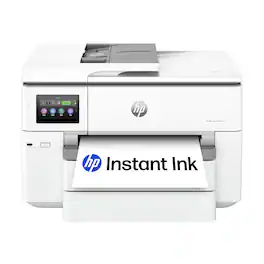
The HP OfficeJet Pro 9730e delivers fast color printing, 500-sheet paper capacity, and handles files up to 11x17". It's AI-enabled to intuitively adapt to your workflow, with wireless and security features that keep your multifunction printer up to date and secure, and is the world's only wide-format printer with P3 Color.

The HP OfficeJet Pro 9135e delivers fast color printing, 500-sheet paper capacity, and duplex scanning and copying. It's AI-enabled to intuitively adapt to your workflow, with wireless and security features that keep your multifunction printer up to date and secure.

The HP OfficeJet Pro 8125e delivers fast color printing, 225-sheet paper capacity, and scan and copy capabilities. It's AI-enabled to intuitively adapt to your workflow, with wireless and security features that keep your multifunction printer up to date and secure.

The HP OfficeJet Pro 9720e delivers fast color printing, 250-sheet paper capacity, prints files up to 11x17", and copies and scans files up to 8.5 x 14". It's AI-enabled¹ to intuitively adapt to your workflow, with wireless and security features that keep your multifunction printer up to date and secure, and is the world's only wide-format printer with P3² Color.
| Pros for HP - OfficeJet Pro 9730e Wireless AI-Enabled Wide Format AiO Inkjet Printer w/ 3 Mos. Instant Ink (+1 Bonus Mo. Ink w/ Code) - White | |||
|---|---|---|---|
| Print Quality, Overall Performance, Setup, Connectivity, Paper Tray Capacity | Print Quality, Overall Performance, Setup, Ease of use, Speed | Overall Performance, Print Quality, Setup, Connectivity, Ease of Use | There were no pros for this product— |
| Cons for HP - OfficeJet Pro 9730e Wireless AI-Enabled Wide Format AiO Inkjet Printer w/ 3 Mos. Instant Ink (+1 Bonus Mo. Ink w/ Code) - White | |||
| Size, Weight | Noise Level, Connectivity, Software | There were no cons for this product— | There were no cons for this product— |
Specs
Reviews
Customers are saying
Customers are pleased with the OfficeJet Pro 9730e's print quality and overall performance, as well as its paper tray capacity and ease of use. The printer is also praised for its quick setup and connectivity. Some customers find the printer's size to be a drawback, particularly the limitations of the ADF scanner, and have noted its considerable weight.
Customer Images
The vast majority of our reviews come from verified purchases. Reviews from customers may include My Best Buy members, employees, and Tech Insider Network members (as tagged). Select reviewers may receive discounted products, promotional considerations or entries into drawings for honest, helpful reviews.
- Rated 2 out of 5 stars
Typical of the new HP Products
Bought this to replace an HP 8620 which had worked flawlessly for 13 years. The 8620 print-head failed, and a brand new HP print-head would not work, nor would new cartridges. This printer was as close to the same specs as the now expensive paper-weight 8620 so I placed an online order. Received the printer and the only way it would work was to create an HP Smart account and agree to the advertised 3 months "free" Instant Ink trial. It would not switch seamlessly between tray 1 and tray 2. When that issue was resolved after many hours of work, then the ADF would not work. Many more hours to get that issue fixed. ADF will not scan a 1 sided document and print a 2 sided copy as the old 8620 did. Hp tech support (If you could call it that) could one suggest uninstall and reinstall software. Of course that didn't work. The advertised 3 months "free" HP Instant Ink was shortened at forced enrollment to only 2 months, and now HP has my credit card info. with no way to delete it and say I will be billed at the end of 1 month, which translates to 0 months "free" trial. Online reviews indicate even though customer cancelled the Instant Ink scam HP has wormed their way into the printer firmware and will brick the printer if HP Instant Ink is not re-enrolled! There needs to be another class action lawsuit! Buyer BEWARE of buying ANY HP products!
RMed Posted
- Rated 5 out of 5 stars
Crafty lady
Prints nice and works great met expectations and quality
Skatintothegroove Posted
- Rated 5 out of 5 stars
Excellent Small Office (or big home) Printer
In the world of InkJet printers, this one is a beast. That's not just because of it's size - it is fairly large - but also because of the scope of what it can do. Whether you have a home office or small business or are just a large family that does a lot of printing, this printer has you covered and is definitely one I would recommend. PROS:- TWO Large trays to hold lots of paper and two different sizes/types of paper- Large Scanner for things bigger than standard 8.5" by 11"- Nice Color Screen that's easy to read- Simple setup with help from HP App or Software- Wifi Printing works great CONS- Uses InkJet Cartridges rather than Reservoirs- Could be too large for some Home Offices Overall, I absolutely love this printer. I'm not a huge fan of HP Computers but have always loved their printers. This one was actually an upgrade from my previous HP Home printer/scanner. That one worked great for me and I was happy with it, but I decided to upgrade to this one for my home office for several improvements that I think most small offices would appreciate. First, it has a larger color screen. My old one has a very small monotone screen that was okay, but not the easiest thing to use. This one has a much larger screen that is color AND can be angled up for easy viewing - it's excellent. The next upgrade that I love is the two large trays. Each tray will hold almost a full ream of paper AND can hold full legal size paper. This is great because you can have two different types/sizes of paper to print to at the ready any time. The other significant upgrade is the scanning area. It's huge and can handle things much larger than a standard paper size. With this I will be able to scan anything I need to without any issues at all which is awesome. The only thing I really miss from my old printer is the ink system. The previous HP printer I had used a reservoir system. There was a LARGE reservoir for each color ink built into the printer - you fill it up and then you're good to go until it runs out which takes a while. This printer goes back to the "old" way of using ink cartridges which won't last nearly as long. HP does of course have the Instant Ink subscription service and with the purchase of this printer, I'm getting 3 months free so I signed up to try it out and see how I like it. Setting up the printer using the instructions provided and the app/software was fairly easy. At one point the app kinda hung on me so I just opened the HP Software App on my MacBook and that was able to easily complete the setup. Once that was done printing to it through WiFi was a breeze and my spouse could immediately print to it from his iPhone without the need to install any 3rd party software which I like. Pages print quickly and look great. I haven't done a lot of scanning yet, but it seems to work great and I love that I can also use the feeder to scan a lot of documents at one time. Besides the convenience of WiFi printing it does have the standard cord connection in the back (cord not provided since most people won't need it). I also liked that it immediately updated the firmware itself without me having to do anything. This is really a great quality printer with excellent "business" options that I think would be great for any small office as well as families or individuals who need something a little more robust than the standard printer.
holllywoodfrodo Posted







