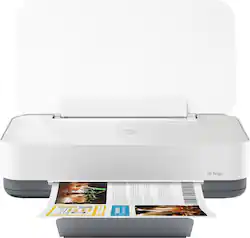
HP - Tango Wireless Instant Ink Ready Inkjet Printer - Wisp Gray
- Key Specs
- Networking: Wireless
- ENERGY STAR Certified: true (Devices carrying the ENERGY STAR service mark, such as computer products and peripherals, kitchen appliances, and other products, generally use 20% to 30% less energy than required by federal standards.)
- Printer Type: Printer
- ISO Color Print Speed: 8 pages per minute (The number of color pages able to be printed per minute in the device's default single-side mode, as tested by the International Standards Organization (ISO).)
- ISO Mono Print Speed: 11 pages per minute (The number of black ink (grayscale) pages able to be printed per minute in the device's default single-side mode, as tested by the International Standards Organization (ISO).)
- Output Tray Capacity: 20
- General
- Product Name: Tango Wireless Instant Ink Ready Inkjet Printer
- Brand: HP
- Display Screen: false
- Model Number: 2RY54A#B1H
- Color: Wisp Gray
- Dimensions
- Product Height: 3.58 inches (The out of box height of the item. Height is measured as the vertical distance from the bottom of the item to the top as it would be primarily used or placed.)
- Product Width: 14.8 inches (The out of box width of the item. Width is measured as the horizontal distance from one side of the item to the other as it would be primarily used or placed.)
- Product Weight: 6.79 pounds (The out of box weight of the item.)
- Features
- Automatic Document Feeder: false
- Photo Printing: true
- Monochromatic/Color: Color
- Automatic Two-Sided Printing: false
- Tray Capacity: 50
- Duty Cycle: Up to 500 (The maximum number of pages per month that the device can produce without failing, as specified by the manufacturer.)
- Certifications Listings & Approvals
- EPEAT Qualified: false (The Electronic Product Environmental Assessment Tool (EPEAT) was designed to provide an environmental assessment tool for purchasers. In order to qualify for EPEAT, a product must meet all 23 required criteria.)
- Ink
- Compatible Cartridges: HP 64 Tri-color, HP 64 Black
- Ink Subscription Service Available: false (The printer monitors ink usage and alerts the subscription provider when levels are low. A purchased subscription provides refills of ink based on usage.)
- Memory
- Memory Card Slot: false
- Paper Info
- Maximum Document Length: 14 inches
- Maximum Document Width: 8.5 inches
- Supported Paper Sizes: Letter; legal; 4 x 6 in; 5 x 7 in; 8 x 10 in; No. 10 envelopes (Note: many other media sizes are supported. Anything from 3 x 5 to 8.5 x 14")
- Paper Feeder: Tray loader
- Paper Handling: 50-sheet input tray, 20-sheet output capacity
- Media Weight (Minimum): 16 grams per square meter
- Media Weight (Maximum): 110 grams per square meter
- Compatible Media Types: Plain Paper, HP Photo, Matte, Glossy Papers, Other Photo, Matte, Glossy Papers, Inkjet Hagaki, Thick, Plain Paper, Light/Recycled Paper
- Performance
- Printer Resolution (Black): Up to 1200 x 1200 (Refers to the number of pixels/dots, both horizontally and vertically, of the image produced by the printer in black ink. Generally, the higher the resolution, the sharper and cleaner the produced image.)
- Printer Resolution (Color): Up to 4800 x 1200 (Refers to the number of pixels/dots, both horizontally and vertically, of the image produced by the printer in colored ink. Generally, the higher the resolution, the sharper and cleaner the produced image.)
- Approximate Page Yield (Black): 125
- Approximate Page Yield (Color): 110
- Compatibility
- Works With: Amazon Alexa, Google Assistant (Compatible with or able to be connected to other smart devices or applications.)
- Connectivity
- Minimum System Requirements: Microsoft Windows 10, 8.1, 8, 7; MAC OS X v10.11 El Capitan, macOS Sierra v10.12 (previously OS X), macOS High Sierra v10.13; 1 GHz CPU; 2 GB HDD space; Internet connection; browser; Android requires 5.0 or above; iOS requires 10.0 or above
- Other
- UPC: 192545507141
Built to match the way you live and designed for use with the HP Smart app, Tango helps you stay a step ahead by connecting and printing from any device, anywhere.
- Works with Amazon Alexa: Ask your compatible device (separate device is required) to print custom shopping lists, to-do lists, as well as a variety of coloring activities and crossword puzzles.
- Works with Google Assistant: Ask your compatible device (separate device is required) to print your Google Calendar, templates for custom calendars, and checklists, as well as select activities and word games.
- With Tango you can print free photos: Only on HP Tango - print free photos, up to 5" x 7", from your smartphone when you enroll in HP's Instant Ink service1.
- Prints up to 11 ISO ppm* in black, up to 8 ISO ppm* in color: Generates documents quickly.
- Be sure you have the right cartridge: Enter your printer's model number into the Ink and Toner Finder to find compatible cartridges.Get started ›
- Ideal for home use: Offers excellent print quality for photos and documents, accepts a variety of paper types and sizes.
- Wireless and mobile printing capability: Connect this printer to your computer easily with built-in Wi-Fi. Plus, print from your smartphone, tablet, and other mobile devices with the free HP Smart app or Apple AirPrint.
- Up to 4800 x 1200 dpi (dots per inch) color resolution: Its high resolution allows producing incredible quality and detail in documents and photos. Up to 1200 x 1200 dpi when printing in black only.
- One black and one tri-color print cartridge: Three dye-based inks produce vivid color in photos, and the pigment-based black ink produces crisp text.
- Standard paper handling: Up to 50-sheet input and 20-sheet output capacity.
- Dynamic Security: This printer uses dynamic security, which may be updated periodically by firmware updates. The printer is intended to be used solely with cartridges using only original HP electronic circuitry.
Whats Included
- HP 64 Setup Black Instant Ink Ready Cartridge (~125 pages)
- HP 64 Setup Tri-color Instant Ink Ready Cartridge (~110 pages)
- HP Tango Wireless Instant Ink Ready Printer
- Ink caution flyer
- Instant Ink flyer
- Power cable
- Setup poster
Product Manuals
Q: Does this printer scan pictures and documents
A: Have not scanned yet, but understand this printer is not a scanner. "Scanning" is accomplished by taking a photo of the document with your cell camera, and printing that.
A: You can definitely use a hotspot from your phone, but you don't even need to do that! With the assistance of the HP Smart app and your iPhone/iPad's WiFi Direct features, you can connect to the Tango with ease!
Q: If the COLOR ink is empty, will HP-Tango print B&W docs with black ink?
A: Since this is a two cartridge printer, you can print in single cartridge mode. HP's exclusive feature, Single Cartridge Mode, allows you to print with only one cartridge -- just don't leave the empty one in. So you never have to buy color if you don't want to. I would just advise to set up with both cartridges in the box first. Then, you can use single cartridge mode.
Q: Are you still able to traditionally print from a Mac desktop/laptop?
A: Yes, you can still connect and print with this printer from your Mac desktop or laptop.
Q: Does this printer photo copy?
A: You copy using the HP Smart App which goes hand in hand with the Tango printer. As smartphone cameras have gotten better and better you are able to take a high resolution scan using your phone and the Smart App can automatically detect the borders and deliver a perfect reproduction without the need to go to the printer to load a document.
Q: Can i use this printer with my dell laptop?
A: Yes, the Tango printer works with all modern Windows computers, as well as Chromebooks, Macs, phones and tables.
Q: does this printer do copy's? I am a college student, would you recommend this printer?
A: You can copy and scan with the HP smart app and your smart phone with the Tango printer. It is great for a college student. One great feature about this printer is that if you enroll in the HP Instant Ink program, any 4x6" or 5x7" photos printed from your smart phone are free.
Q: Will my Tango X link to a tablet without WiFi. And how. John
A: You can use WiFi Direct. Wireless Direct (WiFi Direct) allows you to directly connect to printer from a mobile device or computer without the need for internet access or a wireless network. You would connect to the printer’s wireless direct signal just like you would connect to a wireless network. The printer would have a unique name in your wireless connections, i.e. Direct-04-Printer. For more information, you can go to: https://www8.hp.com/us/en/campaigns/wireless-printing-center/wireless-direct.html