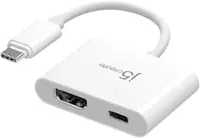
j5create - USB 3.0 to Dual HDMI Multi-Monitor Adapter - Silver
More Buying Options
Related Item

About This Item
- Key Specs
- Connector Type (End 1): USB-A
- Gender (End 1): Male
- Connector Type (End 2): HDMI Type A
- General
- Brand: j5create
- Model Number: JUA365
- Product Name: USB 3.0 to Dual HDMI Multi-Monitor Adapter
- Color: Silver
- Quantity: 1
- Compatibility: Windows 7 or later, macOS 10.8 or later. Available USB Type-A port USB 3.1/3.0 is required for 4K resolutions
- Connectivity
- Cable Type: USB
- Product Type: Adapter
- Connector Type (End 1): USB-A
- Gender (End 1): Male
- Connector Type (End 2): HDMI Type A
- Warranty
- Warranty - Parts: 2 year limited
- Warranty - Labor: 2 year limited
- Other
- UPC: 847626001840
This USB 3.0 to Dual HDMI Multi-Monitor Adapter acts as an external video card for your MacBook or Windows computers. It allows you to add two additional displays through your USB 3.0 port, boosting your productivity by giving you more screen space to work from. One of the HDMI ports can output resolutions up to 4K, while the other can output resolutions up to 2048 x 1152. This is the perfect alternative to a costly video card. With this USB 3.0 Multi-Monitor Adapter, you can quickly install the driver with a simple USB plug-in. Afterwards, connect the device to your monitors using HDMI cables and then you will have a dual-display workstation!
- HDMI dual independent display output: The highest resolution one port is 4K(3840x2160)@30Hz and the other port is 2K(2048x1152)@60Hz.
- Supports 4 Display Modes: Mirroring mode, clone one screen onto another. Extended mode, extend your desktop across multiple displays. Primary mode, have individual applications open on each monitor. Display Rotation, view an image or report vertically.
- Increase Efficiency: Through the convenient and simple USB interface installation, two display screens can be added quickly, and the efficiency is doubled.
- Universal Compatibility: Compatible with both Mac & Windows. Backwards compatible with USB 2.0.
- HDMI dual independent display output: The highest resolution one port is 4K(3840x2160)@30Hz and the other port is 2K(2048x1152)@60Hz.
- Supports 4 Display Modes: Mirroring mode, clone one screen onto another. Extended mode, extend your desktop across multiple displays. Primary mode, have individual applications open on each monitor. Display Rotation, view an image or report vertically.
- Increase Efficiency: Through the convenient and simple USB interface installation, two display screens can be added quickly, and the efficiency is doubled.
- Universal Compatibility: Compatible with both Mac & Windows. Backwards compatible with USB 2.0.
Whats Included
- 1 - JUA365 USB 3.0 to Dual HDMI Multi-Monitor Adapter
- 1 - Quick Installation Guide
- 1 - JUA365 USB 3.0 to Dual HDMI Multi-Monitor Adapter
- 1 - Quick Installation Guide
Q: How many display modes does this adapter support?
A: This adapter supports four display modes: mirroring, extended, primary, and display rotation.
Q: Which USB version is required for 4K resolution?
A: You will need a USB 3.1/3.0 port for 4K resolutions.
Q: Can I add or remove monitors without restarting my computer?
A: Yes, the adapter is hot-swappable, allowing you to add or remove monitors without rebooting your system.
Q: What is the maximum resolution supported by this adapter?
A: This adapter supports resolutions up to 4K UHD on one display and 2K on the other display simultaneously.
Q: What is the maximum refresh rate supported for the 2K resolution?
A: The other port supports a maximum resolution of 2K (2048x1152) at 60Hz.
Q: Can I use this adapter with my MacBook?
A: Yes, this adapter is compatible with both macOS and Windows operating systems.
Q: If i plug this into my pc will it split two monitors with different displays
A: Yes, that is exactly what I did.
A: Yes, you have to download and install their driver. I would recommend against doing this. The driver doesn't use your build-in Mac video, instead it implements a "screen mirroring" method and has caused multiple problems for me. I'm using it with a MacBook Pro and am very disappointed with the product and the manufacturer's response when I opened a service ticket with their customer service department -- which was basically this: "We're sorry, but the product doesn't work for your needs." I was only trying to use it to add external monitors to my laptop while at my desk. Among the most serious issue was that I cannot disconnect the device without shutting down my laptop. NOT ACCEPTABLE!
Reviews
Customers are saying
Customers highly value the USB 3.0 to Dual HDMI Multi-Monitor Adapter for its ease of use, HDMI ports, and overall performance. Compatibility and size are also appreciated features. Some customers have expressed concerns regarding the price, driver installation, lag, resolution, and heat.
Customer Images
The vast majority of our reviews come from verified purchases. Reviews from customers may include My Best Buy members, employees, and Tech Insider Network members (as tagged). Select reviewers may receive discounted products, promotional considerations or entries into drawings for honest, helpful reviews.
Compare similar products

This USB 3.0 to Dual HDMI Multi-Monitor Adapter acts as an external video card for your MacBook or Windows computers. It allows you to add two additional displays through your USB 3.0 port, boosting your productivity by giving you more screen space to work from. One of the HDMI ports can output resolutions up to 4K, while the other can output resolutions up to 2048 x 1152. This is the perfect alternative to a costly video card. With this USB 3.0 Multi-Monitor Adapter, you can quickly install the driver with a simple USB plug-in. Afterwards, connect the device to your monitors using HDMI cables and then you will have a dual-display workstation!

The USB-C to Dual HDMI Multi-Monitor Adapter acts as an external video card for your MacBook or Windows laptops. It allows you to add two additional displays through your USB-C port, boosting your productivity by giving you more screen space to work from. One of the HDMI ports can output resolutions up to 4K, while the other can output resolutions up to 2048 x 1152. Simply install the driver for the USB-C to Dual HDMI Multi-Monitor Adapter by plugging-in the adapter and then connect your monitors using HDMI cables for a dual-display workstation!

The JUA254 USB to HDMI Multi-Monitor Adapter works as an external video card, instantly allowing users to attach additional displays via HDMI connection without the hassle of a lengthy setup or having to install additional hardware. The USB 3.0 Display Adapter can support up to four displays running on the same computer, turning your workstation into a fully-functioning, multi-display powerhouse. This USB adapter works as an external video card, instantly allowing additional displays without the hassle of opening the computer casing and installing an external graphics card. You can have a second monitor with an extended display, a mirrored display, a rotational display (rotation mode not available for Mac), or make it your primary monitor. Now enjoy true 1080p HD resolution through any Windows or Mac computer with a USB 3.0 port. These adapters are also backwards compatible with USB 2.0 resolutions and playback, which are ideal for office applications. The simple plug-and-play function allows you to connect your computer to a second monitor or projector within seconds to create a new visual environment on Windows 10.

Use this Rocketfish 2-Output HDMI Splitter with 4K at 60Hz and HDR Pass-Through to create two outputs with one HDMI signal. It has a plug-and-play interface with no setup necessary, and it has full 4K and HDR compatibility to accommodate the latest visual displays. This Rocketfish HDMI splitter retains the sound and image quality of the original input.
| Pros for j5create - USB 3.0 to Dual HDMI Multi-Monitor Adapter - Silver | |||
|---|---|---|---|
| Ease of use, HDMI, Performance, Compatibility, Size | Ease of use, HDMI, Overall Performance, Connectivity, Price | Performance, Functionality | HDMI, Ease of use, Performance, Picture Quality |
| Cons for j5create - USB 3.0 to Dual HDMI Multi-Monitor Adapter - Silver | |||
| Price, Driver, Lag, Resolution, Heat | Compatibility | There were no cons for this product— | Price, Signal, Power Consumption |