Logitech - C270 720 Webcam with Noise-Reducing Mics - Black
Logitech - C270 720 Webcam with Noise-Reducing Mics - Black
- Logitech - Zone 300 Wireless Bluetooth On-ear Headset With Noise-Canceling Microphone - Rose$69.99

More Buying Options
Related Item

Specifications
- Video ResolutionHD (720p)
- Key Specs
- Video Resolution: HD (720p) (Refers to the number of pixels, both horizontally and vertically, used to capture the video. The higher the resolution the finer the video detail that can be seen.)
- General
- Brand: Logitech
- Model Number: 960-000694
- Product Name: C270 720 Webcam with Noise-Reducing Mics
- Color: Black
- Camera
- Video Resolution: HD (720p) (Refers to the number of pixels, both horizontally and vertically, used to capture the video. The higher the resolution the finer the video detail that can be seen.)
- Maximum Video Frame Rate: 720p (HD) @ 30 FPS (The maximum frequency at which consecutive images can be captured by a video recording device.)
- Megapixels: 3 megapixels (Measures the amount of graphic resolution that the product can capture.)
- Image Resolution (Display): 1280 x 720 (Refers to the number of pixels, both horizontally and vertically, used to either capture an image or display it. The higher the resolution the finer the image details.)
- Autofocus: false (Allows the camera to automatically focus through the lens, rather than by adjusting the lens manually.)
- Features
- Integrated Microphone: true
- Plug And Play Operation: true (The product can work when first used or connected, without reconfiguration or adjustment by the user.)
- 360 Degrees Rotation: false (The product is capable of turning freely about an axis, incorporating horizontal points of view covering 360 degrees.)
- Connectivity
- System Requirements: Windows 10 or later, Windows 8, Windows 7; macOS 10.10 or later; Chrome OS; Android v 5.0 or above (The software that a product must have for it to be able to integrate with another product.)
- Connectivity: USB-A
- Dimensions
- Product Height: 2.87 inches (The out of box height of the item. Height is measured as the vertical distance from the bottom of the item to the top as it would be primarily used or placed.)
- Product Width: 1.26 inches (The out of box width of the item. Width is measured as the horizontal distance from one side of the item to the other as it would be primarily used or placed.)
- Product Depth: 2.62 inches (The out of box depth of the item. Depth is measured as the distance from the front of the item to the back as it would be primarily used or placed.)
- Product Weight: 0.2 pounds (The out of box weight of the item.)
- Warranty
- Warranty - Parts: 2 years
- Warranty - Labor: None
- Other
- UPC: 097855070739
With the Logitech C270 Webcam, you can confidently join any video meeting knowing you’ll always have quality audio and video. Our most affordable camera, the C270 Webcam is an upgrade for your laptop or desktop with practical features that outperform most built-in laptop cameras. It supports crisp HD 720p/30 fps video calls with diagonal 55° field of view. Logitech’s RightLight technology adjusts to your lighting conditions, producing brighter images to help you look good even in low-light and backlit situations. And the noise-reducing mic makes sure your voice comes across clearly, even in busy environments.
- Crisp widescreen HD 720p video and high-quality photo camera: Crisp HD 720p/30 fps video calls with diagonal 55° field of view and auto light correction. Compatible with popular platforms including Skype and Zoom.
- Built-in noise-reducing mic: The built-in noise-reducing mic makes sure your voice comes across clearly up to 5 ft away, even if you’re in busy surroundings.
- Adjusts to lighting conditions: C270’s RightLight 2 feature adjusts to lighting conditions, producing brighter, contrasted images to help you look good in all your conference calls.
- Universal clip: The adjustable universal clip lets you attach the camera securely to your screen or laptop, or fold the clip and set the webcam on a shelf. You’re always ready for your next video call.
- Flexible webcam that goes beyond built-in: Small, agile and adjustable, it brings a whole new angle to video calling.
- More sustainable: Certified carbon neutral: the carbon impact of the product and packaging has been reduced to zero.
Whats Included
- Logitech HD Webcam C270
- 5 ft (1.5 m) attached USB-A cable
- User documentation
Q: Does this Logitech webcam have a built-in microphone?
A: Yes, the Logitech C270 has a built-in noise-reducing microphone.
Q: How does this webcam handle different lighting conditions?
A: This webcam uses Logitech's RightLight 2 technology to adjust to varying lighting conditions, producing brighter, more contrasted images.
Q: Does the webcam come with any software?
A: Yes, the Logitech C270 webcam includes Logi Tune software.
Q: What is the video resolution of this webcam?
A: This webcam supports HD video resolution of 720p.
Q: Can I use this webcam with a laptop?
A: Yes, the Logitech C270 webcam is compatible with laptops and desktops.
Q: will it work in windows 10?
A: Yes, works fine with windows 10.
Q: What accessories go with this? For example, USB cable + mic connecor, CD driver, etc.
A: The only thing that comes with it is basic software / drivers on CD. The USB cable is permanently attached to the camera and the microphone is built in. So far after using it a few times I can say it gives a nice clean image and the microphone sounds really good for being a built in feature.
A: Yes, it will work with Zoom.
Compare similar products

With the Logitech C270 Webcam, you can confidently join any video meeting knowing you’ll always have quality audio and video. Our most affordable camera, the C270 Webcam is an upgrade for your laptop or desktop with practical features that outperform most built-in laptop cameras. It supports crisp HD 720p/30 fps video calls with diagonal 55° field of view. Logitech’s RightLight technology adjusts to your lighting conditions, producing brighter images to help you look good even in low-light and backlit situations. And the noise-reducing mic makes sure your voice comes across clearly, even in busy environments.

Look, sound, and meet better with Brio 100—a simple and affordable webcam that lets you show your best self in video calls. Full HD 1080p resolution and auto-light balance bring clarity and brightness to your calls, so you look your best. Sound better with a built-in microphone, and get total privacy with an integrated shutter.

Logitech C920s is a budget-friendly, work-from-anywhere webcam that delivers a professional video meeting experience. It includes features designed to make you look and sound great in your next meeting. A 78º diagonal field of view perfectly frames you and your space, while autofocus adjusts smoothly and precisely. RightLight 2 technology automatically adjusts to your lighting situation even in low-light or backlit conditions. And dual integrated mics accurately capture your voice from multiple angles for greater nuance. If you’re streaming or recording, use Logitech’s Capture app to edit and customize. Flip down the lens cover at any point to protect your privacy.
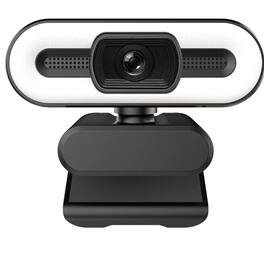
Enhance your virtual presence with the Sanoxy 1080P USB 3.0 Webcam, designed for high-definition video calls, content creation, and live streaming. Featuring crisp 1080P resolution and advanced H.264 compression technology, this webcam delivers smooth, vivid video at 30 frames per second with efficient data transmission. The built-in microphone ensures clear voice capture, while the fast auto focus keeps your image sharp even with movement. A 105° wide-angle lens provides a broader field of view, making it ideal for group calls or showing more of your workspace. With simple USB 3.0 plug-and-play setup and compatibility with PCs and laptops, this webcam is a powerful, easy-to-use tool for professional and personal video communication.
| Pros for Logitech - C270 720 Webcam with Noise-Reducing Mics - Black | |||
|---|---|---|---|
| Overall Performance, Video Quality, Ease of Use, Setup, Resolution | Ease of Use, Setup, Image Quality | Video Quality, Overall Performance, Ease of Use, Setup, Privacy Feature | There were no pros for this product— |
| Cons for Logitech - C270 720 Webcam with Noise-Reducing Mics - Black | |||
| Mounting, Compatibility, Field of View, Focus, Features | Mounting, Focus, Field of View, Adjustability, Design | Focus, Compatibility, Field of View, Autofocus, Cable Length | There were no cons for this product— |
Specs
Reviews
Customers are saying
Customers are pleased with the C270 720 Webcam's overall performance and video quality. Many users find it easy to use and appreciate the quick setup, as well as the high-definition resolution. However, some customers have reported challenges with mounting and compatibility, and have noted that it has only essential features and lacks auto-focus. Additionally, a few users have mentioned a narrow field of view.
Customer Images
The vast majority of our reviews come from verified purchases. Reviews from customers may include My Best Buy members, employees, and Tech Insider Network members (as tagged). Select reviewers may receive discounted products, promotional considerations or entries into drawings for honest, helpful reviews.
- Rated 5 out of 5 stars
Great starter webcam
First off, i bought this because i just happened to have a 25 dollar gift card from xmas and needed a cheap webcam asap. That said im extremely impressed, i am able to stream on obs and other software at 720p and its honestly super sharp no lag. I compared it to my buddies 1080p webcam that cost 70 bucks we could only tell slight differences in quality. Coming from a labtop webcam you will be insanely impressed. Now if you are into luxury this isnt for you. But it also does have ultrawide mode which is super nice, it comes with software aswell. It attches to top of your monitor and is adjustable. I dont use the audio because i have a mic, but i tested it and it was decent aswell and it wasnt super quiet like some other webcam mics. For facecam while gaming at this price its hard to beat i reccomend for sure.
lazyM Posted
- Rated 4 out of 5 stars
It gets the job done
Works flawlessly with my work laptop and teams. It is truly a plug and play item. I use this specifically for teams meetings that require cameras on or when interfacing with clients. Cheapest webcam you can get to get the job done. This is actually my second one. I have one at my home office and in office office. For 720 p the picture isn’t half bad
SamS Posted
- Rated 5 out of 5 stars
Great for Zooming
As advertised. Easy plug and play on top of my monitor. I use primarily for family and friends Zoom calls, showing PowerPoints, pictures and videos. I had a concern with choosing the 720 resolution, but more than adequate for my use.
Shawnt Posted