
Logitech - C615 1080 Webcam with HD Light Correction - Black
Related Item

Specifications
- Video ResolutionFull HD (1080p)
- Key Specs
- Video Resolution: Full HD (1080p) (Refers to the number of pixels, both horizontally and vertically, used to capture the video. The higher the resolution the finer the video detail that can be seen.)
- General
- Brand: Logitech
- Model Number: 960-000733
- Product Name: C615 1080 Webcam with HD Light Correction
- Color: Black
- Camera
- Video Resolution: Full HD (1080p) (Refers to the number of pixels, both horizontally and vertically, used to capture the video. The higher the resolution the finer the video detail that can be seen.)
- Maximum Video Frame Rate: 1080p (Full HD) @ 30 FPS (The maximum frequency at which consecutive images can be captured by a video recording device.)
- Megapixels: 2 megapixels (Measures the amount of graphic resolution that the product can capture.)
- Image Resolution (Display): 1920 x 1080 (Refers to the number of pixels, both horizontally and vertically, used to either capture an image or display it. The higher the resolution the finer the image details.)
- Autofocus: true (Allows the camera to automatically focus through the lens, rather than by adjusting the lens manually.)
- Features
- Integrated Microphone: true
- Plug And Play Operation: false (The product can work when first used or connected, without reconfiguration or adjustment by the user.)
- 360 Degrees Rotation: false (The product is capable of turning freely about an axis, incorporating horizontal points of view covering 360 degrees.)
- Connectivity
- System Requirements: For HD video calling and sharing: 2.4GHz Intel® Core™2 Duo processor; Windows XP (SP2 or higher), Vista or 7 (32- or 64-bit); 2GB RAM; 200MB hard drive; USB 2.0 port; Internet connection (The software that a product must have for it to be able to integrate with another product.)
- Connectivity: USB Type A
- Dimensions
- Product Height: 6 inches (The out of box height of the item. Height is measured as the vertical distance from the bottom of the item to the top as it would be primarily used or placed.)
- Product Width: 3 inches (The out of box width of the item. Width is measured as the horizontal distance from one side of the item to the other as it would be primarily used or placed.)
- Product Depth: 8.25 inches (The out of box depth of the item. Depth is measured as the distance from the front of the item to the back as it would be primarily used or placed.)
- Product Weight: 8.8 pounds (The out of box weight of the item.)
- Other
- UPC: 097855074805
This webcam features high-definition video calling and still image capture with up to 2.0MP resolution to ensure crisp, clear video and picture quality. The 1-click upload capability allows you to easily share pictures and videos online.
- Still-image resolution up to 2.0MP: For clarity. Video capture up to 1920 x 1080 pixels and up to 30 fps for lifelike detail and motion.
- CMOS image sensor: Provides sharp images even in dim light.
- High-definition video calling: So you can speak with friends and family online.
- Built-in microphone: Provides echo-free audio with or without a headset for clear videoconferencing or calls to friends.
- 1-click upload: Allows you to easily post to Facebook, YouTube and Twitter.
- 360° swivel: Provides flexible placement options.
- Fold-and-go design: Offers easy portability.
- USB connectivity: For fast, easy connections.
- More sustainable: Certified carbon neutral: the carbon impact of the product and packaging has been reduced to zero.
- Still-image resolution up to 2.0MP: For clarity. Video capture up to 1920 x 1080 pixels and up to 30 fps for lifelike detail and motion.
- CMOS image sensor: Provides sharp images even in dim light.
- High-definition video calling: So you can speak with friends and family online.
- Built-in microphone: Provides echo-free audio with or without a headset for clear videoconferencing or calls to friends.
- 1-click upload: Allows you to easily post to Facebook, YouTube and Twitter.
- 360° swivel: Provides flexible placement options.
- Fold-and-go design: Offers easy portability.
- USB connectivity: For fast, easy connections.
- More sustainable: Certified carbon neutral: the carbon impact of the product and packaging has been reduced to zero.
- Still-image resolution up to 2.0MP: For clarity. Video capture up to 1920 x 1080 pixels and up to 30 fps for lifelike detail and motion.
- CMOS image sensor: Provides sharp images even in dim light.
- High-definition video calling: So you can speak with friends and family online.
- Built-in microphone: Provides echo-free audio with or without a headset for clear videoconferencing or calls to friends.
- 1-click upload: Allows you to easily post to Facebook, YouTube and Twitter.
- 360° swivel: Provides flexible placement options.
- Fold-and-go design: Offers easy portability.
- USB connectivity: For fast, easy connections.
- More sustainable: Certified carbon neutral: the carbon impact of the product and packaging has been reduced to zero.
Whats Included
- Logitech HD Webcam C615
- Owner's manual
- Logitech HD Webcam C615
- Owner's manual
- Logitech HD Webcam C615
- Owner's manual
Q: How do you stop seeing answers to questions
A: You can check out anytime you like, but you can never leave.
A: The Logitech website gives this camera a field of view (FoV) of 78 degrees. I know, not terribly helpful, is it? However, with a bit of that math you swore you would never need in the real world, I can tell you that for each foot of distance, it should see an area that is roughly 17.5 inches wide, and 11 inches tall. For each additional foot of distance, you add another 17.5 x 11 inches. So at 2 feet it sees 35 inches wide by 22 inches tall. To put some perspective to this, if you set a laptop on your lap (about 18 inches from your face) you can see from the top of your head to somewhere around the middle of your chest and from shoulder to shoulder. For people who use it on a monitor for their PC (about 3 feet from your face), you can see from the top of your head to the middle of your hips (if you are 5'-6" or so) and an area 6 feet wide. Sorry, I don't have a body reference for that, but its "about" the width of a normal sized couch. The Logitech C525 (also sold at best buy) has a FoV of 68 degrees which is a viewable area of 16.5 inches wide by 9.25 inches high per foot. Laptop: Top of head to upper chest and most of your shoulders. PC: Top of head to most of your upper body and 4 feet wide or twice as wide as your counter tops are deep. If you want to know how far you have to be from either of these cameras to see a specific width (Man! I wish I could include this awesome 8 foot wide painting my 2 year old did in my videos!) you can take the width (in feet) of the thing you want to see, and divide that number by 1.62 for the C615 or 1.37 for the C525. This will give the distance (again, in feet) of how far the camera has to be from the thing to see the whole width. Example: My kid's 8 foot wide painting. I take 8 and divide it by 1.62 because I have the C615 and I see I need to have the camera at least 4.94 feet from the painting. If I have the C525 instead, I take 8 and divide it by 1.37 and I find I need to be 5.84 feet away. If you don't want to (or don't know how to) figure out the feet and inches from that, just round UP to make sure you can see it.
A: It does have a mic. . go to settings then to mic and make sure this webcam is the primary. Test it and go. This is a plug and play item. Just have to find it .
A: Tilts up and down and spins 360 degrees. It has a clip that should fit your monitor. My monitor is about 1/2 inch.
Q: how long is the usb cable that it comes with?
A: It has a 3 foot cord. If you are running it behind a TV and down to a computer it will need a USB extension.
Q: does this camera have a zoom in/out feature
A: Yes it does. You can also control it in up and down and right and left movements. Done through the webcam controller program using your computer mouse. You can download the program from Logitech, it should automatically download when you set up the camera.
Q: windows 10
A: Confirmed plug and play with Windows 10
Q: Is it compatible with the Mac?
A: Yes. I have personally used this with a Mac mini.
Compare similar products
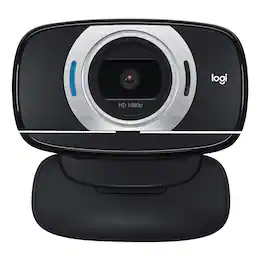
This webcam features high-definition video calling and still image capture with up to 2.0MP resolution to ensure crisp, clear video and picture quality. The 1-click upload capability allows you to easily share pictures and videos online.

With the Logitech C270 Webcam, you can confidently join any video meeting knowing you’ll always have quality audio and video. Our most affordable camera, the C270 Webcam is an upgrade for your laptop or desktop with practical features that outperform most built-in laptop cameras. It supports crisp HD 720p/30 fps video calls with diagonal 55° field of view. Logitech’s RightLight technology adjusts to your lighting conditions, producing brighter images to help you look good even in low-light and backlit situations. And the noise-reducing mic makes sure your voice comes across clearly, even in busy environments.
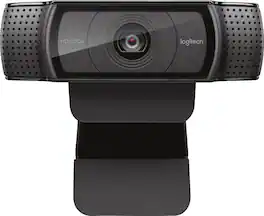
Stay connected with this Logitech C920 Pro webcam that features 1080p resolution when video chatting via Skype and 15.0-megapixel still image capture for crisp visuals. The built-in microphone offers stereo sound for video chatting with loved ones.

Logitech C920s is a budget-friendly, work-from-anywhere webcam that delivers a professional video meeting experience. It includes features designed to make you look and sound great in your next meeting. A 78º diagonal field of view perfectly frames you and your space, while autofocus adjusts smoothly and precisely. RightLight 2 technology automatically adjusts to your lighting situation even in low-light or backlit conditions. And dual integrated mics accurately capture your voice from multiple angles for greater nuance. If you’re streaming or recording, use Logitech’s Capture app to edit and customize. Flip down the lens cover at any point to protect your privacy.
| Pros for Logitech - C615 1080 Webcam with HD Light Correction - Black | |||
|---|---|---|---|
| There were no pros for this product— | Overall Performance, Video Quality, Ease of Use, Setup, Resolution | There were no pros for this product— | Video Quality, Overall Performance, Setup, Ease of Use, Privacy Feature |
| Cons for Logitech - C615 1080 Webcam with HD Light Correction - Black | |||
| There were no cons for this product— | Compatibility, Field of View, Focus, Mounting, Features | There were no cons for this product— | Focus, Compatibility, Field of View, Autofocus, Cable Length |
Specs
Reviews
Customer Images
- Rated 5 out of 5 stars
Cost-effective HD webcam
Pros: highly configurable (180-deg pivot, folds out to work with full monitors, portable displays, laptops); low cost, includes 1/4-20 camera mount; good resolution Cons: auto focus is hit-or-miss at times; default settings are a little "hot" (color, contrast); short USB cable might be an issue for desktops This is the third C615 I've purchased (one for work, one for home, one for my mother). It's easy to set up and the built-in microphone is adequate. Better than most laptop cameras and worth the price (<$70). Sits on a monitor okay, but would prefer that the hinged section could be completely flat. I recommend that you download the Logitech Camera Settings software to optimize your video.
This review is from Logitech - C615 1080 Webcam with HD Light Correction - Black
ZubenElGenubi Posted
- Rated 5 out of 5 stars
Great Quality Camera
This camera offers a quality picture at a great price. I use it for zoom calls and Google meets. Took less than 30 seconds to set up. The only thing I’d be careful of is the length of the USB cord. It’s really designed for a laptop, not for a desktop monitor where the tower is often further away or under the desk, so I had to buy a 2-sided USB extender for my setup. But overall, great product and easy to use. It rotates too so you’re able to switch the angle while recording. Pretty neat! Would highly recommend.
This review is from Logitech - C615 1080 Webcam with HD Light Correction - Black
Angela Posted
- Rated 5 out of 5 stars
Best audio capturing
Never thought this camera would do so much. My voice is clear in the other end, ice pic picture and has a little blue light that indicates when it’s on and off.. it also swirls at 160 and goes left to right but not all the way around.
This review is from Logitech - C615 1080 Webcam with HD Light Correction - Black
Vsanchez653 Posted







