Remote for Nanoleaf Light Panels
- Key Specs
- Remote Control Type: Programmable
- Number Of Devices Controlled: 12
- Works With: Amazon Alexa, Google Assistant, Siri (Compatible with or able to be connected to other smart devices or applications.)
- General
- Product Name: Remote for Nanoleaf Light Panels
- Brand: Nanoleaf
- Model Number: NL26-0001
- Features
- Remote Control Type: Programmable
- Connectivity
- Number Of Devices Controlled: 12
- Wireless: true
- Compatibility
- Works With: Amazon Alexa, Google Assistant, Siri (Compatible with or able to be connected to other smart devices or applications.)
- Dimensions
- Product Weight: 0.29 ounces (The out of box weight of the item.)
- Other
- UPC: 740016551331
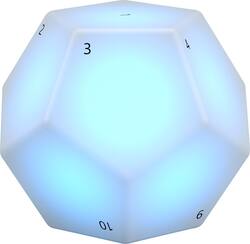
Change the lighting effects on your smart LED panels with this Nanoleaf Bluetooth remote. The dodecahedron's numbered sides have pre-programmed scenes that you can modify via the Nanoleaf app, and it supports Apple HomeKit devices for simplified control. Activate a function by rotating the corresponding side of this Nanoleaf Bluetooth remote to the top position.
- Nanoleaf remote: Control Nanoleaf Light Panels and other HomeKit products effortlessly
- Bluetooth technology: Connects to Nanoleaf Light Panels with an easy pairing process.
- Pre-programmed scenes for each side: Let you set up as soon as you get the remote.
- Dimming and brightening feature: Works by turning the remote clockwise or counterclockwise so you now have even more control over your scene.
- Homekit enabled: If you have iOS8 or later and a Home Hub (sold separately).
- Rhythm module: Available for Android 5.01+ users to control the Nanoleaf Light Panels.
- Sleek design: Looks like art and works like magic.
- 12 programmable sides: For maximum control.
- Powered by 2 AA batteries: No change needed for up to 3 years.
- Works with iOS, Android, and Nanoleaf app.: For convenient usage.
Whats Included
- 2x AA battery
- Nanoleaf Remote for Nanoleaf Light Panels
Q: Does the Nanoleaf remote work with the Rythm panels?
A: Hi Stella! Yes, the Nanoleaf remote does work with the Nanoleaf Light Panels.
Q: Does the remote require wi-fi??
A: Hi! Yes, the Nanoleaf remote will require WIFI connection as you will need to set up the remote in order to pair and control the lights.
Q: What the heck does this thing do? There is NO description.
A: It is a remote control for a Nanoleaf or Canvas panel set up/installation so you do not have to use the app to turn it on. There are 12 numbered sides (a dodecagon). Once linked, you can change the pattern/show by picking up the remote and rotating it to the desired number (facing up) and putting it down, and the pattern/show will change to a preset pattern. The patterns For each number can be changed in the Nanoleaf app. By default, side 1 turns on the panel to last pattern/show displayed; and 12 turns it off. It glows while rotating it so you can see the numbers in a dark room. Hope this helps.












