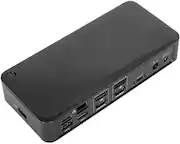
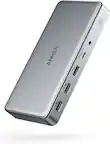
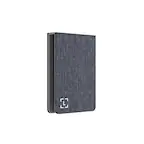
Targus - USB-C Dual HDMI 4K Docking Station with 100W PD Pass-Thru - Silver
Targus - USB-C Dual HDMI 4K Docking Station with 100W PD Pass-Thru - Silver
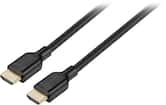
- Insignia™ - 6' 4K Ultra HD HDMI Cable - Black$24.99

Related Item

About This Item
- Key Specs
- Maximum Number of Displays Supported: 2
- Number of DisplayPort Outputs (Total): 0
- General
- Brand: Targus
- Model Number: DSU200TT
- Product Name: USB-C Dual HDMI 4K Docking Station with 100W PD Pass-Thru
- Color: Silver
- Display
- Maximum Number of Displays Supported: 2
- Ports
- Display Connector(s): 1 x HDMI (The number and type of connectors used to connect to an external display.)
- Number of DisplayPort Outputs (Total): 0
- Number of HDMI Ports (Total): 2
- Number of VGA Ports: 0 (VGA (Video Graphics Adapter or Video Graphics Array) is a display standard that transmits via analog signals. This type of interface is typically used to connect a computer to a display device such as a monitor, projector, or TV.)
- Number Of Ethernet Ports: 1
- Number of USB Ports (Total): 2
- USB Ports: 2 x USB-A 3.2, 1 x USB-C (The number and type of USB ports the product has.)
- Headphone Jack: false (The device features an interface that allows for the connection of headphones.)
- Memory Card Slot: true
- Memory Card Type: microSD, Secure Digital
- Power
- Powered: false
- Compatibility
- Brand Compatibility: Universal
- Model Compatibility: Universal
- Features
- Indicator Light(s): false
- Dimensions
- Product Height: 0.5 inches (The out of box height of the item. Height is measured as the vertical distance from the bottom of the item to the top as it would be primarily used or placed.)
- Product Length: 2.25 inches (The out of box length of the item. Length is measured as the longest dimension of the item.)
- Product Width: 4.5 inches (The out of box width of the item. Width is measured as the horizontal distance from one side of the item to the other as it would be primarily used or placed.)
- Product Weight: 0.2 ounces (The out of box weight of the item.)
- Other
- UPC: 092636357245
Turn your laptop into a dual video workstation with the compact USB-C Alt. Mode Dual HDMI 4K Docking Station with 100W PD Pass-Thru. Connect your USB-C-enabled devices to two HDMI monitors, while also connecting to a Gigabit Ethernet network, and plugging in your key peripherals — like mice, keyboards, flash drives, or hard drives — into the USB-A ports. Plus, access your data with the SD and Micro SD card reader/writer. You can even keep your laptop charged and powered by connecting the laptop USB-C power adapter to the USB-C port on the dock. This dock also provides transfer speeds up to 5Gbps per port. It supports up to 100W (20V/5A) charging max. Compact and lightweight, it’s easy to take it along with you anywhere you go.
- Designed for most laptops with USB ports: Including Windows, Mac, Android, ChromeOS, Linux, Samsung DeX laptops.
- Connects up to two 4K UHD @ 60 Hz monitors for improved productivity: Via two HDMI 2.0 ports.
- USB-C Alt. Mode 7-inch host cable: Supports PD Pass-Thru Fast Role Swap up to 100W.
- Gigabit Ethernet port: For secure wired access at ultrafast speeds.
- Connectivity made simple: Enhance your productivity and connect to more with 2 USB-A 3.2 Gen 1 ports (1 fast-charging).
- 1 SD and 1 Micro SD slots: Supporting Secure Digital v3.0 UHS-I.
- Perfectly portable: Slim and light, this dock is perfect for the home, office, or anywhere in between. Great for mobile workers or those in hoteling or hot desking environments.
- Charge and power host device: With up to 100W Power Delivery pass-thru, this dock allows you to power and charge your USB-C laptop or host simply by connecting the laptop’s power adapter into the USB-C port. Great for laptops with only one USB-C port.
- Designed for most laptops with USB ports: Including Windows, Mac, Android, ChromeOS, Linux, Samsung DeX laptops.
- Connects up to two 4K UHD @ 60 Hz monitors for improved productivity: Via two HDMI 2.0 ports.
- USB-C Alt. Mode 7-inch host cable: Supports PD Pass-Thru Fast Role Swap up to 100W.
- Gigabit Ethernet port: For secure wired access at ultrafast speeds.
- Connectivity made simple: Enhance your productivity and connect to more with 2 USB-A 3.2 Gen 1 ports (1 fast-charging).
- 1 SD and 1 Micro SD slots: Supporting Secure Digital v3.0 UHS-I.
- Perfectly portable: Slim and light, this dock is perfect for the home, office, or anywhere in between. Great for mobile workers or those in hoteling or hot desking environments.
- Charge and power host device: With up to 100W Power Delivery pass-thru, this dock allows you to power and charge your USB-C laptop or host simply by connecting the laptop’s power adapter into the USB-C port. Great for laptops with only one USB-C port.
Whats Included
- Owner's manual
- Owner's manual
Q: How many monitors can I connect to this docking station?
A: You can connect up to two monitors to this docking station.
Q: What type of memory card slots does the docking station have?
A: This docking station has one SD card slot and one Micro SD card slot.
Q: How many USB-A ports does this docking station have?
A: This docking station has 2 USB-A 3.2 Gen 1 ports, one of which is fast-charging.
Q: What is the maximum charging power supported by this docking station?
A: This docking station supports a maximum charging power of 100W (20V/5A).
Q: Does this docking station have an ethernet port?
A: Yes, the docking station has a Gigabit Ethernet port for secure wired access at ultrafast speeds.
Q: Will this work for my 2021 16in M1 Pro MacBook Pro?
A: It is very glitchy. Only one HDMI will work in extend mode or you can mirror them. Wireless mouse and keyboard in USB port can feel lag moving mouse. Would recommend a Kensington SD5700T Thunderbolt 4 Docking Station for full functionally I love it!
Q: The Docking Station is working with Dell, lenovo and mac ?
A: This dock should work with those different brands if those brands have a USB C port that supports DP Alt Mode or a Thunderbolt port with the same support.
Q: Will this work for my steam deck to put on my monitors
A: This is a USB-C Displayport Alt Mode dock, if your Steam Deck supports that then this dock will work for you and connecting external monitors.
Reviews
Customers are saying
Customers consistently note the USB-C Dual HDMI 4K Docking Station's ease of use, overall performance with dual monitors, and versatile connectivity options. Many appreciate its compact size and simple setup. However, some users have reported compatibility issues, particularly with MacBooks, and have expressed concerns about the cord length and heat dissipation. A few users have also mentioned limitations with monitor support on certain Macbook Pro models.
Customer Images
The vast majority of our reviews come from verified purchases. Reviews from customers may include My Best Buy members, employees, and Tech Insider Network members (as tagged). Select reviewers may receive discounted products, promotional considerations or entries into drawings for honest, helpful reviews.
Compare similar products

Turn your laptop into a dual video workstation with the compact USB-C Alt. Mode Dual HDMI 4K Docking Station with 100W PD Pass-Thru. Connect your USB-C-enabled devices to two HDMI monitors, while also connecting to a Gigabit Ethernet network, and plugging in your key peripherals — like mice, keyboards, flash drives, or hard drives — into the USB-A ports. Plus, access your data with the SD and Micro SD card reader/writer. You can even keep your laptop charged and powered by connecting the laptop USB-C power adapter to the USB-C port on the dock. This dock also provides transfer speeds up to 5Gbps per port. It supports up to 100W (20V/5A) charging max. Compact and lightweight, it’s easy to take it along with you anywhere you go.

Acer USB C Docking Station Dual Monitor With 2 HDMI, 9-IN-1 Laptop Docking Station with 4K HDMI, USB A&C 3.0, SD/Micro SD, 100W PD Charging, USB C Dock Compatible with Acer/Dell XPS/HP/Mac/Surface etc

Featuring all the ports you need, the USB-C® Dual 4K60 Mini Dock. This USB-C® mini dock supports DisplayPort™ 1.4 and Multi-Stream Transport (MST), giving you the ability to create a dual 4K workstation with two HDMI™ outputs. It includes three USB™ SuperSpeed 5Gbps ports (1 USB-C® and 2 USB™ Type-A) for peripheral connectivity or downstream charging. It also supports Power Delivery 3.0, which provides up to 100W pass-through charging to power the connected peripherals and charge your host laptop with a USB-C® power adapter.
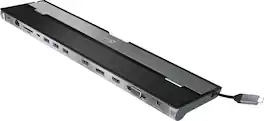
This triple display docking station turns your Mac or Windows laptop into a full workstation with a DisplayPort output, two HDMI outputs, and a VGA output, with resolution support up to 4K (3840 x 2160) on two displays and 1080p on the other one. You can also use your laptop screen for four displays in total, making it easy to access multiple applications at once. With 100W Power Delivery, three USB 3.0 ports, and a USB-C port, this docking station is perfect for your MacBook, Dell XPS, or other USB-C laptop requiring additional ports. This USB 3.0 docking station is also equipped with a RJ45 Gigabit Ethernet port, memory card reader/writer, and combo audio jack for maximum productivity. The elevated design assists with heat dissipation and, with its double-sided cable storage compartment, ensures an easy connection regardless of your USB-C port’s location. All 13 ports are combined into one slim docking station, so you’ll have all the connections you need to stay productive!
| Pros for Targus - USB-C Dual HDMI 4K Docking Station with 100W PD Pass-Thru - Silver | |||
|---|---|---|---|
| Ease of use, Overall Performance, Connectivity, HDMI, Size | Overall Performance, Connectivity, Port Selection, Portability | Overall Performance, Ease of Use | Ease of use, Overall Performance, Connectivity, USB-C, Ports |
| Cons for Targus - USB-C Dual HDMI 4K Docking Station with 100W PD Pass-Thru - Silver | |||
| Compatibility, Cord Length, Heat, Monitor Support | There were no cons for this product— | There were no cons for this product— | Compatibility, Power Supply |
Specs
Explore tech essentials Sponsored
- $27.99The price was $31.99