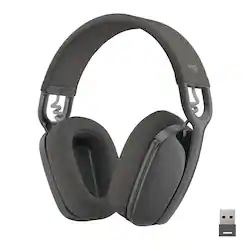
Logitech - Zone Vibe 125 Wireless Over-the-Ear Headphones with Noise-Canceling Microphone - Graphite
- Key Specs
- Noise Cancelling (Active): false
- Sound Mode: Stereo
- Connection Type: Wireless
- Wireless Connectivity: Bluetooth, Radio Frequency (RF) (The manner in which a device sends data to another device over a short distance without the use of wires or cables.)
- True Wireless: false (These headphones not only lack wires between the device and headphones, they also lack wires between the headphones themselves. (true wireless is really only possible with in-ear headphones))
- Maximum Wireless Range: 100 feet
- Built-In Microphone: true
- Carrying Case: true
- Microphone Features: Noise cancelling, Retractable
- Headphone Fit: Over-the-Ear
- Adjustable Headband: true
- Battery Life: 20 hours (Battery life will vary depending on the product configuration, product model, applications loaded on the product, power management setting of the product and the product features used by the customer. As with all batteries, the maximum capacity of this battery will decrease with time and usage.)
- General
- Product Name: Zone Vibe 125 Wireless Over-the-Ear Headphones with Noise-Canceling Microphone
- Brand: Logitech
- Model Number: 981-001166
- Color: Graphite
- Audio
- Noise Cancelling (Active): false
- Sound Isolating: true
- Environmental Noise Control: true (A technology that automatically or manually adjusts, or eliminates, ambient background sound to allow conversational voices to be heard clearer.)
- Minimum Frequency Response: 100 hertz (Describes the maximum range of frequencies or musical tones a product can reproduce, from very low tones to very high treble tones. The minimum frequency or musical tone the speaker can reproduce. High treble tones have higher frequencies while low tones and deep bass have lower frequencies.)
- Maximum Frequency Response: 8 kilohertz (Describes the maximum range of frequencies or musical tones a product can reproduce, from very low tones to very high treble tones. The maximum frequency or musical tone the speaker can reproduce. High treble tones have higher frequencies while low tones and deep bass have lower frequencies.)
- Impedance: 45 ohms (Describes the resistance of an electric signal throughout the system. Devices with low impedance require less power to deliver optimal signals but are more at risk for damage from overloading. Higher impedance requires more power but is more protected from overload damage.)
- Sensitivity: 118 decibels adjusted
- Sound Mode: Stereo
- Driver Size: 40 millimeters
- Connectivity
- Connection Type: Wireless
- Wireless Connectivity: Bluetooth, Radio Frequency (RF) (The manner in which a device sends data to another device over a short distance without the use of wires or cables.)
- True Wireless: false (These headphones not only lack wires between the device and headphones, they also lack wires between the headphones themselves. (true wireless is really only possible with in-ear headphones))
- Maximum Wireless Range: 100 feet
- Number Of Devices Connectable Simultaneously: 3
- Features
- Built-In Microphone: true
- Carrying Case: true
- Microphone Features: Noise cancelling, Retractable
- Controls: Volume, Call, Mute, Track selection
- Body Metrics Measured: Not Applicable
- Lighting Type: None
- Maximum Talk Time: 18 hours
- Design
- Headphone Fit: Over-the-Ear
- Adjustable Headband: true
- Foldable Design: false
- Power
- Rechargeable: true
- Battery Life: 20 hours (Battery life will vary depending on the product configuration, product model, applications loaded on the product, power management setting of the product and the product features used by the customer. As with all batteries, the maximum capacity of this battery will decrease with time and usage.)
- Charging Accessory Included: Cable
- Charging Interface(s): USB Type A (The connection for transmitting power to charge the device.)
- On/Off Switch: Yes
- Material
- Headband Material: Plastic
- Warranty
- Manufacturer's Warranty - Parts: 1-Year
- Manufacturer's Warranty - Labor: None
- Other
- UPC: 097855175113
Experience immersive audio with Logitech Zone Vibe 125 headphones. Professional enough for the office, casual enough for home, it’s designed for the way you work and play—without compromise. Lightweight headphones feature large speaker drivers for powerful sound and fabric mesh cushions for a comfortable fit. The flip-to-mute mic provides immediate privacy anytime, while its noise-canceling feature ensures you’re heard clearly. Get up to 30m wireless range plus a USB receiver for smoother connection. Collaborate with coworkers in video meetings —then slide into your evening for personal entertainment. Long battery life ensures Zone Vibe 125 goes as long as you do.
- Find your Vibe: Professional enough for the office or working from home, casual enough for your leisure activities, Zone Vibe 125 is designed for the way you work and play.
- Wireless freedom: Seamlessly switch between your laptop and mobile phone with Bluetooth or the USB receiver with up to 100 ft range.**
- All-day battery: Up to 18 hours of talk time and 20 hours of listening time, with battery life that goes as long as you do.*
- Noise-canceling technology: By using beamforming technology and digital signal processing (DSP), Zone Vibe 125 captures your voice clearly while blocking background sound and noise.
- Flip-to-mute mic: Provides immediate privacy anytime and at a moment’s notice; when not needed, the mic conveniently tucks away inside the over ear headset for a clean look.
- Immersive audio: 40 mm speaker drivers deliver full-bodied bass, crisp higher frequencies, and low distortion, whether you’re on a video conferencing call, listening to music, or enjoying a podcast.
- Lightweight comfort: Weighing only 185 grams, the featherweight design with memory foam earpads for a comfortable fit that won’t weigh you down, even when meetings go long.
- Sustainable design: The plastic parts in Zone Vibe 125 include a minimum of 25% certified post-consumer recycled plastic (excludes plastic in printed wiring assembly (PWA).
Whats Included
- Zone Vibe 125 Headphones
- USB-A receiver
- USB-C adapter
- USB-C to USB-A charging cable
- Travel bag
- User documentation
Q: Will the dongle work with PS5/XBOX?
A: Hello David. The Zone Vibe 125 will work with PlayStation and Switch via Bluetooth (but you'll get the typical BT lag issues). The USB receiver will connect to the PS, but it seems to only work in mono using the USB instead of stereo. Unfortunately, the headset will not work with XBox.
A: I don't know about connecting to 3 devices, but I have mine connected to my laptop (USB-A receiver) and my phone (Bluetooth). It will play music from my laptop up until I start using my phone. It doesn't even have to be anything with music or sound. As soon as I pick up my phone and click on the screen, the music from my laptop immediately stops playing and the headset switches to my phone. To switch back to the laptop I have to begin using it again in some capacity (either press play on the music or start typing/clicking and I then can press play on my headset for music).
Q: Is the Logitech Zone Vibe 125 headset certified for Microsoft Teams?
A: It works well for me with Teams.
A: Hey! No, you will not be able to connect the headset to an external microphone using a USB-C to audio jack cable as this is a wireless headphone that can be connected only via the USB-A receiver which is included in the packaging.
A: Hello, Audiophile! Yes, the USB receiver is RF and the headset is Bluetooth. As long as your TV's USB ports can output audio to them or it has Bluetooth, you should be able to use the headset on your TV. - Maggie from Logitech
Q: Can the bluetooth be disabled, for environments where bluetooth is not allowed for security reasons?
A: Yes. It has a USB option. It’s still wireless, but you plug it in your device, and it connects just fine.
A: Yes you can use while connected :)
A: You dont need the USB adapter to connect to a laptop with Bluetooth. I use the USB adapter for desktop PC.












