Questions & Answers
- Model:
- B07XJ8C8F5
- |
- SKU:
- 6430060
Q: QuestionCan i pair en echo dot 3rd gen and a 4th gen and listen to music in two rooms?
Asked by Laura.
- A:Answer Yes you can and here is how if you ever need to You can register two or more Alexa-enabled devices to one Amazon account. Once you do that, you must put them all on the same Wi-Fi network, and then you can get them set up for multi-room music using the Alexa app, which includes creating a group for them. When ready, update and open the Amazon Alexa app on your mobile device, and then follow these steps: Select Devices in the bottom left corner Tap the + in the top right corner Tap on Set Up Multi-Room Music, then "Continue" Pick a name for your group or select one from the list. Tap Next On the next page select the Echo devices to include in the group. Those unavailable will be greyed out. Tap save Alexa will connect the devices creating the group Once enabled, say: "Play [song or artist] on [Echo devices' group name]"
Answered by Iambatman88
Q: QuestionWhat is the operating system run on? I saw it states Android. But is that all android or specific phones only?? Please help. Want one for my black Friday gift. Thanks
Asked by Turtle1969.
- A:Answer The Echo Dot doesn't use any operating system. The initial setup process requires any smart phone or tablet (Android or iOS) to set up. After that, the device uses your wifi to connect to the internet.
Answered by Amazon Devices Customer Support
Q: QuestionHow loud is this device
Asked by Bee.
- A:Answer Very loud if you have up to 100% just did as a test to see and I could her just talking 4 rooms away! I keep mine in my bedroom at 36% its next to my doorway and I can put music on and even listen music and hear in next room.
Answered by Iambatman88
Q: QuestionWhy do the 4th generation Echo and Echo Dots have white power cords?
Asked by AlexaFan.
- A:Answer I've wondered this myself they in past had black with black. When I got my device and was white cord I was shocked. Something simple but its tacky looking.
Answered by Iambatman88
Q: QuestionIf I purchase 2 Echo Dot 4th Gen's, one for myself and give the other to my daughter who lives in another location...can we connect both Echo Dots to use as a communication device? Being able to speak to each other from my home to her home?
Asked by Fireman.
- A:Answer Hi there! The answer is yes! I currently do this with my mother who lives in another state and it works great! Hope this helps!
Answered by Amazon Devices Customer Support
Q: QuestionWhy has my echo dot been updating for two weeks . Every time we go to check on it it say it is updating . Makes no sense
Asked by Jess.
- A:Answer Alexa sends bad update to older devices to force you to buy more. I have had several after two years go into update mode and nothing fixes it. I called Amazon multiple times and everything they tell me to do I do and it never stopped. I left it plugged in and two months later still updating. Removed app and re added. Removed device and re added. Hard reset. Literally nothing will fix it.
Answered by Anonymous
Q: QuestionI purchased an Echo Dot for my husband for Christmas. Am I able to purchase another Echo Dot and put it in a different room and listen to different music or do they have to play the same music.
Asked by Dar.
- A:Answer Yes you can listen to different music on your echos or videos if you have a show.
Answered by Tech2021
Q: QuestionCAN I CONNECT MY ECHO DOT TO MT PC?
Asked by jedidon.
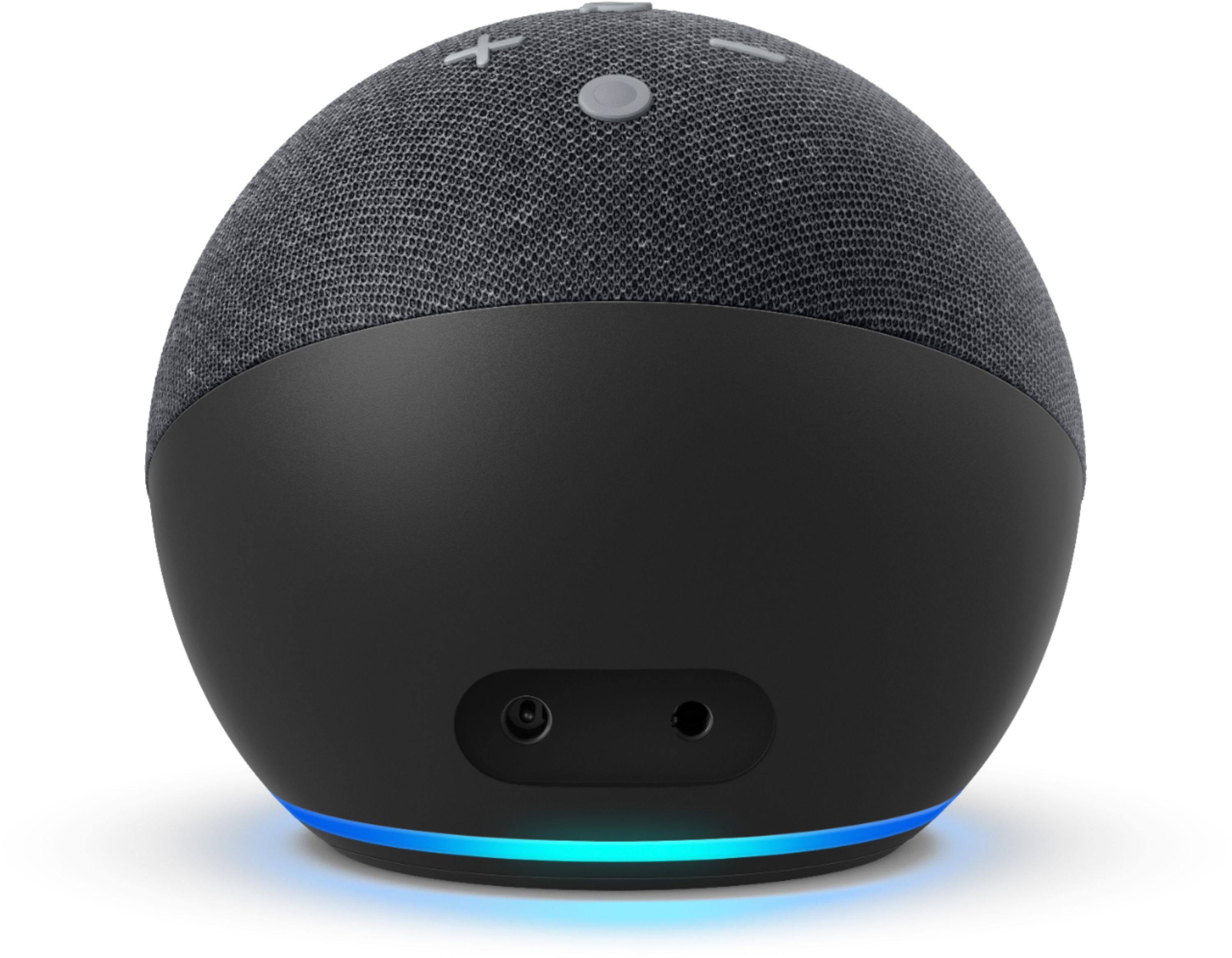
- A:Answer Alexa can play music through its own built in speaker or through a 3.5 mini plug cord if a cord is attached to Alexa. When a cord is attached, Alexa can play through another device or speaker that has a 3.5 audio input port. Alexa does not broadcast with Bluetooth, only from its own speakers or an attached cord. A 3.5 mini cord is NOT included with Alexa. Cord must be purchased separately.
Answered by richlion
Q: QuestionPlug-in? on what? 120v or other source?
Asked by Philippe.
- A:Answer The Echo Dot uses 110 V or 220 V depending on the wall adapter supplied with the Echo. An adapter proper for the country it is sold in is included in the package. An adapter may be used to change to another voltage but the included Power Block is fairly large and might not fit some voltage adapters.. Devices sold in the USA use the included 110 volt adapter by plugging it into a standard wall socket. The Echo has no battery so it must be plugged into a wall socket to work.
Answered by richlion
Q: QuestionCan I hook it up to my Sony Blu Ray and LG TV?
Asked by Californiadreaming.
This question was asked about the related product: Amazon - Echo Dot (4th Gen) Smart speaker with Alexa - Twilight Blue
- A:Answer Hello CC! Thanks so much for your question on using your Echo Dot with a Blu Ray player or TV. I assume the reasoning for wanting to use this with these devices is so that you can use the Echo Dot as a speaker for your TV and/or Blu Ray player. The Echo Dot uses BlueTooth technology to be able to do just that. So as long as your player and/or TV are BlueTooth compatible then the answer is yes! The setup instructions will vary based on each device and will need to be done using the settings and instructions for each of your devices. All you would have to do once your TV and/or Blu Ray player are discoverable, is to go to the Alexa app on your smartphone, tap Devices in the bottom right corner, tap Echo & Alexa in the top left corner, find your Echo Dot that you would like to use, and then tap Bluetooth Devices. From there you can search for discoverable BlueTooth devices and pair them up! I hope this answers your question and you have a spectacular day!
Answered by Amazon Devices Customer Support
Q: Questionis ALEXA SPEAKING HEBREW ?
Asked by Anonymous.
- A:Answer Hello, Hebrew is not a supported language by Alexa. Amazon is constantly updating it's Alexa services and very well could support this language at a later time. Currently you can ask Alexa to translate many phrases into Hebrew, you just can't change the actual language of the device to understand and respond in Hebrew. Have a great day!
Answered by Amazon Devices Customer Support
Q: QuestionDoes this set wake up alarms or do I need the one with the clock for that? Thank you.
Asked by Nikki77.
- A:Answer It will wake you up at a certain time if requested..
Answered by Carlytoez
Q: QuestionCan I use an Echo Dot to turn on and find channels on my new 65" class Sony Bravia XR A80J OLED 4K UHD and what else can the echo dot do? I currently don't have an Alexa or an Echo - just trying to see which to buy and what can they do with my tv? Thank
Asked by Lasses.
This question was asked about the related product: Amazon - Echo Dot (4th Gen) Smart speaker with Alexa - Twilight Blue
- A:Answer Hello, Lasses! As long as your TV supports it, you can connect an Echo Dot to your Sony TV. Here are the steps to connect Alexa to your TV: 1. On the supplied remote control, press the HOME button. 2. The next steps will depend on your TV menu options: -Under Your apps, select See all → TV Control with Smart Speakers app. -Select Apps → TV Control Setup with Amazon Alexa app. -If TV Control with Smart Speakers app or TV Control Setup with Amazon Alexa app is displayed on the Home screen, select one of them. -Note: You won't find the TV Control with Smart Speakers or TV Control Setup with Amazon Alexa app if your TV isn't supported. Once connected, you can ask Alexa to do a number of things.You can turn on/off the TV, control the volume, change the channel or ask for a specific channel number, change the input, and control playback for DVR or streaming content. I hope this helps. Have a great day!
Answered by Amazon Devices Customer Support
Q: QuestionCan We Call Our Parents On 4th Generation Echo Dot White With Clock
Asked by Fatbuddy4376789012345678901234567.
- A:Answer Hi there, Yes, you can call on this deice. When you download the Alexa app and set up the device it will ask you to sync your contacts and enter your phone #. When you do this, it will allow you to speak to the Echo and say "Alexa, call "xxx"" and you would say the name as it is listed in your contacts. When you call them, it will appear that you are calling from your cell phone if they have caller ID. If they too have Echo devices, it will also give you the option of calling their Alexa devices as well. I hope this info helps. Have a great day.
Answered by Amazon Devices Customer Support
Q: QuestionCan this speaker work as just a standard Bluetooth speaker
Asked by Holy.
- A:Answer Hello Holy, yes you can. You do have to go through the setup process to activate the Echo Dot. Once it's all set up, you can simply say; "Alexa, turn on Bluetooth." You can then take your phone and connect to the open Bluetooth network. Have a great day!

Answered by Amazon Devices Customer Support
Q: QuestionHi, Can I change the language to Portuguese in Alexa ? Thanks.
Asked by Alexandre.
This question was asked about the related product: Amazon - Echo Dot (4th Gen) Smart speaker with Alexa - Twilight Blue
- A:Answer Hi Alexandre! Yes, you can change the language to Portuguese on your Echo device, here's how: Open the Alexa app on your phone. 1. Open More and select Settings. 2. Select Device Settings. 3. Select your device. 4. Under Language, select your preferred language. 5. Select the language you want to set your device to. Tip: There are also options for Multilingual Mode. Select from the available language combinations so you can speak to Alexa in both languages and have her respond appropriately. Thanks for your question, have a great day!
Answered by Amazon Devices Customer Support
Q: QuestionWhere I can see the dimensions of the box for the Echo Dot 4Th Gen? I know the dimensions of the sphere, I need to now the box. Thank you.
Asked by Rebecca.
- A:Answer Hello, Rebecca! The dimensions of the box are 6.5" L x 4" H x 4.125" D. I hope that helps! Have a great day!
Answered by Amazon Devices Customer Support
Q: QuestionMy husband has impaired speech and Alexa will not recognize his voice. He has repeated the 4 sentences over 5 times. What can we do?
Asked by Beemis.
- A:Answer Hello Beemis, Have you created a voice profile for him yet? This may help. Here is how you would do that: Open the Alexa app on your mobile device. Tap the More icon in the bottom toolbar and go to Settings > Account Settings > Recognized Voices. Here, you’re going to create a voice profile for yourself. Alexa automatically associates this profile with whomever is signed into the Alexa app, so make sure the right person is signed in. You can easily do this by going to Settings > Your Profile and then confirming that your name is listed. I hope this helps!
Answered by Amazon Devices Customer Support
Q: QuestionCan you listen to apple music on this? If not, what can I listen to? Thanks!
Asked by Piper.
- A:Answer Hello Piper, yes you can. There are several music services available through the Amazon Echo Devices. Amazon Music, SiriusXM, Spotify, Pandora, iHeartRadio, TuneIn and Apple Music. Hope that helps, have a great day!

Answered by Amazon Devices Customer Support
Q: QuestionI want to use one of the Alexa devices as a dedicated music streaming device. I am going to connect it by a 3.5mm cable to my Onkyo receiver. Is the output the same, whether I choose a 4th generation Dot, 3rd generation Dot,. or a 4th generation Echo?
Asked by David.
This question was asked about the related product: Amazon - Echo Dot (4th Gen) Smart speaker with Alexa - Twilight Blue
- A:Answer Hi David! Yes, the line level output would be the same from all of the alexa devices you mentioned. Hope this helps, enjoy your day!
Answered by Amazon Devices Customer Support
Most-viewed items
- $329.99$329.99The price was $469.99
- $149.00$149.00The price was $399.00
- $159.99$159.99The price was $179.99
- $1,149.00$1,149.00The price was $1,299.00
- $449.99$449.99The price was $649.99