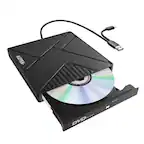
A:AnswerSome people with Windows computers said it worked for them. There are no guarantees. The box says it is compatible with Mac systems that do not have optical drives.
A:AnswerYes, you can. I copy my music cd’s to my Mac as well as my dvd’s, and I have instructional textbook cd’s that I load as well. I have a game cd that is really old, and I am having some trouble with that; but that’s a different issue.
A:AnswerYes, it works perfectly with my 2020 MacBook Air that came with Catalina preinstalled. The only thing is I needed to use an adapter because my new computer only has usb-c ports.
A:AnswerIt should. The box says it is compatible with Mac systems that do not have optical drives. It works fine with my 2020 MacBook Air that also came with Catalina.
A:AnswerWhile some Windows users have said it worked for them, the box says it is compatible with Mac systems that do not have optical drives. There is no guarantee that it will work for you.
A:AnswerThe box says it is compatible with Mac systems that do not have optical drives. Some Windows users have claimed it worked for them, but there are no guarantees.
A:AnswerAccording to the box, it is compatible with Mac systems that do not have portable drives. Since Dell computers are not Macs, there is no guarantee that the drive will work for you.
A:AnswerThis drive connects via USB port which the iPad doesn't have. Even if you manage to purchase a USB to USB-C or Lightning for old models, the iPad iOS does not recognizes this drive when connected. A CD drive requires too much power that an iPad cannot provide.
A:AnswerI do not know if it is coded for regions. I bought mine in the United States and used it to play a DVD in my region. I don’t know if the ones in Europe are different, or if they are all the same, and are region free. I do not have any discs meant for a different region in order to test.
A:AnswerIf your Mac has a usb-c port, you will need to use an adapter. If yours has a regular usb drive, you can just connect it directly to your computer. If your computer has an optical drive built into it you will not be able to use it. It only is compatible with Mac systems that do not have optical drives.