“Could I transfer a SSD and a SATA drive from a previous computer into this one, and is the video card up-gradable?”
Answer This Question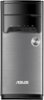
1-5 of 5 Answers
Yes you can put in drives from previous computers, it has two 3.5" slots for drives. Also this has UMA graphics in it which stands for Unified Memory Architecture. UMA is simply integrated graphics, so yes you can put a graphics card inside because the motherboard does have a slot for it.
Sorry, there was a problem. Please try again later.You can put a SSD in. But the power supply only can plug two hard drive or SSD, so if you do SSD then you can't plug other one hard drives, or you need unplug the DVD drives power, and warranty voided, you can put a video card in, but need change the power supply for it, inside that one is very small I think only like 350w.
Sorry, there was a problem. Please try again later.video is integrated and you can easily add a new card in the one slot. Be sure it is compatible. However ASUS says you should not open the case as you will jeopardize your warranty isn't that great?
Sorry, there was a problem. Please try again later.ssd would work video card on board not upgradable
Sorry, there was a problem. Please try again later.I am not certain about the hard drive transfer but the video card upgrade does not work well with this computer. Requires a higher 750 watt power supply, etc. but then it depends on what video card you are upgrading to. I would not recommend an upgrade with this computer.
Sorry, there was a problem. Please try again later.