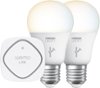
“Belkin WeMo Smart LED Bulb Do I need a WeMo light switch, or installing the light bulb will suffice for remote operation?”
Answer This Question
1-8 of 8 Answers
You do need the Wemo controller to use the bulb remotely via the app.
Sorry, there was a problem. Please try again later.The bulb will work on its own. The remote hardware is in the bulb.
Sorry, there was a problem. Please try again later.You do not need the WeMo light switch, but you do need the Belkin WeMo Hub, or some other type of hub that can control these bulbs. I use the Samsung Smartthings hub to control these bulbs.
Sorry, there was a problem. Please try again later.You don't need a Wemo light switch, but you will need a Wemo link, which allows you to connect something like 50 bulbs or more to it, I just had to much trouble getting the bulbs to appear on the app. I gave up and bought a LIFX smart light, I highlyrics recommend them, a lil more expensive, but no switch or link just the light bulb and your wifi to connect to the LIFX.
Sorry, there was a problem. Please try again later.You need one of the Wemo Light Bulbs and a Wemo Link.
Sorry, there was a problem. Please try again later.You need a hub to connect it to WiFi, but you don't need the light switch.
Sorry, there was a problem. Please try again later.You'll need a WeMo Link in order to access the bulb via wifi. The light switch in which you are speaking of would only give you the ability to turn it on and off. The bulb is a better choice as it allows for dimming. Just be sure to pick up the Link in order to get it to work. You won't need more than one link. A single link will help you control all kinds of Belkin products. Hope that helps.
Sorry, there was a problem. Please try again later.No, you don't need a WeMo Light Switch. Instead, you need to have a WeMo Link so that you remotely control the WeMo Smart LED Bulb. If you don't have one yet, we suggest that you start by purchasing this set: http://www.bestbuy.com/site/belkin-wemo-led-lighting-starter-set-warm-white/6981075.p?id=1219243022570&skuId=6981075
Sorry, there was a problem. Please try again later.